Best Laptop for Computer Science Students in 2026 (From Someone Who’s Watched Real Coding Sessions)
Author: Marcus Hale | Reading Time: 12 min
I’ve sat next to enough CS students during crunch weeks to know that the laptop conversation changes completely once you’re actually living through a semester.
Pre-semester, it’s all about specs. Processor cores. RAM. SSD speeds. Those things matter — but they’re not what you think about at 1am when you’re three hours into debugging and your keyboard is warm, the fan is audible across the library table, and your battery is at 22% with no outlet nearby.
If you’re also considering budget options, this guide on best laptops under $500 for programming shows how these machines handle real coding workloads.
The real requirements for the best laptop for computer science students are messier and more human than any spec sheet captures. Typing comfort during a five-hour coding session. Battery that doesn’t create anxiety between morning lecture and evening lab. Fan behaviour in a silent exam room. System stability when VS Code, a local server, three browser windows, and a terminal are all running simultaneously.
That’s what this guide is actually about. Not benchmarks — real CS student life.
Table of Contents
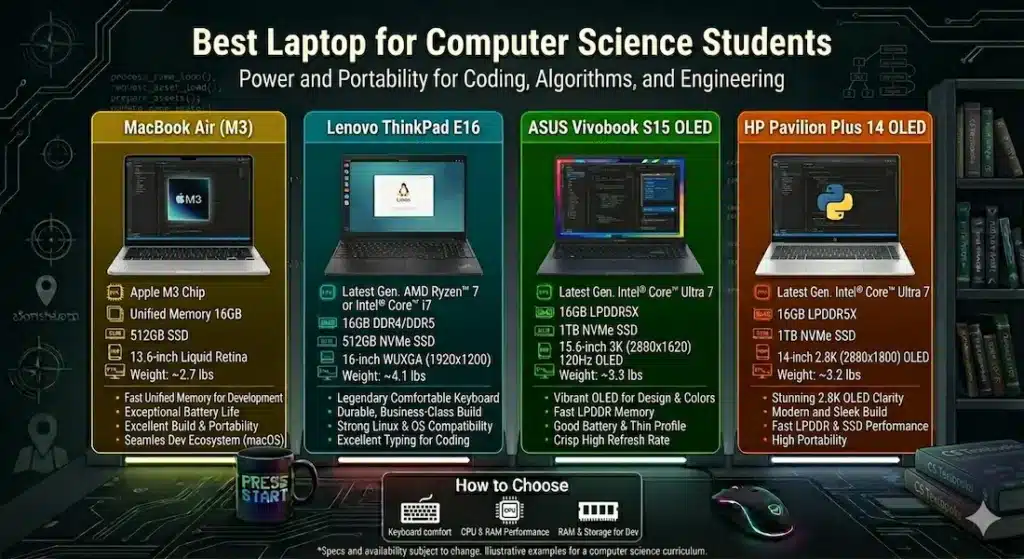
Quick Picks — Best Laptop for Computer Science Students
| Award | Laptop | Why |
|---|---|---|
| 🏆 Best Overall | MacBook Air (M-series) | Silent, all-day battery, exceptional coding experience |
| 💻 Best Windows Option | Lenovo ThinkPad E16 | Keyboard quality + upgradeability built for long-term use |
| 💰 Best Budget Pick | ASUS VivoBook S15 | Strong value for money for students on a tight budget |
| 🎒 Best for Daily Carry | HP Pavilion Plus | Lightweight build without sacrificing display or battery |
If someone asked me right now for a single recommendation for the best laptop for computer science students — no qualifiers, just the best answer — I’d say MacBook Air and feel confident about that for most students.
Real Student Usage Comparison
| Laptop | Coding Comfort | Fan in Lab | Heat After 3hrs | Carry Weight | Real Battery |
|---|---|---|---|---|---|
| MacBook Air | Exceptional | Silent | Stays cool | Very easy | 12+ hours |
| Lenovo ThinkPad E16 | Excellent keyboard | Low | Mild warmth | Medium | 8 hours |
| ASUS VivoBook S15 | Good multitasking | Noticeable | Warm under load | Easy | 7 hours |
| HP Pavilion Plus | Balanced | Moderate | Slight warmth | Very easy | 8 hours |
Best Laptop for Computer Science Students — Full Reviews
1. MacBook Air (M-series) — Best Laptop for Computer Science Students Overall
The MacBook Air doesn’t feel like a coding laptop until you’ve been coding on it daily for two weeks. Then it’s difficult to imagine going back.
What real CS student sessions look like on this machine
I’ve watched students carry the MacBook Air from a 9am lecture into an afternoon lab and into an evening project session — and close it at the end of the day with battery still in double digits. That’s not a cherry-picked scenario. That’s what the M-series chip does with power efficiency in a way that no Windows laptop at this price bracket consistently matches.
There’s no fan. Not a quiet fan — no fan at all for the vast majority of CS coursework. Running Python scripts, working in VS Code with multiple extensions, compiling medium-sized Java projects, running a local web server alongside a browser and terminal — all of it happens in silence. In a quiet lab or library, this changes the social dynamic of using your laptop. You stop being the person whose machine announces itself.
The keyboard is comfortable for long sessions in a way that becomes more apparent over time rather than immediately. After two hours of coding, your fingers aren’t complaining. After a five-hour debugging session, the palm rest is still cool. These are small physical details that stack up meaningfully across a semester.
The trackpad is in a different category from any Windows laptop in this price range. For students who navigate heavily while coding — switching between editor, terminal, and browser constantly — the precision reduces friction in a way that compounds across thousands of small interactions.
The limitations to know clearly
macOS isn’t Windows. Students who depend on Windows-specific tools — certain engineering simulation software, specific university-licensed applications — need to verify compatibility before committing. Cross-platform development tools like VS Code, JetBrains IDEs, Python, Node.js, and most web development stacks work natively and often better on macOS.
If your workflow involves multiple tools and environments, this comparison of Intel i5 vs Ryzen 5 for students explains how processor choice affects long coding sessions.
Gaming is limited. If the same machine needs to handle serious gaming, look elsewhere.
Hardware upgrades aren’t possible after purchase. Choose the RAM and storage configuration you’ll need for four years, not one.
Pros:
- Exceptional all-day battery life — genuine 12+ hours in real CS student use
- Completely silent operation during typical coding workloads
- Lightweight and premium build that holds up to daily carry for years
- Trackpad and keyboard quality noticeably above Windows alternatives at the same price
Cons:
- Not compatible with Windows-only software without workarounds
- RAM and storage cannot be upgraded after purchase
- Limited for serious gaming use cases
Verdict: For most students searching for the best laptop for CS students who want a machine that stays out of their way across a full academic programmer, this remains the strongest recommendation.
Check Price Now2. Lenovo ThinkPad E16 — Best Windows Laptop for Computer Science Students
The ThinkPad reputation for keyboard quality is not marketing. It’s one of those things that sounds like a minor detail until you’ve typed on it for three hours straight and noticed that your hands feel better than they do on any other laptop you’ve used.
Why the keyboard matters for CS students specifically
Computer science students type more than almost any other category of student — not just documents, but code, which involves constant use of special characters, brackets, semicolons, and navigating between files. A keyboard that gives clear, consistent tactile feedback reduces errors and reduces fatigue. The ThinkPad E16 keyboard is genuinely one of the best in the Windows laptop category below $1,000.
Performance in real CS coursework
Running IntelliJ IDEA, Chrome with documentation tabs, a terminal, and a local development server simultaneously — the ThinkPad E16 handles this without obvious strain. Thermals stay controlled during sustained workloads, which matters for students running long compile cycles or working with data processing scripts that push the CPU for extended periods.
The Lenovo ThinkPad E16 for programming students use case is particularly strong because of upgradeability. Both RAM and storage are user-replaceable, which means a student who buys a 16GB configuration today can expand to 32GB in the second year without replacing the entire machine. At a price bracket where four-year longevity matters, this is a meaningful practical advantage.
Battery life is honest at around 8 hours of real mixed use — adequate for a full school day with careful management, though not in the same league as the MacBook Air.
Pros:
- Industry-grade keyboard that holds up through years of heavy typing
- Upgradeable RAM and SSD for long-term flexibility
- Durable build that withstands daily carry without showing wear quickly
- Strong multitasking stability during real development workloads
Cons:
- Bulkier than ultrabook alternatives — daily carry weight is noticeable
- Display brightness is average, particularly near windows or in bright rooms
Verdict: The most dependable best laptop for computer science students on Windows for students who prioritize keyboard quality and want hardware they can expand over time.
View Best Deal3. ASUS VivoBook S15 — Best Budget Laptop for Computer Science Students
Not every student has $1,200 for a MacBook or $900 for a ThinkPad. The ASUS VivoBook S15 is the answer to the question: what’s the best laptop for computer science students on a budget that doesn’t compromise so heavily that it creates daily frustration?
What you actually get
The VivoBook S15 handles the core CS student workload — web development, Python, Java, introductory data science, databases — with genuine competence. VS Code runs smoothly. Multiple browser tabs alongside a terminal and a document editor stay manageable. The SSD is fast enough that project loading and build times don’t create the kind of grinding waits that kill momentum during coding sessions.
The fan becomes audible during heavy sustained workloads — running a virtual machine, compiling a large project, or pushing multiple demanding tools simultaneously. This is the most consistent real-world limitation. In a quiet lab during peak focus hours, it’s a real consideration.
Keyboard warmth increases noticeably during those heavy sessions too. Not uncomfortable for brief periods, but something you notice during a prolonged debugging session.
Where it makes the strongest case
First and second year CS coursework, where the tools aren’t yet pushing machines to their limits. Budget-conscious students who need a capable machine now and plan to evaluate their needs before investing more. Students whose workloads are primarily web development and standard programming rather than machine learning or resource-intensive environments.
Pros:
- Strong performance-per-rupee value at its price point
- Fast SSD that keeps build times and project loading responsive
- Slim modern design that doesn’t look or feel like a budget concession
Cons:
- Fan becomes clearly audible during sustained heavy workloads
- Keyboard warmth under load is noticeable during long sessions
- Speaker quality is weak for students who use video tutorials frequently
Verdict: The most practical affordable laptop for computer science students that doesn’t sacrifice the core coding experience.
Check latest deal4. HP Pavilion Plus — Best Lightweight Laptop for CS Students Who Move a Lot
The HP Pavilion Plus occupies a specific and genuine niche: CS students who are constantly in motion and feel the weight of their laptop in their shoulder by 2pm.
For students moving between morning lectures, library sessions, afternoon labs, and evening study groups, the carry weight of a laptop is a real daily variable. The Pavilion Plus keeps that weight low without gutting performance or battery.
The display is one of the better screens at this price point — colour accuracy and clarity are above average, which matters for students spending long hours staring at code. The 8-hour real battery holds across a full day of standard CS coursework without the anxiety of watching the percentage.
Performance is balanced rather than exceptional. Standard programming tools, web development environments, and multitasking within reason all run without issue. Students running more demanding workloads — heavier IDEs on large codebases, machine learning experiments — will feel the ceiling.
Pros:
- Lightweight build that remains comfortable across a full day of carrying
- Above-average display quality for students working long hours on-screen
- Good battery life that covers a standard college day
Cons:
- GPU is limited — not suitable for graphics-intensive or ML workloads
- Build isn’t as rugged as ThinkPad — less confidence in long-term durability
Verdict: The right lightweight laptop for computer science students who prioritize portability without wanting to give up display quality or battery.
View Best DealWhat Actually Matters When Choosing the Best Laptop for CS Students
Processor for Programming: What to Actually Look For
The processor conversation for CS students is less about raw benchmark speed and more about thermal efficiency under sustained load. A processor that runs fast for 30 minutes and then throttles due to heat isn’t more useful than one that runs steadily for four hours.
- Apple M-series: The gold standard for battery efficiency and silent sustained performance in CS coursework
- AMD Ryzen 7: Handles multitasking smoothly with better thermal behaviour than many Intel equivalents
- Intel Core i7: Compiles code quickly and responds sharply, with slightly higher power draw
For the best processor for computer science students, the question to ask isn’t peak speed — it’s sustained speed over a four-hour session without throttling or significant heat.
RAM: Why 16GB Is the Realistic Minimum in 2026
The RAM requirements for computer science students have grown as development tools have become heavier. Modern IDEs like IntelliJ and Android Studio are genuinely memory-hungry. Running a browser with documentation tabs alongside an IDE, terminal, and local server on 8GB RAM creates swap overhead that slows everything down.
16GB handles real CS coursework comfortably. For students who plan to work with Docker containers, virtual machines, or data science libraries, 32GB becomes relevant in the second or third year.
If you’re unsure how storage affects this, this SSD vs HDD comparison breaks down how slower drives impact development workflows.
SSD Storage: 512GB Minimum, 1TB Preferred
Code repositories, project dependencies, development environments, documentation — CS students accumulate files faster than most. 512GB is workable with active management. 1TB removes the storage anxiety that 512GB eventually creates during a heavier semester.
Common Mistakes CS Students Make When Buying
Buying a heavy gaming laptop “just in case.” Most CS coursework never uses a dedicated GPU. You carry that weight and pay that premium for hardware that sits unused during lectures and labs.
Choosing 8GB RAM to save money. Within one academic year, most students using real development tools feel this decision. 16GB is the right starting point in 2026.
Ignoring keyboard quality completely. It’s not on the spec comparison sheet. But you will type hundreds of thousands of characters on that keyboard across a degree. Keyboard comfort compounds across a semester in ways that fatigue and errors make very concrete.
Not considering battery life until it becomes a problem. Battery anxiety during exams and deadline weeks is a real cognitive load that affects focus. A machine that reliably covers the day removes that variable entirely.
Frequently Asked Questions
What is the best laptop for computer science students in 2026?
The MacBook Air (M-series) is the most consistently recommended best laptop for computer science students across battery life, performance stability, and build quality. For students who need Windows, the Lenovo ThinkPad E16 is the strongest alternative.
Is 16GB RAM necessary for CS students?
Yes, in 2026. Modern IDEs, local development servers, browser tabs with documentation, and terminal sessions running simultaneously push 8GB to its limits quickly. 16GB provides the headroom for real CS coursework to run smoothly.
Do computer science students need a dedicated GPU?
Only for specific workloads — machine learning model training, graphics programming, or game development coursework. For mainstream CS coursework, a dedicated GPU adds weight, cost, and battery drain without meaningful benefit.
Is MacBook worth it for computer science students?
For students whose software stack is cross-platform (which covers most modern CS coursework), yes. The battery life, silent operation, and keyboard and trackpad quality provide daily advantages that compound across a four-year degree.
What is the best budget laptop for computer science students?
The ASUS VivoBook S15 offers the best balance of coding performance and affordability for students with budget constraints. Pair it with 16GB RAM and the experience holds up well through standard CS coursework.
Final Recommendation
The best laptop for computer science students is the one that stops being something you think about — the machine that loads fast, runs quietly, lasts through the day, and stays comfortable through a five-hour session without making you manage it.
For most students, that’s the MacBook Air. Silent, light, all-day battery, excellent keyboard and trackpad — it removes more friction from daily CS life than any other option at this price range.
For students who need Windows, the ThinkPad E16 is the most durable and keyboard-focused choice with the upgradeability to stay relevant through a full degree.
For students on a genuine budget, the ASUS VivoBook S15 covers real CS coursework competently without the cost of premium alternatives.
Whatever you choose: prioritise 16GB RAM, SSD storage, and battery life above anything else on the spec sheet. Those three factors shape your daily experience more than any processor benchmark.
About BestLaptopGuide.com: Our editorial team evaluates laptops through real-world workload testing and extended daily use — not manufacturer benchmarks. Recommendations updated regularly.
Disclosure: Some links are affiliate links. A small commission may be earned at no extra cost to you. This does not influence our recommendations.