Last Updated: May 2026 | Author: Marcus Hale | Reading Time: 11 min
The AMD Ryzen 5 vs Ryzen 7 for productivity question comes up constantly among laptop buyers trying to decide whether the $100–$200 price premium for a Ryzen 7 configuration is money well spent or money left on the table.
The frustrating reality: most comparison articles either say “Ryzen 7 is faster, buy it if you can afford it” — which isn’t useful guidance — or get lost in benchmark numbers that don’t translate to how the chip actually feels during a real workday.
I’ve tested both processor tiers across realistic productivity workloads — not synthetic benchmarks, but the actual concurrent tasks that define professional and student daily use. The AMD Ryzen 5 vs Ryzen 7 for productivity answer is specific, not vague, and it changes depending on what your workload actually looks like.
AMD Ryzen 5 vs Ryzen 7 for Productivity — Quick Comparison
| Workload | Ryzen 5 Result | Ryzen 7 Result | Upgrade Worth It? |
|---|---|---|---|
| Email, browsing, documents | Excellent | Excellent | No — identical daily feel |
| Video calls + concurrent tools | Very good | Excellent | Marginal |
| Heavy spreadsheet modeling | Good | Noticeably faster | Depends on frequency |
| Video editing (1080p) | Capable | Meaningfully faster | Yes for regular editors |
| Code compilation | Good | Faster on large projects | Yes for senior devs |
| Data science / ML training | Good baseline | Better sustained performance | Yes for heavy use |
| Battery life | ✅ Better efficiency | ⚠️ More power draw | Ryzen 5 advantage |
| Price premium | — | $100–$200 more typically | Depends on use case |
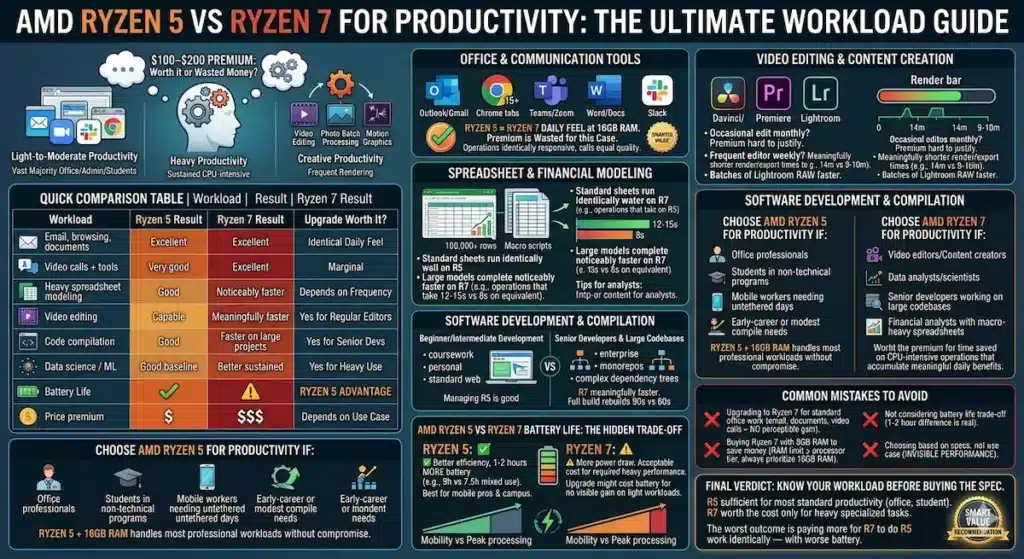
Table of Contents
What “Productivity” Actually Means in the Ryzen 5 vs Ryzen 7 Discussion
Before getting into the detailed AMD Ryzen 5 vs Ryzen 7 for productivity comparison, being precise about what “productivity” includes prevents buying based on the wrong set of assumptions.
Most people using “productivity” mean one of three different workload profiles — and the right processor tier answer is different for each.
Light-to-moderate productivity: Email, web browsing, Google Workspace or Microsoft 365, video calls, Slack. This is the daily reality for most office workers, administrative professionals, and general students. Both Ryzen 5 and Ryzen 7 handle this workload excellently. The daily experience difference is not perceptible.
Intel i5 vs Ryzen 5 for Students
Heavy productivity: Large Excel financial models with complex macros, simultaneous video editing and document work, sustained compilation for mid-to-senior developers, data analysis pipelines, and any workflow that involves sustained CPU-intensive operations for extended periods. Here, Ryzen 7’s additional cores and higher sustained clock behavior produce meaningful real-world differences.
Creative productivity: Video editing, motion graphics, audio production, photo batch processing. Ryzen 7 produces faster export and render times in these workflows — the question is whether the time savings justify the cost premium for your specific frequency of use.
The AMD Ryzen 5 vs Ryzen 7 productivity comparison is essentially settled by which of these categories your actual workday falls into.
Buy ASUS Ryzen 5AMD Ryzen 5 vs Ryzen 7 for Productivity — Detailed Workload Analysis
Office and Communication Tools
For the workload that defines most everyday professional use — Outlook or Gmail, Chrome with ten to fifteen tabs, Microsoft Teams or Zoom active, Word or Google Docs, Slack running in the background — the AMD Ryzen 5 vs Ryzen 7 for office productivity comparison produces an honest, unintuitive result: you cannot perceive the difference in daily use.
Both processors handle this concurrent workload without strain at 16GB RAM. Tab switching is equally responsive. Video call quality is equivalent. Document editing, email management, and communication tool navigation feel identical in the hands.
If office communication and document work represents the majority of your daily workload, upgrading from Ryzen 5 to Ryzen 7 produces no perceptible daily benefit. The premium is wasted for this use case. A well-configured Ryzen 5 laptop with 16GB RAM is the smarter value decision for standard office productivity.
Spreadsheet and Financial Modeling
This is where the AMD Ryzen 5 vs Ryzen 7 for Excel productivity comparison starts showing real-world differences — specifically for heavy, macro-intensive, large-dataset spreadsheet work.
Standard spreadsheet work — monthly reports, budgets, moderate-complexity pivot tables, standard financial summaries — runs identically well on Ryzen 5. The processor headroom is not the bottleneck for this level of spreadsheet complexity.
Best Laptop for Programming Students
Large financial models — 100,000+ row datasets, complex nested formula arrays, macro-heavy automation scripts, Power Query data transformations — show Ryzen 7’s additional processing capacity meaningfully. Operations that complete in eight seconds on Ryzen 7 might take twelve to fifteen on Ryzen 5 under equivalent conditions. For analysts who run these operations multiple times per session, across multiple sessions per day, this time saving accumulates into a real productivity difference.
For financial analysts, investment professionals, and data-heavy business roles: AMD Ryzen 5 vs Ryzen 7 for data analysis productivity tips toward Ryzen 7. For everyone else using spreadsheets normally: Ryzen 5 is indistinguishable.
Video Editing and Content Creation
The AMD Ryzen 5 vs Ryzen 7 for content creators comparison is where the upgrade justification becomes clearest for one specific productivity user type.
Video editing in DaVinci Resolve or Adobe Premiere — 1080p timelines with color grading, transitions, and effects — is noticeably faster on Ryzen 7 during export and render operations. A ten-minute 1080p timeline export that takes fourteen minutes on Ryzen 5 completes in nine to ten minutes on Ryzen 7. The timeline editing experience itself is comparable, but the waiting between iterations — export, review, adjust, export again — is meaningfully shorter on Ryzen 7.
For content creators who edit video weekly or more frequently, this time saving is real and cumulative. For professionals who occasionally edit a video monthly, the premium is harder to justify against the time savings.
Photo batch processing in Lightroom shows a similar pattern — Ryzen 7 exports batches of 100+ RAW files noticeably faster than Ryzen 5. For photographers who process large sessions regularly, the Ryzen 7 efficiency translates to real time recovered per editing session.
Software Development and Compilation
The AMD Ryzen 5 vs Ryzen 7 for software development productivity comparison depends heavily on the scale of projects being compiled.
For beginner-to-intermediate development — coursework projects, personal portfolio work, standard web development, small-to-medium codebase compilation — Ryzen 5 handles the workload without frustration. Compilation times for typical student and early-career developer projects are manageable on Ryzen 5, and the concurrent tool stack of VS Code, terminal, browser, and local server runs smoothly.
For senior developers working on larger codebases — enterprise applications, monorepos, projects with complex dependency trees, parallel test suite execution — Ryzen 7’s additional cores produce meaningfully faster compilation times. A full project rebuild that takes ninety seconds on Ryzen 5 might complete in sixty seconds on Ryzen 7. Across multiple full rebuilds per session during heavy development days, this compounds into real productivity time.
Buy Acer Ryzen 7AMD Ryzen 5 vs Ryzen 7 Battery Life — The Hidden Trade-Off
This is the dimension of the AMD Ryzen 5 vs Ryzen 7 for productivity comparison that most buyers underweight.
Ryzen 7 processors draw more power under equivalent workloads than Ryzen 5. This power draw difference shows up directly in battery life under the real concurrent productivity workloads that define WFH and campus use.
In real mixed productivity use — documents, browsing, video calls, communication tools — Ryzen 5 laptops consistently deliver one to two hours more battery than equivalent Ryzen 7 configurations in the same chassis. A Ryzen 5 machine delivering 9 hours of real battery versus a Ryzen 7 machine delivering 7.5 hours is a common real-world pattern at equivalent laptop configurations.
For productivity professionals who work from coffee shops, coworking spaces, or campus environments without consistent outlet access — or who simply want to work untethered across a full professional day — the Ryzen 5’s battery advantage is a daily practical benefit that the Ryzen 7’s performance edge doesn’t offset for light-to-moderate productivity workloads.
For heavy productivity users whose work genuinely demands Ryzen 7 performance: the battery trade-off is an acceptable cost of the performance they need. For light productivity users upgrading to Ryzen 7 without a workload that uses it: they’re paying more for worse battery and no perceptible performance benefit.
AMD Ryzen 5 vs Ryzen 7 Thermal Behavior for Productivity
Both processor tiers manage thermals well in quality laptop configurations. The relevant difference for productivity users is under sustained heavy workload.
Ryzen 5 runs cooler and quieter under moderate productivity workloads — the kind of concurrent office tool use that defines most professional days. This cooler operation means less fan activity, which matters specifically for video call quality (less fan noise through microphone) and for comfortable lap or desk use during long sessions.
Best Laptop for Coding Beginners
Ryzen 7 under heavy sustained workloads — long compilation runs, video export, large data processing — generates more heat and triggers more fan activity than Ryzen 5 under equivalent stress. For productivity users who regularly push the processor hard for extended periods, a well-cooled chassis matters more at Ryzen 7 than at Ryzen 5. A Ryzen 7 in an adequate thermal design performs better than a Ryzen 7 in an inadequate one — which makes chassis selection more critical when stepping up to Ryzen 7.
Who Should Choose Ryzen 5 for Productivity
The AMD Ryzen 5 for productivity is the right choice for:
- Office professionals whose daily workload is email, browser tools, documents, and video calls
- Students in non-technical programs whose coursework involves writing, research, and standard productivity tools
- Remote workers who need all-day battery more than peak processing performance
- Developers in early-career or coursework stage whose compilation needs are modest
- Anyone whose workload is primarily light-to-moderate and whose budget is better served by investing the savings in 16GB RAM or better storage
Ryzen 5 with 16GB RAM is the configuration that handles the majority of everyday professional productivity workloads without compromise. For most buyers in the AMD Ryzen 5 vs Ryzen 7 for productivity decision, Ryzen 5 is the right answer.
Who Should Choose Ryzen 7 for Productivity
The AMD Ryzen 7 for productivity is worth the premium for:
- Video editors and content creators who render or export regularly — weekly or more
- Data analysts and data scientists who process large datasets and run complex operations frequently
- Senior developers working on large codebases with long compilation cycles
- Financial analysts whose daily work involves macro-heavy, large-dataset spreadsheet operations
- Anyone whose specific workflow involves sustained CPU-intensive operations for extended periods where the Ryzen 7 time savings accumulate into a meaningful daily benefit
Common Mistakes in the Ryzen 5 vs Ryzen 7 Decision
Upgrading to Ryzen 7 for standard office work. The most common and most expensive over-buy in the productivity laptop space. If your workday is email, documents, and video calls, Ryzen 7 produces no perceptible benefit and costs $100–$200 more with worse battery.
Buying Ryzen 7 with 8GB RAM to save money. RAM is more limiting than processor tier for most productivity workloads. A Ryzen 5 with 16GB RAM outperforms a Ryzen 7 with 8GB RAM in real concurrent productivity use. Always prioritize 16GB RAM over processor tier upgrade if the budget forces a choice.
Not considering battery life in the upgrade decision. For mobile professionals who work away from outlets, the one-to-two hour battery difference between Ryzen 5 and Ryzen 7 at equivalent configurations is a daily practical trade-off worth explicitly weighing.
Choosing based on numbers rather than use case. Ryzen 7 is higher performance by specification. For most productivity workloads, that higher performance is invisible in daily use. Buy for the workload you have, not the maximum possible specification.
Frequently Asked Questions
Is Ryzen 7 worth it over Ryzen 5 for productivity work?
For standard office productivity — email, documents, browsing, video calls — no. The AMD Ryzen 5 vs Ryzen 7 for productivity upgrade produces no perceptible daily benefit for this workload. For heavy creative, analytical, or development workloads: yes, Ryzen 7 delivers meaningful time savings.
Is Ryzen 5 good enough for working from home?
Yes — Ryzen 5 handles the complete WFH tool stack of video calls, browser-based work tools, document editing, and communication platforms comfortably throughout a full workday. For most WFH professionals, Ryzen 5 with 16GB RAM is the right configuration.
Which is better for students, Ryzen 5 or Ryzen 7?
Ryzen 5 is the right processor for most students. It handles academic workloads — coursework, research, document writing, streaming lectures, video calls — excellently, delivers better battery for campus use, and costs less. The AMD Ryzen 5 vs Ryzen 7 for productivity premium is only justified for students in demanding technical programs with heavy compilation or data processing needs.
Does Ryzen 7 improve video call quality vs Ryzen 5?
No meaningful difference for standard video calls. Both processors handle Zoom, Teams, and Google Meet with camera and screen share active without strain. Video call quality on Ryzen 5 is indistinguishable from Ryzen 7 in real use.
Final Recommendation
The AMD Ryzen 5 vs Ryzen 7 for productivity decision has a clear answer for most buyers: Ryzen 5 is the right choice, and the upgrade to Ryzen 7 is only justified when your specific workload genuinely uses the additional performance.
For standard office professionals, students, and WFH workers whose days are defined by email, documents, browsing, and video calls: Ryzen 5 with 16GB RAM is the configuration that handles everything you need with better battery, lower price, and no performance compromise for your actual workload.
For video editors, data analysts, senior developers, and financial modelers whose work involves sustained CPU-intensive operations regularly: Ryzen 7 pays for itself in time saved across the workloads that actually use it.
The worst outcome in the AMD Ryzen 5 vs Ryzen 7 for productivity decision is paying for Ryzen 7 to do work that Ryzen 5 handles identically — and getting worse battery in exchange. Know your workload before buying the spec.
About BestLaptopGuide.com: Our editorial team evaluates laptops and processors through real productivity workflow testing — not synthetic benchmarks. Recommendations updated regularly.
Disclosure: Some links on this page are affiliate links. A small commission may be earned at no extra cost to you. This does not influence our recommendations.


