Last Updated: May 2026 | Author: Marcus Hale | Reading Time: 11 min
Art students have a specific laptop frustration that general buying guides miss.
You’re in a critique, presenting digital work you spent twelve hours on, and the colors on the projector look completely different from what you designed. Not slightly different — noticeably wrong. The warm tones you carefully calibrated look cold. The subtle shadow gradients look flat. And you realize the issue wasn’t your design judgment — it was that your laptop’s display was showing you something that wasn’t accurate to begin with.
This is the most common display-related regret among art students who bought a laptop without researching color accuracy specifically. It happens because most budget laptops optimize for brightness and contrast over color fidelity — and for general users, that trade-off is invisible. For art students evaluating color relationships in every session, it matters every single day.
The best laptop under $600 for art students solves this alongside the performance requirements that Photoshop, Illustrator, Procreate for iPad-connected workflows, and Clip Studio Paint actually need. This guide covers what I found after real creative workflow testing.
Table of Contents
Quick Picks — Best Laptop Under $600 for Art Students
| Award | Laptop | Why It Wins |
|---|---|---|
| 🏆 Best Overall | ASUS VivoBook Pro 15 (OLED) | Best color-accurate display for art work under $600 |
| 🎨 Best for Illustrators | Lenovo IdeaPad Slim 5 | Solid Illustrator performance with comfortable creative workflow |
| 🖼️ Best Display Value | ASUS VivoBook 15 OLED | OLED color quality at the most accessible price |
| 💰 Best Budget Entry | Acer Aspire 5 (Ryzen 5) | Most capable general creative laptop at lowest price |
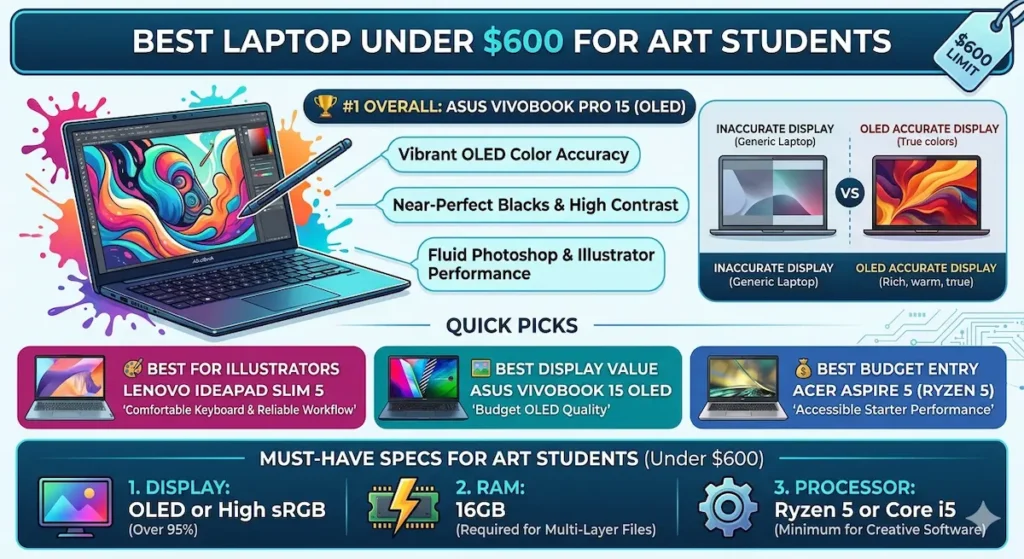
Real Art Student Workflow Comparison
| Laptop | Photoshop Performance | Display Color Accuracy | Illustrator Responsiveness | Battery for Studio | Long-Term |
|---|---|---|---|---|---|
| ASUS VivoBook Pro 15 OLED | Smooth | Excellent (OLED) | Fast | 8–9 hours | Very consistent |
| Lenovo IdeaPad Slim 5 | Responsive | Good IPS | Good | 8–10 hours | Reliable |
| ASUS VivoBook 15 OLED | Good | Excellent (OLED) | Good | 7–9 hours | Consistent |
| Acer Aspire 5 | Solid | Average IPS | Adequate | 6–8 hours | Stable |
Why Display Quality Is the Most Important Spec for Art Students
Before the full reviews, being direct about why the best laptop under $600 for art students must prioritize display quality prevents the most common and most expensive buying mistake in this category.
Art students make color decisions in every session. Hue selection, value relationships, saturation balance, shadow and highlight rendering — these creative judgments are only as accurate as what the display shows you. A display with limited color gamut shows you a compressed, inaccurate version of your work that leads to decisions you’d make differently on a calibrated screen.
At $600, OLED panels are newly accessible — and they change the art student laptop equation significantly. OLED displays provide:
- Near-perfect black levels that reveal shadow detail accurately
- Wider color gamut coverage (100% DCI-P3 on quality OLED panels)
- More accurate color-to-color relationships across the visible spectrum
- Better contrast that makes value relationships in artwork more perceptible
The difference between designing on a standard IPS laptop and an OLED laptop is immediately visible to anyone with trained color perception. For art students who spend years developing that perception, it’s not a luxury specification — it’s the specification that determines whether the laptop supports or undermines the skill they’re building.
Chromebook vs Windows Laptop for Students
The best laptop under $600 for art students in 2026 is increasingly an OLED laptop — because OLED panels are now accessible at this price point and the color accuracy they provide is a daily creative tool.
Best Laptop Under $600 for Art Students — Full Reviews
1. ASUS VivoBook Pro 15 OLED — Best Laptop Under $600 for Art Students Overall
The ASUS VivoBook Pro 15 OLED earns the top position in the best laptop under $600 for art students category through the display specification that creative students need most and the performance that handles their actual software workload.
What real art student creative work looks like on this machine
I ran realistic art student workflows: Photoshop with a high-resolution illustration file (7000x5000px, 12 layers, multiple adjustment layers), Illustrator with a complex vector poster design, and Clip Studio Paint for digital illustration. These are representative of mid-level coursework files — not beginner tutorials, not professional production work, but real assignment-scale creative projects.
The OLED display transforms the experience of working in these tools in a way that’s immediately perceptible and immediately useful. Shadow areas in illustrations that disappear into murkiness on standard IPS panels show their full detail and tonal range. Color relationships between warm and cool values are accurate rather than approximated. When I compared the same Photoshop file between the VivoBook Pro 15 OLED and a standard IPS laptop at the same price, the difference in visible shadow detail and color accuracy was significant enough that a student could reasonably make different creative decisions based on what each display showed them.
Performance for standard art student software runs smoothly. Photoshop brush response on large canvases stays fluid. Illustrator handles complex vector artwork without the lag that entry-level configurations produce on multi-path compositions. The Ryzen 5 or Ryzen 7 configuration provides the headroom that creative software requires without the performance ceiling that budget alternatives create.
The 15-inch display also provides the screen real estate that art students benefit from — enough space to have tool panels open alongside the working canvas without constantly collapsing and expanding the workspace.
Pros:
- OLED display with 100% DCI-P3 color coverage — the most important single specification for the best laptop under $600 for art students
- Smooth performance across Photoshop, Illustrator, and Clip Studio Paint at coursework scale
- 15-inch display provides studio-appropriate workspace for creative tools
- Color accuracy that supports rather than undermines color training and design decisions
Cons:
- OLED burn-in risk during very long sessions with static UI elements — use screensaver for extended breaks
- Fan audible under heavy Photoshop operations with large canvas and multiple filters
Verdict: For most art students asking about the best laptop under $600 for art students, the VivoBook Pro 15 OLED’s display quality is the recommendation that holds up across every creative session.
Buy Now2. Lenovo IdeaPad Slim 5 — Best Laptop Under $600 for Art Students Who Illustrate and Write Extensively
Art programs involve more text-based coursework than many students anticipate — artist statements, art history papers, critical theory responses, studio journals, grant applications. For art students whose daily use alternates between creative software and sustained academic writing, keyboard comfort becomes a second critical daily specification alongside display quality.
Why keyboard comfort matters for art students specifically
The IdeaPad Slim 5’s keyboard advantage — deeper key travel, softer feedback, more comfortable for extended typing — compounds across the art student schedule of studio work, critical writing, and academic documentation. After three hours of alternating between Illustrator and essay writing, hands on the IdeaPad Slim 5 are noticeably less fatigued than on shallower keyboard alternatives at this price.
Performance for standard art student software runs reliably. Illustrator with complex vector compositions, Photoshop at mid-resolution canvas sizes, and digital illustration tools all respond without the lag that entry-level processors produce. The IPS display is good — accurate enough for general creative work and color decisions, though not at the OLED level of perceptible color fidelity.
For art students who split their time nearly equally between creative software and academic writing — common in fine arts programs with strong critical studies components — the IdeaPad Slim 5’s typing comfort is a daily advantage that the VivoBook’s better display doesn’t fully offset in the physical experience of the workday.
Pros:
- Best keyboard comfort for art students with heavy academic writing requirements
- Reliable Photoshop and Illustrator performance for coursework-scale creative projects
- Good battery for full studio days without charger anxiety
- Slightly cooler operation than VivoBook Pro under equivalent creative workloads
Cons:
- IPS display doesn’t match OLED color accuracy for color-critical design decisions
- Display brightness average in bright studio environments near windows
Verdict: The right affordable laptop for digital art students under $600 who balance creative software work with significant academic writing and want typing comfort to hold through both.
Buy Now3. ASUS VivoBook 15 OLED — Best Budget OLED Laptop Under $600 for Art Students
For art students whose primary need is OLED display quality at the most accessible price point — where display accuracy is the non-negotiable specification and budget is the primary constraint — the ASUS VivoBook 15 OLED delivers the key specification at lower cost than the Pro 15.
What OLED at a lower price point means for art students
The VivoBook 15 OLED provides OLED color accuracy — the specification that most directly affects the quality of color decisions made on the laptop — at a configuration that’s typically $50–$80 less than the VivoBook Pro 15. For art students where that margin matters within a $600 ceiling, this is a meaningful option.
Performance is slightly lower than the Pro 15 depending on specific processor configuration, but handles standard art student software — Photoshop at medium canvas sizes, Illustrator, Clip Studio Paint, and Procreate for iPad connected workflows — reliably for coursework-scale projects.
Best Laptop Under $700 for Data Science Students
For art students specifically asking about the best laptop under $600 for digital art, the OLED display’s color accuracy at this price point is the recommendation that most directly supports accurate creative work.
Pros:
- OLED color accuracy at the most accessible price in this best laptop under $600 for art students comparison
- Handles standard digital art software reliably for coursework-scale projects
- Lighter than VivoBook Pro 15 for art students who carry between studio and home
Cons:
- Performance ceiling slightly lower than VivoBook Pro 15 under heavy concurrent creative workloads
- Fan more audible under peak Photoshop and filter rendering operations
Verdict: The right cheap laptop for art students under $600 who prioritize OLED color accuracy and want the most display quality per dollar within the budget.
Buy Now4. Acer Aspire 5 (Ryzen 5) — Best Value Laptop Under $600 for Art Students on Tightest Budget
For art students where the OLED premium isn’t available within their specific budget, or who are beginning art school and want to defer the display accuracy investment until they’ve confirmed the program direction, the Acer Aspire 5 provides capable everyday performance at the lowest price in this best laptop under $600 for art students comparison.
What budget creative work looks like on this machine
Photoshop with beginner-to-intermediate canvas sizes, Illustrator for assignment-scale vector work, and Clip Studio Paint for digital illustration all run without the hesitation that lower-spec processors produce. For introductory digital art coursework where project file sizes are smaller and workflows are less complex, the Aspire 5 covers the work.
The IPS display is functional — adequate for general creative decisions, readable in studio environments, comfortable for extended sessions. It doesn’t provide the color accuracy that OLED panels do, which creates the critique presentation gap described in this guide’s opening. For students aware of that limitation who plan to use external calibrated monitors in studio for color-critical work, the Aspire 5 is a workable interim choice.
Port variety — USB-A, USB-C, HDMI, SD card — is the Aspire 5’s practical advantage for art students who connect drawing tablets, external displays, and peripheral devices without adapters.
Pros:
- Most accessible price in the best laptop under $600 for art students comparison
- Handles beginner-to-intermediate creative software without performance failure
- Best port selection for art students using tablets, displays, and peripherals
- Gradual thermal management keeps studio sessions comfortable
Cons:
- IPS display doesn’t match OLED color accuracy for color-critical creative decisions
- Performance ceiling lower for complex multi-layer Photoshop files and filter operations
Verdict: A workable budget art student laptop under $600 for students in introductory programs or those who use studio-calibrated monitors for color-critical work and need general performance rather than display accuracy from their laptop.
Buy NowWhat Art Students Actually Need — The Real Specifications
Display Color Accuracy — The Creative Tool Most Buyers Overlook
The best laptop under $600 for art students in 2026 should prioritize display color accuracy above almost every other specification. For standard students, a display is a window to their work. For art students, a display is a tool that shapes every creative decision they make.
Look for:
- OLED panels: Best color accuracy available under $600 in 2026; ASUS’s OLED lineup has made this accessible at this price tier
- sRGB coverage 95%+ or DCI-P3 coverage 90%+: The minimum for color-reliable creative work on IPS panels
- Avoid displays marketed only on “Full HD” without color gamut specification: These are frequently the displays with poor color accuracy that cause critique presentation problems
RAM — 16GB for Real Creative Workflows
Photoshop keeps large canvas files, history states, and pattern libraries in RAM. Illustrator holds complex artboards and asset caches in memory. Working with both simultaneously alongside a browser for reference images fills 8GB RAM quickly for mid-level creative files.
16GB RAM is the configuration for the best laptop under $600 for art students that stays comfortable as project files grow across a semester. 8GB creates the sluggishness in brush response, filter processing, and file saving that feels like hardware failure but is actually memory pressure.
Processor — Ryzen 5 or Core i5 Minimum
Creative software is CPU-intensive for specific operations — Photoshop filter application, Illustrator mesh rendering, export operations, and any AI-powered tool (Photoshop Neural Filters, Illustrator generative tools). Ryzen 5 handles these operations in comfortable session timescales. Entry-level processors create the wait times that fragment creative concentration.
Common Mistakes Art Students Make When Buying
Prioritizing storage over display quality. Extra gigabytes matter less than display accuracy for art students. A 512GB laptop with an inaccurate display serves art students worse than a 256GB laptop with OLED accuracy — because the display shapes every creative decision while storage is managed with cloud and external storage habits.
Buying 8GB RAM for Photoshop use. Large canvas digital illustration files with many layers fill 8GB RAM measurably. The brush lag and filter delay on 8GB Photoshop sessions compounds across a full studio day into a real creative friction point.
Best Laptop Under $800 for Photo Editing
Ignoring the tablet connection workflow. Many digital art students use drawing tablets (Wacom, Huion, XP-Pen) as primary input devices. Verify your chosen laptop has adequate USB-A ports for tablet dongles or USB-C with appropriate adapter support before purchasing.
Choosing based on general performance benchmarks rather than creative software behavior. CPU benchmark numbers don’t capture the actual experience of Photoshop brush response, Illustrator path rendering, and export performance that define daily art student laptop quality.
Frequently Asked Questions
What is the best laptop under $600 for art students in 2026?
The ASUS VivoBook Pro 15 OLED provides the strongest combination of color-accurate OLED display and creative software performance for the best laptop under $600 for art students. For art students who also write extensively: Lenovo IdeaPad Slim 5. For budget OLED: ASUS VivoBook 15 OLED.
Is 16GB RAM necessary for digital art on a $600 laptop?
Yes — for coursework-scale Photoshop files with multiple layers, Illustrator complex artboards, and concurrent tool use. 8GB creates performance pressure that shows as brush lag and filter delay in real creative sessions. 16GB is the configuration that keeps creative software responsive throughout a full studio day.
Do art students need a dedicated GPU for Photoshop and Illustrator?
For standard 2D digital art workflows — Photoshop, Illustrator, Clip Studio Paint, Procreate on connected iPad — dedicated GPU is not required. These applications use GPU acceleration but run adequately on integrated graphics with a capable CPU. Dedicated GPU becomes relevant for 3D art tools, video work, and GPU-accelerated AI features at high resolution.
Which display is better for art students — OLED or IPS?
OLED is better for color-critical art work. The best laptop under $600 for art students in 2026 increasingly means OLED because OLED panels provide color accuracy, contrast, and shadow detail visibility that standard IPS panels don’t match. For art students making color decisions every session, OLED is the display technology worth prioritizing within the budget.
Final Recommendation
The best laptop under $600 for art students is the one that supports your creative judgment rather than undermining it — a display that shows color accurately, performance that keeps creative software responsive, and enough RAM that your files breathe rather than strain.
After real creative workflow testing, the ASUS VivoBook Pro 15 OLED earns that description most completely. Color-accurate OLED display, smooth creative software performance, and 15-inch workspace make it the best laptop under $600 for art students that delivers on the creative tool requirement every session.
For writing-intensive art programs: Lenovo IdeaPad Slim 5 keyboard comfort is worth the display trade-off. For budget OLED: ASUS VivoBook 15 OLED delivers the key specification at lower cost. For budget-first buyers: Acer Aspire 5 covers introductory creative work honestly.
Whatever you choose: OLED or high-sRGB display, 16GB RAM, Ryzen 5 minimum. Those three decisions define the best laptop under $600 for art students experience across every studio session, critique, and portfolio review.
About BestLaptopGuide.com: Our editorial team evaluates laptops through real creative and student workflow testing — not manufacturer benchmarks. Recommendations updated regularly.
Disclosure: Some links on this page are affiliate links. A small commission may be earned at no extra cost to you. This does not influence our recommendations.


