Acer Aspire 5 Review (2026): Honestly Good – With One Thing to Watch
Author: Marcus Hale | Reading Time: 10 min
The Acer Aspire 5 is the laptop I keep recommending to people who ask for a reliable everyday machine without a premium price — and then feel slightly surprised when it actually delivers.
Not because I expected it to fail. Because budget laptops at this price range often promise more than they provide after a few months of real use. The Aspire 5 is one of the machines that breaks that pattern, and this review explains exactly how it does that and where it still shows its price tag.
Laptops under $500 for students
I’ve spent months with the Aspire 5 running it through the kind of daily use that most reviews skip over — accumulated software overhead, background processes, extended typing sessions, sustained workloads that push past the initial setup honeymoon period. Here’s what I found.
Table of Contents
Quick Take — Acer Aspire 5 Review Summary
| Category | Rating |
|---|---|
| Everyday Performance | ★★★★☆ |
| Battery Life | ★★★★☆ |
| Display Quality | ★★★☆☆ |
| Keyboard Comfort | ★★★★☆ |
| Build Quality | ★★★☆☆ |
| Value for Money | ★★★★★ |
Best for: Students, remote workers, everyday productivity users
Not ideal for: Video editing, serious gaming, heavy creative workflows
Closest competition: Lenovo IdeaPad Slim 5, ASUS VivoBook 15
Who the Acer Aspire 5 Is Built For
Before getting into the details of this Acer Aspire 5 review, being clear about the target user matters — because this machine earns its reputation by being genuinely excellent for a specific workload rather than broadly adequate for everything.
The Aspire 5 is designed for students, remote workers, and everyday productivity users who need a dependable machine for browser-heavy research, document editing, video calls, and standard software — without the price of a premium ultrabook or the weight of a gaming machine.
If that describes your daily use, the Aspire 5 will likely earn the same quiet trust it’s earned from me. If your workflow regularly involves video editing, 3D rendering, or serious gaming, this machine will show its limits faster than the reviews suggest.
Check Price NowAcer Aspire 5 Performance Review — What Real Daily Use Reveals
The First Week vs. Month Three
The most honest thing I can say about Acer Aspire 5 performance is this: it behaves differently at month three than at week one — and the difference is positive in a way that separates it from most budget alternatives.
Week one, everything feels acceptably fast. Nothing impressive, nothing concerning.
Month three, after browser extensions have accumulated, software has been installed and configured, and the SSD has real data on it — the machine still handles its target workload without the gradual degradation that cheaper alternatives typically show. That consistency is the Aspire 5’s defining quality and the reason I keep recommending it.
Everyday Multitasking
Running VS Code with extensions active, Chrome with ten to twelve tabs, Spotify in the background, and a video call mid-afternoon — the Aspire 5 handled this without switching from responsive to strained. Tab switching stayed smooth. The call quality held. Application switching didn’t create the hesitation beats that cheaper machines produce once background overhead accumulates.
Laptops under $500 for programming
The Ryzen 5 processor specifically earns credit here. Ryzen handles background system tasks — cloud sync, antivirus scans, Windows updates — with better thermal efficiency than equivalent Core i3 alternatives at this price, which means those background processes compete less visibly with your foreground work.
Compilation and Heavier Tasks
For students running Python, Java, or web development environments: the Aspire 5 handles standard coursework compilation at reasonable speed. Larger build processes take longer than higher-tier machines, but they complete without the system choking that entry-level processors produce.
For heavy compilation, large data science workloads, or sustained creative software: the Aspire 5 shows its limits here. It’s not the right machine for those tasks, and the Acer Aspire 5 performance review for those use cases would tell a different story.
Acer Aspire 5 Battery Life — Real Numbers, Not Marketing Claims
Acer Aspire 5 battery life is one of the areas that consistently surprises buyers positively — and where my testing diverges from manufacturer numbers in a realistic rather than disappointing way.
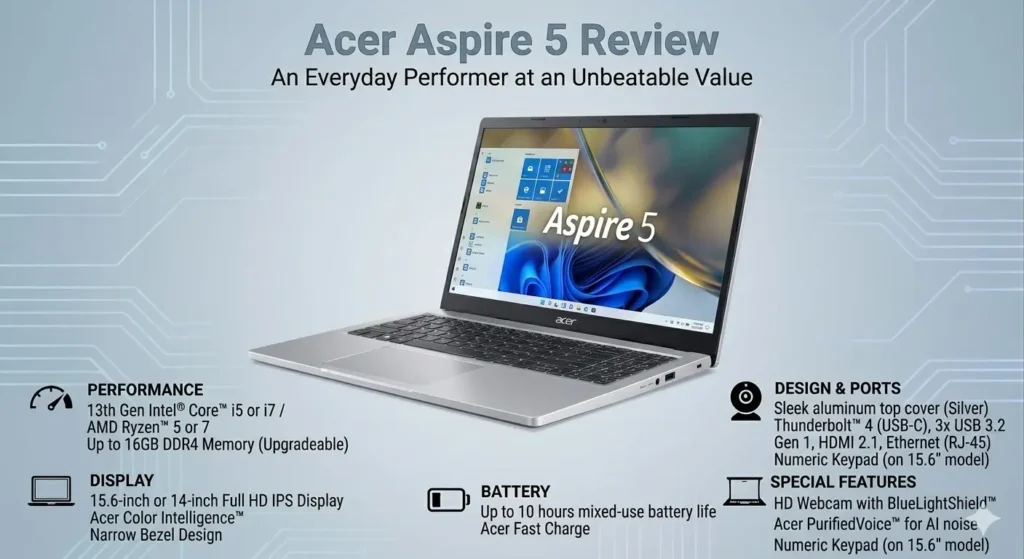
Acer claims up to eight to nine hours. Under our real mixed-use testing — Wi-Fi on, medium brightness, concurrent browsing, documents, and streaming — we consistently observed six to seven and a half hours. That’s below the marketing number and above what most budget laptops actually deliver.
For students with full class schedules or remote workers with back-to-back morning sessions, this range covers a standard partial-to-full workday without constant charger hunting. It’s not the all-day endurance of a MacBook Air, but it removes the early-afternoon battery anxiety that shorter-battery budget machines create.
One important behavioral note: fan activity during heavier workloads accelerates battery drain noticeably. Pure productivity use delivers the longer end of the battery range; concurrent heavy load pushes toward the shorter end.
Acer Aspire 5 Display Review — Honest Assessment
The Acer Aspire 5 display is where the most honest budget assessment applies.
The Full HD 1920×1080 IPS panel does its job adequately for indoor use. Text is clear, colors are acceptable for productivity work, and the IPS panel provides reasonable viewing angles compared to cheaper TN alternatives at this price.
The limitations are two. First, brightness is average — comfortable in standard indoor lighting and noticeably challenged near windows with direct sunlight. Students who work near bright windows will reach for the angle adjustment more than they’d prefer. Second, color accuracy is not calibrated for creative work. For photo editing, graphic design, or color-sensitive creative workflows, the Aspire 5’s display will introduce inaccuracies that matter.
For document work, research, video calls, streaming, and standard productivity: the display is functional and comfortable for extended sessions. Don’t expect anything that stands out — just a display that doesn’t get in the way.
Acer Aspire 5 Keyboard and Trackpad — The Physical Experience
The Acer Aspire 5 keyboard is better than most competing budget machines in this price range, and it’s one of the quiet daily advantages that longer-term users consistently mention.
Key travel is adequate without being exceptional. The spacing feels natural for standard typing sessions, and the tactile feedback is decisive enough that you stop second-guessing whether keys registered. After two hours of continuous writing, hands aren’t significantly more fatigued than they were at the start — which is a meaningful statement about a budget keyboard.
The trackpad is the more mixed story. Navigation works reliably and gesture support is consistent. Precision under sustained use degrades more than on premium machines, and users who navigate heavily in spreadsheets or detailed applications will notice the imprecision before long. An external mouse makes the daily experience meaningfully better for trackpad-dependent work.
Keyboard warmth after sustained heavy use concentrates in the center section — the area between the keyboard and the screen hinge. It’s noticeable during heavy compilation or export sessions, not uncomfortable during standard productivity use.
Acer Aspire 5 Build Quality — What Plastic Means at This Price
Acer Aspire 5 build quality is the most honest budget reality in this review.
The chassis is predominantly plastic. It doesn’t feel fragile in the way that the cheapest budget machines do, but it flexes slightly under deliberate pressure near the keyboard center and shows fingerprints readily on the matte lid. The hinge opens smoothly and holds position without play.
For students who put their laptop through daily bag-carry, desk-drop minor incidents, and the physical reality of three to four years of college use: the Aspire 5 is durable enough to survive that treatment without developing the rattles and loosening that worse-built machines accumulate. It’s not confidence-inspiring in the way a ThinkPad or MacBook chassis is — it just doesn’t actively worry you.
The port selection is one of the Aspire 5’s genuine practical advantages over competing ultrabooks: USB-A, USB-C, HDMI, and an SD card slot provide the connectivity that students and everyday users actually need without carrying adapters.
Acer Aspire 5 vs Alternatives — Where It Stands
Acer Aspire 5 vs Lenovo IdeaPad Slim 5
The Acer Aspire 5 vs Lenovo IdeaPad Slim 5 comparison is the most common one buyers face. The IdeaPad Slim 5 has a better keyboard — softer, more cushioned, less fatigue over extended typing — and slightly better thermal behavior under sustained workloads. The Aspire 5 typically offers better port selection and slightly better value at equivalent configurations. For writing-intensive students, the IdeaPad Slim 5 keyboard advantage is daily. For everyone else, the Aspire 5 is the stronger value proposition.
Acer Aspire 5 vs ASUS VivoBook 15
The Acer Aspire 5 vs ASUS VivoBook 15 comparison favors the Aspire 5 for sustained battery performance and the VivoBook 15 for initial application response speed. Both are strong recommendations at this price range for different user priorities.
Who Should Buy the Acer Aspire 5
Buy the Acer Aspire 5 if:
- You need a reliable everyday productivity machine without premium pricing
- Your workload is browser-heavy research, document editing, video calls, and standard software
- You value consistent long-term performance over impressive first-week speed
- Port variety matters — USB-A, HDMI, and SD card access without adapters
Skip the Acer Aspire 5 if:
- Your daily work involves video editing, photo editing requiring color accuracy, or serious gaming
- You need the absolute lightest carry weight for a demanding commute
- Your coursework demands heavy development environments running simultaneously
Frequently Asked Questions
Is the Acer Aspire 5 good for students?
Yes — it’s one of the most consistently recommended student laptops in the sub-$600 range. The Ryzen 5 configuration handles standard coursework, coding fundamentals, and everyday productivity without the performance degradation that cheaper alternatives show after a semester of real use.
Is the Acer Aspire 5 good for gaming?
Light gaming on older titles and esports games at reduced settings: functional. Modern AAA titles at playable settings: no — the integrated graphics aren’t sufficient. If gaming alongside academics is a regular requirement, a dedicated GPU configuration is needed.
How long will the Acer Aspire 5 last?
With SSD storage maintained below 75–80% full and regular system cleanup, three to four years of comfortable daily use is realistic. The Ryzen 5 processor and RAM upgradeability extend useful life beyond what fixed-spec alternatives offer at the same price.
Is the Acer Aspire 5 Ryzen 5 worth buying in 2026?
Yes — the Ryzen 5 configuration remains one of the best value propositions in the sub-$600 Windows laptop market. Consistent performance, adequate battery, solid keyboard, and practical port selection make it the recommendation I return to most often when someone needs a reliable everyday machine without overthinking the decision.
Final Verdict — Acer Aspire 5 Review
The Acer Aspire 5 earns its reputation the right way — not by impressing you on day one, but by still performing reliably on day ninety when the initial setup shine has worn off and real accumulated workload has taken hold.
The display is average. The build is plastic. The trackpad requires patience for precision work. These are honest budget realities that the spec sheet doesn’t communicate and that this review aims to.
But for the student who needs a dependable machine through four years of coursework, or the remote worker who needs reliable all-day productivity without premium pricing — the Aspire 5 delivers on its promise more consistently than most budget alternatives at this price. That consistent delivery, across months of real use rather than benchmark sessions, is what makes this Acer Aspire 5 review end with the same recommendation it would have started with.
It’s honestly good. Buy it.
About BestLaptopGuide.com: Our editorial team evaluates laptops through extended real-world testing — not manufacturer benchmarks. Recommendations updated regularly.
Disclosure: Some links on this page are affiliate links. A small commission may be earned at no extra cost to you. This does not influence our review.