Best Laptop Under $500 for Students — Real College Life Review
Buying the best laptop under $500 for students sounds easy until you actually live with one during a stressful semester. On the first day, most budget laptops feel fast enough. But a few weeks later — when you’re juggling 12 browser tabs, a Zoom class, background downloads, and assignment deadlines — small performance differences suddenly feel huge.
I’ve seen this happen repeatedly with students around me. Some buy a cheaper model to save money, only to regret it when the laptop starts lagging during exams or when the fan spins loudly in a silent library. Others choose slightly better configurations and end up using the same device comfortably for years.
This guide focuses on real academic usability, not just specs. If you want a laptop that still feels responsive after months of multitasking, the processor choice and SSD speed matter far more than branding or design.
Laptops under $500 for business use
Table of Contents
Quick Picks — If You Want a Fast Recommendation
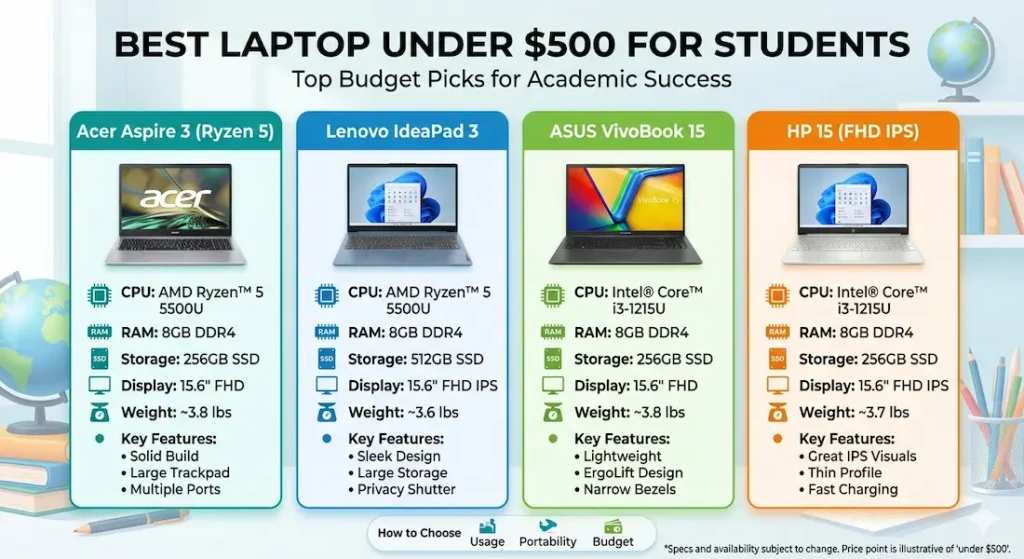
🏆 Best Overall Choice: Acer Aspire 3 Ryzen 5
💻 Best for Programming Students: Lenovo IdeaPad 3 Ryzen 5
🔋 Best for Battery & Portability: ASUS VivoBook 15
💰 Buy Only for Basic Needs: HP 15 Core i3
If I had to recommend just one safe option for most students, the Acer Aspire 3 would be my default pick.
🧭 Which Laptop Should You Choose as a Student?
If you want something that just works without thinking too much, go with the Acer Aspire 3. It handles everyday student workloads like notes, browsing, and assignments without slowing down after a few weeks.
If you spend a lot of time typing — coding, writing assignments, or documentation — the Lenovo IdeaPad 3 is the more comfortable option. The keyboard makes a noticeable difference over long sessions.
If your college routine involves moving around all day, the ASUS VivoBook 15 is easier to carry and lasts longer on battery, but you’ll have to compromise slightly on performance.
The HP 15 is only worth considering if your usage is very basic. It works fine for simple tasks, but you’ll notice its limits much sooner than the others.
Acer Aspire 3 Ryzen 5 — The “Safe Choice” Laptop Students Rarely Regret
What Daily Use Feels Like
With multiple Chrome tabs open, lecture videos playing, and assignments being edited simultaneously, the system feels consistently responsive. Boot time stays around 12–15 seconds, which surprisingly matters when you’re rushing to open files before class starts.
After about an hour of sustained multitasking, the keyboard centre becomes slightly warm. The fan ramps up — noticeable in quiet classrooms but not embarrassing loud. It’s the kind of noise you quickly get used to.
Screen, Build, and Carry Experience
Indoors, the Full HD display is comfortable for reading PDFs and working on slides. Near bright windows or outdoors, brightness feels just adequate rather than impressive. The lightweight plastic build is practical for backpack travel, though pressing hard in the keyboard’s centre reveals mild flex.
What really stands out with this laptop is how consistent it feels over time. Some budget laptops feel fast initially but start slowing down once your workload increases — this one holds up much better in comparison.
Pros
• Reliable performance during real multitasking
• Fast SSD keeps workflow smooth
• Upgradeable RAM improves longevity
Cons
• Display brightness could be better
• Fan noise increases under heavy load
Lenovo IdeaPad 3 Ryzen 5 — A Slightly Better Choice for Coding Comfort
Students who spend long hours typing code or writing assignments may prefer this keyboard. It feels softer and less fatiguing during extended sessions. Running development tools alongside browsers remains stable, though battery drains a bit faster than Aspire 3.
Laptops under $500 for programming
Speaker output feels thin during online lectures, so headphones are recommended. Still, for programming students, this laptop often feels like the more comfortable workspace. If I had to choose purely for typing comfort, I’d pick this over the Aspire 3.
View Best DealASUS VivoBook 15 — The Mobility-Focused Student Laptop
If your college routine involves moving between buildings all day, this laptop’s lighter feel and battery life you can rely on through a typical college day can be reassuring. With moderate usage, it can last close to an entire campus schedule.
However, heavy multitasking reveals performance limits sooner than Ryzen 5 systems. I’d personally choose this only if portability and battery life matter more than performance.
⚠️ Check latest dealHP 15 Core i3 — Only Consider for Very Basic Academic Work
For note-taking, browsing research material, and preparing presentations, this laptop works fine. But once you start opening many apps together, slowdowns appear earlier.
Honestly, this is the weakest option on this list — fine for basic use, but not something I’d recommend for long-term heavy workloads.
View Best DealRyzen vs Core i3 — The Difference You Feel After One Semester
In everyday college use, Ryzen laptops tend to remain smoother when switching between apps or running background processes. Core i3 models are usable but reach their limits sooner — especially as coursework becomes heavier each year.
Choosing stronger processors early often means fewer upgrade worries later.
Best laptops for coding beginners
RAM and SSD — Why These Matter More Than Design
An SSD-based student laptop simply feels faster in everyday tasks. Booting, loading software, and copying files become noticeably smoother. Similarly, 8GB RAM is now the realistic minimum for online learning and multitasking.
Upgradeable memory is an underrated feature that can extend laptop lifespan significantly.
Common mistakes students make when choosing best laptop under $500 for students
• Buying HDD laptops because they look cheaper
• Choosing 4GB RAM variants assuming upgrades later
• Ignoring processor generation differences
• Prioritising thin design over performance stability
Avoiding these mistakes helps students choose the best laptop under $500 for students with greater long-term satisfaction.
Practical Buying Guide — How to Choose Smartly
Processor: Ryzen 5 or modern Core i3 minimum
RAM: 8GB recommended, upgradeable preferred
Storage: Always choose SSD
Battery: Expect realistic 5–8 hours
Weight: Consider portability if commuting daily
You can also consider a refurbished laptop under $500 for better performance at a lower price
Frequently Asked Questions
Is $500 enough for a dependable college laptop?
Yes. With modern processors and SSD storage, students can get reliable performance for academic workloads.
Can these laptops handle programming courses?
Ryzen 5 models can comfortably run beginner to intermediate development tools.
Are budget laptops suitable for gaming?
They support light gaming but are not designed for demanding modern titles.
How long can a budget student laptop realistically last?
A well-chosen configuration can remain usable for around three to four academic years.
Final Verdict — Best Laptop Under $500 for Students
For most students, choosing a Ryzen-based laptop with SSD storage offers the best balance between affordability and long-term usability. Among current options, Acer Aspire 3 provides the most dependable real-world experience, making it the safest recommendation for academic life.
About BestLaptopGuide.com: Our editorial team evaluates real student usage patterns across multiple semesters — not manufacturer claims. Recommendations updated regularly.
Disclosure: Some links are affiliate links. A small commission may be earned at no extra cost to you. This does not influence our recommendations.


