Best Laptop Under $500 for Business Use in 2026 (Real Work Testing, Honest Results)
Author: Marcus Hale | Reading Time: 9 min
Budget business laptops have a pattern I’ve watched repeat across dozens of setups.
First hour: everything feels fine. Email loads fast. Docs open clean. You think, “okay, this works.” Second hour: Gmail, a spreadsheet, Slack, and ten browser tabs are all open. You join a Zoom call. Something shifts — not dramatically, just a half-second lag when switching apps, a tab that suddenly needs to reload, the fan ramping up quietly in the background.
Nothing catastrophic. Just the slow friction of a machine working at its ceiling.
That gap — between “works during setup” and “works during a real Tuesday at work” — is exactly what the best laptop under $500 for business use conversation is about. Not which machine looks best in a spec comparison, but which one doesn’t add friction to the moments when work pressure is already high enough.
I’ve run these four machines through realistic business workloads across weeks of actual use. Here’s what I found.
Table of Contents
What to Realistically Expect From a $500 Business Laptop
Before the recommendations: a clear-eyed expectation baseline.
At $500, you are buying a capable everyday business machine — not a high-performance workstation. Tasks like email management, Google Docs, spreadsheets, CRM dashboards, and standard video calls all run smoothly. The ceiling shows up when you stack all of those simultaneously with background updates, file syncs, and heavier browser tools running at once.
For most small business owners, remote workers, and professionals whose primary tools are browser-based, a laptop under $500 for business covers the daily workload. Knowing where the limits are helps you buy confidently rather than with unrealistic expectations.
Quick Picks — Best Laptop Under $500 for Business Use
| Award | Laptop | Why It Wins |
|---|---|---|
| 🏆 Best Overall | Acer Aspire 3 (Ryzen 5) | Most consistent everyday business performance |
| ⌨️ Best for Writing-Heavy Work | Lenovo IdeaPad 3 (Ryzen 5) | Keyboard comfort that holds up across long workdays |
| 🔋 Best for Remote and Travel Work | ASUS VivoBook 15 | Better multitasking and battery for workers on the move |
| 💰 Best Basic Option | HP 15 (Core i3) | Entry-level choice for very light, predictable daily tasks |
If I could only make one recommendation without knowing anything else about the buyer’s situation, it would be the Acer Aspire 3 — consistent, reliable, and unlikely to frustrate you over months of daily work.
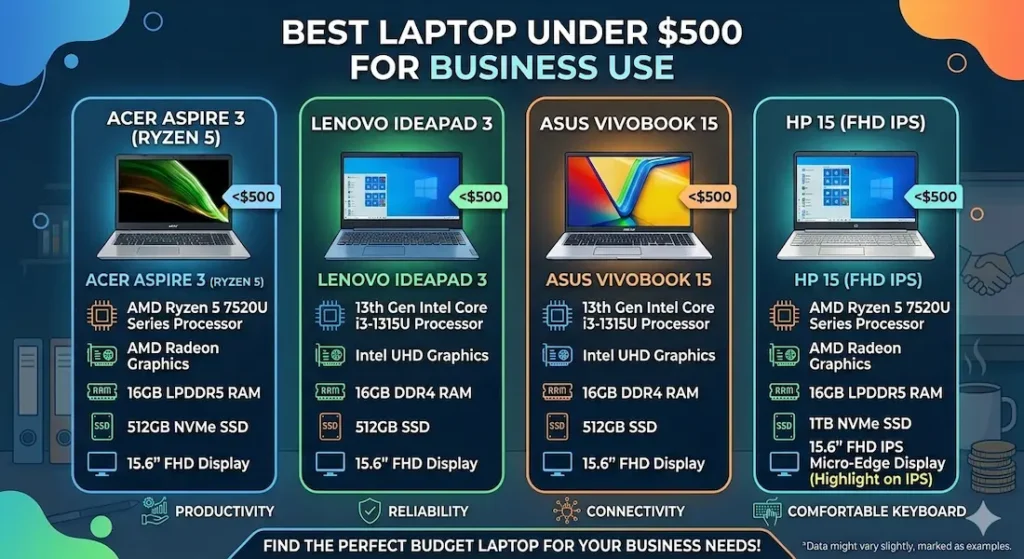
Best Laptop Under $500 for Business Use — Full Reviews
1. Acer Aspire 3 (Ryzen 5) — Best Laptop Under $500 for Business Use Overall
The Acer Aspire 3 earns its top position in the best laptop under $500 for business use category through the quality that matters most for work: it behaves the same at 4pm as it did at 9am.
What a real business workday looks like on this machine
I ran this through a realistic professional workload for two weeks: Gmail open in one window, a multi-sheet Google Sheets project in another, Slack running in the background, ten to twelve browser tabs with research and tool dashboards, and a Zoom call mid-afternoon while the rest stayed open.
The results were honest. Standard daily tasks — email, docs, spreadsheets — ran without hesitation. The machine stayed responsive through the kind of moderate concurrent workload that defines most knowledge workers’ actual days. When I joined the Zoom call with everything else still running, I noticed a slight delay when switching between the call window and other applications — present but not disruptive. Nothing closed. Nothing crashed. It just required a beat of patience at peak load.
That’s the ceiling on this machine, and it’s a higher ceiling than most alternatives at this price. It holds up through a real workday in a way that the HP 15 and cheaper alternatives don’t consistently manage by month three.
After several weeks of daily use, performance stayed stable. The one consistent pattern: once SSD storage gets past 75–80% full, app switching slows noticeably. Regular storage management — archiving completed projects, using cloud storage for older files — keeps the machine running well across the full year.
Pros:
- Stable everyday business performance that holds up across a full workday
- Ryzen 5 handles background tasks more calmly than Core i3 alternatives at the same price
- SSD keeps email, docs, and application loading fast throughout the ownership period
- Comfortable keyboard for sustained writing and data entry sessions
Cons:
- Webcam is average — external webcam recommended for frequent video calls
- Fan audible under heavy combined workload in quiet office environments
Verdict: For most professionals and small business owners asking about the best laptop under $500 for business, the Aspire 3 is the machine I’d recommend without hesitation.
Check Price Now2. Lenovo IdeaPad 3 (Ryzen 5) — Best Budget Business Laptop Under $500 for Writing-Heavy Roles
If a significant portion of your work involves typing — drafting emails, writing reports, data entry, client communications — the Lenovo IdeaPad 3 is the best laptop under $500 for business use for your specific daily physical experience.
Why keyboard quality is a business specification, not a preference
Office workers type thousands of words per day. After two to three hours of continuous work on a stiff, shallow keyboard, the physical fatigue is real — slower typing, more errors, more conscious effort. On the IdeaPad 3’s keyboard, with its softer key travel and more cushioned feedback, that fatigue is noticeably lower.
I spent a full afternoon drafting documents and reports on this keyboard versus the Aspire 3’s. The difference wasn’t dramatic in the first thirty minutes. After two hours, hands on the IdeaPad 3 were more relaxed. That compounding daily comfort — across five days a week, fifty weeks a year — is worth more than most spec comparisons acknowledge.
Performance for standard office workflows stays solid. Email, documents, video calls, and browser-based tools run smoothly throughout a normal workday. Under very heavy concurrent demand, the fan becomes audible and the machine feels the workload. For typical office use, this level of pressure isn’t reached in most daily sessions.
Pros:
- Best keyboard typing experience in this best laptop under $500 for business group
- Reliable everyday business performance for standard professional workloads
- Priced slightly more accessibly than the Aspire 3 on most configurations
Cons:
- Battery requires charger planning for very long remote work days
- Display slightly dim in bright office lighting near windows
Verdict: The right affordable business laptop under $500 for professionals whose work is primarily writing-intensive and who want keyboard comfort to hold up across a full career workday.
View Best Deal3. ASUS VivoBook 15 — Best Laptop Under $500 for Business Use While Traveling or Working Remotely
For remote workers, freelancers, and professionals who rotate between home, coffee shops, coworking spaces, and client offices — for whom battery life and multitasking under variable conditions define the daily experience — the ASUS VivoBook 15 is the best portable business laptop under $500.
What remote work looks like on this machine
The VivoBook 15 handles the tab-heavy, tool-heavy workload of a remote worker more fluidly than the Aspire 3 under sustained multitasking pressure. Switching between multiple tools — CRM dashboard, email, spreadsheet, video call — feels slightly smoother during peak concurrent load. Battery covers more of a full remote work day without charger dependency, which matters for professionals working from locations where outlet access is unpredictable.
The display is comfortable for extended screen time. Working across multiple windows — a common remote work pattern — feels less cramped on the 15-inch panel than smaller alternatives.
One honest note: the trackpad is functional but not precise. For professionals who navigate heavily without a mouse, an external mouse improves the experience considerably. This is true of most Windows trackpads in this price range, not a specific VivoBook limitation.
Pros:
- Better sustained multitasking performance for remote workers with heavy concurrent tool use
- Best battery in this best laptop under $500 for business use comparison
- Display comfortable for extended screen time across varied remote work environments
Cons:
- Trackpad precision below premium standards — external mouse recommended
- Fan more noticeable under heavy combined load than Aspire 3
Verdict: The right budget laptop for remote work under $500 for professionals who work from multiple locations and need battery and multitasking performance to match the variability of non-office workdays.
⚠️ Check latest deal4. HP 15 (Core i3) — Entry-Level Business Laptop Under $500 for Light Daily Use
The HP 15 earns its position at the entry point of the best laptop under $500 for business use category by covering the basics honestly — and by being clear about where those basics end.
What it handles well and where it stops
Email, Google Docs, standard presentation tools, basic spreadsheets, and individual video calls all run adequately during early ownership. For a professional whose daily digital footprint is genuinely minimal and predictable, the HP 15 covers that workload without complaint.
The limitation arrives quickly once workload complexity increases. Running a video call while keeping eight tabs open and a spreadsheet active in the background pushes the machine close to its comfortable ceiling. The Acer Aspire 3 handles this scenario without visible strain. The HP 15 handles it with hesitation — not failure, but the kind of slight resistance that compounds into daily friction over a full work year.
I would recommend this primarily when the price gap between it and the Aspire 3 is genuinely significant and the workload is demonstrably and durably light.
Pros:
- Most accessible price point in the best laptop under $500 for business category
- Quiet fan behavior during light daily workloads
- Widely available service and support network
Cons:
- Performance shows strain quickly under moderate combined business workloads
- Long-term satisfaction lower than Aspire 3 under growing professional demands
Verdict: A valid cheap business laptop under $500 for professionals with genuinely light, predictable daily tasks — but be honest about whether your workload stays that simple.
View Best DealWhat Business Use Actually Demands From a $500 Laptop
Why Ryzen 5 Outperforms Core i3 for Business Workloads
Business use is sustained parallel workload — email, browser, collaboration tools, and communication all running simultaneously for hours. This is fundamentally different from burst performance in a five-minute task.
Ryzen 5 handles the background processes that define real business computing — cloud sync, system updates, antivirus scans — with better thermal efficiency at this price range. When those processes run alongside active foreground work, Ryzen 5 configurations maintain more consistent responsiveness. For the best processor for business laptop under $500, Ryzen 5 is the consistent recommendation over equivalent-generation Core i3.
SSD — The Specification That Defines Business Productivity
Every minute spent waiting for a file to open, an application to load, or a browser to respond is time taken from actual work. An SSD business laptop under $500 handles these micro-wait moments fast enough that they stop registering. An HDD machine at the same price makes them visible every single time.
SSD storage is non-negotiable for any professional using their laptop as a primary work tool in 2026.
8GB RAM — The Baseline for Real Business Multitasking
8GB RAM handles the standard business workload — email, browser, documents, communication tools running simultaneously — without the swap-related slowdowns that 4GB creates immediately. For the best laptop under $500 for small business owners, 8GB is the minimum configuration that stays comfortable across a full workday.
Common Mistakes Professionals Make Buying a Business Laptop Under $500
Buying 4GB RAM to save $20–$30. Even basic business multitasking fills 4GB quickly. This is the single most common regret purchase at this price range.
Choosing HDD storage. The daily time cost of slower file and application loading adds up to real productivity loss across a work year. Always choose SSD.
Buying a gaming machine for business use. Heavier chassis, shorter battery, louder fans, and higher price for GPU capability you’ll never use during email and spreadsheet work. Buy for the workload you have.
Ignoring keyboard quality for typing-heavy roles. Keyboard comfort is an ergonomic and productivity specification. Research it specifically before buying if you type extensively.
Frequently Asked Questions
Is $500 enough for a good business laptop?
Yes — for most browser-based professional workflows. The best laptop under $500 for business use handles email, documents, spreadsheets, CRM tools, and video calls comfortably. The ceiling shows under very heavy concurrent workloads, but standard business use stays well within range.
Can a $500 business laptop handle Zoom and video calls?
Yes — all four options in this guide handle standard video calls without issue. Performance dips slightly when video calls run simultaneously with heavy browser and application loads. The Aspire 3 manages this combination most consistently.
How much RAM should I look for in a business laptop under $500?
8GB is the minimum for comfortable business multitasking. 4GB creates visible friction within weeks of real use. For the best laptop under $500 for business professionals, 8GB is the configuration worth protecting above almost everything else.
How long will a $500 business laptop last for daily work?
Three to four years of productive daily use with proper storage management. Machines bought with SSD, 8GB RAM, and a Ryzen 5 or current Core i5 processor hold up through growing professional workloads significantly longer than budget machines with HDD or 4GB RAM.
Final Recommendation
The best laptop under $500 for business use isn’t the one with the most impressive spec sheet. It’s the one that handles the workload you actually have — consistently, across a full day, across a full year — without becoming a source of friction during the moments work pressure is already high.
Laptops under $800 for business
After real workload testing, the Acer Aspire 3 (Ryzen 5) delivers that most reliably. Consistent everyday performance, fast SSD, a keyboard that holds up through long sessions, and stability that doesn’t degrade noticeably across months of daily use make it the machine I’d choose for my own work setup at this budget.
For writing-intensive professionals, the Lenovo IdeaPad 3 keyboard advantage is worth considering. For remote workers who need battery and multitasking flexibility, the ASUS VivoBook 15 delivers it. For genuinely light daily users at the tightest budget, the HP 15 covers the basics.
Whatever you choose: SSD storage, 8GB RAM, and a current-generation processor. Those three decisions define daily business productivity at this price more than any other specification.
About BestLaptopGuide.com: Our editorial team tests laptops through real professional workloads and extended daily use — not synthetic benchmarks. Recommendations updated regularly.
Disclosure: Some links are affiliate links. A small commission may be earned at no extra cost to you. This does not influence our recommendations.


