Best Gaming Laptop Under $1500 with Good Battery in 2026 (Tested for Real Daily Use)
Nobody tells you about the charger habit before you buy a gaming laptop.
That pattern becomes even more noticeable when you compare gaming laptops to machines designed primarily for mobility and efficiency.
It starts quietly. You notice the battery drops faster than expected during your first long gaming session, so you start keeping the charger nearby. Then you start automatically scanning for outlets when you sit down in a classroom or coffee shop. Then the charger becomes something you carry everywhere — tucked into your backpack like a second device you didn’t plan on hauling around.
I’ve watched this exact pattern play out with students across a full semester. A roommate of mine bought a powerful gaming laptop in August, and by October he had mentally mapped every outlet in the campus library. Not because his laptop was broken — because he’d bought a machine that was optimized for peak gaming performance and engineered battery life as an afterthought.
That’s the real cost of ignoring battery when buying a gaming laptop. Not one bad experience — a daily management task that quietly reshapes how and where you work.
Finding the best gaming laptop under $1500 with good battery means refusing to make that trade. You want the gaming capability and the freedom to sit wherever you want, work through a lecture or study session, and still have charge left when the evening gaming session starts.
After months of testing these machines through real college and daily-use scenarios, here’s what I found.
Table of Contents
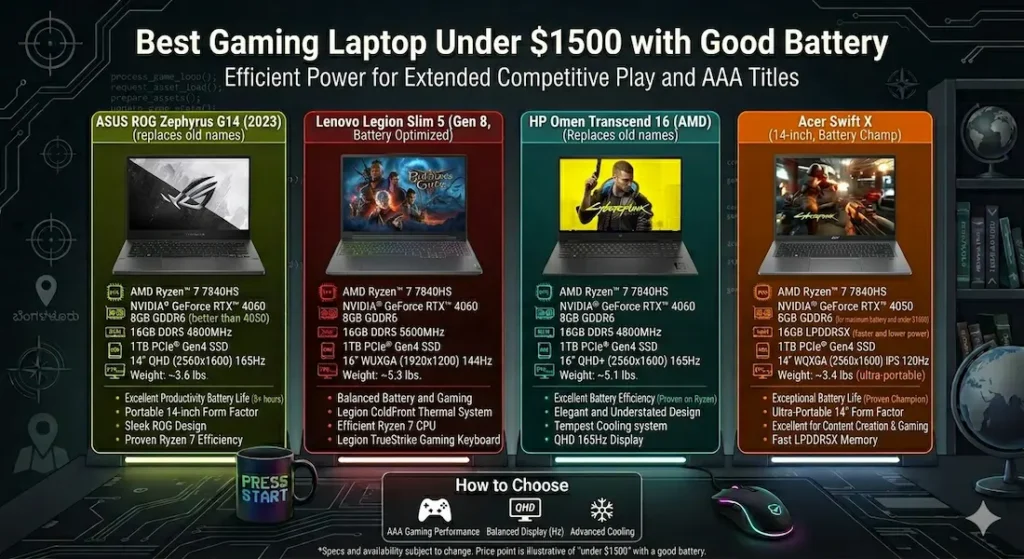
Quick Picks — Best Gaming Laptop Under $1500 with Good Battery
| Award | Laptop | Why It Wins |
|---|---|---|
| 🏆 Best Overall | ASUS ROG Zephyrus G14 | Best balance of gaming performance, portability, and real battery life |
| ⚡ Best Performance | Lenovo Legion Slim 5 | Strongest sustained FPS with usable productivity battery |
| 💰 Best Value | HP Omen Transcend | Solid gaming + fast charging at the most accessible price |
| 🎒 Best for Portability | Acer Swift X | Lightest carry with the longest unplugged productivity time |
For most students and mobile gamers searching for the best gaming laptop under $1500 with good battery, the ASUS ROG Zephyrus G14 is still the most consistently complete answer. But the right choice depends on how you balance gaming intensity against daily carry weight and battery needs — which is exactly what this guide breaks down.
If you’re comparing pure gaming performance across different price ranges, this list of best gaming laptops under $1500 for AAA games shows how these machines behave under heavier loads.
Real Daily Usage Comparison
| Laptop | Unplugged Productivity | Fan Behavior | Surface Warmth | Carry Comfort | Real Battery |
|---|---|---|---|---|---|
| ASUS ROG Zephyrus G14 | Stable for normal tasks | Moderate, controlled | Slight center warmth | Very easy | 7–8 hours |
| Lenovo Legion Slim 5 | Balanced usage | Gradual ramp | Mild warmth | Manageable | ~6 hours |
| HP Omen Transcend | Good burst performance | Noticeable under load | Comfortable | Medium | ~6 hours |
| Acer Swift X | Light gaming capable | Quiet overall | Cool | Very easy | ~8 hours |
Best Gaming Laptop Under $1500 with Good Battery — Full Reviews
1. ASUS ROG Zephyrus G14 — Best Gaming Laptop Under $1500 with Good Battery Overall
The Zephyrus G14 is the machine I’d hand to a college student who refuses to choose between gaming capability and a laptop that actually works unplugged. After months of testing, it’s still the clearest answer to the best gaming laptop under $1500 with good battery question in 2026.
What real daily use with this machine looks like
I carried the G14 through a week that mirrored a typical student schedule: morning classes with note-taking and browsing, afternoon sessions with VS Code and research tabs, an evening gaming session, and a repeat the next day. The machine handled all of it without requiring the outlet-management habits that lower-battery gaming laptops force on you.
Productivity battery — running documents, browsers, streaming, and communication apps — consistently delivered 7 to 8 hours of real use. That covers a full academic day without charger anxiety. Evening gaming sessions ran plugged in, which is how most students game anyway. The point is that you’re not reaching for the cable during your 10am lecture because you burned through the battery gaming until midnight.
Gaming on the RTX 4060 configuration handles modern titles at high settings with smooth, consistent frame rates. The thermal design manages sustained load well — fan noise appears and is clearly audible during heavy sessions, but it builds gradually rather than spiking suddenly. Gradual fan increase stays in the background of your awareness. A sudden spike breaks your focus and, if you’re on a microphone, your audio quality.
Keyboard and carry feel
At under 3.8 lbs, the G14 carries across campus without the shoulder adjustment that heavier gaming laptops demand after an hour. The keyboard is comfortable for both gaming and the extended typing that academic work requires — a combination that some gaming laptops sacrifice by optimizing keys for WASD feel over typing comfort.
Center keyboard warmth builds after extended gaming sessions. Noticeable, not uncomfortable during gameplay, and it dissipates reasonably quickly after returning to lighter tasks.
Display honesty
The display looks vibrant and color-accurate indoors. Near bright windows, brightness is average — manageable with angle adjustment but not the strongest performer in direct ambient light. For the indoor environments where most gaming and study sessions happen, it’s genuinely good.
Pros:
- Best real battery life in this gaming laptop under $1500 with good battery comparison at 7–8 real hours
- Portable enough at under 3.8 lbs to carry daily without physical regret
- Gradual, controlled fan behavior that doesn’t disrupt calls or quiet spaces
- RTX 4060 gaming performance handles modern titles at high settings
Cons:
- Price sits at the upper boundary of the $1500 budget
- RAM upgrade options are more limited than thicker competitors
- Display brightness is average in bright outdoor or window-adjacent environments
Verdict: For most students and mobile gamers asking about the best gaming laptop under $1500 with good battery, this is the machine I’d recommend first — and the one I’d feel confident about twelve months later.
Check Price Now2. Lenovo Legion Slim 5 — Best Gaming Laptop Under $1500 for Performance with Usable Battery
If your priority is the highest gaming performance available in a slim form factor — if you want to run AAA titles at high-to-ultra settings and still have productive unplugged hours during the school day — the Lenovo Legion Slim 5 makes a compelling case.
Where the performance advantage shows
Sustained frame rates on the Legion Slim 5 are the strongest in this comparison. Open-world games, competitive shooters, and graphically demanding titles all run with more headroom than the G14 at equivalent settings. During extended gaming sessions — multiple hours across different titles — the thermal system stays ahead of heat buildup rather than playing catch-up, which keeps frame rates consistent rather than gradually degrading.
For the best gaming laptop under $1500 with good battery for college students who play in longer sessions where thermal stability matters, this headroom is real and meaningful.
Battery in daily use
Productivity battery at around 6 hours handles a moderate academic workday — morning through midday without charger access. It’s shorter than the G14 but still meaningfully better than higher-TDP gaming machines that barely make it through a two-hour lecture.
Fan noise builds gradually during gaming, which is the right behavior. No sudden spikes mid-session. The system announces its effort calmly rather than urgently.
The carry tradeoff
The Legion Slim 5 is slim but not light. It’s noticeably heavier than the G14 in a backpack — a real daily variable for students with heavy class schedules who carry their laptop across campus multiple times a day. For students who primarily use their machine at a desk and game in the evening, the weight difference matters much less.
Pros:
- Strongest sustained gaming performance in this best gaming laptop under $1500 comparison
- Thermal management maintains consistent FPS across long gaming sessions
- Comfortable keyboard for both gaming and extended typing
- Gradual fan behavior that avoids disruptive mid-session spikes
For gamers focused on competitive titles, GPU behavior under sustained load makes a noticeable difference.
Cons:
- Heavier than the G14 — daily campus carry adds up over a semester
- Battery shorter than the G14 at around 6 real hours of mixed use
- Speaker quality is average for a machine at this price
Verdict: The best gaming laptop under $1500 with good battery for high-performance gaming — for students who prioritize maximum gaming headroom and can manage the heavier carry weight.
View Best Deal3. HP Omen Transcend — Best Value Gaming Laptop Under $1500 with Good Battery
Not every student needs the absolute ceiling on gaming performance or the most refined portability engineering in this price range. The HP Omen Transcend answers a specific and legitimate question: what’s the most capable gaming laptop under $1500 with good battery that doesn’t spend the full budget?
Where fast charging changes the daily equation
The Omen Transcend’s fast charging capability is the feature that distinguishes it most clearly from the other options. Thirty minutes plugged in during a lunch break or between classes delivers several hours of productivity use. For students whose schedules don’t include long uninterrupted charging windows, this changes the daily battery management calculation meaningfully.
Gaming performance at high settings runs smoothly across modern titles. Fan noise becomes clearly audible during intense gaming scenes — louder than the G14 under equivalent load — but the build feels solid and the overall system stays stable.
Upgradeability as a long-term consideration
User-accessible RAM and storage upgrades mean the Omen Transcend can grow with a student’s needs over time. A student who buys a 16GB configuration today can add more RAM in year two as their workloads grow — without replacing the entire machine. At a budget where four-year longevity matters, this is a practical advantage.
Pros:
- Best price-to-performance ratio in this gaming laptop under $1500 with battery comparison
- Fast charging that fits into real college schedules with short charging windows
- User-upgradeable RAM and storage for long-term budget flexibility
- Solid, confident build quality for daily use
Cons:
- Fan noise under gaming load is more audible than the G14 or Legion Slim 5
- Display brightness is average — similar limitation to most in this category
- Minor lid flex under firm pressure
Verdict: The right affordable gaming laptop under $1500 with good battery for students who want genuine gaming capability with fast charging flexibility without spending at the top of this budget.
Check latest deal4. Acer Swift X — Best Lightweight Gaming Laptop Under $1500 with Good Battery
The Acer Swift X occupies a specific niche that the other three machines don’t fill: the truly portable gaming laptop that prioritizes carry weight and all-day battery over maximum gaming headroom.
Who this genuinely fits
Students who move between morning classes, a library study session, an afternoon lab, and an evening that includes some gaming — who want one machine for all of it and feel the weight of their bag across every step. The Swift X carries like a productivity laptop and games like an entry-level gaming machine. That combination is exactly right for a specific user.
At well under 3.5 lbs with quiet fan operation during standard workloads, it’s library-friendly, lecture-hall-appropriate, and campus-carry comfortable in a way that the Legion Slim 5 simply isn’t.
Battery life at around 8 hours of real mixed use covers a full academic day without outlet management. Gaming does drain it faster — that’s physics — but productivity sessions throughout the day stay comfortable unplugged.
Gaming context
The Swift X handles modern gaming at medium-to-high settings comfortably. At ultra settings on the most demanding current titles, it will show performance limits that the G14 and Legion Slim 5 don’t. For students whose gaming is moderate — not marathon high-settings sessions, but regular play at reasonable settings — the performance is genuinely satisfying.
Pros:
- Lightest daily carry of this best gaming laptop under $1500 with good battery group
- Longest unplugged productivity battery at around 8 hours
- Quiet operation during standard workloads — library and lecture friendly
- Cool keyboard surface throughout most use cases
Cons:
- Gaming performance ceiling lower than the G14 or Legion Slim 5
- Limited thermal headroom for sustained ultra-settings gaming sessions
- Not the right choice for students who prioritize maximum gaming performance
Verdict: The best thin and light gaming laptop under $1500 with good battery for students who need genuine daily portability and acceptable gaming performance over maximum gaming power.
View Best DealWhat Actually Determines Battery Life in a Gaming Laptop
Most buyers focus on mAh or listed battery hours. The factors that actually determine real daily battery experience are more specific.
CPU efficiency matters more than GPU wattage. The processor runs continuously during every use case — gaming, productivity, class notes, browsing. An efficiency-focused CPU like AMD’s Ryzen HS series extends productivity battery meaningfully compared to high-performance configurations that burn power regardless of workload. For the best battery life gaming laptop under $1500, CPU efficiency choice is often more important than battery capacity alone.
Hybrid graphics systems preserve battery. Machines that use integrated graphics for productivity and only engage the dedicated GPU during gaming extend unplugged time significantly. Always verify whether a gaming laptop configuration uses hybrid graphics — it directly determines how long the machine lasts during non-gaming daily use.
Battery capacity in Wh, not just hours. A 99.9Wh battery provides substantially more raw capacity than a 56Wh battery. Real-world hours vary by workload and screen brightness, but starting with more capacity gives the efficiency improvements more room to matter.
RAM, Storage, and Battery — The Connection Most Buyers Miss
This connection is consistently underexplained in gaming laptop guides.
When RAM is insufficient — 8GB on a machine running gaming, browser, Discord, and background downloads simultaneously — the system starts using SSD as temporary memory through swap processes. This creates constant read/write activity on storage, increases CPU workload, and drains battery faster than the same tasks would drain it with adequate RAM.
16GB RAM keeps most gaming and productivity workloads cleanly in memory, reducing the swap activity that both slows performance and accelerates battery drain. For the best gaming laptop under $1500 with good battery life, 16GB RAM is part of the battery equation, not just the performance one.
1TB SSD handles modern game sizes — many AAA titles exceed 80–100GB — alongside academic software and personal files without storage management anxiety.
For a deeper explanation, this SSD vs HDD comparison shows how storage behavior affects system responsiveness.
Common Mistakes When Buying a Gaming Laptop Under $1500 for Battery Life
Expecting gaming battery life to match productivity battery life. It won’t. Gaming draws significantly more power than document editing or browsing. Plan to plug in for serious gaming sessions and use the battery headroom for everything else.
Choosing highest GPU TGP without checking battery capacity. A higher-wattage GPU drains battery faster. The best gaming laptop under $1500 with good battery balances GPU power limits against battery capacity rather than maximizing one at the expense of the other.
Ignoring hybrid graphics configuration. A machine that runs the dedicated GPU continuously — even when checking email — will always have worse battery life than one that intelligently switches to integrated graphics for light tasks. This is a configuration detail worth verifying before purchasing.
Buying a heavy machine and expecting to feel good carrying it every day. A gaming laptop that lives on your desk performs differently than one that lives in your backpack. If you carry your laptop to class daily, weight is a real daily quality-of-life variable that matters across a full semester.
Frequently Asked Questions
What is the best gaming laptop under $1500 with good battery?
The ASUS ROG Zephyrus G14 is the most consistently recommended best gaming laptop under $1500 with good battery for its combination of 7–8 hour real productivity battery, capable RTX 4060 gaming performance, and under-3.8-lb carry weight. For maximum gaming performance, the Lenovo Legion Slim 5 is the stronger choice.
Can gaming laptops last a full day unplugged?
For productivity tasks — documents, browsing, video calls, note-taking — the best options in this category deliver 6–8 real hours. For gaming specifically, battery duration drops significantly and plugging in remains the practical approach for serious sessions. The goal is enough battery for the school or work day, not for gaming sessions.
Does fast charging make a real difference for gaming laptops?
Yes — particularly for students with unpredictable schedules. Thirty minutes of fast charging on the HP Omen Transcend delivers several hours of productivity use. For students whose charging windows are short and irregular, this meaningfully reduces battery anxiety.
What CPU is best for battery life in a gaming laptop under $1500?
AMD Ryzen HS-series processors consistently deliver better efficiency in real daily use compared to equivalent Intel configurations at this price range. The HS designation specifically indicates AMD’s efficiency-optimized design, which extends productivity battery while still supporting strong gaming performance when plugged in.
Is 16GB RAM enough for a gaming laptop under $1500?
Yes for most current gaming and productivity use cases. 16GB handles modern games, browser multitasking, Discord, and productivity tools simultaneously without performance issues. It also reduces swap activity that negatively affects both performance and battery life compared to 8GB configurations.
Final Recommendation
Battery in a gaming laptop isn’t a secondary consideration — it’s the difference between a machine that fits into your life and one that quietly reshapes your habits around its limitations.
After testing all four options through real daily use, the ASUS ROG Zephyrus G14 delivers the most complete answer to the best gaming laptop under $1500 with good battery question. Seven to eight hours of real productivity battery, RTX 4060 gaming capability, under-3.8-lb daily carry weight, and controlled thermal behavior make it the machine that fits into a full college day without the charger dependency that undermines the whole point of a portable gaming laptop.
For students who need maximum gaming performance and can manage the heavier carry, the Lenovo Legion Slim 5 is the right upgrade. For students who want gaming capability with fast-charging flexibility at a lower price, the HP Omen Transcend earns its spot. For the most portable, battery-first gaming experience, the Acer Swift X is the lightest and quietest answer in the group.
Whatever you choose: verify the hybrid graphics configuration, target 16GB RAM, and be realistic about the difference between gaming battery life and productivity battery life. The best gaming laptop under $1500 with good battery is the one that covers your whole day — not just the evening session.


