Best Laptop for Travel and Portability in 2026 (What You Only Learn After a Few Real Trips)
The first time I packed a heavy laptop for a work trip, I didn’t think much of it. Slid it into my bag, walked through O’Hare like normal, felt completely fine.
By the second day — after lugging it through two terminals, wedging it onto a tray table in a middle seat, and scrambling for an outlet at Gate C14 because the battery died mid-email — I had developed strong feelings about carry weight and battery anxiety. By day four, the laptop was staying at the hotel unless I had a specific reason to bring it.
If you’ve ever dealt with a laptop dying mid-task, this guide on best laptops under $500 with long battery life shows how different setups handle real-day usage.
Nobody tells you what the best laptop for travel and portability really means until you’ve learned it the hard way. It’s not the spec sheet. It’s the moment you realize your bag shoulder is sore at 2pm. It’s watching the battery percentage drop at 11am with no outlet in sight. It’s muting a client call because the fan suddenly kicked in during a quiet lounge session.
After months of testing these machines across real travel scenarios — not benchmarks, not controlled desks — here’s what actually separates a great travel laptop from one that just looks good on paper.
Table of Contents
Quick Picks — Best Laptop for Travel and Portability
| Award | Laptop | Why It Wins |
|---|---|---|
| 🏆 Best Overall | MacBook Air (M-series) | Silent, 12+ hour battery, light enough to genuinely forget you’re carrying it |
| 💻 Best Windows Travel Laptop | Dell XPS 13 | Premium, compact Windows machine with a display that works in real light |
| 💰 Best Budget Travel Pick | Lenovo IdeaPad Slim 5 | Solid travel performer without the premium price tag |
| ⚖️ Best Ultra-Light Option | HP Pavilion Aero | The lightest carry in this category for travelers who count every ounce |
For most people asking about the best laptop for travel and portability without additional context, the MacBook Air is still the most complete answer in 2026. For travelers who need Windows, the Dell XPS 13 is the right alternative.
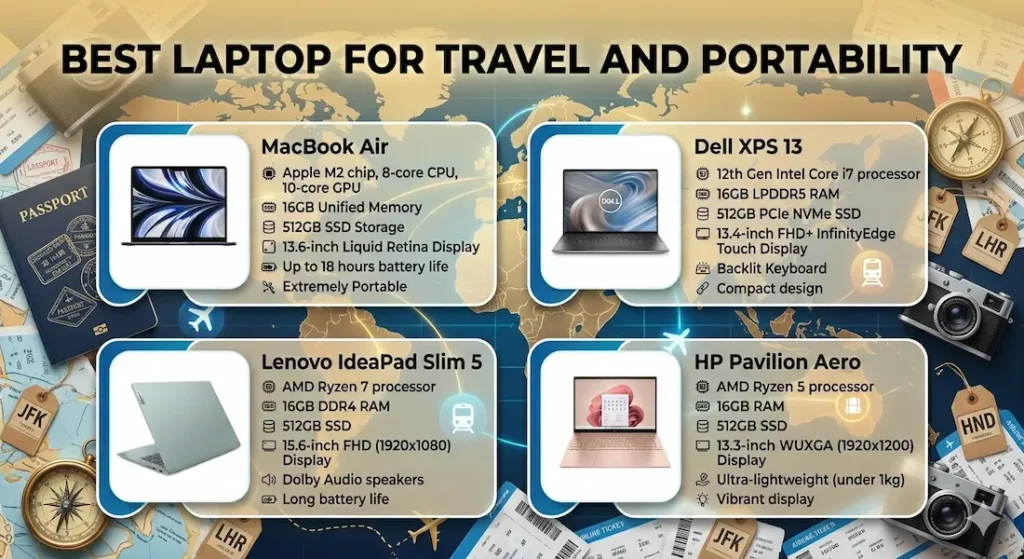
How These Laptops Actually Feel During Real Travel
| Laptop | Carry Feel | Real Battery | Fan in Quiet Spaces | Bright Outdoor Screen | Overall |
|---|---|---|---|---|---|
| MacBook Air | You forget it’s there | 12+ hours | Completely silent | Good enough | Exceptional |
| Dell XPS 13 | Light and confident | ~10 hours | Low, occasional | Genuinely bright | Very comfortable |
| Lenovo IdeaPad Slim 5 | Noticeable over time | ~8 hours | Audible sometimes | Average | Practical |
| HP Pavilion Aero | Immediately light | ~9 hours | Moderate under load | Good | Easy daily carry |
Best Laptop for Travel and Portability — Full Reviews
1. MacBook Air (M-series) — Best Laptop for Travel and Portability Overall
If you’ve ever landed after a five-hour flight, worked through a two-hour layover, and checked into a hotel with your battery still above 40% — you understand exactly why this machine dominates the travel laptop conversation.
What a full week of travel with this laptop looks like
I carried the MacBook Air through a week-long work trip that included four flights, multiple client meetings, coffee shop sessions, and hotel room late-night work. The laptop went into the bag at 7am and came out when I needed it. I didn’t adjust carry position because of its weight. I didn’t check the battery percentage anxiously every hour. I didn’t hear the fan once in a quiet lounge or hotel lobby.
That complete absence of friction is what the best laptop for travel with all-day battery actually looks like in practice.
At just under 2.8 lbs, the MacBook Air stops registering as a weight consideration after day one. The M-series chip handles everything from spreadsheets and Zoom calls to photo editing without generating heat that requires a fan — passive cooling means dead silence in every environment. For professionals who work from quiet airport lounges, open-plan coworking spaces, or in the background of a hotel room while a partner sleeps, this matters more than any benchmark.
Typing in the real spaces where travel work happens
Airplane tray tables. Coffee shop counters. Your lap on a train. The MacBook Air’s keyboard and trackpad hold up in all of these situations — stable enough on uneven surfaces, comfortable enough that two hours of typing on a flight doesn’t leave your wrists complaining.
This kind of silent operation becomes especially important if you work in shared or quiet environments throughout the day.
Where to set expectations
The display is clear and sharp indoors. Near bright windows or in direct sunlight, reflections require angle adjustment — it’s not the brightest panel in this group. This is a real-world limitation for travelers who work from outdoor patios or particularly bright spaces.
Port selection is genuinely minimal — two Thunderbolt ports and MagSafe charging. If your travel kit includes USB-A accessories or you regularly connect to hotel room TVs or conference room projectors, a small adapter becomes part of your standard travel loadout. For most cloud-based professional workflows, this isn’t a daily friction point.
Pros:
- Genuine 12+ hour battery that covers a full travel day without charger management
- No fan, no heat during typical travel workloads — complete silence everywhere
- Light enough to carry daily without cumulative shoulder fatigue
- Keyboard and trackpad quality that holds up in the awkward spaces travel work demands
Cons:
- Limited ports require adapter for USB-A peripherals and video output
- Display struggles more than competitors in very bright outdoor environments
- Premium price sits at the top of this comparison
Verdict: For frequent travelers, remote workers, and digital nomads searching for the best laptop for travel and portability, this is still the machine I’d recommend first — and the one most people stop looking after finding.
Check Price Now2. Dell XPS 13 — Best Windows Laptop for Travel and Portability
For professionals whose work requires Windows — enterprise software, IT environments, specific industry tools — the Dell XPS 13 is how you get a premium travel experience without switching ecosystems.
What makes it stand out on the road
The display. Working from a window seat in an airport lounge, a coffee shop with afternoon sun coming through, or a conference room with strong overhead lighting — the XPS 13’s screen brightness handles real ambient light better than almost any other laptop in this weight class. For the best thin and light laptop for travel that won’t leave you fighting screen reflections in variable environments, this is the strongest Windows answer.
At around 2.7 lbs with a compact footprint, it fits on economy tray tables without the angle gymnastics that wider laptops demand. The build feels premium — the kind of confident construction that doesn’t make you nervous when your bag gets shoved into an overhead bin.
Battery life at around 10 hours of real mixed use covers a cross-country flight comfortably and carries through a full client-site day without requiring a charger hunt. Fan noise surfaces under heavy sustained multitasking — worth knowing if you regularly work in library-quiet environments — but stays quiet during light-to-moderate workloads that cover most travel sessions.
The honest tradeoffs
Like the MacBook Air, port selection is limited. An adapter is standard kit for anyone who connects to external displays or uses USB-A accessories. The price sits at a premium that puts it near the top of this budget range.
Pros:
- Best display brightness for variable travel lighting conditions in this group
- Premium, confident build quality that holds up to regular travel wear
- Strong real-world battery that covers full travel days without anxiety
- Compact footprint designed for the tight spaces travel work actually happens in
Cons:
- Fan becomes audible in quiet environments under sustained multitasking
- Limited ports require adapter planning for full peripheral connectivity
- Premium price point
Verdict: The strongest lightweight Windows laptop for travel and portability for professionals who need Windows and want a machine that genuinely feels engineered for life on the road.
View Best Deal3. Lenovo IdeaPad Slim 5 — Best Budget Laptop for Travel and Portability
Not every traveler needs to spend $1,000+ for a machine that handles the road reliably. The IdeaPad Slim 5 is the honest answer to the best affordable laptop for travel — capable enough for real work travel, priced accessibly enough that it doesn’t require a budget conversation before buying.
What budget travel work looks like with this machine
Writing, researching, email, video calls, cloud-based business tools — the IdeaPad Slim 5 handles the full standard professional travel workload without complaint. Battery at around 8 hours covers a full domestic travel day with reasonable management — charging at the hotel the night before a long transit day rather than depending on finding airport outlets.
Carry weight is noticeable compared to the MacBook Air and XPS 13. It’s not heavy in an absolute sense, but after a full day moving through airports, client offices, and back to a hotel, you feel it in a way you don’t with the lighter options. For travelers whose trips are primarily desk-based work sessions with minimal daily movement, this is a minor consideration. For travelers who are constantly mobile throughout the day, it accumulates.
Fan activity becomes audible during heavy multitasking sessions. In quiet environments — hotel lobbies, client offices, library-style coworking spaces — this is worth factoring in if quiet operation matters for your work style.
Pros:
- Best price point for a genuinely capable travel and portability laptop under $800
- Covers all standard travel work tasks reliably
- Comfortable keyboard for sustained writing during travel sessions
Cons:
- Heavier than the MacBook Air and XPS 13 — carry weight registers over a full travel day
- Fan audible in quiet spaces under sustained load
- Display average in bright ambient lighting conditions
Verdict: The right budget travel laptop for cost-conscious travelers whose trips involve more focused sitting work than constant all-day movement.
Check latest deal4. HP Pavilion Aero — Best Ultra-Lightweight Laptop for Travel and Portability
At just over 2.2 lbs, the HP Pavilion Aero fills a specific and genuine need: travelers for whom carry weight is the primary variable above every other consideration.
Who this actually fits
Travel content creators who carry camera gear that already pushes their bag weight. Freelancers who move between three client locations in a single day. Road warriors with heavy personal luggage who need the laptop to cost as little carry weight as possible. For these users, the Pavilion Aero’s weight advantage is not a marginal spec improvement — it’s a daily quality-of-life change.
The weight difference between 2.2 lbs and 2.8 lbs sounds negligible on a spec sheet. Felt in a shoulder bag across six hours of movement through an airport, a client building, a transit ride, and a coworking stop, it’s a real difference that compounds across every travel day.
Battery at around 9 hours handles most full work days. Performance for documents, video calls, browser work, and standard productivity tools stays responsive throughout normal travel sessions. Fan activity becomes more noticeable under sustained load than the premium options — this is a managed tradeoff of the ultra-light design rather than a flaw.
Build quality is functional and travel-durable but doesn’t match the long-term confidence of the MacBook Air or XPS 13 construction. For travelers whose bags regularly get overhead-binned and moved aggressively, the more premium build of the other options may hold up better across years of use.
Pros:
- Lightest carry weight in this comparison — stops registering in your bag completely
- Reliable battery life for full standard work travel days
- Good display quality for an ultra-light machine at this price
Cons:
- Fan more audible under load than premium alternatives
- Build quality functional but not premium-grade for heavy-duty travel
- Performance ceiling lower than the MacBook Air and XPS 13 for heavy workloads
Verdict: The best ultra-lightweight laptop for frequent travelers who prioritize carry weight above every other variable and whose work stays within standard productivity boundaries.
View Best DealWhat Travel Actually Teaches You About Laptop Choice
Most laptop guides focus on specs. Two or three real trips will teach you the following instead.
Weight compounds across a travel day in ways spec sheets don’t communicate. The difference between 3.5 lbs and 2.7 lbs feels trivial at a desk. Walked through two airport terminals, carried during a full client day, and packed back into an overhead bin, it’s a real daily physical variable. For the best portable laptop for frequent travelers, under 3 lbs is the practical target.
Battery life determines freedom more than performance does. Outlet access during travel is inconsistent — flights, transit periods, busy gate areas, and client sites don’t always have available power when you need it. A machine that reliably delivers 10+ hours of real mixed use removes an entire category of travel anxiety. One that delivers 6–7 hours requires planning every day.
For users who care about screen quality, display type can make a noticeable difference across long work sessions.
Fan behavior in quiet shared spaces is a social and professional factor. Airport lounges, hotel lobbies, client conference rooms, and open coworking spaces are the environments where travel work actually happens — and they’re acoustically sensitive in a way home offices aren’t. A laptop that stays quiet under normal workloads is a better travel companion than one that announces itself in a silent room.
Outdoor and variable-light display performance matters when you don’t control your environment. Home desks have predictable lighting. Travel doesn’t. A display that adapts to coffee shop windows, airport natural light, and hotel room lamps without requiring constant physical adjustment saves real energy across a long travel day.
RAM and Storage — Getting the Configuration Right for Travel
Travel work expands unpredictably. What starts as a focused writing session turns into a simultaneous video call, shared document, browser with eight research tabs, and background email sync within thirty minutes.
16GB RAM handles that expanded workload smoothly. 8GB reaches its ceiling faster during travel sessions than most buyers expect — the combination of active applications, browser tabs, and background cloud sync creates memory pressure that creates the subtle lag and hesitation that ruins focused work sessions.
512GB SSD is the practical minimum for travel. Offline files, downloaded assets, cached project data, and working documents accumulate faster during trips than desk work. 1TB removes storage management anxiety entirely for longer trips or content-heavy workflows.
Mistakes Travelers Consistently Make When Buying
Buying a performance-first or gaming laptop for travel. Performance beyond travel work needs costs you directly in weight, battery life, and fan noise — the three things that matter most on the road. For the best laptop for travel and portability, efficient beats powerful every time.
Not accounting for the full packed bag weight. The laptop spec is one number. What you actually carry includes the charger, adapter, cables, and personal items. A light laptop makes the total manageable. A heavy one compounds everything else in the bag.
Ignoring fan behavior for quiet-environment work. Fan noise during a client call or in a shared quiet space is uncomfortable and professionally distracting in ways that only register when it actually happens.
Choosing a dim display to save money. Travel lighting is unpredictable. A display that requires constant physical adjustment to compensate for ambient light conditions creates daily friction that adds up across every away-from-home session.
Buying 8GB RAM to lower the price. Travel workloads hit this ceiling faster than home workloads. The multitasking combination of calls, documents, and browser tools fills 8GB in normal professional sessions.
Simple Buying Checklist for a Travel Laptop
Before finalizing any purchase, check these five things:
- ✅ Weight: Under 3 lbs ideally — under 2.8 lbs for all-day carry comfort
- ✅ Battery: Rated 10+ hours; expect 8–10 hours real mixed use
- ✅ Fan behavior: Check user reviews specifically for quiet-environment noise
- ✅ RAM: 16GB minimum for real travel multitasking
- ✅ Storage: 512GB SSD minimum; 1TB preferred for longer trips
Frequently Asked Questions
What is the best laptop for travel and portability in 2026?
The MacBook Air (M-series) is the most consistently recommended best laptop for travel and portability for its combination of weight, battery life, silent operation, and build quality. For Windows users, the Dell XPS 13 is the strongest alternative. For budget travelers, the Lenovo IdeaPad Slim 5 is the most capable affordable option.
Is the MacBook Air good for travel and remote work?
Yes — it’s arguably the machine most deliberately suited to this use case. Silent operation, genuine 12+ hour battery, under-2.8-lb weight, and durable build quality make it the benchmark for what the best portable laptop for digital nomads and remote workers should deliver.
Do I need a powerful laptop for travel use?
No. For the vast majority of travel workloads — documents, email, video calls, cloud-based tools, presentations — processing efficiency and battery endurance matter far more than raw performance. The best travel and portability laptop is optimized around those priorities, not benchmark scores.
Why does battery life matter so much for traveling?
Because outlet access during travel is genuinely unpredictable. Flights, transit periods, gate areas, and client locations don’t reliably have available power when you need it. A machine with 10+ hours of real battery removes a category of background planning and anxiety that affects your focus and productivity across every travel day.
What weight should a travel laptop be?
Under 3 lbs is the practical guideline for a lightweight laptop for travel and work that doesn’t create daily carry fatigue. Under 2.8 lbs provides the all-day carry comfort where you genuinely stop noticing the laptop’s weight in your bag.
Is the Dell XPS 13 good for frequent business travel?
Yes — particularly for Windows users who need a machine that handles variable lighting conditions well and feels confident in quality-conscious business environments. The display brightness, build quality, and compact footprint make it one of the best laptops for business travel in the Windows category.
Final Recommendation
The best laptop for travel and portability doesn’t feel impressive. It feels easy.
You carry it without adjusting your posture. You work without checking the battery percentage. You sit in a quiet lounge without the machine announcing itself. You arrive at the hotel at the end of a long travel day and the battery still has hours left.
That’s the experience the right machine delivers — and after testing all four options across real travel scenarios, the MacBook Air delivers it most consistently. Silent, light, all-day battery, and build quality that holds up across years of travel use make it the benchmark answer to the best laptop for travel and portability question in 2026.
For Windows professionals, the Dell XPS 13 is the right choice. For budget-conscious travelers, the IdeaPad Slim 5 covers the workload without the premium price. For weight-first travelers who count every ounce, the HP Pavilion Aero is the lightest answer in the category.
But whatever you choose: prioritize battery, weight, and fan behavior over processor benchmarks. Those are the specs that travel reveals — every single trip.


