Last Updated: May 2026 | Author: Marcus Hale | Reading Time: 11 min
Architecture students have a specific laptop problem that most general buying guides miss entirely.
The workload isn’t just heavy — it’s varied in a way that stresses different hardware components at different times. AutoCAD technical drafting stresses CPU and RAM. Revit BIM modeling stresses all three — CPU, GPU, and RAM simultaneously on complex building models. Rhino with Grasshopper parametric design is computationally intensive in bursts. Lumion and V-Ray rendering are GPU-intensive for extended periods. Adobe Creative Suite for presentation boards adds another layer.
A laptop that handles one of these well while failing another creates real problems in an architecture program where you’re switching between tools across a twelve-hour studio session.
I’ve tested these machines through realistic architecture student workloads. The best laptop for architecture under $1200 has to handle that full tool rotation without becoming the limiting factor in your design process.
Table of Contents
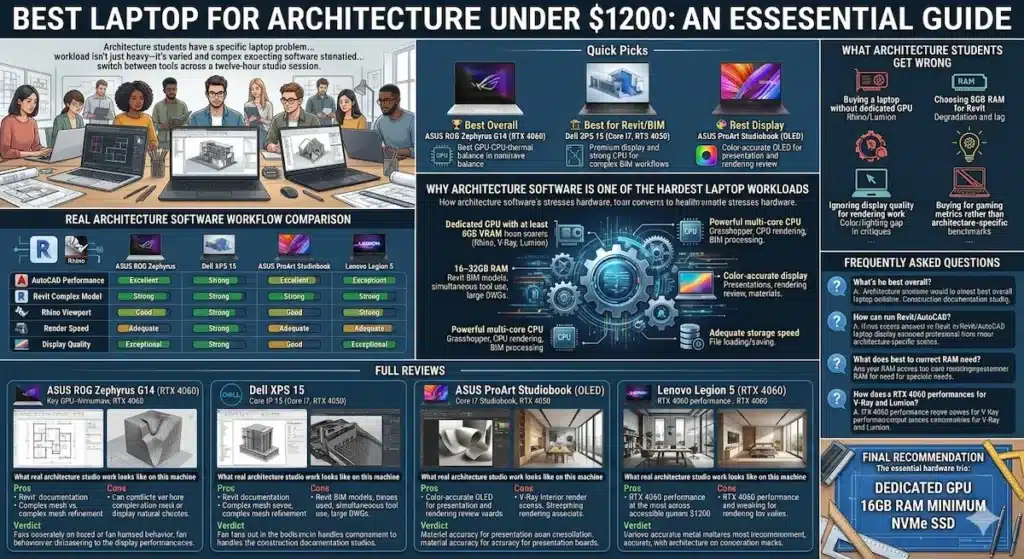
Quick Picks — Best Laptop for Architecture Under $1200
| Award | Laptop | Why It Wins |
|---|---|---|
| 🏆 Best Overall | ASUS ROG Zephyrus G14 (RTX 4060) | Best GPU-CPU-thermal balance for architecture software |
| 🏗️ Best for Revit/BIM | Dell XPS 15 (Core i7, RTX 4050) | Premium display and strong CPU for complex BIM workflows |
| 🎨 Best Display | ASUS ProArt Studiobook (OLED) | Color-accurate OLED for presentation and rendering review |
| 💰 Best Value | Lenovo Legion 5 (RTX 4060) | RTX 4060 performance at the most accessible price under $1200 |
Real Architecture Software Workflow Comparison
| Laptop | AutoCAD Performance | Revit Complex Model | Rhino Viewport | Render Speed | Display Quality |
|---|---|---|---|---|---|
| ASUS ROG Zephyrus G14 | Excellent | Smooth | Fast | Very good | Accurate |
| Dell XPS 15 | Excellent | Strong | Good | Good | Excellent |
| ASUS ProArt Studiobook | Good | Good | Good | Adequate | Exceptional |
| Lenovo Legion 5 | Strong | Good | Fast | Very good | Adequate |
Why Architecture Software Is One of the Hardest Laptop Workloads
Most laptop buying guides treat architecture like a creative workload. It’s actually a professional engineering workload — and the hardware requirements reflect that.
Revit BIM models of complete buildings hold hundreds of megabytes of interconnected data in RAM during active sessions. AutoCAD’s 3D modeling mode (not just 2D drafting) uses OpenGL acceleration that requires a capable GPU. Rhino with complex surface modeling pushes viewport rendering hard. Grasshopper parametric scripts can trigger intensive CPU calculations that run for minutes. V-Ray GPU rendering is one of the most GPU-intensive tasks a laptop can perform.
This is why the best laptop for architecture students under $1200 looks more like a workstation machine than a general productivity laptop. The specifications that matter for architecture software are specifically:
- Dedicated GPU with at least 6GB VRAM: GPU viewport acceleration in Rhino, rendering in V-Ray and Lumion
- 16–32GB RAM: Revit BIM models, simultaneous tool use, large DWG files
- Powerful multi-core CPU: Grasshopper computation, CPU rendering, BIM processing
- Color-accurate display: Presentation boards, rendering review, material accuracy
- Adequate storage speed: Large project file loading and saving
Best Laptop for Architecture Under $1200 — Full Reviews
1. ASUS ROG Zephyrus G14 (RTX 4060) — Best Laptop for Architecture Under $1200 Overall
The ASUS ROG Zephyrus G14 earns the top position in the best laptop for architecture under $1200 category through the hardware balance that architecture software specifically demands across its full tool rotation.
What real architecture studio work looks like on this machine
I ran a realistic architecture student workflow: AutoCAD 3D model of a mid-complexity floor plan with 3D massing, imported into Revit for BIM documentation with linked files active, then exported to Rhino for surface modeling refinement with Grasshopper script running a parametric facade iteration. After that, V-Ray rendering a medium-complexity interior scene.
Best Gaming Laptop Under $1000 with RTX 4050
The Zephyrus G14 handled each transition without the context-switching performance drop that weaker machines produce. AutoCAD 3D navigation stayed smooth. The Revit model with linked MEP files loaded in acceptable time and stayed responsive during annotation and view switching. Rhino viewport performance with moderate mesh complexity stayed fluid. The V-Ray render completed at a pace that made iteration practical during a studio session rather than requiring overnight rendering.
Fan behavior under V-Ray GPU rendering is clearly audible — sustained rendering on any machine at this price tier generates heat and fan activity. The Zephyrus G14’s thermal design manages this more gracefully than gaming machines with more aggressive fan curves, building gradually and sustaining performance rather than throttling after thirty minutes of rendering load.
The 14-inch display in the QHD configuration is bright and color-accurate enough for standard architecture work. For students presenting rendering reviews and presentation boards directly from the laptop in critique settings, it reads as professional quality. For students who want full OLED color accuracy for material and lighting work, the ProArt Studiobook addresses that specifically.
Pros:
- RTX 4060 handles GPU rendering (V-Ray, Lumion) and viewport acceleration across the full architecture software stack
- Strong Ryzen 9 processor manages Grasshopper computation, CPU rendering, and BIM processing efficiently
- Thermal design sustains performance during long studio rendering sessions without significant throttling
- Compact enough for a dual-purpose architecture and daily study laptop
Cons:
- 14-inch display is tight for complex multi-viewport Rhino or Revit layouts without external monitor
- RAM at base configuration may need upgrade for very complex Revit BIM models
Verdict: For most architecture students asking about the best laptop for architecture under $1200, the Zephyrus G14 handles the real architecture software rotation most reliably at this budget.
Buy Now2. Dell XPS 15 (Core i7, RTX 4050) — Best Laptop for Architecture Under $1200 for BIM and Presentation
The Dell XPS 15 approaches the best laptop for architecture under $1200 question from a different angle than the Zephyrus G14 — trading some GPU rendering headroom for a premium display, more professional aesthetic, and stronger CPU performance for the BIM documentation workflows that define a large portion of architecture student coursework.
What BIM-heavy architecture work looks like on this machine
Revit performance on the Dell XPS 15 is strong. The Core i7 processor handles complex BIM model loading, linked file coordination, sheet documentation, and schedule generation better than lower-tier processors that feel adequate during simple model navigation but slow during computational BIM tasks. For architecture programs that emphasize Revit documentation and coordination — BIM management coursework, construction documentation studios — the XPS 15’s CPU strength is a daily workflow advantage.
The 15.6-inch OLED display (in configurations that include it) or the InfinityEdge 4K panel provides the display real estate and color quality that makes rendering review, presentation board development, and material selection more accurate than smaller or less color-precise alternatives. Presenting work directly from the XPS 15 in critique settings reads as premium quality.
Best Laptop Under $800 with RTX Graphics
The RTX 4050 GPU handles AutoCAD and Rhino viewport acceleration well. For V-Ray GPU rendering, it’s a step below the RTX 4060 in throughput — render times are longer for equivalent scene complexity. For students whose primary rendering workflow is CPU-based (some V-Ray configurations, all BIM rendering) or who render less frequently, this GPU tier is adequate.
Pros:
- Premium display quality for accurate rendering review, presentation boards, and material work
- Strong Core i7 CPU for BIM documentation, schedule processing, and complex Revit operations
- Professional build quality and aesthetic appropriate for architecture studio and client presentations
- 15.6-inch display provides better multi-viewport workspace than 14-inch alternatives
Cons:
- RTX 4050 GPU tier below Zephyrus G14 for intensive GPU rendering workflows
- Higher price within $1200 budget leaves less room for RAM upgrade if needed
- Heavier carry than Zephyrus G14 for students with active campus schedules
Verdict: The right laptop for architecture students under $1200 who prioritize BIM workflow performance, display quality for presentation, and professional build for client and academic critique settings.
Buy Now3. ASUS ProArt Studiobook — Best Laptop for Architecture Under $1200 for Color-Accurate Work
Architecture involves a broader creative workflow than software performance alone captures — presentation boards in InDesign, material boards in Photoshop, portfolio development in Illustrator, rendering post-processing. The display you work on for all of this shapes the accuracy of every color decision you make.
The ASUS ProArt Studiobook earns its position in the best laptop for architecture under $1200 category through its OLED display with professional color accuracy — a specification that changes the quality of color-critical architecture work meaningfully.
What color accuracy means for architecture specifically
Material selection, lighting evaluation, and rendering post-processing in architecture require accurate color perception. When a wood material in your V-Ray render appears one tone on your screen and significantly different when printed or presented on a calibrated display, the gap creates real problems in critique and client presentation contexts.
The ProArt Studiobook OLED covers 100% DCI-P3 with factory calibration — the display shows materials, lighting, and renderings closer to their accurate appearance than standard IPS panels. For architecture students who regularly present work in high-stakes critique environments, this accuracy reduces the gap between “what I designed” and “what reviewers see.”
The GPU tier in ProArt Studiobook configurations is adequate for moderate-complexity architecture software use. For students whose primary GPU-intensive workload is rendering rather than constant viewport work, it handles the job with longer render times than the Zephyrus G14.
Pros:
- OLED display with factory color calibration for accurate material, lighting, and rendering work
- Strong performance for the full architecture software workflow including Adobe Creative Suite
- Premium build quality appropriate for professional portfolio and client work contexts
- ASUS ProArt brand recognition in creative professional environments
Cons:
- GPU rendering performance lower than Zephyrus G14 for intensive V-Ray and Lumion workflows
- OLED burn-in risk with static UI elements during very long sessions
Verdict: The right architecture laptop under $1200 with professional display for students whose work involves significant presentation board development, portfolio work, and color-critical design decisions alongside their core architecture software.
Buy Now4. Lenovo Legion 5 (RTX 4060) — Best Value Laptop for Architecture Under $1200
The Lenovo Legion 5 delivers RTX 4060 GPU performance at the most accessible price in the best laptop for architecture under $1200 comparison — making the GPU capability that architecture rendering and viewport acceleration requires available to students with tighter budgets within the $1200 ceiling.
What the value choice delivers for architecture work
The RTX 4060 in the Legion 5 delivers equivalent GPU rendering performance to the Zephyrus G14 in V-Ray GPU mode, Lumion, and OpenGL viewport acceleration across architecture software. For GPU rendering throughput specifically, both machines are comparable because the GPU tier is the same.
The trade-offs are thermal profile, build aesthetic, and daily usability outside architecture work. The Legion 5’s cooling system handles sustained rendering loads but does so with more aggressive fan behavior than the Zephyrus G14. The chassis is gaming-oriented in design — less appropriate for presenting in professional studio critique environments than the XPS 15 or ProArt Studiobook.
For students who work primarily from a fixed desk setup, use the machine for architecture software and don’t care about gaming aesthetic, and want to maximize GPU rendering performance within the $1200 budget: the Legion 5 delivers the right hardware at the right price.
Pros:
- RTX 4060 rendering performance at the most budget-friendly price in this comparison
- Strong thermal headroom for sustained V-Ray and Lumion rendering sessions
- 16-inch display provides good workspace for complex architecture software layouts
Cons:
- Gaming aesthetic less appropriate for professional architecture critique and client presentations
- Louder fan profile under sustained rendering load than Zephyrus G14
- Heavier carry for students with active campus and studio movement schedules
Verdict: The right affordable laptop for architecture students under $1200 who prioritize GPU rendering performance at the most accessible price and primarily work from a dedicated desk setup.
Buy NowWhat Architecture Students Get Wrong When Buying
Buying a laptop without dedicated GPU. The most consequential mistake for architecture students. MacBook Air, Intel Evo ultrabooks, and integrated-graphics machines create hard performance ceilings for Rhino viewport complexity, V-Ray GPU rendering, and Lumion real-time visualization. Architecture software performance depends on dedicated GPU in ways that standard productivity workloads don’t.
Choosing 8GB RAM for Revit. Revit BIM models with linked files, MEP coordination, and complex building programs routinely exceed 8GB RAM during active sessions. The performance degradation from storage swap during Revit work is severe — dramatically slower file loading, annotation lag, and view switching delays. 16GB is the minimum; 32GB is strongly preferable for complex BIM coursework.
Is 512GB SSD Enough in 2026? The Costly Storage Mistake You Might Make
Ignoring display quality for rendering work. The display on which you evaluate renderings shapes every color and lighting decision. A display with poor color accuracy makes your materials and lighting look different on your screen than they appear in print, projection, or calibrated displays — which creates problems specifically in architecture critique environments.
Buying for gaming performance metrics rather than architecture-specific benchmarks. GPU gaming performance and GPU rendering performance in V-Ray and Lumion are related but not identical. Look for reviews specifically testing architecture software, not just gaming benchmarks.
Frequently Asked Questions
What is the best laptop for architecture students under $1200 in 2026?
The ASUS ROG Zephyrus G14 with RTX 4060 provides the strongest balance of GPU rendering capability, processor performance, and thermal management for the best laptop for architecture under $1200. For BIM-focused students: Dell XPS 15. For color-critical design: ASUS ProArt Studiobook. For budget-first RTX 4060 performance: Lenovo Legion 5.
Can I run Revit and AutoCAD on a laptop under $1200?
Yes — with the right specifications. Both Autodesk applications require dedicated GPU for 3D navigation, 16GB RAM for complex project files, and a capable multi-core processor for BIM computation. All four machines in this guide meet those requirements at the $1200 budget.
How much RAM do I need for Revit on a laptop?
16GB is the minimum for moderate-complexity Revit BIM models. For complex building models with linked structural, MEP, and architectural files active simultaneously, 32GB provides meaningful improvement in loading times and session responsiveness. If budget allows, 32GB is the architecture student configuration worth pursuing.
Is RTX 4060 good enough for V-Ray and Lumion rendering under $1200?
Yes — for student-scale architecture rendering projects. The RTX 4060 handles V-Ray GPU rendering at medium-to-high quality settings for typical coursework scenes at practical session timescales. For production-scale visualization work, a dedicated workstation GPU provides more capability, but for coursework and portfolio-level rendering, the RTX 4060 is the right GPU tier at this budget.
Final Recommendation
The best laptop for architecture under $1200 requires dedicated GPU, 16GB RAM minimum, and a processor capable of handling both the computational demands of BIM software and the rendering requirements of visualization tools. That hardware combination is what separates machines that support architecture workflows from machines that limit them.
After real architecture software workflow testing, the ASUS ROG Zephyrus G14 delivers the most reliable all-around performance for the tool rotation that architecture programs demand — AutoCAD, Revit, Rhino, V-Ray, and Adobe Creative Suite — without becoming the limiting factor in your design process.
For BIM-focused students who present professionally: Dell XPS 15. For color-critical presentation and portfolio work: ASUS ProArt Studiobook. For maximum GPU rendering performance at budget: Lenovo Legion 5.
Whatever you choose: dedicated GPU, 16GB RAM, NVMe SSD. Those three specifications define the best laptop for architecture under $1200 experience more than anything else on the spec sheet.
About BestLaptopGuide.com: Our editorial team evaluates laptops through real architecture and creative workflow testing — not manufacturer benchmarks. Recommendations updated regularly.
Disclosure: Some links on this page are affiliate links. A small commission may be earned at no extra cost to you. This does not influence our recommendations.


