Is 512GB SSD Enough in 2026? (What You Actually Notice After Real Daily Use)
Author: Marcus Hale | Reading Time: 10 min
The storage warning usually arrives at the worst possible time.
You’re mid-project, trying to install a software update your workflow depends on, and the system tells you there isn’t enough space. Not because you’ve been reckless — just because months of normal, accumulated use have quietly filled the drive.
I’ve watched this happen to enough people to have a clear picture of the two groups. One group buys a 512GB laptop and never thinks about storage again. Another group buys the same spec and spends a semester or a work year constantly deleting files to make room for the next thing they need.
512GB SSD for college students
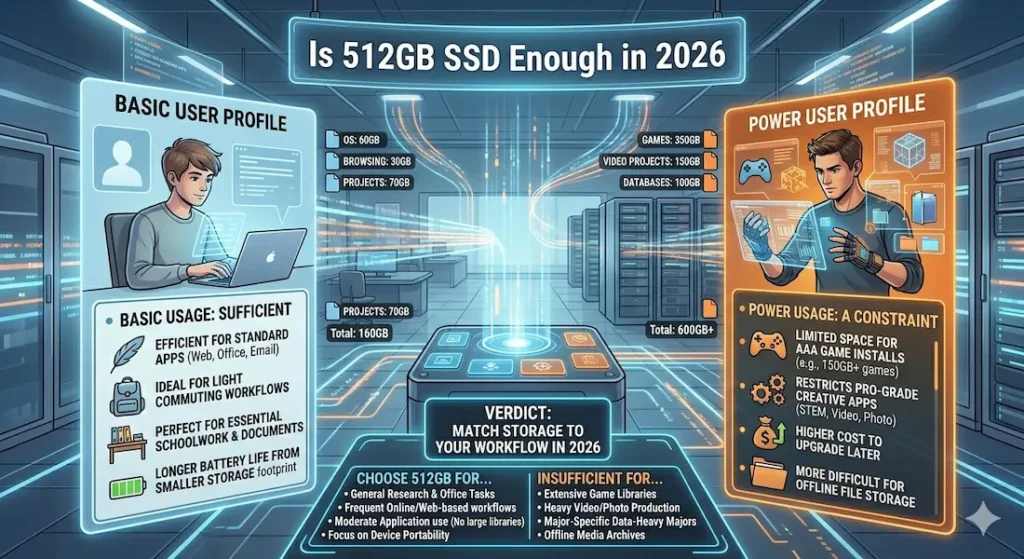
The difference isn’t the hardware. It’s the usage pattern. And that means the answer to is 512GB SSD enough in 2026 is genuinely different depending on what you do with your computer every day.
Table of Contents
What You Actually Get From 512GB
Before getting into use cases, the math matters. Because you don’t get 512GB of usable space — you get meaningfully less.
| What’s Already Consuming Space | Rough Size |
|---|---|
| Windows 11 + system files | 60–80GB |
| Applications and development tools | 40–80GB |
| Cumulative updates and system cache | 20–40GB |
| Total consumed before your files | 120–200GB |
That leaves real usable space closer to 300–380GB from a 512GB drive before you’ve saved a single personal file. That’s the honest baseline for evaluating whether 512GB SSD storage capacity covers your actual workflow.
Is 512GB SSD Enough in 2026? — The Direct Answer by Use Case
There’s no universal answer, but there are clear answers by how you use your computer. Here’s where the line falls based on real observation.
Students and General Everyday Use
Is 512GB SSD enough in 2026 for students? For the majority of academic and everyday users, yes — comfortably.
Notes, PDFs, research documents, presentation files, web browsing, video streaming, standard productivity software — this is the baseline academic workload, and it fits within 512GB without requiring active management. Most students in writing-heavy or business programs get through four years on 512GB by using cloud storage for completed assignments and keeping their downloads folder clean.
Laptops under $800 for students
The experience starts shifting when lecture recordings are downloaded regularly rather than streamed, when creative coursework produces large project files, or when the tool requirements of a specific program grow heavier than standard productivity software. For these students, 512GB works but requires awareness.
Is 512GB SSD enough for everyday use? For standard computing — browsing, email, productivity apps, streaming, and light creative work — 512GB is sufficient and unlikely to cause daily management stress for most users.
Check Price NowProgramming and Development Work
Is 512GB SSD enough for programming? This is the most use-case-dependent answer on this list.
For web development with standard tools — VS Code, Node.js projects, Python environments, standard Git workflows — 512GB handles the workload without strain. Most beginner-to-intermediate development projects don’t consume significant storage beyond the tools themselves.
The math changes quickly once heavier development environments enter the picture. Docker containers accumulate storage fast — a few active container configurations can consume 20–40GB before you notice. Android Studio installs weigh in at 15–25GB plus emulator images. Multiple Python virtual environments for different project requirements add 2–10GB each. Large Node.js projects with full node_modules directories can reach 5–15GB per project.
Is 512GB SSD enough for web development? For frontend and standard full-stack work: yes. For backend development with containerized environments and multiple active services: storage management becomes a regular habit.
Is 512GB SSD enough for coding with multiple tools? If you’re running several concurrent environments — Docker, emulators, multiple language runtimes — 1TB prevents the project-juggling that 512GB requires.
Gaming
Is 512GB SSD enough for a gaming laptop? This is where 512GB shows its clearest limits.
Modern game install sizes have grown past what most buyers anticipate at purchase:
| Game | Install Size |
|---|---|
| GTA V | ~100GB |
| Call of Duty: Warzone | 150GB+ |
| Red Dead Redemption 2 | ~120GB |
| Cyberpunk 2077 | ~70GB |
| Fortnite | ~30GB |
How many games can 512GB SSD hold? After the operating system and basic software consume 120–200GB, you have 300–380GB of practical space. That’s three to four large AAA titles simultaneously — before considering game updates, save files, and any other software on the machine.
For gamers who play one or two titles heavily and don’t maintain a large active library, 512GB is manageable. For gamers who want to keep five to six games installed without constantly rotating titles through downloads and deletions, 512GB creates real daily friction.
Is 512GB SSD enough for gaming? For casual gaming with selective title management: yes. For maintaining a standard gaming library without constant storage management: 1TB is the practical minimum.
Video Editing and Creative Work
Is 512GB SSD enough for video editing? Rarely, and the math explains why.
A single 4K video project — raw footage, working files, exports, and revisions — can easily consume 40–80GB. Two active projects consume the storage equivalent of the entire operating system overhead above. For students in film, media production, or any creative field where project files are large and multiple projects are active simultaneously, 512GB creates storage anxiety that compounds across a semester.
For photo editing and standard graphic design, the calculus is more favorable. Individual files are smaller, and a well-organized workflow can fit within 512GB with active archiving habits. Adobe Creative Cloud’s installation footprint (30–50GB for a standard toolkit) reduces the practical headroom, but photo editors manage more comfortably than video editors.
512GB vs 1TB SSD in 2026 — The Real Difference
The spec sheet answer is simple: double the storage. The daily experience answer is more nuanced.
| Storage | Daily Experience |
|---|---|
| 512GB | You’re occasionally aware of storage; cleanup is periodic but necessary |
| 1TB | Storage stops being a thing you think about |
Should I buy 512GB or 1TB SSD in 2026? That question resolves differently depending on whether you want storage to be a background management task or completely invisible.
512GB works if you’re willing to use cloud storage actively for completed files, delete media you’ve finished with, and do periodic system cleanup. Users who build these habits into their routine rarely hit the walls that frustrate others.
1TB is for users who don’t want storage to be a consideration at all — who want to install what they need, keep what they want, and never think about it. For anyone who anticipates their usage growing heavier across a device’s lifespan (which is most people, honestly), 1TB provides the headroom that prevents 512GB from feeling limiting by year two.
How Full Storage Affects SSD Performance
This is the detail that surprises most users when they first encounter it.
SSDs don’t just run out of space — they slow down as they approach capacity. When an SSD is 80–90% full, write speeds drop noticeably because the drive has less free space to use for write buffering and garbage collection. The result is a subtle but real change in system responsiveness during file transfers, installations, and large saves.
512GB SSD storage capacity real world usage is most directly impacted by this effect. A 512GB drive at 90% capacity — which is 460GB used — performs measurably slower than the same drive at 60% capacity. Users who regularly push their 512GB drive to near-full capacity aren’t just managing space; they’re managing performance.
Keeping a 512GB drive below 75–80% full isn’t just good practice for space management — it’s how you maintain the performance that made SSD storage worthwhile in the first place.
Check latest dealUsage Habits Matter More Than Capacity
Here’s the observation that explains why two people with identical 512GB laptops have completely different experiences: it’s almost never about the capacity, it’s about the habits.
Users who manage 512GB comfortably:
- Store completed projects in Google Drive or OneDrive rather than locally
- Stream content rather than downloading when connectivity allows
- Uninstall applications they no longer use
- Archive completed semester or project work at natural break points
Users who struggle with 512GB:
- Download everything by default rather than streaming
- Keep multiple older versions of large project files locally
- Install software speculatively without removing it when unused
- Treat the laptop as permanent local storage rather than active workspace
Neither approach is wrong — they just produce different storage experiences from the same hardware. If you know your habits lean toward the second group, either build new habits or buy 1TB.
Common Mistakes People Make About Storage in 2026
Assuming 512GB “should be enough” because it was enough five years ago. Software installs are larger. Operating system footprints have grown. Applications that previously required 2GB now require 8GB. The 512GB that felt spacious in 2019 feels tighter in 2026.
Not accounting for the operating system overhead upfront. Many buyers compare their 512GB drive size to their current file count without factoring in the 120–200GB already consumed by the system before personal files begin.
Buying without thinking about usage growth. Your files in month one are not your files in month eighteen. Development projects grow. Media libraries expand. Software environments multiply. Storage needs almost always increase across a device’s lifespan.
Assuming cloud storage fully solves the problem. Cloud storage extends 512GB significantly, but it requires active internet access, doesn’t help with installed applications, and creates workflow friction when offline access is needed.
Frequently Asked Questions
Is 512GB SSD enough in 2026?
For standard everyday use, student academics, and light programming: yes. For gaming, video editing, or development with heavy tool environments: 512GB creates management overhead that 1TB avoids. The is 512GB SSD enough in 2026 answer is strongly use-case dependent.
Is 512GB SSD enough for programming?
For standard web development and scripting: yes. For development with Docker, multiple emulators, or large framework environments: storage fills faster than most developers expect. 1TB is worth choosing if heavy development environments are part of your regular workflow.
Is 512GB SSD enough for gaming?
It holds three to four large AAA titles comfortably. For gamers with larger active libraries or who prefer not to manage game installations actively, 1TB is the practical recommendation. Is 512GB SSD enough for gaming laptop purchases? Only if you’re selective about what stays installed.
Should I get 512GB or 1TB SSD?
If budget is a genuine constraint and your usage is standard everyday computing: 512GB with active cloud storage habits works. If you want to stop thinking about storage entirely and anticipate heavy use: 1TB is the recommendation that eliminates the problem rather than managing it.
Final Answer
Is 512GB SSD enough in 2026?
For most everyday users and students with standard academic workloads: yes, with active storage habits.
For gamers, video editors, and developers with heavy tool environments: no — 512GB creates friction that grows more noticeable across months of use.
The honest recommendation: if 1TB is available at a reasonable price premium, take it. The storage anxiety that 512GB can create by year two costs more in daily cognitive overhead than the price difference does at purchase. For users where the upgrade genuinely isn’t affordable, 512GB works — but only with deliberate cloud storage use and periodic cleanup built into the routine.
Storage you never think about is worth paying for once.
About BestLaptopGuide.com: Our editorial team evaluates real-world storage usage patterns across students and professionals — not manufacturer claims. Recommendations updated regularly.
Disclosure: Some links are affiliate links. A small commission may be earned at no extra cost to you. This does not influence our recommendations.


