Best Thin and Light Laptop Under $800 in 2026 (What Daily Carry Actually Reveals)
Nobody talks about shoulder fatigue when they’re buying a laptop.
They talk about processor speed and RAM and whether the SSD is NVMe. All reasonable things to consider. But the spec comparison ends at the checkout page, and the shoulder fatigue begins on day two of carrying a heavier-than-expected machine across three buildings and back.
I spent months watching students and freelancers work with their laptops in real environments — classrooms, coffee shops, library tables, airport gates. Nobody was complaining about benchmark scores. The complaints I heard were about weight that accumulated over a full day, glare from a library window that required awkward repositioning, a fan that ramped up during a quiet afternoon study session. The small, persistent frustrations that don’t make it into spec comparisons but shape every hour of daily use.
That difference becomes even clearer when you compare lightweight machines to performance-focused laptops designed for heavier workloads.
That’s what the best thin and light laptop under $800 conversation is really about. Not which machine scores highest on a fifteen-minute test, but which one you stop thinking about by week two because it’s handling everything you throw at it without requiring you to manage it.
After months of real daily-carry testing, here’s the honest breakdown.
Table of Contents
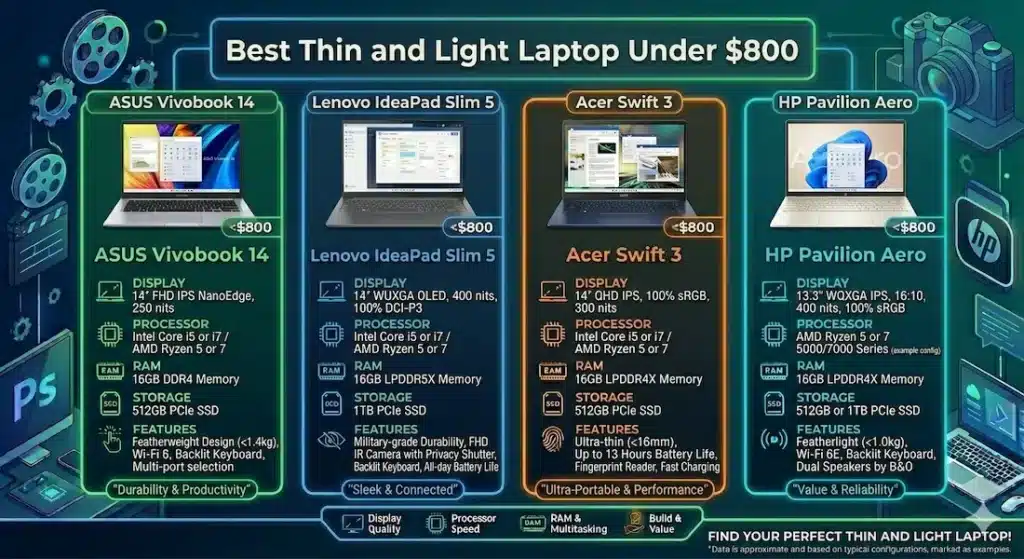
Quick Picks — Best Thin and Light Laptop Under $800
| Award | Laptop | Why It Wins |
|---|---|---|
| 🏆 Best Overall | ASUS VivoBook 14 | Most balanced combination of portability, performance, and daily comfort |
| ⌨️ Best Typing Comfort | Lenovo IdeaPad Slim 5 | Keyboard quality that makes long writing sessions noticeably less fatiguing |
| 🎒 Best for Frequent Travelers | Acer Swift 3 | Lightest carry with battery that covers real travel days |
| 💰 Best Entry Budget | HP Pavilion Aero | Most accessible price point for ultra-light everyday use |
For most students, remote workers, and daily commuters searching for the best thin and light laptop under $800, the ASUS VivoBook 14 is the recommendation that holds up across months of real use.
How These Laptops Actually Feel After Weeks of Daily Carry
| Laptop | Carry Comfort | Fan Behavior | Keyboard Feel | Screen Near Window | After 6 Months |
|---|---|---|---|---|---|
| ASUS VivoBook 14 | Easy to forget in your bag | Soft hum during updates | Comfortable | Slight manageable glare | Still smooth |
| Lenovo IdeaPad Slim 5 | Slightly heavier | Quiet, occasional bursts | Excellent | Balanced brightness | Reliable |
| Acer Swift 3 | Very light | Gentle under moderate load | Warm after long typing | Good | Consistent |
| HP Pavilion Aero | Ultra light | Noticeable under sustained load | Slight flex | Dim outdoors | Slows over time |
If you’re comparing how laptops behave across different usage styles, this guide on laptops for digital marketing shows how performance and portability balance out in real workflows.
Best Thin and Light Laptop Under $800 — Full Reviews
1. ASUS VivoBook 14 — Best Thin and Light Laptop Under $800 Overall
The ASUS VivoBook 14 is the kind of machine that earns its recommendation through consistency rather than a headline moment. There’s no single feature that makes you stop and think “this is remarkable.” What happens instead is that weeks pass and you haven’t once been annoyed by it — which, for a daily-carry laptop, is the highest possible praise.
What a real workday looks like with this machine
I tested the VivoBook 14 through a representative student and remote worker week: document editing and email in the morning, browser research across multiple tabs through the afternoon, video calls interspersed throughout, and occasional light media in the evening. The machine handled all of it without visible strain.
App switching stayed responsive. Video calls didn’t create the kind of system stress that causes background applications to lag. Loading times were fast enough that you stop thinking about them — which is exactly the benchmark that matters for daily use.
One afternoon, working at a library table near a bright window, I noticed the glare was manageable with minor screen angle adjustment — present but not disruptive. The keyboard developed mild warmth near the center keys after about an hour of continuous typing. Not uncomfortable, but noticeable if you’re resting your palms during a long writing session. These are both real-world observations that wouldn’t appear on any spec sheet.
Fan noise during background system updates is clearly present in a quiet room. It’s not aggressive — more of a steady hum than a sudden ramp — but in a library during a focused study session, you become aware of it. It settles once the update completes.
Long-term stability after six months
Performance stayed consistent across six months of regular use. The one pattern worth noting: once storage approached 75–80% full, app switching slowed noticeably. A cleanup session restored responsiveness. For students who download files routinely and never clear out completed projects, this happens faster than expected. Building cleanup habits early keeps the machine performing well into the second and third year.
Pros:
- Light enough that daily carry stops registering as a physical consideration
- Consistent, predictable performance across real everyday workloads
- Comfortable keyboard that holds up across standard-length writing and work sessions
- Long-term performance stability with reasonable storage management
Cons:
- Speakers are thin — external audio strongly recommended for video calls and media
- Display brightness is adequate indoors but not designed for outdoor or bright-window use
Verdict: For most students and remote workers asking about the best thin and light laptop under $800, the VivoBook 14 is the machine I’d recommend without qualification and stand behind six months later.
Check Price Now2. Lenovo IdeaPad Slim 5 — Best Thin and Light Laptop Under $800 for Long Typing Sessions
The IdeaPad Slim 5 feels like it was designed by someone who has typed for a living — someone who knows what a keyboard needs to feel like at hour three of a writing session, not just the first fifteen minutes.
The keyboard difference in real use
Key travel on the IdeaPad Slim 5 is calibrated more generously than most thin and light machines at this price. The keys give enough physical feedback that you stop second-guessing whether each press registered — which reduces both typos and the cognitive overhead of double-checking your typing. After two hours of sustained writing, finger fatigue is noticeably lower than on the ASUS VivoBook 14’s keyboard.
For students with paper-heavy courses, remote workers who draft long documents daily, or freelancers whose work is primarily text — this keyboard quality is a daily quality-of-life difference that no benchmark captures.
For users who rely heavily on typing, keyboard quality often becomes the most noticeable factor over time.
Display brightness for variable lighting
The display on the IdeaPad Slim 5 handles indoor lighting variation better than the VivoBook 14. Near classroom fluorescent lighting, at a coffee shop with overhead spotlights, or at a library table with mixed ambient sources — brightness stays readable without constant manual adjustment. This is the kind of detail that sounds minor and feels significant across dozens of working environments per semester.
Performance in real student and professional sessions
Standard workloads — documents, research tabs, video calls, note-taking applications running simultaneously — stay smooth throughout a normal working day. Under heavier multitasking, fan noise becomes present in quiet environments. Not aggressive, but noticeable enough in a library study room to register.
Battery life covers a standard academic day with moderate management. Most users still carry a charger for reliability during long days — a practical habit that reflects real battery expectations rather than manufacturer claims.
Pros:
- Best keyboard typing experience of any thin and light laptop under $800 in this comparison
- Better display brightness for variable indoor lighting environments
- Stable performance across standard student and professional workloads
- Comfortable for long typing sessions without significant palm-rest heat
Cons:
- Slightly heavier than the VivoBook 14 and Acer Swift 3 for daily carry
- Fan becomes noticeable in quiet environments under sustained multitasking
- Battery requires charger planning for full academic days
Verdict: The strongest lightweight laptop under $800 for students and professionals who spend significant daily time typing and want the keyboard quality to show up across every session.
View Best Deal3. Acer Swift 3 — Best Thin and Light Laptop Under $800 for Frequent Travelers
For students who commute, remote workers who rotate between multiple locations, and anyone whose laptop spends significant time in transit — the weight of a machine is not an abstract spec. It’s a physical variable that you feel on your shoulder at 4pm after a day of carrying it.
The Acer Swift 3 is the best portable thin and light laptop under $800 for users who count carry weight as a genuine priority rather than a tiebreaker.
What ultra-light carry actually changes
Carrying the Acer Swift 3 across a full campus day — morning to evening, multiple buildings, a library stop, and an off-campus coffee shop session — the laptop stops being something you think about. It goes into the bag and comes out when needed. That absence of weight awareness is more valuable than it sounds when you’ve experienced the cumulative fatigue of carrying a heavier machine across the same day.
Battery life through moderate working sessions — browsing, document editing, occasional video calls — covers a full academic schedule without charger anxiety between stops. For students who move between classes and study sessions, this independence from outlet planning removes a daily scheduling burden.
Performance context for mobile use
Standard productivity workloads run smoothly — writing, research, email, video calls. Under heavier sustained multitasking, fan noise becomes more noticeable than on the VivoBook 14, and keyboard warmth builds gradually over extended typing sessions. These are managed trade-offs of the ultra-light form factor rather than engineering failures.
For travelers and commuters whose workload stays within standard productivity boundaries, these limitations don’t register in daily use. For users who push into heavier multitasking regularly, the IdeaPad Slim 5 or VivoBook 14 offer better thermal headroom.
Pros:
- Lightest daily carry in this best thin and light laptop under $800 comparison
- Battery covers full commuting days without scheduled charging stops
- Consistently slim profile that genuinely fits into any bag without compromising space
Cons:
- Fan more noticeable under sustained load than VivoBook 14 or IdeaPad Slim 5
- Keyboard warmth builds during extended typing sessions
- Performance ceiling lower for heavy multitasking compared to the top two options
Verdict: The right thin and light travel laptop under $800 for students and professionals who genuinely move throughout the day and want their laptop to move with them without complaint.
Check latest deal4. HP Pavilion Aero — Best Budget Ultra-Light Laptop Under $800
The HP Pavilion Aero sits at the lightest and most budget-accessible point in this comparison — and it earns that position honestly, with clear limitations worth understanding before committing.
What it handles well
Standard everyday tasks — documents, email, streaming, video calls, basic browsing — run comfortably during the first months of ownership. For a first laptop buyer, a student with genuinely light coursework demands, or someone who needs a lightweight secondary machine for travel, the Pavilion Aero covers the basics without embarrassing itself.
The weight is genuinely notable at just over 2.2 lbs — lighter than anything else in this comparison. For users whose primary requirement is the lightest possible machine at the most accessible price, it delivers that combination directly.
Where the limits appear
Fan noise under sustained load is more prominent than the VivoBook 14 or IdeaPad Slim 5. As workloads grow across a semester — more tabs, heavier applications, the natural expansion of a student’s tool stack — performance starts showing strain that wasn’t visible during early light use. Over several months, the gap between the Pavilion Aero and the VivoBook 14 grows more noticeable under real workload pressure.
The display struggles in bright outdoor environments more than competing options. For users who work near windows regularly, this requires more physical adjustment than the alternatives.
When it makes the right choice
When the price gap between this and the VivoBook 14 is meaningful and the workload is genuinely and durably light. When ultra-light weight is the overriding priority above performance headroom. When it’s serving as a secondary machine rather than a primary daily driver.
Pros:
- Lightest carry weight in this entire comparison at just over 2.2 lbs
- Most accessible price point for the best ultra-light laptop under $800 category
- Adequate for standard everyday tasks during early ownership
Cons:
- Fan noise more prominent under sustained load than the other options
- Performance shows strain sooner under growing workload demands
- Display brightness struggles in bright ambient light
Verdict: A valid budget thin and light laptop under $800 for genuinely light workloads and users who prioritize weight above all else — but be honest about how the workload will grow before committing.
View Best DealWhat Actually Determines Daily Carry Comfort in a Thin Laptop
Weight and the Cumulative Fatigue Nobody Measures
The difference between 2.8 lbs and 3.5 lbs sounds trivial on a spec sheet. Carried across three campus buildings, a lunch break off-site, and an afternoon library session, it’s a real daily physical variable. Weight fatigue accumulates across hours and days in ways that first-week testing never reveals.
For the best thin and light laptop under $800, under 3 lbs is the practical target for daily carry that stops registering physically. Under 2.5 lbs provides the kind of carry comfort where you genuinely stop accounting for the laptop’s presence in your bag.
Processor Efficiency Over Raw Performance
Thin laptops manage heat in compact chassis by balancing performance against thermal output. A processor that runs at lower sustained power draw keeps the chassis cool and the fan quiet — which matters for writers in libraries, students in classrooms, and remote workers in quiet co-working environments.
AMD Ryzen 5 handles background tasks — system updates, cloud sync, antivirus scanning — with better thermal efficiency at this price range, keeping fan behavior calmer during mixed workloads.
Intel Core i5 delivers slightly sharper burst responsiveness — quicker individual app launches and task switching — at the cost of slightly higher thermal activity under sustained load.
For the best everyday thin laptop under $800, either Ryzen 5 or Core i5 covers standard workloads. Efficiency and thermal behavior matter more than raw benchmark numbers for the sustained daily use that portable laptops are designed for.
RAM and SSD — The Configuration That Determines Long-Term Satisfaction
The pattern that repeats across budget thin laptops: 8GB RAM feels fine during light initial use and starts creating friction within months as real workloads develop. Browser-heavy research sessions, multiple active applications, background cloud sync — these fill 8GB faster than most buyers anticipate.
16GB RAM removes that ceiling for standard student and professional workloads. Combined with SSD storage — which is non-negotiable for any thin and light laptop under $800 in 2026 — the daily performance stays smooth across the first year and beyond.
If you’re unsure why memory matters this much, this guide explains how RAM impacts everyday performance.
HDD storage in a thin laptop is a dealbreaker regardless of other specifications. Boot time, application loading, and browser performance all depend fundamentally on storage speed. At the $800 price bracket, SSD is universally available and should be considered a baseline requirement.
Mistakes Buyers Make When Choosing Thin and Light Laptops
Buying an ultra-thin design without checking thermal performance. The thinnest machines sometimes throttle processing speed to manage heat in minimal chassis space. A slightly thicker machine with better airflow often performs more consistently under sustained daily workloads.
Ignoring keyboard quality completely. For a machine that might host hundreds of hours of typing per semester, key travel, spacing, and tactile feedback determine daily physical comfort in ways that spec tables don’t capture. Research keyboard quality specifically before committing.
Choosing 8GB RAM to stay at a lower price. The savings feel real at purchase and disappear within months of real academic or professional use. 16GB is the configuration that stays comfortable across years rather than semesters.
Underestimating weight for daily carry. Test the full packed bag weight, not just the laptop. A light laptop in a heavy bag still helps. A moderately heavy laptop in an already full student bag accumulates meaningfully across a full campus day.
Frequently Asked Questions
Is $800 enough for a good thin and light laptop?
Yes — the best thin and light laptop under $800 handles everyday productivity, academic work, video calls, and standard professional tasks comfortably. The key is configuration: 16GB RAM, SSD storage, and a Ryzen 5 or Core i5 processor at minimum.
Which is the safest thin and light laptop under $800 in 2026?
The ASUS VivoBook 14 is the most consistently reliable option based on real daily workload testing. Its combination of carry weight, keyboard comfort, stable thermals, and long-term performance consistency makes it the lowest-risk choice in this price range.
Do thin laptops overheat under regular use?
Thermal behavior varies by model. The best options in this category — the VivoBook 14 and IdeaPad Slim 5 — manage heat with gradual fan response rather than sudden spikes. Ultra-thin designs with insufficient cooling can throttle under sustained load. Always check user reviews specifically for long-session thermal behavior.
How much does laptop weight actually matter for students?
More than most buyers account for. Students who carry their laptop between multiple campus locations daily feel the cumulative weight difference across a full semester. Under 3 lbs provides comfortable all-day carry; under 2.5 lbs provides the carry comfort where the laptop stops registering as a weight consideration.
What is the best thin and light laptop under $800 for students in 2026?
The ASUS VivoBook 14 for most students balancing performance, portability, and everyday reliability. The Lenovo IdeaPad Slim 5 for students with heavy writing and typing demands. The Acer Swift 3 for students who commute extensively and count every ounce.
Final Recommendation
The best thin and light laptop under $800 is the one you stop thinking about — the machine that handles your daily workload without requiring management, carries without registering as weight, and stays consistent six months in rather than just six days in.
After testing all four options through real daily carry and extended workload scenarios, the ASUS VivoBook 14 earns that description most reliably. Consistent performance, comfortable carry weight, a keyboard that holds up across real working sessions, and stable long-term behavior make it the machine I’d recommend to most students and remote workers in this price range without reservation.
For typing-intensive users who want the best keyboard in this category, the Lenovo IdeaPad Slim 5 delivers that daily advantage. For commuters and frequent travelers who count every ounce, the Acer Swift 3 is the lightest capable answer. For budget-first buyers with genuinely light workloads, the HP Pavilion Aero gets you started without overspending.
Whatever you choose: insist on SSD storage, target 16GB RAM, verify carry weight against your actual daily bag situation, and research keyboard quality specifically. Those four decisions shape your daily experience with any thin and light laptop under $800 more than any other specification on the comparison sheet.


