Best Thin Gaming Laptop Under $1500 in 2026 (Tested for Real College and Daily Use)
By the second week of spring semester, you can always spot the students who bought the wrong gaming laptop.
They’re the ones walking across campus with one shoulder visibly lower than the other — backpack weighted down by a six-pound machine with a chunky power brick taking up half the remaining space. First semester, they were proud of the specs. Second semester, they’re quietly researching something slimmer.
I’ve seen this pattern enough times to know it’s not about performance regret. It’s about daily friction. The laptop that crushes benchmarks in a dorm room becomes a burden the moment you carry it to three classes, a library session, and an evening gaming run on the same day.
If you’re trying to balance performance with portability, this guide on best laptops for travel and portability breaks down what actually matters when you carry your machine every day.
That’s the real conversation around thin gaming laptops under $1500 — not which one scores highest in a five-minute benchmark, but which one you’ll still want to carry and use nine months into the school year.
After months of testing these machines through real student and daily-use scenarios, here’s the honest breakdown.
Table of Contents
Quick Picks — Best Thin Gaming Laptop Under $1500
| Award | Laptop | Why It Wins |
|---|---|---|
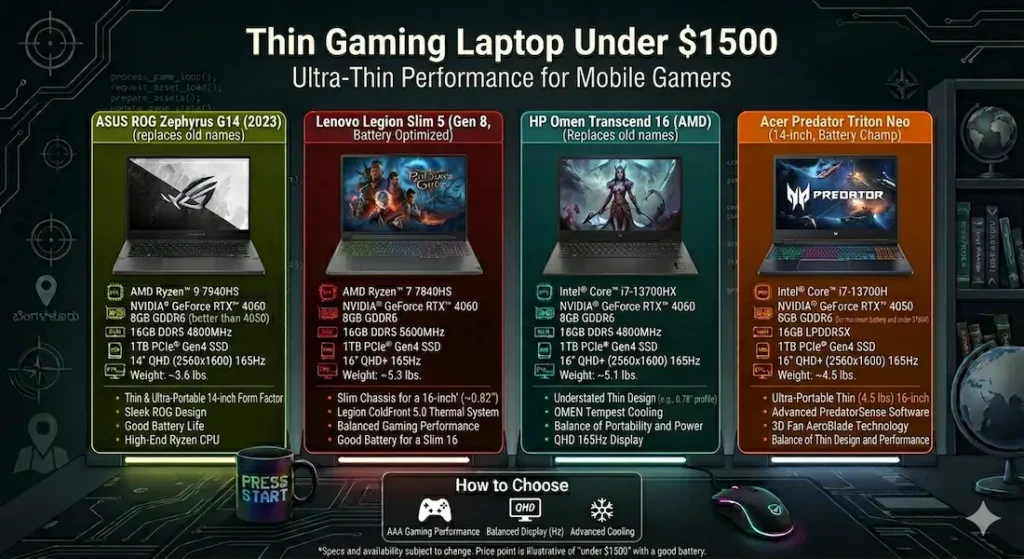
| 🏆 Best Overall | ASUS ROG Zephyrus G14 | Best balance of portability, performance, and battery for daily use |
| ⚡ Best Sustained FPS | Lenovo Legion Slim 5 | Strongest gaming performance in a slim form factor |
| 🖥️ Best Display Experience | Acer Predator Triton Neo | QHD panel makes games and media genuinely immersive |
| 💰 Best Value Pick | HP Omen Transcend | Strong gaming capability at the most accessible price in this tier |
If someone pressed me for a single recommendation with no additional context — the ASUS ROG Zephyrus G14 is where I’d start, and for most people it’s also where the search ends.
Real Daily Usage Comparison
| Laptop | Gaming Stability | Fan Behavior | Keyboard Heat | Daily Carry | Real Battery |
|---|---|---|---|---|---|
| ASUS ROG Zephyrus G14 | Smooth, consistent | Gradual ramp | Slight center warmth | Very easy | 6–7 hrs |
| Lenovo Legion Slim 5 | Strong sustained FPS | Gradual build | Mild warmth | Manageable | ~6 hrs |
| Acer Predator Triton Neo | Visually immersive | Noticeable under load | Warm center zone | Easy | ~5.5 hrs |
| HP Omen Transcend | Good burst performance | Audible in intense scenes | Comfortable | Easy | ~6 hrs |
Best Thin Gaming Laptop Under $1500 — Full Reviews
1. ASUS ROG Zephyrus G14 — Best Thin Gaming Laptop Under $1500 Overall
The Zephyrus G14 has been one of the most consistently recommended machines in the slim gaming category for a few years now, and testing it through a real student workweek explains why that reputation holds.
What a full day with this laptop actually feels like
Monday: morning classes with the laptop in a backpack, afternoon project work in VS Code and Chrome, evening gaming session running a demanding open-world title. The G14 handled every phase of that day without requiring any mental adjustment for how to treat it.
At 3.8 lbs, it genuinely doesn’t register as a gaming machine when you’re carrying it. You stop thinking about the weight by day three, which is exactly when carry comfort stops being a spec and becomes a reality.
Gaming performance on the RTX 4060 configuration handles modern titles at high settings without the frame rate instability that cheaper slim machines show after 30–40 minutes of sustained load. The fan does ramp up — there’s no thermal magic happening here — but it builds gradually rather than suddenly spiking mid-session. That distinction matters more than it might seem. Gradual fan increase stays in your awareness without demanding your attention. A sudden loud spike pulls you out of whatever you’re doing.
Keyboard warmth after 90 minutes of gaming centers around the middle section of the keyboard — the area under your right palm during mouse use. It’s warm, not hot, and doesn’t affect comfort during gaming. During class notes and assignments, the machine stays noticeably cooler.
Battery life context
6–7 hours of real mixed use — productivity tasks, browsing, note-taking, light media. Gaming drains it faster and almost always benefits from staying plugged in. For a thin gaming laptop under $1500 for college students, this battery range covers a full day of academic use and leaves gaming as an evening plugged-in activity, which is how most students use it anyway.
Display reality
Colors are rich and accurate indoors. The high-refresh panel makes motion smooth in both games and everyday scrolling. Near bright windows or in direct sunlight, brightness is average — manageable with screen angle adjustment but not the strongest performer outdoors.
Pros:
- Exceptional carry weight for a machine with genuine gaming chops
- Fan behavior is gradual and predictable during gaming sessions
- Real-world battery that covers academic use without constant charger anxiety
- Build quality feels confident — not plasticky despite the slim profile
Cons:
- RAM and storage are limited upgrade options compared to thicker competitors
- 14-inch screen is a tradeoff for portability — gamers who prefer larger displays should look elsewhere
- Premium pricing sits at the top of this budget tier
Verdict: For most students and daily users searching for the best thin gaming laptop under $1500, the G14 is the safest, most well-rounded choice available right now.
Check Price Now2. Lenovo Legion Slim 5 — Best Slim Gaming Laptop Under $1500 for Raw Performance
If you’re less concerned about carrying the lightest possible machine and more focused on what happens once it’s open and running, the Legion Slim 5 makes a compelling case.
Where it earns its spot
The sustained FPS numbers on the Legion Slim 5 are the strongest in this category. Open-world games, competitive shooters, and graphically demanding titles all run with more headroom than you get from the G14 at equivalent settings. The thermal design is more mature than most slim competitors — cooling stays ahead of heat buildup rather than constantly playing catch-up.
During a weekend of extended gaming — multiple three-hour sessions across different games — frame rates stayed consistent from the beginning of each session to the end. There was no gradual performance drop as temperatures climbed, which is the most common failure mode of slim gaming laptops pushed through long sessions.
If you’re comparing gaming performance more directly, this list of best gaming laptops under $1500 for AAA games shows how these machines perform in heavier gaming scenarios.
The weight reality
The Legion Slim 5 is slim, but not light. It’s noticeably heavier than the G14 in a backpack. For students with heavy class schedules who carry their laptop across campus all day, this is a real daily consideration. For students who primarily use their laptop at a desk and game in the evenings, the weight matters much less.
The keyboard is comfortable for extended gaming and typing alike — key travel and spacing feel right for both use cases.
Pros:
- Strongest sustained gaming performance of any machine in this thin gaming laptop under $1500 category
- Thermal management holds up across long gaming sessions without FPS degradation
- Comfortable keyboard that works well for both gaming and academic typing
- Upgradeable configuration options extend the machine’s useful life
Cons:
- Heavier than ultra-slim alternatives — daily carry across a large campus adds up
- Speaker quality is average — external audio recommended for immersive gaming
Verdict: The best thin gaming laptop under $1500 for high FPS gaming for users who prioritize performance headroom and game in longer sessions where thermal stability determines the experience.
View Best Deal3. Acer Predator Triton Neo — Best Slim Gaming Laptop Under $1500 for Display Quality
Some gaming laptops treat the display as an afterthought — something to check off the spec sheet before moving on to GPU numbers. The Acer Predator Triton Neo treats it as the centerpiece, and for a specific category of gamer, that matters significantly.
The display difference in real use
The QHD panel on the Triton Neo adds visible depth to textures, lighting, and environmental detail that standard FHD panels don’t deliver. Playing games with rich visual environments — open-world RPGs, story-driven titles, anything where the visuals are part of the experience — feels genuinely different on this display. Colors have more presence. Shadows have more definition.
For users who also use their laptop for media consumption, video editing, or content creation alongside gaming, this display quality translates into every use case, not just gaming.
Thermal honesty
The keyboard center zone gets noticeably warm during extended gaming sessions. Not uncomfortable for brief periods, but present enough that marathon sessions require awareness. The fan becomes clearly audible under heavy load — louder than either the G14 or the Legion Slim 5 in equivalent scenarios.
Battery life averages around 5.5 hours of real mixed use — the shortest in this group. Plan for charger access during full academic days if this is your primary laptop.
Who this fits
Gamers who value visual immersion and display quality over raw performance numbers or thermal quietness. Users whose gaming sessions are moderate in length rather than marathon. Students who want the best display on a thin gaming laptop under $1500 and are willing to manage the thermal tradeoffs.
Pros:
- QHD display delivers visible visual quality improvement for gaming and media
- Premium chassis design that looks and feels more expensive than its price
- Smooth high-refresh gaming with strong GPU performance at high settings
Cons:
- Battery life is the weakest in this group — around 5.5 hours real mixed use
- Fan noise under load is more noticeable than competing options
- Keyboard heat during long sessions is more pronounced than the G14 or Legion Slim 5
Verdict: The right slim gaming laptop under $1500 for gamers who care about visual experience and use their machine for display-quality-sensitive tasks beyond gaming.
Check latest deal4. HP Omen Transcend — Best Value Thin Gaming Laptop Under $1500
Not everyone needs the absolute best performance or the most refined display in this price range. Some buyers want a capable slim gaming machine that doesn’t spend the full $1,500 budget — leaving headroom for peripherals, storage upgrades, or simply keeping costs down.
The HP Omen Transcend delivers genuine gaming performance at the most accessible price point in this category.
What it handles well
Modern titles at high settings run smoothly. Fast charging makes it practical for students who can’t always plan their charging schedule. The slim design doesn’t sacrifice the gaming aesthetic entirely — it looks like a gaming machine without the aggressive bulk that older gaming laptop designs required.
Fan noise becomes clearly audible during intense gaming scenes. The lid has slight flex under firm pressure — minor but noticeable compared to the G14’s more rigid construction. Display brightness is average.
When it makes the strongest case
When the price difference between this and the G14 is meaningful to your budget and the performance difference isn’t critical to your gaming priorities. As a budget thin gaming laptop under $1500 for casual-to-moderate gamers who want a slim machine without spending at the top of the bracket, it earns its place.
Pros:
- Best price-to-performance value among thin gaming laptops under $1500
- Fast charging that accommodates unpredictable daily schedules
- User-accessible upgrade options for RAM and storage
Cons:
- Fan noise is the most audible of this group during demanding gaming scenes
- Display brightness doesn’t match the G14 or Triton Neo
- Build quality shows minor flexibility under pressure
Verdict: A practical affordable thin gaming laptop under $1500 for gamers who want slim form factor and solid gaming performance without paying premium prices.
View Best DealWhat to Actually Look For in a Thin Gaming Laptop Under $1500
GPU Power Limits — The Detail That Changes Everything
This is the single most overlooked specification when buying a thin gaming laptop under $1500, and it explains why two laptops with the same GPU model can perform very differently.
Slim laptops run GPUs at lower power limits than thick gaming laptops to manage heat in a compact chassis. An RTX 4060 running at 80W performs noticeably differently than the same GPU at 115W. Before buying, check the GPU TGP (Total Graphics Power) for your specific configuration — not just the GPU name.
The sweet spot for a thin gaming laptop under $1500 with RTX 4060 is a power limit that balances real performance with manageable thermals. Configurations pushing higher wattage in a slim chassis often create heat and fan noise that undermine the portability advantage.
This kind of balance becomes important if you’re also using the same machine for productivity or multitasking outside gaming.
RAM and Storage — What Slim Laptops Often Restrict
16GB RAM is the minimum for smooth gaming combined with academic multitasking. The overlap between gaming sessions and background tasks — Discord, browser, streaming, downloads — fills RAM faster than most buyers anticipate.
1TB SSD is the practical target. Modern game installations routinely exceed 80–100GB each. A 512GB drive fills faster than you’d expect once you have three or four current titles installed alongside your operating system and academic software.
Check upgrade paths before buying. Some slim gaming laptops solder RAM, meaning what you buy is what you have permanently. If upgradeability matters for your long-term budget strategy, verify this specifically for the configuration you’re considering.
Common Mistakes Buyers Make With Slim Gaming Laptops
Expecting desktop-equivalent cooling in an ultra-thin chassis. Physics applies here. Slimmer machines manage heat differently than thicker ones. Thermal performance is engineered thoughtfully in the best options, but it’s always a managed balance rather than an elimination of the tradeoff.
Ignoring actual carry weight for daily use. 0.5 lbs sounds trivial. Carried across a campus for five hours, five days a week, it becomes a real daily variable. Check the weight spec — and then actually compare it to what’s currently in your bag.
Prioritizing gaming specs while ignoring keyboard comfort. Students use these machines for hours of typing daily. A gaming laptop with an unusable keyboard for academic work creates daily friction that gaming-only spec comparisons never reveal.
Overlooking battery capacity for a gaming machine. Larger battery capacity matters even if you plug in during gaming — it covers the academic hours before gaming and reduces the number of times you need to locate an outlet during the day.
Frequently Asked Questions
What is the best thin gaming laptop under $1500 right now?
The ASUS ROG Zephyrus G14 is the most consistently recommended thin gaming laptop under $1500 for its combination of portability, gaming performance, battery life, and build quality. For users who prioritize raw FPS above portability, the Lenovo Legion Slim 5 is the stronger performer.
Are thin gaming laptops powerful enough for modern AAA games?
Yes. Modern slim gaming laptops with RTX 4060 or better GPUs handle current AAA titles at high settings with smooth frame rates. The difference from thicker laptops is in sustained performance during very long sessions, not in overall gaming capability.
Do thin gaming laptops overheat during long sessions?
Thermal management varies significantly by model. The best thin gaming laptops under $1500 — the G14 and Legion Slim 5 in particular — maintain stable temperatures through extended sessions with gradual rather than sudden fan behavior. Budget options in this category manage heat less elegantly.
How is battery life on thin gaming laptops under $1500?
For productivity and academic tasks: 6–7 hours of real mixed use is realistic for the top options. Active gaming drains battery significantly faster and works best plugged in. For daily student use away from outlets, the G14 provides the strongest balance.
Is the ASUS ROG Zephyrus G14 worth it for college students?
For students who want a single machine that handles gaming, academic work, and daily carry without compromise, the G14 is one of the strongest answers at this price point. The weight, battery, and build quality make it one of the few gaming laptops that genuinely works as an everyday college laptop rather than just a dorm-desk machine.
Final Recommendation
The best thin gaming laptop under $1500 isn’t the one that scores the highest in a ten-minute benchmark. It’s the one you still want to carry in March, still enjoy gaming on in April, and still trust to handle a deadline at midnight in May.
After testing all four options through real extended use, the ASUS ROG Zephyrus G14 consistently earns that description. Its portability, thermal behavior, battery life, and gaming performance hit the right balance for students and daily users who refuse to choose between a capable gaming machine and a laptop they can actually live with every day.
If raw sustained FPS is your priority, the Legion Slim 5 delivers it. If display quality defines your gaming experience, the Triton Neo is worth the tradeoffs. If budget is the driving constraint, the HP Omen Transcend gives you genuine gaming performance without spending at the ceiling.
But for the majority of people searching for the best thin gaming laptop under $1500 — configure it right, carry it daily, and stop thinking about your hardware.


