HP Pavilion 15 Review (2026): Honest Assessment After Months of Daily Use
Author: Marcus Hale | Reading Time: 14 min
The first time I paid close attention to the HP Pavilion 15, it wasn’t sitting on a test bench.
It was open on a desk two rows ahead of me in a university lecture hall. The person using it was switching between slides, Chrome tabs, and what looked like a shared Google Doc — the kind of unremarkable multitasking that happens a hundred times a day for a student.
Nothing about that moment was dramatic. The laptop just sat there doing its job. And that, I’d come to learn after months of testing the HP Pavilion 15, is the most accurate summary of what it is: a machine that does its job without drama, without impressing you, and without embarrassing you — right up until you ask too much of it.
This HP Pavilion 15 review isn’t built around synthetic benchmarks. It’s built around what the machine actually feels like during a two-hour study session, during a deadline push at 11pm, and during a Zoom call in a quiet room when the fan decides to make itself known.
That’s what you actually need to know before buying.
Table of Contents
Quick Take — Is the HP Pavilion 15 Worth It in 2026?
Best for: Students, remote workers, basic daily use Not ideal for: Video editing, heavy multitasking, long high-performance sessions Closest alternative: ASUS VivoBook 15, Acer Aspire 5
If you’re asking whether the HP Pavilion 15 is worth buying in 2026 — the honest answer is yes, conditionally. It’s worth it if your workload matches what this machine is genuinely built for. It’s not worth it if you’re expecting a laptop that will grow with you over three or four demanding years.
HP Pavilion 15 vs Alternatives — Real Daily Use Comparison
| Laptop | How It Feels Daily | Real Battery | Fan Noise | Best For |
|---|---|---|---|---|
| HP Pavilion 15 | Practical, consistent | 5–7 hrs | Noticeable under load | Students, basic work |
| ASUS VivoBook 15 | Slightly more fluid | 6–7 hrs | Moderate | Multitasking students |
| Dell Inspiron 15 | Stable, reliable | 6–8 hrs | Balanced | General everyday use |
| Acer Aspire 5 | Smoother under pressure | 7–9 hrs | Low, gradual | All-around performance |
The HP Pavilion 15 vs Acer Aspire 5 decision comes down to this: if you’re at the tighter end of your budget and your workload is genuinely light, the Pavilion 15 is the practical call. If you can stretch at all, the Aspire 5 leaves more headroom.
Check Price NowWho the HP Pavilion 15 Actually Fits
Before getting into the detailed HP Pavilion 15 review, it’s worth being specific about who this machine is and isn’t designed for — because most buyer regret at this price point comes from mismatched expectations.
This laptop fits:
- Students who need a reliable daily driver for coursework, research, and video calls
- Remote workers running documents, spreadsheets, email, and browser-based tools
- Anyone looking for a practical everyday laptop without a demanding workload
- Budget-conscious buyers for whom affordability is a genuine constraint, not just a preference
This laptop will frustrate:
- Video or photo editors who need sustained performance
- Developers working on anything beyond light coding tasks
- Students in their third or fourth year of a demanding programme with heavier tool requirements
- Anyone expecting performance to hold steady under consistent high load
The HP Pavilion 15 for students use case is real and valid. The HP Pavilion 15 for heavy development or creative work is where people end up disappointed.
HP Pavilion 15 Performance Review — Real-World Usage, Not Benchmarks
Normal Daily Workload
For the tasks that fill most students’ and remote workers’ days — writing documents, researching across multiple tabs, streaming a lecture or tutorial in the background, joining a video call — the HP Pavilion 15 performance is best described as consistently adequate.
Not fast. Not sluggish. Consistent.
Tab switching happens without obvious lag at a reasonable number of tabs open. Google Docs loads without hesitation. Streaming alongside a working document doesn’t create noticeable drag. This is what HP Pavilion 15 everyday use looks like, and for students whose workload stays in this range, it holds up reliably.
The key word is “stays.” The experience I’m describing is based on controlled, moderate use. The moment the workload grows, the picture changes.
You can also explore detailed comparisons like best laptops under $500 for students to see how these alternatives perform in real academic workloads.
When You Push It
Open your IDE alongside Chrome with twelve tabs, run a local server, and keep Spotify in the background. Or try to run a Zoom call while your download manager is active and another application is indexing in the background.
You’ll notice a slowdown. Not a freeze, not a crash — just a beat of hesitation before things respond. The kind of pause where you instinctively click again, wondering if it registered, and then the application catches up.
In a single session, this is a minor annoyance. Across a week of homework sessions, it starts shaping how you work — closing tabs preemptively, avoiding running certain tools simultaneously, restarting the browser when it gets heavy. These small accommodations compound.
This is the honest reality of HP Pavilion 15 performance under multitasking pressure — and it’s what most spec-focused reviews miss.
HP Pavilion 15 Battery Life — Real Test Results
Battery life is one of the most misrepresented specs in laptop reviews, so I’ll be specific about what I observed.
Light use (document editing, light browsing, occasional streaming): 6–7 hours consistently.
Mixed real use (combination of video calls, research tabs, document work, occasional background tasks): closer to 5–6 hours.
If you’re asking whether HP Pavilion 15 battery life is good — it’s adequate for a half-day away from a charger. For a full school day with morning to afternoon classes plus an after-school study session, you’ll be thinking about finding a power outlet by early afternoon.
This isn’t a dealbreaker for students who have regular charger access. It does matter for students who move between buildings and can’t guarantee outlet access throughout the day. If portable all-day battery is a priority, the ASUS VivoBook 15 handles this category more comfortably.
Heat and Fan Behavior — The Detail That Matters in Real Life
This is one of the most searched questions about the HP Pavilion 15, and the honest answer is: yes, it gets warm under load, and the fan becomes clearly audible.
Under light use — browsing, documents, low-demand streaming — the machine stays quiet and the temperature stays comfortable on your lap.
Under moderate-to-heavy load — multiple active applications, video calls with other tasks running, any sustained processing — the fan kicks in noticeably. Not aggressively loud, but definitely present. In a quiet classroom, library, or study room, you’ll be aware of it. Occasionally the person sitting next to you will be too.
I’ve seen this described dismissively in other reviews. From a practical student standpoint, sitting in a silent exam room or a hushed library and having your laptop’s fan become the loudest thing in your vicinity is uncomfortable in a way that’s hard to fully appreciate until it happens.
If you’re comparing multiple options in this price range, this breakdown of best laptops under $500 for programming explains how these laptops behave under more demanding workflows.
Does the HP Pavilion 15 have heating issues? Not in the sense of thermal throttling under light use. But if your sessions regularly involve sustained load, the fan behaviour is something to factor into your decision — especially if you study in quiet environments.
Display Quality — Good Enough Indoors, Limited Near Windows
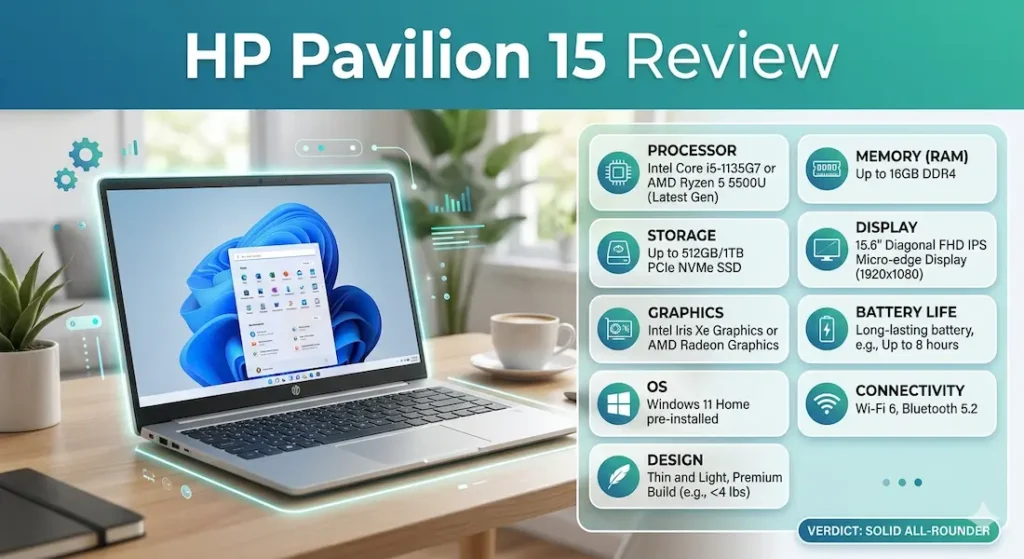
The HP Pavilion 15 display is a Full HD 1080p panel that performs adequately in controlled indoor lighting. Text is clear, colours are reasonable for document work and streaming, and the screen holds up fine for the typical student or office workload.
The limitation shows near windows or in brightly lit environments. Brightness doesn’t reach the level where you can comfortably work in direct ambient light without adjusting your position. This is a common limitation at this price range, not unique to the Pavilion 15, but worth knowing if you regularly work near windows or outdoors.
For late-night study sessions in dim rooms, the display is actually comfortable — less harshly bright than some competing panels, which works in its favour for long reading sessions.
Keyboard and Trackpad — Comfortable to Start, Noticeable Over Time
Typing comfort on the HP Pavilion 15 is good for shorter sessions and becomes more noticeable during extended use.
For an hour of writing, the keyboard feels comfortable — adequate key travel, reasonable spacing, responsive feedback. For two to three hours of continuous writing, the keys feel slightly less forgiving than the better keyboards at this price point. It’s not painful or problematic, but students who write extensively will notice the difference if they’ve used a Lenovo IdeaPad or similar machine with a more refined keyboard.
The trackpad functions reliably for standard navigation. It won’t impress anyone coming from a premium machine, but it also won’t frustrate during normal daily use. Multi-finger gestures work consistently enough.
HP Pavilion 15 Build Quality — Honest Assessment
The HP Pavilion 15 build quality reflects its price point clearly.
It looks clean and professional in a way that doesn’t draw attention to itself — which is the right quality for a classroom or office environment. The chassis is predominantly plastic, and it feels it. There’s slight flex in the keyboard deck under firm pressure, and the lid doesn’t feel rigid when opened one-handed.
None of this affects daily usability. The machine doesn’t feel fragile, and it handles normal carry-and-use treatment without complaint. But if tactile build quality matters — if the way a laptop feels when you open it affects your confidence in using it daily — this machine won’t give you that premium reassurance.
HP Pavilion 15 After 6 Months — Long-Term Honest Assessment
This is where the HP Pavilion 15 long-term durability review becomes more useful than a first-impressions piece.
After six months of regular use:
Performance: Functionally similar to day one for light tasks. Under heavier workloads, the machine feels slightly more strained than it did early on — partly because expectations have adjusted and partly because software overhead tends to grow over time.
Battery: Noticeably weaker than during the first few months of use. Went from 6–7 hours real-world to closer to 5–6. This is normal battery degradation, but it happens faster than on machines with larger battery capacities.
Storage: Students who don’t actively manage their drive find 512GB filling up faster than expected. Downloads, project files, cached data — it accumulates. Regular cleanup and using cloud storage for documents extends comfort significantly.
The honest HP Pavilion 15 long-term assessment: it holds up without failing, but it doesn’t get better with time. The compromises you accept on day one are still there six months later, occasionally more noticeable.
HP Pavilion 15 for Programming — What to Realistically Expect
The HP Pavilion 15 for programming question comes up regularly, so it’s worth addressing directly.
For beginner and light coding — learning Python, building simple web pages, running introductory Java projects — the machine works. VS Code runs without issue on lighter setups. Basic scripts execute. Simple local servers start without drama.
For anything beyond that — full-stack development with multiple services running locally, Android Studio, Docker containers, anything that puts sustained demand on the processor while keeping other tools open — you’ll feel the limits. The machine doesn’t crash, but it hesitates, and those hesitations add up during development work in a way that’s more disruptive than during document-based tasks.
For everyday work setups, this guide on best laptops under $500 for business use shows how similar machines handle productivity tasks and multitasking.
The HP Pavilion 15 for students taking introductory CS classes: adequate. For students in a serious development-focused programme: you’ll likely want more headroom than this machine provides.
RAM and Storage Configuration — Where Most Buying Mistakes Happen
8GB RAM vs 16GB RAM on the HP Pavilion 15:
The 8GB configuration is the one most commonly available at the budget price point, and it’s workable for light use. But it starts feeling tight once you’re running multiple active applications — which happens in a typical student session more often than buyers anticipate.
The 16GB configuration delivers a noticeably smoother experience across the same workloads. If both configurations are available at a similar price gap, 16GB is consistently worth the extra spend.
Storage: 512GB SSD is adequate for most students if managed actively. If the choice is between an HDD configuration and an SSD configuration at a similar price, the SSD is always the right call — the performance difference in daily use is substantial and immediately obvious.
Common Mistakes Buyers Make With the HP Pavilion 15
Buying the lowest RAM configuration to save money. The 4GB configuration (where it appears) creates a frustrating experience within weeks. 8GB is the minimum; 16GB is meaningfully better.
Expecting the performance to stay consistent as workload grows. The machine that handles first-semester coursework comfortably may struggle with third-year project complexity. If the plan is to use this laptop through multiple years of increasingly demanding work, the Aspire 5 or similar machine offers better runway.
Ignoring the display brightness limitation. Students who work near windows or in brightly lit spaces will notice this more than they expect to. It’s not a dealbreaker, but it affects daily comfort in ways that don’t show up in spec comparisons.
Assuming the battery rating matches real use. The 6–7 hour real-world figure is more realistic than manufacturer claims. Plan for charger access in the afternoon if you’re running on a full school day.
HP Pavilion 15 Pros and Cons
What works:
- Affordable entry point for students and budget-focused buyers
- Reliable and consistent for light-to-moderate daily tasks
- Professional appearance that fits classroom and office environments
- Available in configurations with 8GB RAM and SSD for reasonable performance
What you’ll notice:
- Fan becomes audible under moderate-to-heavy load
- Battery requires charger access in the second half of a full school day
- Display brightness struggles near windows
- Performance headroom for growth is limited compared to Ryzen 5 alternatives
- Build quality reflects the price point — functional but not confidence-inspiring
Buying Guide — Should You Buy the HP Pavilion 15?
Choose the HP Pavilion 15 if:
- Your budget is genuinely constrained and this is the realistic option
- Your workload is light and unlikely to grow significantly — basic documents, browsing, streaming, occasional video calls
- You prioritise affordability over long-term performance headroom
Consider alternatives if:
- You plan to code seriously, multitask heavily, or use demanding applications
- Battery life through a full school day without charger access is a priority
- You want a machine that performs equally well in year two and year three as it does today
The best alternatives to compare:
- Acer Aspire 5 — better performance consistency and keyboard at a slightly higher price
- ASUS VivoBook 15 — better battery for mobile students
- Lenovo IdeaPad 3 — better keyboard for students who write extensively
Frequently Asked Questions
Is the HP Pavilion 15 good for students?
Yes — for students with genuinely light to moderate workloads. The HP Pavilion 15 for students handling essays, research, presentations, and standard online learning tools is a practical choice. Students with heavier coursework or those planning to code seriously may hit its limits sooner than expected.
Is the HP Pavilion 15 good for programming?
For beginner-level and introductory programming: yes. For full-stack development, Android Studio, Docker, or anything requiring sustained multi-tool performance: the machine works but shows its limits noticeably. The HP Pavilion 15 for programming is best positioned as a light coding machine, not a development workhorse.
Does the HP Pavilion 15 have heating issues?
It runs warm under moderate-to-heavy load and the fan becomes clearly audible during those sessions. Under light use, temperature and noise stay controlled. It’s not an overheating problem in the sense of performance throttling, but the fan behaviour in quiet environments is worth factoring in.
Is the HP Pavilion 15 worth buying in 2026?
Yes, conditionally. If your workload matches what this machine is designed for and your budget is genuinely constrained, the HP Pavilion 15 in 2026 is still a valid everyday laptop. If you can stretch to the Aspire 5 or similar, you’ll get noticeably more performance headroom for a small additional investment.
How long does the HP Pavilion 15 battery last?
Yes, conditionally. If your workload matches what this machine is designed for and your budget is genuinely constrained, the HP Pavilion 15 in 2026 is still a valid everyday laptop. If you can stretch to the Aspire 5 or similar, you’ll get noticeably more performance headroom for a small additional investment.
How does the HP Pavilion 15 compare to the Acer Aspire 5?
The Aspire 5 handles multitasking more smoothly, offers better keyboard comfort for long sessions, and has more performance runway as workloads grow. The Pavilion 15 is cheaper. For most students who can bridge the price gap, the Aspire 5 is the better long-term value. For strictly budget-constrained buyers, the Pavilion 15 is a workable alternative.
Final Verdict — HP Pavilion 15 Review Summary
After months of daily testing, the HP Pavilion 15 earns an honest, unglamorous assessment: it’s a practical everyday laptop that does its job reliably within a clearly defined workload — and starts showing its limits the moment that workload grows.
It won’t impress you. It won’t frustrate you during normal use. It will remind you of its constraints during deadline pushes, heavy multitasking sessions, and sustained coding work.
If your budget is genuinely tight and your workload is genuinely light, the HP Pavilion 15 is worth buying in 2026. It delivers consistent everyday performance at an accessible price point, and for a student running standard coursework tools, that’s a real and valid use case.
If your budget has any flexibility, the Acer Aspire 5 is the better investment — better performance consistency, better keyboard, and more headroom for the workload growth that comes naturally across a full academic programme.
The HP Pavilion 15 handles today well. It just doesn’t leave much room for tomorrow.
About BestLaptopGuide.com: Our editorial team evaluates laptops through real student workload testing and extended daily use — not manufacturer benchmarks. Recommendations are reviewed and updated regularly.
Disclosure: Some links on this page are affiliate links. A small commission may be earned at no extra cost to you if you purchase through them. This does not influence our recommendations.