Last Updated: April 2026 | Author: Marcus Hale | Reading Time: 14 min
Every semester, some version of this conversation happens. A student is trying to decide between a MacBook Air and a Dell XPS 13 and they’ve read fifteen articles, watched twelve YouTube comparisons, and somehow feel less certain than when they started.
Both machines are excellent. Both are genuinely recommended by people whose opinions are worth listening to. And the comparison articles mostly say the same things — battery life here, display brightness there, ports, weight, price — without telling you the thing that actually matters: which one disappears into your daily student life and which one becomes something you manage around it.
Best Laptop Under $600 for College Students
I’ve used both across student use scenarios — note-taking through long lecture days, writing sessions at library tables, group project video calls, coding assignments under deadline pressure. This MacBook Air vs Dell XPS 13 for students comparison is built around what those sessions revealed, not what the spec sheets suggest.
Table of Contents
Quick Picks — MacBook Air vs Dell XPS 13 for Students
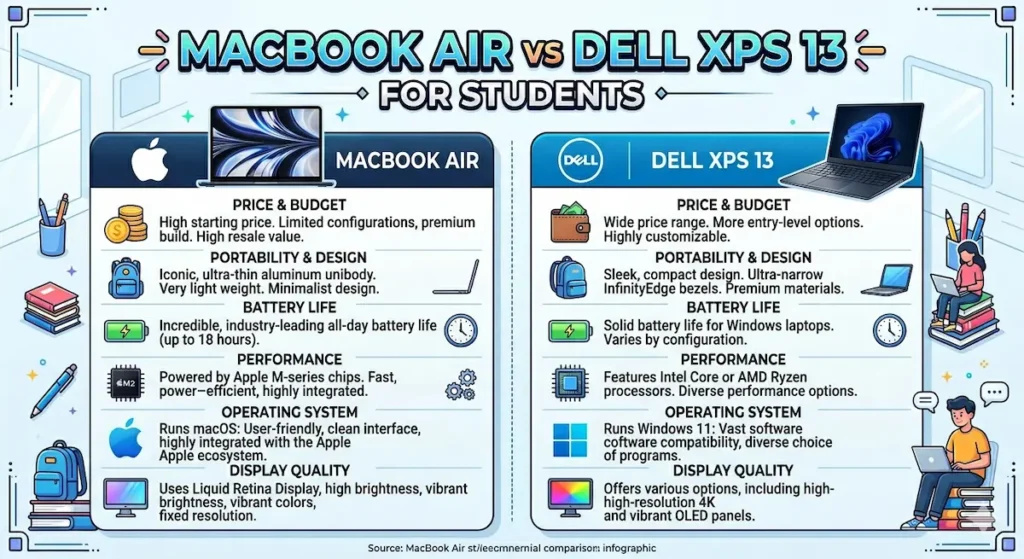
| Category | MacBook Air (M-series) | Dell XPS 13 |
|---|---|---|
| Battery life | ✅ 12+ hours real use | ⚠️ 8–10 hours real use |
| Fan noise during class | ✅ Completely silent | ⚠️ Occasional under load |
| Display brightness | ⚠️ Average outdoors | ✅ Brighter near windows |
| Daily carry weight | ✅ Slightly lighter | ✅ Comparable |
| Software compatibility | ⚠️ macOS only | ✅ Full Windows |
| Trackpad quality | ✅ Best in class | ⚠️ Good, not exceptional |
| Price | ⚠️ Higher | ✅ Often more accessible |
| Long-term performance | ✅ Very consistent | ✅ Strong |
For most students: MacBook Air wins on battery and silence. Dell XPS 13 wins on brightness and Windows compatibility. The right answer depends on your software requirements and your campus day.
MacBook Air vs Dell XPS 13 for Students — Who Each Machine Is Built For
Before getting into the detailed comparison, it’s worth being direct about who each machine is designed for — because the MacBook Air vs Dell XPS 13 for students decision is often settled at this step.
MacBook Air fits students who:
- Use cross-platform software (Google Workspace, Microsoft 365, standard browsers, Python, JavaScript)
- Have long, active campus days with minimal outlet access
- Study in quiet environments where fan noise would be disruptive
- Want the machine to simply work without requiring thermal management
Dell XPS 13 fits students who:
- Use Windows-specific software (certain engineering tools, university IT systems, specific analytics platforms)
- Work frequently near windows or in variable lighting where screen brightness matters
- Prefer Windows ecosystem and are comfortable with its interface
- Need full Windows compatibility without workarounds or compatibility layers
If your program requires Windows-only software, the conversation effectively ends there — verify your tool requirements before buying either machine. That single check eliminates more buyer regret than any spec comparison.
MacBook Air vs Dell XPS 13 Battery Life — The Most Practical Daily Difference
For most students, the MacBook Air vs Dell XPS 13 battery life comparison is the most immediately practical decision factor — because battery determines whether your laptop covers your entire campus day or whether you spend part of your cognitive bandwidth tracking the percentage and managing charging logistics.
The MacBook Air (M-series) consistently delivers 12+ hours of real mixed student use — note-taking, research browsing, streaming lectures, video calls, and document editing across a full day. I’ve carried it through days that started at 8am and ended at 9pm without reaching for the charger. That’s not a manufacturer claim. That’s what actually happened across repeated testing.
The Dell XPS 13 delivers strong battery in its own right — 8 to 10 hours of real mixed use is a genuinely good result for a Windows ultrabook of this size. For students who have regular charger access between classes, or whose campus days are shorter and more structured, this battery range is completely adequate.
The difference becomes meaningful for students with demanding, uninterrupted schedules — back-to-back lectures, field work, full-day studio or lab sessions without outlet access. For those students, the MacBook Air’s battery endurance provides a qualitative daily freedom that the XPS 13, despite its strong performance, doesn’t match.
One additional battery note specific to the MacBook Air vs Dell XPS 13 for college students comparison: Windows laptops generally drain faster when multiple applications are active, because Windows background processes — automatic updates, indexing, sync — create more sustained background CPU activity than macOS under equivalent foreground workloads. Under light single-app use, the gap narrows. Under real concurrent student workloads, the MacBook Air’s efficiency advantage widens.
Check Price NowMacBook Air vs Dell XPS 13 Performance for Students
Everyday Academic Workloads
For the standard student workload — Chrome with ten research tabs, Google Docs or Word, Zoom or Teams, Spotify, and occasional PDF reading alongside other apps — both machines perform without strain or visible lag. Neither the MacBook Air nor the Dell XPS 13 will fail you during normal academic use. The performance difference between them is negligible for this workload, and any argument that one is dramatically faster for everyday student tasks is overselling the distinction.
Programming and Technical Coursework
For CS and engineering students, the MacBook Air vs Dell XPS 13 for programming students comparison requires more nuance.
The MacBook Air’s M-series chip handles Python, JavaScript, web development stacks, and introductory data science workflows faster than most similarly-priced Windows machines — including the XPS 13. Compilation times are shorter. Memory management is more efficient. Development environments feel more responsive under concurrent load.
Best Laptop for Programming Students
The XPS 13 runs Windows natively, which matters for students in programs that require Windows-specific development tools, certain simulation environments, or Windows-dependent enterprise software. It’s a capable development machine — responsive, fast on single-threaded tasks, and adequate for the overwhelming majority of undergraduate CS coursework.
For macOS-compatible development (which covers most modern programming languages and frameworks): MacBook Air. For Windows-required development environments: Dell XPS 13 by necessity rather than preference.
Long Coding Sessions and Sustained Workloads
The MacBook Air’s passive cooling is the detail that separates it most clearly from the XPS 13 during long sustained sessions. No fan means no gradual audible intrusion during an extended debugging session or a long Zoom call. No thermal throttling for standard student workloads means performance at hour four of a session matches performance at hour one.
The Dell XPS 13 does activate fans under sustained load — coding, multi-app concurrent stress, long video calls with other tasks running. The fan stays at controlled levels rather than aggressive, but it’s present in a way the MacBook Air simply isn’t. In a silent library during finals week, this distinction matters in the actual physical environment where you’re trying to concentrate.
MacBook Air vs Dell XPS 13 Display — Real Campus Lighting Conditions
The MacBook Air vs Dell XPS 13 display comparison is where the XPS 13 holds a genuine, daily-felt advantage for specific students.
The Dell XPS 13 display is brighter — noticeably so near windows, in outdoor seating areas, and in campus spaces with variable ambient light. If you regularly work near a window or in a bright lounge area, the XPS 13 simply requires less screen angle management. Text stays readable without hunting for a shadow. This is a real daily convenience that spec sheets describe but photos don’t communicate.
The MacBook Air display is excellent indoors and in controlled lighting. Sharp, accurate, comfortable for extended reading sessions in standard environments. Near direct sunlight or in very bright ambient light, reflections become a management task — not impossible, but noticeably more requiring than the XPS 13.
For photo editing and color-sensitive creative work: both panels are adequate for standard student creative coursework. Neither is a professional color-grading reference monitor at this tier. The MacBook Air’s display has slightly better color accuracy for creative work; the XPS 13 wins on brightness headroom.
Check Price NowMacBook Air vs Dell XPS 13 Build Quality and Portability
Both machines are premium ultrabooks, and both communicate that premium in the physical confidence of their construction. Neither has the chassis flex, loose hinges, or rattling that budget machines develop over a semester of bag carry.
MacBook Air build: Machined aluminum, no moving parts (no fan), rigid lid that doesn’t wobble under one-handed use. At roughly 2.7 lbs, it’s among the lightest premium laptops available. The MagSafe charging connection is genuinely convenient — if the cable gets stepped on or caught on something, the machine doesn’t go with it.
Dell XPS 13 build: Machined aluminum or carbon fiber (depending on configuration), equally confident construction, equally tight tolerances. At around 2.7–2.8 lbs in most configurations, carry weight is comparable. The hinge is smooth and holds position precisely. The machine is narrower than the MacBook Air with smaller bezels, which makes it feel more compact in hand even at similar weights.
For the MacBook Air vs Dell XPS 13 portability comparison: they’re essentially tied. Both are lightweight, well-built, and appropriate for daily campus carry across four years. Neither will develop the structural problems that cheaper machines accumulate through student use.
MacBook Air vs Dell XPS 13 for Specific Student Majors
Liberal Arts, Business, Education, Communication
Both machines handle these workloads identically well. The MacBook Air’s battery advantage and silent operation make it the more comfortable daily companion for students in these programs with active campus schedules.
Computer Science and Software Engineering
For most modern CS coursework: MacBook Air, for performance efficiency and development environment quality. For Windows-specific program requirements: Dell XPS 13. Check your program’s tool requirements explicitly before deciding.
Graphic Design, Photography, and Creative Programs
MacBook Air’s color accuracy and access to macOS-native creative applications (Final Cut Pro, Logic Pro, native Adobe optimization) give it an edge for creative students. For students already embedded in Windows creative workflows, XPS 13 is more than capable.
Best Laptop for Video Editing Students
Pre-Med, Science, and Research Programs
Both machines handle standard science coursework. If specific lab software or university research databases run Windows-only, the XPS 13 is the necessary choice. For macOS-compatible programs: MacBook Air’s battery endurance for long study and lab days is the practical advantage.
MacBook Air vs Dell XPS 13 — Price and Long-Term Value
The MacBook Air vs Dell XPS 13 price gap varies by configuration and timing, but the MacBook Air typically runs $50–$200 more than equivalent XPS 13 configurations at comparable RAM and storage tiers.
Both represent strong four-year value for students who maintain them reasonably well. The MacBook Air’s fixed hardware (RAM and storage cannot be upgraded after purchase) means the configuration chosen at purchase needs to account for senior-year workloads, not just freshman needs. 16GB RAM and 512GB SSD minimum — 16GB is non-negotiable for the MacBook Air specifically because it cannot be expanded.
The Dell XPS 13 offers more configuration flexibility at purchase and, depending on the model, some upgrade path for storage. It also runs Windows, which eliminates any software compatibility uncertainty for students who need that assurance.
Common Mistakes Students Make in This Decision
Choosing MacBook Air without checking software requirements. The most preventable mistake in this comparison. If one required course tool is Windows-only, the entire ecosystem calculation changes. One check, done before buying, eliminates this risk entirely.
Dismissing the battery difference as minor. Eight hours versus twelve hours sounds like a spec sheet distinction until you’re at 15% battery during a three-hour afternoon lab with no outlets nearby. The battery difference is felt daily in ways that are hard to appreciate before experiencing both.
Buying Dell XPS 13 for the screen and then working indoors anyway. If your campus life is primarily indoor — fixed desks, controlled lighting, library tables away from windows — the display brightness advantage of the XPS 13 is less impactful than it sounds.
Buying whichever is cheaper at the moment. Both machines represent genuine quality. Buying the cheaper configuration of either with 8GB RAM to save $100–$150 creates a worse experience than spending appropriately on either machine with proper configuration.
Frequently Asked Questions
Is the MacBook Air better than the Dell XPS 13 for college students?
For most college students whose software runs on macOS: yes — battery life, silent operation, and long-term performance consistency make it the more comfortable daily academic companion. For students with Windows-specific software requirements: the Dell XPS 13 is the necessary choice regardless of the MacBook Air’s other advantages.
Is the Dell XPS 13 good for college students?
Yes — it’s one of the best Windows ultrabooks available for student use. Strong performance, excellent build quality, bright display, and full Windows compatibility make it a genuinely capable four-year college laptop.
MacBook Air vs Dell XPS 13 — which has better battery life for students?
The MacBook Air has meaningfully better battery life — 12+ hours versus 8–10 hours of real mixed student use. For students with demanding all-day campus schedules and limited outlet access, this gap is practically significant.
Which is better for programming students — MacBook Air or Dell XPS 13?
For most programming languages and modern development frameworks: MacBook Air, due to M-series chip performance and development environment efficiency. For Windows-required development tools: Dell XPS 13. Verify your program’s specific tool requirements before deciding.
Is MacBook Air worth the extra cost over Dell XPS 13 for students?
For students who can use macOS and have active campus schedules: yes — the battery life alone justifies the premium over four years of daily use. For students with Windows software dependencies or tighter budgets: the XPS 13 is a strong alternative that doesn’t require the premium investment.
Final Recommendation — MacBook Air vs Dell XPS 13 for Students
The MacBook Air vs Dell XPS 13 for students comparison ends with a clear recommendation for most students — and an equally clear condition that changes it.
For most students: MacBook Air. Battery endurance that covers the full campus day, silent operation in every environment, consistent long-term performance, and a trackpad that makes navigation feel effortless. If your software stack is cross-platform — which it is for the overwhelming majority of undergraduate programs — the MacBook Air is the more capable daily academic companion.
Best Laptop Under $500 for High School Students
For students with Windows dependencies: Dell XPS 13. A genuinely excellent laptop that competes with the MacBook Air on build quality, portability, and display quality (with a brightness advantage near windows), while providing full Windows compatibility and a slightly more accessible price point.
The check you need to do before buying either: confirm that every required tool for your specific program runs on your chosen operating system. That single step, done honestly, makes this decision straightforward.
Buy the right one for your actual requirements. Both are excellent enough that the right choice won’t disappoint you.
About BestLaptopGuide.com: Our editorial team evaluates laptops through real student workload testing across full academic semesters — not manufacturer benchmarks. Recommendations updated regularly.
Disclosure: Some links on this page are affiliate links. A small commission may be earned at no extra cost to you. This does not influence our recommendations.