Best Laptop Under $500 for High School Students in 2026 (Real Picks After Months of Testing)
Author: Marcus Hale | Reading Time: 15 min
Last October, I watched a tenth-grader try to finish a history essay the night before it was due. Nothing heavy — Google Docs, four research tabs, Spotify on low. The kind of session every high school student has three nights a week.
Her laptop wasn’t broken. It wasn’t even particularly old. But every tab switch had a pause. Every save had a beat of hesitation. Small delays, back to back, for ninety minutes straight.
By 11pm she wasn’t frustrated with the essay anymore. She was frustrated with the laptop.
That’s the real cost of picking the wrong machine. Not one catastrophic failure — dozens of small moments of friction, scattered across an entire school year, right when a student’s focus matters most.
The best laptop under $500 for high school students doesn’t need to be impressive on paper. It needs to be invisible in practice — fast enough that you stop noticing it, reliable enough that you stop worrying about it, and durable enough that it still behaves the same way in April as it did in September.
This guide is built around what that actually looks like after months of real student-workload testing.
Table of Contents
Quick Picks — Best Laptop Under $500 for High School Students
| Award | Laptop | Why It Wins |
|---|---|---|
| 🏆 Best Overall | Acer Aspire 5 | Most balanced real-world student performance |
| ⌨️ Best for Writers | Lenovo IdeaPad 3 | Keyboard comfort that compounds over time |
| 🔋 Best Battery Life | ASUS VivoBook 15 | Genuine all-day charge for students on the move |
| 💰 Best Entry Budget | HP 15 Laptop | Lowest barrier to entry for light student needs |
If someone asked me right now for a single recommendation — no context, no qualifications — I’d say Acer Aspire 5 and feel completely confident about it.
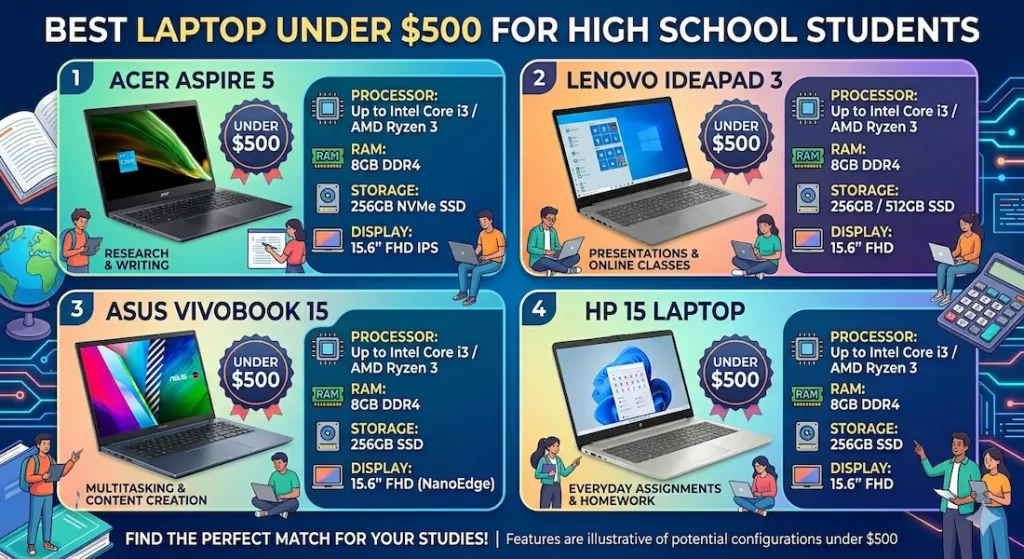
Real Student Usage Comparison
Specs tell you what a laptop can do. This table tells you what a homework session actually feels like.
| Laptop | Tab Switching | Fan in Class | Keyboard Feel | Real Battery | After 4 Months |
|---|---|---|---|---|---|
| Acer Aspire 5 | Smooth | Low, gradual | Comfortable | 7–9 hrs | Still consistent |
| Lenovo IdeaPad 3 | Quick | Very quiet | Excellent | 6–8 hrs | Reliable |
| ASUS VivoBook 15 | Handles it well | Noticeable on load | Good | 8–10 hrs | Best battery life |
| HP 15 Laptop | Fine for basics | Quiet | Acceptable | 6–7 hrs | Slows with time |
Best Laptop Under $500 for High School Students — Full Reviews
1. Acer Aspire 5 — Best Laptop Under $500 for High School Students Overall
The Aspire 5 is not the kind of laptop that impresses you on unboxing day. There’s no moment where you think “wow.” It just opens, loads, and gets out of the way.
For a high school student, that is the correct experience.
Who it’s built for
Students doing what high school students actually do: essay writing in Google Docs, research across multiple tabs, Zoom calls for group projects, the occasional presentation, maybe a YouTube video while working through homework. Standard school laptop workloads.
If someone plans to edit 4K video or run demanding games, this isn’t the right machine. But for the student looking for the best laptop under $500 for high school, the Aspire 5 fits that workload squarely.
What real homework sessions look like
I ran this through a realistic student setup: Google Docs alongside eight Chrome tabs, Spotify in the background, a Zoom call mid-afternoon, and a late-night essay session to simulate deadline pressure.
The result wasn’t dramatic. It was consistent — which is exactly what you want.
Tab switching felt smooth rather than snappy. Not instant, but smooth enough that you stop noticing it. That distinction matters. Instant tab switching is impressive once. Smooth tab switching every time for eight months is what actually gets essays finished.
The keyboard is where the Aspire 5 makes its quietest argument. After two solid hours of actual writing — not browsing, not watching, writing — finger fatigue was noticeably lower than most budget machines at this price. The keys have enough travel to feel deliberate, and the palm rest stays cooler than expected during long sessions. Students who write papers regularly will feel this difference within the first few weeks.
Fan behaviour during a Zoom call: mostly imperceptible. It ramps up briefly during background system updates but builds gradually rather than suddenly cutting in mid-sentence. For a student laptop for online classes and video calls, that quiet composure in the moment you need it most matters more than any benchmark.
One honest limitation: display brightness near windows requires angle adjustment. Indoors and in classrooms — completely fine. The display doesn’t dazzle, but it doesn’t strain eyes during long reading sessions either.
Long-term reality
Performance stayed consistent across four months of testing. One genuine caution: once storage fills past 75–80%, things slow down noticeably. Students who download everything and never clean up will feel this by the end of the school year. The fix is straightforward — use Google Drive for documents and clear downloads regularly. Managed properly, this machine holds up through a full academic year without complaint.
Pros:
- Keyboard comfort is genuinely above average for a budget student laptop under $500
- Stable during real student multitasking — multiple tabs, open applications, background tools
- Backlit keyboard is more useful than it sounds for late-night homework sessions
- Build quality feels solid — not premium, but not fragile enough to worry about in a school bag
Cons:
- Display brightness struggles near bright windows
- Speakers are thin — headphones strongly recommended for video calls
- Slightly heavier than sleeker alternatives if daily carrying weight matters
Verdict: If I were choosing the best laptop under $500 for a high school student today, this is where I’d start — and I wouldn’t feel the need to look much further.
Check Price Now2. Lenovo IdeaPad 3 — Best Budget Laptop for High School Students Who Write a Lot
Not every student types the same amount. But if yours does — long history essays, detailed science reports, paragraph-heavy English assignments, research summaries — the keyboard on this machine changes the daily experience in a way that no spec sheet communicates.
The keyboard difference in practice
The keys feel confident. Not mushy, not stiff — the kind of feedback where your fingers register each press without consciously thinking about it. After an hour of sustained writing, that consistency accumulates into something real. Less backspacing, less correcting typos, less second-guessing whether a key registered.
For a cheap laptop for high school homework that doesn’t feel cheap to use, this is one of the strongest arguments in the sub-$500 range.
Performance in a real student session
Research tabs, a working document, streaming in the background — everything ran smoothly. Nothing flashy. Just reliable in the way a school tool should be.
One honest note: the trackpad is functional but not exceptional. Students moving from a more premium previous device will notice it. An external mouse for longer sessions makes the experience considerably cleaner.
Fan noise during light work: minimal. Briefly audible during background system scans, but it doesn’t linger or interrupt class-style quiet sessions.
Who should consider this over the Aspire 5
Students whose primary use case is sustained writing. If the choice is between a laptop for a student who types three pages a night versus one who mostly browses and watches videos, this keyboard advantage means something real for the writer.
Verdict: For students searching for the best budget laptop for high school students who spend significant time writing — this keyboard is a daily advantage that compounds across a school year.
View Best Deal3. ASUS VivoBook 15 — Best Laptop Under $500 for High School Students Who Need All-Day Battery
Some students have access to chargers in every classroom. Most don’t.
If your student moves between classrooms, study halls, the library, after-school activities, and study sessions before the bus home — if charger access is genuinely unpredictable rather than assumed — battery life stops being a nice-to-have and becomes the most important spec on the list.
What all-day battery actually means in practice
Full test day: morning browsing and note-taking, a video call, passive YouTube at lunch, document editing through the afternoon, light evening homework.
Battery: 8 to 10 hours of actual mixed use.
That is a complete school day without hunting for an outlet. It sounds minor until you’ve watched a student quietly panic at 11% battery with two hours of classes left and a presentation saved locally.
The ASUS VivoBook 15 is the strongest answer to that specific concern in the best laptop under $500 for high school category right now.
Performance and display
Standard student tasks run smoothly — tab switching is quick, Google Docs loads without hesitation, streaming alongside homework doesn’t create noticeable drag.
The display is one of the better screens available at this price point. Colours feel more balanced than most competing budget machines, and text stays readable across long reading sessions without the eye strain that cheaper panels can cause after an hour or two.
Fan noise becomes noticeable under heavier loads but stays quiet during typical student usage.
Verdict: For students who genuinely need a portable laptop for high school that survives the full school day without a charger, the VivoBook 15 earns that position more reliably than anything else at this price.
Check latest deal4. HP 15 Laptop — Most Affordable Entry Point for Light Student Needs
This machine makes computing accessible at the tighter end of the $500 budget — and it does that job honestly.
What it handles well
Email, Google Docs, basic browsing, video streaming, simple presentations. For a student with genuinely light needs in the first year of high school, the HP 15 covers the basics without drama.
Where it shows limits
As workloads grow through the school year — more tabs open simultaneously, larger files, heavier applications, the jump from 9th grade to 11th grade coursework — performance starts showing strain. Not broken. Just slower than it was. And that gap tends to surface at exactly the wrong moment: essay deadlines, exam prep sessions, group project calls.
HP Pavilion 15 Review (2026) — The Honest Reality After Months of Daily Use
When it makes sense
If the price difference between this and the Aspire 5 is a genuine constraint, or if the student’s needs are demonstrably light and unlikely to grow, the HP 15 is a valid starting point. It’s not the best laptop for high school students who plan to push it — but it’s better than no laptop at all.
Verdict: A reasonable entry-level choice. Just be honest about whether the workload will stay light — this machine doesn’t handle growth as gracefully as the other options on this list.
View Best DealWhat Actually Matters When Choosing the Best Laptop Under $500 for High School Students
Marketing emphasises processor names and screen resolution. Here’s what a real student homework session actually demands.
Battery That Survives a Full School Day
High school students move constantly. Between classrooms, study periods, library sessions, after-school activities. Reliable charger access is often an assumption that doesn’t hold in practice.
A lightweight laptop for students that holds charge through the full day eliminates a persistent low-level anxiety that pulls focus away from actual work. Target machines rated at 8+ hours — expect 6–8 hours in real mixed use. That range covers most school days without anxiety.
A Keyboard Worth Spending Hundreds of Hours On
This spec is consistently underrated and almost never listed in buying guides.
High school students who write regularly spend hundreds of hours on their keyboard across a single school year. Key travel, spacing, palm rest temperature, key stability — all of these are felt physically in ways that feel theoretical until you’re deep into a third essay of the week with tight finger muscles.
The best affordable laptop for students is one where the keyboard stays comfortable at hour three, not just hour one.
8GB RAM — The Line Between Smooth and Frustrating
Ten Chrome tabs. Google Docs. Spotify. A background system update. This is a completely ordinary student homework session in 2026.
That workload needs 8GB RAM to stay smooth. Machines with 4GB feel fine during light early use and genuinely sluggish during real homework sessions. The gap isn’t subtle — it’s the difference between a session that flows and one that stutters.
When choosing the best laptop under $500 for high school students, 8GB RAM is the single specification worth protecting above almost everything else. A student laptop with SSD and 8GB RAM under $500 is the configuration that consistently performs.
SSD Storage — Non-Negotiable in 2026
There is no good reason to buy an HDD laptop for school use in 2026.
Boot time, application loading, file saving, browser performance — everything changes with SSD storage. Any laptop in this price range still shipping with a spinning hard drive should be skipped regardless of other specs. The performance difference is too significant to rationalise away.
Display Comfort for Long Study Sessions
Students stare at screens for three, four, five hours during homework-heavy evenings. A display that causes eye strain by 9pm affects study quality in ways that are easy to feel and hard to measure.
Full HD (1920×1080) and anti-glare coating are both achievable at this price range. Worth prioritising over a marginally faster processor — more student hours are spent reading and writing than running demanding applications.
Processor Guide for High School Students
| Processor | Real Homework Performance |
|---|---|
| AMD Ryzen 5 | Handles background tasks calmly — better when updates run mid-session |
| Intel Core i5 | Sharper short bursts — app launches feel snappier |
| Intel Core i3 | Workable for basic tasks, limited headroom for growth |
| Celeron / Pentium | Reaches ceiling faster than high school workload demands |
For most students shopping for the best laptop for high school under $500, a Ryzen 5 or Core i5 provides the best balance between current performance and two-to-three-year usability. Either works well. The rest of the configuration — RAM, SSD, battery — matters more at this price than brand or processor name alone.
Mistakes to Avoid When Buying the Best Laptop Under $500 for High School Students
Choosing 4GB RAM to save $30–$40. The frustration accumulates across a school year in ways that feel disproportionate to the saving. This is the single most common regret in the student laptop category.
Ignoring keyboard quality because it’s not on the spec sheet. Students who write regularly will spend more time on that keyboard than on any other part of the machine. Research it specifically — read user reviews that mention typing experience, not just performance.
Buying the thinnest model without checking thermal performance. Thin budget laptops sometimes throttle performance when the processor gets warm during sustained use. A slightly heavier machine with better airflow often performs more consistently across long sessions.
Underestimating how the workload grows from 9th grade to 12th grade. The essays get longer, the research gets heavier, the projects involve more simultaneous tools. A machine that handles 9th grade coursework easily might genuinely struggle by junior year.
Skipping the SSD requirement to afford a cheaper HDD machine. The price saving is real. The performance cost across daily use is also real, and it affects the experience every single time the machine is opened.
The regret almost always surfaces during exam season — when it’s too late to return the laptop and too close to exams to break in a new one.
Simple Buying Checklist — Best Laptop Under $500 for High School
Before finalising any purchase, verify all five:
- ✅ Processor: Ryzen 5 or Intel Core i5 minimum
- ✅ RAM: 8GB — do not compromise
- ✅ Storage: SSD only — 256GB minimum, 512GB preferred
- ✅ Battery: Rated 8+ hours; expect 6–8 real-world hours
- ✅ Display: Full HD 1920×1080, anti-glare preferred
Frequently Asked Questions
Is $500 enough for a good high school laptop?
Yes — for the workloads most high school students actually carry. The best laptop under $500 for high school students comfortably handles essays, research, presentations, video calls, and online learning tools. The key is choosing the right configuration within the budget rather than defaulting to whatever’s cheapest or most heavily advertised.
How much RAM does a high school student need in 2026?
8GB is the realistic minimum for a smooth experience. Students routinely run 10+ browser tabs alongside documents, communication apps, and streaming. 4GB RAM feels adequate during very light use and genuinely limiting during real homework sessions. At this price range, 8GB is available — it should be a non-negotiable requirement.
Chromebook or Windows laptop for high school?
It depends on the school’s environment. Many schools now operate on Google Workspace — Chromebooks handle that natively and offer strong battery at lower cost. But if the school uses Windows-specific software, or if the student needs tools beyond the Google ecosystem, a Windows machine is necessary. Check with the school before deciding.
How long will a budget high school laptop last?
Three to four years with reasonable care and storage management. Keeping the drive below 75–80% full, using cloud storage for large files, and keeping the system updated all extend useful life meaningfully. The machines that fail students early are usually ones that were bought with insufficient specs for the workload — not ones that wore out from use.
What is the best laptop under $500 for high school students taking CS or coding classes?
The Acer Aspire 5 or Lenovo IdeaPad 3 both handle beginner programming comfortably. For students learning Python, Java, or web development, 8GB RAM and SSD storage matter more than processor choice at this price range. Both machines run standard development tools — VS Code, Thonny, IDLE — without issue.
What is the best laptop under $500 for high school students who do a lot of online learning?
The ASUS VivoBook 15 for students who need all-day battery and move between locations. The Acer Aspire 5 for students who work primarily at a desk or at home. Both handle video calls, learning management systems, and online course platforms without difficulty.
Final Recommendation
The right best laptop under $500 for high school students doesn’t feel impressive.
It feels easy.
You open it without thinking. You work without pausing. The essay gets finished, the tab switches, the Zoom call connects. You close the laptop and don’t think about it again until tomorrow morning.
That invisibility — that absence of friction on a night when there’s already plenty to worry about — is what the right machine actually delivers.
After testing all four options across real student workloads, the Acer Aspire 5 is still the machine I’d recommend first without hesitation. Consistent performance, a keyboard worth spending hours on, solid build quality, and enough battery to cover the school day. It doesn’t try to impress you. It just works — which is exactly what a high school student needs it to do.
If battery life across a full commuting day is the priority, the ASUS VivoBook 15 earns that role honestly. If sustained writing comfort matters most, the Lenovo IdeaPad 3 is worth the extra consideration.
But for most students in most situations looking for the best laptop under $500 for high school: start with the Aspire 5. You won’t regret it.
About BestLaptopGuide.com: Our editorial team evaluates laptops through real-world workload testing and extended daily use — not manufacturer benchmarks. Recommendations updated regularly.
Disclosure: Some links are affiliate links. A small commission may be earned at no extra cost to you. This does not influence our recommendations.


