OLED vs IPS for Video Editing in 2026 (What You Only Learn After Your First Real Project)
There’s a specific moment that most beginner editors experience and rarely forget.
You spend three hours on a project. The timeline looks clean. Colors feel rich and balanced. The blacks look deep and cinematic. You export, upload, share the link — and then watch it back on your phone.
Something’s off. Not dramatically wrong. The edit is fine. But the colors look different. Slightly flatter. The shadows that looked perfectly moody on your laptop screen now look muddy. You replay it a few times trying to figure out what happened.
What happened was the display.
That’s the moment when the OLED vs IPS for video editing question stops being theoretical. You realize your editing monitor doesn’t just show your work — it shapes every creative decision you make during the session. And if the display isn’t behaving accurately, those decisions quietly accumulate into a final product that looks different on every screen it reaches except the one you edited on.
This guide breaks down what OLED and IPS actually feel like to edit on — not based on panel specs, but based on what happens to your edits across real projects.
Table of Contents
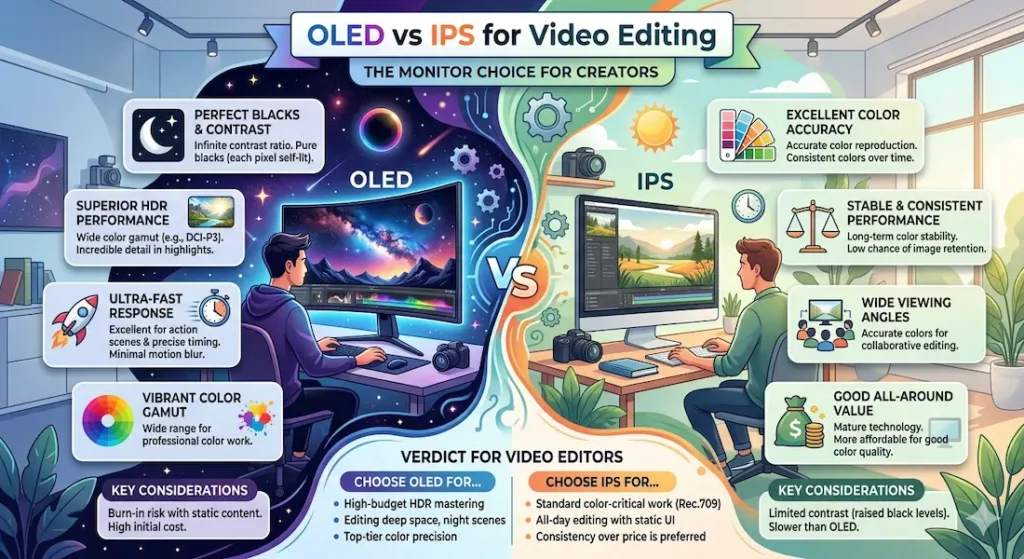
Quick Summary — OLED vs IPS for Video Editing
| Editing Scenario | OLED | IPS |
|---|---|---|
| Color contrast | Very high — visually striking | Balanced and realistic |
| Black levels | True black — deep and cinematic | Slightly gray in dark scenes |
| Brightness for outdoor editing | Struggles in direct light | Handles ambient light better |
| Long session eye comfort | Can cause fatigue for some editors | More consistent comfort |
| Color accuracy across devices | Can vary — edits may not translate | More reliable across screens |
| Battery during editing sessions | Higher power draw | Lower power draw |
| Color grading reliability | Can mislead shadow adjustments | More predictable output |
If you’re deciding on OLED vs IPS for video editing right now, that table already tells the core story. The longer answer explains why each choice makes sense for different types of creators.
OLED for Video Editing — The Full Honest Assessment
The First Impression Is Genuinely Stunning
The first time you edit on an OLED display, something clicks that doesn’t on IPS. The blacks aren’t dark — they’re absent. Pixels turn completely off in dark regions, which means shadow areas in footage look genuinely cinematic in a way that IPS panels, regardless of quality, simply cannot replicate.
Best laptops for video editing students
Color feels vivid and immersive immediately. HDR footage looks the way it was intended to look. When you’re watching a sunrise clip or a colorfully lit urban scene in your editing timeline, OLED delivers a visual experience that feels like it justifies every creative decision you made during the shoot.
For content creators who produce YouTube videos, travel vlogs, lifestyle content, or anything with visually rich footage — the immediate emotional impact of OLED is real and meaningful.
Check Price NowWhere the OLED Editing Experience Gets Complicated
The problem with OLED for video editing color accuracy is subtle but consistent: it looks better than reality.
The same deeply saturated colors and stunning contrast that make OLED impressive to look at make it unreliable as a reference monitor. When you’re doing color grading on an OLED display, you’re making adjustments based on how footage looks on a panel that inherently enhances contrast and pushes color saturation beyond what most viewers will see on their screens.
In practice, this creates a specific pattern that editors notice after their first few projects:
You pull down the shadows on a night scene because they look too bright on screen. On the OLED, the adjustment looks perfect — deep, moody, cinematic. When the video plays back on a standard IPS monitor, a phone screen, or a television, those shadows now look crushed and muddy. Information that was in the shadows is gone, and you can’t see it because OLED’s true blacks made that brightness threshold invisible during editing.
The OLED vs IPS color grading accuracy difference is most visible here — in the shadow regions where OLED’s perfect blacks make it impossible to judge where meaningful detail ends and pure black begins.
OLED During Long Editing Sessions
This is the part that surprises most editors who make the switch from IPS.
During a four-to-five hour editing session, OLED’s high contrast ratio can create a specific kind of visual fatigue that IPS doesn’t. The deep blacks alongside bright interface elements — editing software typically has a lot of white text and bright buttons against dark backgrounds — creates a high contrast environment that some editors find more tiring across a full workday.
This isn’t universal. Some editors work on OLED all day without discomfort. But for editors who already experience eye fatigue during long sessions, the OLED vs IPS for video editing eye strain comparison tends to favor IPS for sustained daily use.
Battery Life During OLED Editing Sessions
OLED panels use more power than IPS during active editing. When you’re running editing software, rendering previews, and keeping the display at full brightness — which most editors need for accurate preview evaluation — OLED’s battery draw is noticeably higher than an equivalent IPS machine running the same workload.
For editors who work on battery regularly — coffee shop editing sessions, working on location, campus editing labs without consistent outlet access — the OLED vs IPS battery life video editing comparison meaningfully favors IPS for practical daily use.
Who Should Choose OLED for Video Editing
- YouTube content creators whose primary distribution is web video viewed on mixed screens
- Creators working with HDR footage who want to see HDR content as intended
- Editors who work in controlled, calibrated environments and can compensate for OLED’s saturation tendencies
- Anyone for whom the editing experience itself — the visual engagement of looking at footage — is part of the creative motivation
Pros:
- Stunning contrast ratio that makes footage look genuinely cinematic during review
- True black levels that no IPS panel can replicate
- Outstanding HDR content representation for creators working with high dynamic range footage
- Visually immersive editing environment for richly shot content
Cons:
- Color accuracy across different screens can be inconsistent — edits may look different on delivery
- Shadow regions difficult to judge accurately due to true black cutting off visible detail
- Higher battery consumption during active editing sessions
- Potential eye fatigue for some editors during very long daily sessions
IPS for Video Editing — The Full Honest Assessment
IPS Doesn’t Wow You — It Earns Your Trust
The first time you sit down at an IPS display after editing on OLED, the reaction is usually mild disappointment. The blacks look slightly gray. The colors look neutral rather than vibrant. The contrast doesn’t have that cinematic depth. The overall impression is competent rather than impressive.
Give it a week of real editing work.
By the end of that week, you’ll have noticed something that matters more for video editing than visual impact: your edits look the same everywhere. The color adjustments you make on the IPS display translate accurately to phones, televisions, other monitors, and client screens. When you export and review on your phone, it looks like what you expected. That reliability — the ability to trust that what you’re seeing represents what your audience will see — is the central argument for IPS for video editing.
Check latest dealIPS Color Accuracy in Real Editing Workflows
A well-calibrated IPS panel shows you footage as it actually is, not as enhanced by exceptional contrast and saturation. Skin tones look natural rather than warm and cinematic. Shadows retain visible detail rather than disappearing into perfect black. Whites are accurate rather than dazzling.
This matters profoundly for IPS vs OLED color grading video editing because every adjustment you make during color grading is a reference against what you’re seeing. On a neutral, accurate IPS display, your reference is reality. On OLED, your reference is an enhanced version of reality — and you’re making decisions based on a baseline that most of your viewers will never see.
For editors who deliver work to clients, the OLED vs IPS color accuracy comparison for video editing strongly favors IPS. A client viewing your color-graded work on their office monitor or home television is seeing it on something much closer to an IPS panel than an OLED display. Editing on IPS gives you the most accurate preview of what that experience will actually look like.
IPS During Long Editing Sessions
Four hours of editing on a well-calibrated IPS display produces less eye fatigue than equivalent time on OLED for most editors. The consistent brightness and more moderate contrast ratio create a visual environment that’s easier to sustain across a full workday.
Budget video editing laptop buyers
This doesn’t mean IPS displays can’t cause eye strain — all displays do at sufficient duration. But the OLED vs IPS for long editing sessions comparison consistently shows IPS holding up better for editors whose work involves sustained daily screen time.
For editors doing long grinding sessions — working through large project backlogs, finishing client work under deadline, grinding through a semester of media coursework — IPS’s sustained comfort is a genuine daily quality-of-life advantage.
IPS for Outdoor and Variable Lighting Editing
IPS displays handle ambient light significantly better than OLED. The higher brightness capabilities and anti-reflective properties of most IPS panels mean that working near windows, in coffee shops with variable overhead lighting, or in any environment without fully controlled lighting is more comfortable on IPS.
OLED displays, while offering superior contrast in controlled dark environments, struggle in bright ambient light conditions. The OLED vs IPS for outdoor video editing comparison is not close — IPS is the practical choice for editors who work in variable real-world lighting conditions rather than controlled studio environments.
Who Should Choose IPS for Video Editing
- Freelance editors who deliver work to clients and need consistent, accurate color output
- Students learning color grading who need to understand what accurate color looks like before developing creative instincts
- Editors who work in variable lighting environments — coffee shops, campus, anywhere without controlled ambient light
- Anyone working on battery regularly who needs practical all-day battery performance
- Professional editors whose work is judged on accuracy and client satisfaction rather than visual impressiveness of the editing experience
Pros:
- More accurate color representation across different display types and viewing devices
- Better brightness handling for variable and outdoor lighting environments
- Lower battery consumption during active editing sessions
- More comfortable for sustained daily editing sessions for most editors
- Shadow and highlight detail more accurately represented for color grading decisions
Cons:
- Blacks appear slightly gray rather than truly absent — less cinematic visual experience
- Less visually impressive for editors who value the immersive quality of the editing environment
- Lower contrast ratio means less dramatic HDR preview representation
OLED vs IPS for Video Editing — The Real Decision Framework
When someone asks about OLED vs IPS for video editing, the answer that matters is about use case, not panel technology.
OLED gives you an exceptional visual editing experience that prioritizes how footage feels to look at during the session. That experience is real and meaningful. The tradeoff is that it can mislead color grading decisions — particularly in shadows — and creates less predictable output across the range of screens your audience uses.
IPS gives you an accurate, reliable reference that shows footage as it actually is. The experience isn’t as visually dramatic, but the edits you make translate consistently to the screens your viewers use. For editors who care about output accuracy — especially client work, professional delivery, and consistent results — this reliability is worth more than visual impressiveness.
The OLED vs IPS which is better for video editing answer in practical terms:
- YouTube creators producing web content for general audiences: OLED works well, and the visual immersion may actually enhance creative engagement
- Freelancers and professional editors delivering to clients: IPS is the safer, more reliable choice
- Students learning color grading: IPS first — understand accurate color before developing creative intuitions on enhanced displays
- Budget laptop shoppers: IPS provides better value and practical battery performance at the same price point
Color Grading Specifically — Where the Display Choice Matters Most
The OLED vs IPS which is better for color grading question has a clearer answer than the general video editing comparison.
Color grading requires making decisions about brightness, shadow detail, color balance, and contrast based on a reference that you trust to reflect what your audience will see. OLED’s perfect blacks and enhanced saturation make it a beautiful grading environment — but a potentially unreliable one.
The specific failure modes in OLED vs IPS for color grading accuracy:
Shadow crushing: Adjusting shadows on OLED can lead to overcorrection because true blacks make the threshold between shadow detail and pure black invisible. The same adjustment viewed on IPS or a standard television shows crushed shadows.
Saturation overshoot: Colors on OLED look more saturated than they appear on standard IPS panels. Edits made to feel “correctly saturated” on OLED may look washed out or flat on standard screens that most viewers use.
Highlight clipping: OLED’s exceptional contrast can make blown highlights feel acceptable when they’re not — the deep blacks make bright highlights appear more balanced than they actually are.
IPS avoids these specific failure modes by showing you footage with more representative tones and contrast. What you grade on IPS is what your audience sees.
RAM, CPU, and Display — Why the Full System Matters
The OLED vs IPS for video editing with 16GB RAM laptop question matters because display choice doesn’t exist in isolation.
A beautiful OLED display on a machine with 8GB RAM and a slow processor still delivers a frustrating editing experience — timeline lag, dropped frame previews, slow renders, and the editing workflow interruptions that make any display irrelevant. Conversely, a powerful machine with an accurate IPS display delivers smooth, reliable editing that makes your creative decisions count.
RAM, CPU, and Display — Why the Full System Matters
For budget video editing laptop buyers specifically:
At the same price point, IPS machines typically provide better processor and RAM configurations than OLED machines. The premium for OLED panels comes from somewhere — usually from processor tier, RAM capacity, or storage. For beginner editors whose priority is smooth timeline performance over display quality, IPS configurations offer more complete editing capability at the same budget.
Common Mistakes When Choosing Between OLED and IPS for Video Editing
Choosing OLED purely for visual impact without considering color accuracy. The visual impression during editing is not what your audience experiences. Output accuracy matters more than editing environment impressiveness.
Editing without calibrating either display type. IPS is more accurate out of the box than OLED, but neither is perfect without calibration. Hardware calibration tools significantly improve color grading reliability regardless of panel type.
Editing in dark rooms on OLED. The darker the editing environment, the more extreme OLED’s contrast appears — amplifying the tendency toward overcorrected shadows. A moderately lit editing environment produces more accurate color decisions on OLED.
Ignoring color gamut alongside panel type. An sRGB-calibrated IPS display is more useful for standard web video delivery than an uncalibrated DCI-P3 OLED. Color space coverage and calibration accuracy affect output quality as significantly as panel type.
Frequently Asked Questions
Is OLED good for video editing?
OLED is visually excellent for video editing and particularly strong for HDR content review. The limitation is color grading accuracy — OLED’s enhanced contrast and saturation can lead to editing decisions that don’t translate consistently to standard IPS displays and televisions that most viewers use.
Is IPS display good for video editing?
Yes — IPS is the widely preferred panel type for professional video editing because of its color accuracy and consistent output across different viewing devices. For client work and professional delivery, IPS provides more reliable color grading reference than OLED.
Which display is better for color grading — OLED or IPS?
IPS is generally better for color grading accuracy. The OLED vs IPS for color grading comparison favors IPS for editors whose priority is accurate, consistent output across the screens their audience uses. OLED is better for visual experience; IPS is better for color grading reliability.
Does OLED cause more eye strain during video editing?
For some editors, yes — particularly during long sessions. The high contrast ratio of OLED creates a more visually intense environment that some editors find more fatiguing over four to five hours compared to IPS. This varies significantly by individual, but IPS is generally considered more comfortable for sustained long-session editing.
Which is better for budget video editing laptops — OLED or IPS?
IPS is better for budget editing laptops. At equivalent price points, IPS machines typically offer better processor and RAM configurations because they don’t carry the OLED panel premium. For beginner editors prioritizing smooth timeline performance, an IPS machine with 16GB RAM will provide a better overall editing experience than an OLED machine with less capable hardware at the same budget.
Final Recommendation
The OLED vs IPS for video editing answer depends on what you’re editing, who it’s for, and what success looks like for your work.
If you create YouTube content for general audiences and value the visual engagement of your editing environment — the cinematic feeling of working with footage that looks its best on your screen — OLED delivers a genuinely compelling editing experience. Accept that you’ll need to be mindful of shadow adjustments and periodically check your edits on reference screens.
If you edit for clients, do serious color grading, or simply want to trust that what you see during editing represents what your audience will see — IPS is the more reliable choice. It’s not as visually impressive during the session. It’s more dependable on delivery.
For most beginner and intermediate editors, IPS is the safer starting point. Understand accurate color representation first. Develop calibrated creative instincts. The visual drama of OLED will be available later, and you’ll use it more effectively once you know what accurate color actually looks like.
That’s not a knock on OLED. It’s an honest recommendation for the display type that serves video editors’ actual needs more consistently.


