Best Laptop for Excel and Office Work in 2026 (Real Productivity Testing, Honest Results)
Author: Marcus Hale | Reading Time: 10 min
Excel work has a reputation for being light. It’s just a spreadsheet, right?
That reputation evaporates the first time you open a financial model with forty tabs, run a VLOOKUP across 80,000 rows while pivot tables are refreshing, and a Zoom call notification pops up in the corner. Suddenly the laptop that handled email and documents fine is showing you its actual limits.
I watched a finance intern go through this during a client presentation last fall. Large Excel file, multiple sheets, formulas running in the background. The file froze mid-presentation. Not crashed — just frozen for about twelve seconds while the audience waited and he tried to look calm. The laptop was less than a year old. Just underpowered for the actual workload.
I’ve also seen the opposite problem: office professionals buying heavy gaming machines thinking “more power means less risk.” One week of daily commuting with a six-pound machine usually ends that experiment.
Laptops under $500 for business use
The best laptop for Excel and office work isn’t the most powerful machine or the cheapest adequate one. It’s the one that handles your actual daily workload — spreadsheets, presentations, video calls, email, browser research — without surprising you at the wrong moment, while being light enough to carry without resentment.
Table of Contents
Quick Picks — Best Laptop for Excel and Office Work
| Award | Laptop | Why It Wins |
|---|---|---|
| 🏆 Best Overall | MacBook Air (M-series) | Silent, all-day battery, smooth Excel and multitasking performance |
| 📊 Best for Heavy Excel | Dell XPS 15 | Stronger processor for large datasets, macros, and financial models |
| 💰 Best Budget Option | Lenovo IdeaPad Slim 5 | Capable everyday office performance at an accessible price |
| ⌨️ Best for Typing Comfort | Lenovo ThinkPad E14 | Keyboard quality built for professionals who type all day |
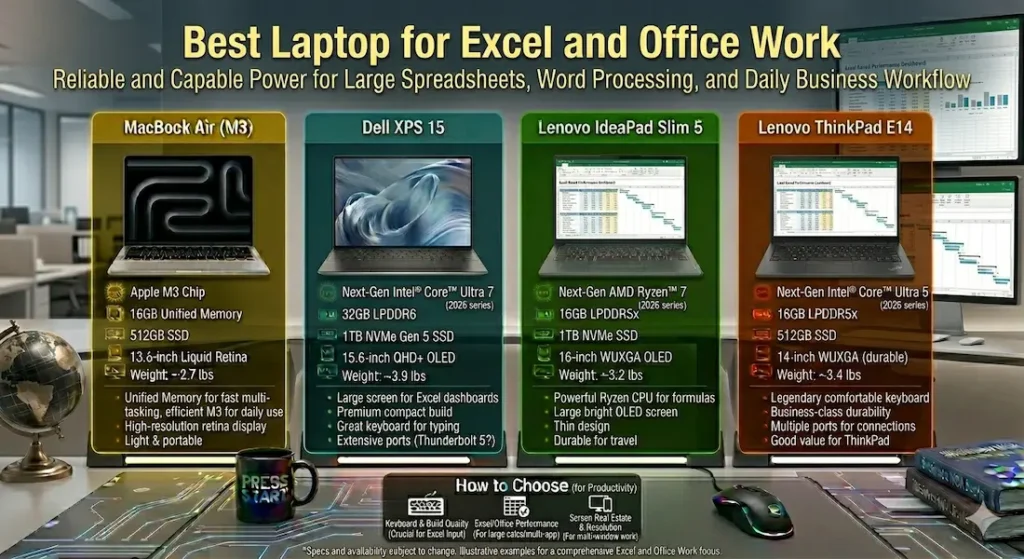
Real Daily Excel and Office Work Comparison
| Laptop | Spreadsheet Feel | Fan Behavior | Typing Comfort | Portability | Real Battery |
|---|---|---|---|---|---|
| MacBook Air | Very smooth | Completely silent | Excellent | Very easy | 12+ hours |
| Dell XPS 15 | Powerful | Noticeable under load | Very good | Medium weight | ~9 hours |
| Lenovo IdeaPad Slim 5 | Good | Moderate | Comfortable | Easy | ~8 hours |
| Lenovo ThinkPad E14 | Stable | Low | Outstanding | Medium | ~8 hours |
Best Laptop for Excel and Office Work — Full Reviews
1. MacBook Air (M-series) — Best Laptop for Excel and Office Work Overall
The MacBook Air earns the top position in the best laptop for Excel and office work category through the daily experience that productivity professionals actually value: a machine that handles the full office workload without becoming the thing you manage alongside the work itself.
What real Excel and office sessions look like on this machine
I ran the MacBook Air through a representative financial professional workload: a multi-sheet Excel model with cross-referencing formulas and conditional formatting running simultaneously with Outlook, Chrome with eight browser tabs, PowerPoint open for a deck under revision, and a Zoom call mid-afternoon. This is a standard Thursday for most office professionals — nothing unusual.
Large Excel files opened fast. Switching between sheets with active formulas stayed responsive. Scrolling through large datasets didn’t produce the hesitation that underpowered machines show when formula recalculations trigger. The full office tool stack ran concurrently without the system flagging.
The silence is the specification that matters most specifically for office work. No fan noise during presentations. No fan noise during client Zoom calls. In a meeting room where every sound registers, or a home office where your video call audio needs to stay clean, a completely silent machine is a daily professional advantage. The best quiet laptop for Excel and office meetings isn’t a preference — it’s a professional tool quality.
Battery delivering 12+ hours of real mixed office use means a full workday plus evening catch-up without charger planning. For professionals who work from home offices, travel to client sites, and work from cafés between meetings, this endurance eliminates the daily logistics of outlet management.
The check every buyer needs to make
macOS doesn’t run all Windows-specific software. Some financial modeling platforms, specific corporate IT environments, and certain industry tools remain Windows-dependent. Verify your complete software stack before committing. This is the check that prevents the most common MacBook Air regret among office professionals.
Pros:
- Completely silent — no fan noise during presentations, calls, or office environments
- All-day battery that covers the full professional workday without charger anxiety
- Smooth concurrent performance across Excel, presentations, email, and browser tools
- Lightweight carry that stops accumulating as daily physical friction
Cons:
- macOS compatibility check required for Windows-specific office tools
- Limited ports require adapter for full peripheral connectivity
- RAM and storage fixed at purchase — configure for four-year needs upfront
Verdict: For most office professionals and finance workers asking about the best laptop for Excel and office work, the MacBook Air is the recommendation that holds up across years of daily professional use.
Check Price Now2. Dell XPS 15 — Best Laptop for Excel Heavy Financial Modeling
When Excel work goes beyond standard reporting into genuine financial modeling — complex macros, large dataset pivots, multi-sheet models with thousands of formula interactions — the processor and display requirements change, and the Dell XPS 15 is the best laptop for Microsoft Excel financial modeling at this tier.
Where the stronger processor actually shows
Standard Excel work — reporting, data entry, vlookups across moderate datasets — runs on any modern machine. Heavy financial modeling is different. Running macros across large tables, refreshing complex pivot tables, processing data in Power Query — these operations benefit materially from a more capable processor. The Dell XPS 15 handles this heavier Excel workload with headroom that the MacBook Air and IdeaPad Slim 5 don’t consistently provide under equivalent demand.
The large 15.6-inch display is a practical spreadsheet advantage. More columns visible simultaneously, less scrolling through large models, the ability to keep formula bars and data ranges in view together — these reduce the cognitive load of navigating complex Excel work in ways that smaller screens genuinely can’t replicate.
For finance teams, analysts, and accountants whose daily Excel sessions involve genuinely large files and complex operations, the XPS 15’s combination of processing power and display real estate makes it the most capable laptop for data analysis and financial modeling in this comparison.
The honest tradeoffs
Fan noise becomes noticeable under heavy sustained workload. For professionals who work in quiet shared office environments, this is worth factoring in. Weight is the other tradeoff — the XPS 15 is heavier than the MacBook Air or IdeaPad Slim 5, and daily commuting with it is a different physical commitment.
Pros:
- Most powerful Excel processing for large datasets, macros, and financial models
- Large display reduces spreadsheet navigation friction for complex modeling work
- Premium build quality for professional office and client environments
Cons:
- Fan audible under heavy Excel workloads in quiet shared spaces
- Heavier daily carry than the MacBook Air for professionals who commute
- Premium pricing at the top of this comparison
Verdict: The right laptop for heavy Excel work and financial modeling for finance professionals whose daily spreadsheet work genuinely demands more processing power than a standard office machine provides.
View Best Deal3. Lenovo IdeaPad Slim 5 — Best Budget Laptop for Excel and Office Work
Not every office professional needs the processing headroom of the XPS 15 or the premium pricing of the MacBook Air. The Lenovo IdeaPad Slim 5 is the honest answer to the best affordable laptop for Excel and office work for professionals with budget constraints.
What standard office work looks like on this machine
Standard Excel reporting, PowerPoint presentations, Outlook email management, Zoom calls, and browser research — the day-to-day office workload that most professionals actually experience — runs reliably throughout standard session lengths. Files open promptly. Tab switching stays responsive. The SSD keeps application loading fast enough that waiting stops registering as a daily occurrence.
The keyboard is comfortable for sustained data entry and report writing. Typing fatigue across a long office day stays lower than on shallower keyboard alternatives in this price range.
Under heavier workloads — larger Excel files, multiple heavy applications running simultaneously, sustained concurrent demand — the machine’s limits become more noticeable. Fan activity increases and response times add hesitation. For professionals whose daily work stays within standard office boundaries, this ceiling isn’t regularly reached.
Pros:
- Most accessible price for capable everyday office laptop performance
- Fast SSD keeps standard Excel and office tool loading consistently quick
- Comfortable keyboard for daily data entry and writing-heavy roles
Cons:
- Performance shows limits sooner than MacBook Air under heavy concurrent workloads
- Display brightness average in bright office or window-adjacent environments
Verdict: The right affordable Excel laptop for office work for professionals with genuine budget constraints whose daily workload stays within standard office productivity boundaries.
Check latest deal4. Lenovo ThinkPad E14 — Best Laptop for Excel and Office Work for Heavy Typists
Office work involves more typing than most people account for before they start. Emails, reports, documentation, meeting notes, data entry — across a full workday, the keyboard under your fingers shapes the physical experience of the entire day.
The Lenovo ThinkPad E14 is the best laptop for office work and typing comfort in this comparison, and for professionals who type extensively throughout their workday, that distinction is felt from day one.
The ThinkPad keyboard in real office use
ThinkPad keyboards have a multi-decade professional reputation that isn’t marketing. Key travel is deeper and more deliberate than consumer alternatives. Tactile feedback per keypress is more consistent. After two hours of sustained data entry or report writing, hands are less fatigued than on most laptops at this price range.
For accountants entering data across large spreadsheets, analysts writing lengthy reports, executives managing heavy email correspondence — the keyboard quality compounds into real daily comfort in ways that spec comparisons never reveal.
Thermal management during office multitasking stays controlled. Fan stays quiet during standard concurrent workloads. The build quality communicates durability — the kind of chassis confidence that inspires trust during daily carry and doesn’t develop rattle or flex across months of professional use.
Pros:
- Best keyboard typing comfort for professionals who type extensively in this comparison
- Controlled thermals during sustained office multitasking
- Durable business-class build that holds up to years of daily professional carry
Cons:
- Slightly bulkier than the MacBook Air or IdeaPad Slim 5 for daily commuting
- Display average compared to the XPS 15 or MacBook Air
Verdict: The right durable laptop for office work and data entry for professionals who type all day and want keyboard comfort to remain consistent across years of daily professional use.
View Best DealWhat Office Work Actually Demands From a Laptop
Processor Efficiency for All-Day Excel Sessions
Excel performance under sustained use — large file manipulation, background formula recalculation, macro execution — depends on sustained CPU performance rather than short burst speed. A processor that runs efficiently across a four-hour modeling session performs better for office work than one that peaks briefly and then throttles under thermal pressure.
Efficient architectures — Apple M-series and AMD Ryzen U-series — maintain consistent performance across long office sessions with better thermal behavior than high-TDP alternatives. For the best processor for Excel and office laptop, prioritize sustained efficiency over benchmark peak speed.
16GB RAM — The Baseline for Real Office Multitasking
The full office tool stack — Excel with a large file, Outlook, Teams or Zoom, browser with multiple tabs, PowerPoint — fills 8GB RAM in a real daily session. The resulting swap activity creates the kind of slight hesitation that office professionals feel as “the computer being slow” and often attribute to the machine being old rather than being underconfigured.
16GB RAM keeps the full office workload running cleanly. Combined with SSD storage, it creates the daily experience where the machine responds at the speed your workflow demands rather than at the speed the hardware ceiling allows.
Common Mistakes Office Laptop Buyers Make
Buying heavy gaming laptops for office use. Weight, battery drain, and fan noise all create daily friction that office work doesn’t require and benefits from avoiding.
Choosing 8GB RAM. Real office multitasking fills 8GB regularly. The hesitations that result show up most clearly during client presentations and deadline rushes.
Ignoring keyboard quality. Office professionals type thousands of words per workday. Keyboard comfort that holds across an eight-hour day is a productivity and ergonomic specification, not a preference.
Not verifying macOS compatibility before buying MacBook Air. Some corporate tools, financial platforms, and industry software remain Windows-only. One check before purchase prevents the most common expensive regret.
Frequently Asked Questions
Which is the best laptop for Excel and office work in 2026?
The MacBook Air (M-series) is the most consistently recommended best laptop for Excel and office work for silent operation, all-day battery, and smooth concurrent performance. For heavy financial modeling, the Dell XPS 15 is the stronger specialized choice.
Is 16GB RAM necessary for Excel work?
Yes — for any Excel use involving large datasets, macros, or multi-application concurrent sessions. 8GB handles small files adequately and creates hesitation once real professional workloads run simultaneously.
Do office laptops need dedicated graphics?
No — for standard Excel, PowerPoint, email, and browser-based office work. Integrated graphics handle all standard office tasks efficiently. Dedicated GPU only becomes relevant for heavy video or creative production.
Why does battery life matter for Excel and office laptops?
Office work happens beyond the desk. Client meetings, travel, working from café sessions, long conference days — consistent battery endurance removes charger dependency that limits where and how long productive sessions happen.
Final Recommendation
The best laptop for Excel and office work is the one that disappears into your workday — opening files quickly, running the full tool stack smoothly, staying silent during calls, and never making battery life a concern before 5pm.
After real office workload testing, the MacBook Air earns that description most completely. Silent operation, all-day battery, smooth Excel performance, and lightweight carry make it the machine that office professionals stop thinking about — which is exactly what any good daily work tool should achieve.
For heavy financial modeling, the Dell XPS 15 provides the processing power that complex Excel demands. For budget-conscious professionals, the Lenovo IdeaPad Slim 5 covers standard office work reliably. For professionals who type extensively, the ThinkPad E14 keyboard quality is worth every comparison.
Verify software compatibility. Target 16GB RAM. Prioritize battery and keyboard comfort. Those four decisions define the best laptop for Excel and office work experience more than any other specification.
About BestLaptopGuide.com: Our editorial team evaluates laptops through real office and productivity workflow testing — not manufacturer benchmarks. Recommendations updated regularly.
Disclosure: Some links are affiliate links. A small commission may be earned at no extra cost to you. This does not influence our recommendations.


