13 Inch vs 15 Inch Laptop for College in 2026 (What You Only Notice After Carrying It Every Day)
Author: Marcus Hale | Reading Time: 11 min
Most students pick their college laptop based on processor and RAM. Size feels secondary — almost like an aesthetic preference rather than a practical one.
That perspective usually lasts about three weeks.
Then you’re walking across campus with the machine in your backpack for the fourth time that day, and suddenly the weight you dismissed during the purchase feels very real on your shoulder. Or you’re in a lecture hall at a small fold-down desk, trying to fit a 15-inch laptop while opening notes and slides simultaneously, and the machine that seemed perfect at home is now an awkward puzzle.
I’ve watched both scenarios play out. A student last semester had to physically shift sideways in a lecture seat to angle his 15-inch laptop so it didn’t hang off the desk edge. The week before, a student squinted at her 13-inch screen trying to read lecture slides while her notes document took up most of the display. Both were annoyed. Both could have chosen differently.
Laptops under $800 for students
The 13 inch vs 15 inch laptop for college decision isn’t really about specs. It’s about what your actual college day looks like — how much you move, what you’re doing when you sit down, and which frustration you’re more willing to live with.
Table of Contents
Quick Decision Framework
Choose 13-inch if: You move between multiple locations throughout your college day and portability is the daily priority.
Choose 15-inch if: You primarily work from a fixed location and need screen space for multitasking, coding, or design work.
The honest middle answer: Most students underestimate daily carry weight and overestimate how often they actually need the extra screen. When in doubt, 13-inch wins for four-year sustainability.
13 Inch vs 15 Inch Laptop for College — Real Situation Comparison
| Daily Situation | 13-Inch Experience | 15-Inch Experience |
|---|---|---|
| Carrying between classes | Easy, barely noticed | Noticeable by afternoon |
| Classroom desk space | Fits anywhere comfortably | Sometimes uncomfortably tight |
| Multitasking with multiple windows | Limited, more window switching | Comfortable side-by-side |
| Watching lecture recordings | Acceptable | Noticeably better |
| Battery during a full class day | Slightly better | Slightly shorter |
| Travel or commuting | Ideal | Bulkier and heavier |
| Long study sessions at a desk | Fine but slightly cramped | More comfortable overall |
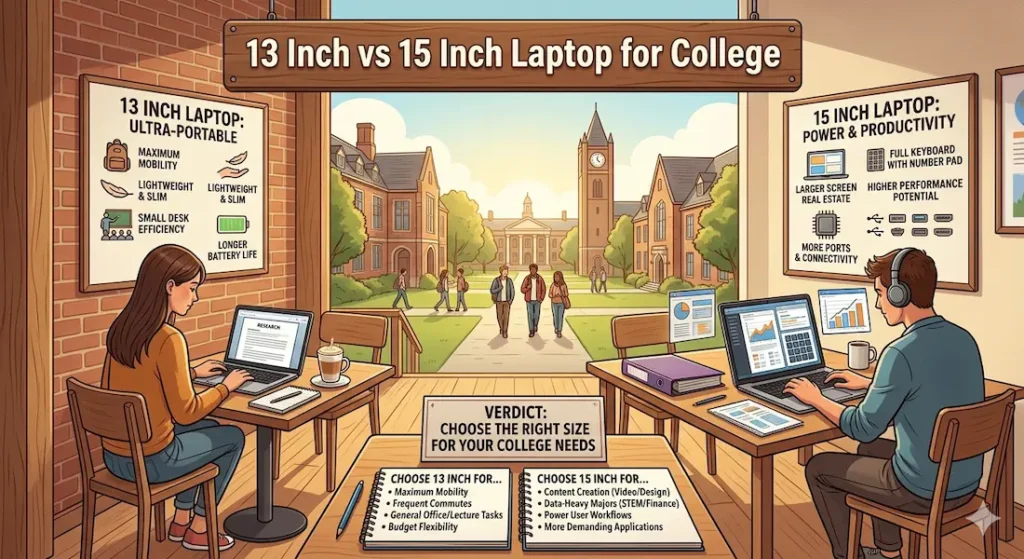
13-Inch Laptops for College — The Full Honest Assessment
The First Thing You Notice Is What Doesn’t Bother You
Students with 13-inch laptops rarely complain about carrying them. That’s the clearest observation from watching both groups across a semester. The machine slides into a bag without shifting the center of gravity noticeably. It comes out in a coffee shop, a library table, or a campus bench without requiring setup consideration. It disappears when you’re focused on something else.
That invisibility is the core argument for the 13 inch laptop for college students who move constantly. The campus isn’t a single building. It’s morning lecture in one hall, office hours in a different building, lunch in the student center, afternoon lab across campus, library session in the evening. On that kind of day, carry weight accumulates — and the difference between a 2.8-pound 13-inch machine and a 4.5-pound 15-inch one is felt by 2pm.
Where 13-Inch Starts Showing Limits
The screen constraint becomes noticeable during specific work patterns. Open a lecture PDF alongside notes in one window and a browser tab in another, and the 13-inch display requires more context-switching than a larger screen. You’ll find yourself minimizing and maximizing windows more often than you want to when working through research-heavy assignments or coursework that requires referencing multiple sources simultaneously.
For 13 inch vs 15 inch laptop for coding students specifically, the narrower screen width means less visible code per line and more horizontal scrolling. Not a dealbreaker for introductory programming, but a daily friction point for students in intensive development courses.
Laptops for computer science students
Long typing sessions on 13-inch keyboards can produce more fatigue than equivalent sessions on 15-inch models. The keyboard decks are slightly smaller, key spacing is slightly tighter, and palm rests give less room. Over a ninety-minute essay-writing session, this difference is felt rather than dramatic.
Thermal reality: Smaller chassis means less internal space for cooling. 13-inch machines tend to reach thermal limits faster under sustained workload than equivalent 15-inch machines. Fans spin earlier, bottom surfaces warm faster. For light academic use, this doesn’t matter. For sustained compilation or video rendering, it does.
Who Should Choose 13-Inch
- Students who move between multiple locations throughout every day
- Commuters who take public transit with their laptop daily
- Students in programs with lighter concurrent tool requirements
- Anyone who will carry the machine six or more hours per day
Pros:
- Lightweight carry that stops registering as a daily physical factor
- Fits classroom desks, café tables, and small study spaces without adjustment
- Better battery behavior under equivalent workloads due to smaller display power draw
- Less physical fatigue over a full commuting day
Cons:
- Limited screen space requires more window switching during multitasking
- Keyboard slightly cramped during extended writing or coding sessions
- Reaches thermal limits sooner under sustained heavy workloads
15-Inch Laptops for College — The Full Honest Assessment
The Screen Space Difference Is Real and Daily
Students working on 15-inch laptops in desk environments are noticeably less frustrated during research and multitasking sessions. Having lecture slides open on one side of the screen and notes on the other — without either being squeezed below comfortable reading size — is a qualitative daily difference in study session efficiency.
For the 13 inch vs 15 inch laptop for college engineering students and CS students specifically, the larger display pays dividends in every coding session. More code visible per scroll, wider terminal windows, the ability to keep documentation and editor side by side at readable sizes — these reduce the cognitive friction of development work in a way that becomes obvious after a week.
15 inch vs 13 inch laptop for college multitasking is where the size advantage most clearly matters. Running a spreadsheet alongside a research document alongside a reference browser tab on a 15-inch screen is comfortable. The same setup on a 13-inch screen requires deliberate window management that interrupts workflow.
The Carry Weight Reality
The 15-inch argument breaks down when you add up the carries across a full college day. Most 15-inch laptops weigh between 4 and 5 pounds. Add a power brick, charger cable, textbook, and personal items, and a college bag becomes something you notice carrying rather than forget you’re carrying.
This compounds across a semester. By month two, students with heavy bags start making decisions — leaving the laptop home when they think they won’t need it, skipping library sessions because it’s not worth the carry, routing their day differently to minimize laptop movement. That behavioral adaptation is the invisible cost of a heavier machine that the initial purchase decision doesn’t account for.
Is the 15 inch laptop too big for college daily carry? For students with very active, mobile campus lives — yes, often. For students who primarily move between dorm and a nearby classroom building and work at a desk most of the day — not necessarily.
Who Should Choose 15-Inch
- Students who work primarily from a fixed desk environment at home or in the library
- Engineering, CS, and design students who need screen space for development and creative work
- MBA students and business majors doing heavy Excel and presentation work
- Students who carry their laptop to one or two locations per day rather than five or six
Pros:
- Screen space that handles real multitasking without constant window management
- Better thermal management for sustained heavy workloads
- More comfortable for extended desk sessions with multiple active applications
- Better viewing experience for lecture recordings and video content
Cons:
- Heavier carry that accumulates as daily physical strain over a full campus day
- Less flexible in tight classroom desk spaces and small café tables
- Slightly shorter battery life under equivalent workloads due to larger display
13 Inch vs 15 Inch Laptop for College — How to Actually Decide
This is the most practical framing for the 13 inch vs 15 inch laptop for college which is better question:
How many locations do you move between on a typical class day?
If the answer is three or more — different buildings, multiple campus areas, commute involved — 13-inch will serve you better across four years. The portability advantage compounds daily in ways that feel small initially and significant at the end of the semester.
If the answer is one or two — dorm to classroom and back — 15-inch will give you better working conditions without the carry burden being a daily issue.
What kind of work defines your major?
Coding, design, financial modeling, and research-heavy coursework genuinely benefit from 15-inch screen real estate. Note-taking, writing-heavy coursework, and standard productivity work can be done comfortably on 13-inch without meaningful sacrifice.
What Matters More Than Screen Size
The 13 inch vs 15 inch laptop for college debate often overshadows the specifications that actually determine daily performance — regardless of screen size.
16GB RAM is the baseline for real college multitasking in 2026. Chrome tabs, active applications, background processes, and communication tools fill 8GB in standard academic sessions. Both 13-inch and 15-inch laptops should meet this minimum.
SSD storage transforms the daily experience on either screen size. Fast application loading, quick file access, responsive system behavior — these are SSD characteristics that matter every session regardless of display dimensions.
Battery life intersects with screen size in a practical way: larger screens drain battery faster. For students who move constantly and can’t guarantee outlet access, 13-inch machines with efficient processors typically provide better real-world battery endurance than equivalent 15-inch configurations.
Common Mistakes Students Make in This Decision
Choosing size based on how it looks rather than how their day works. A 15-inch laptop looks capable and professional. If your day involves six location changes, that capability becomes a burden.
Underestimating how heavy 4+ pounds feels at hour six. Every college student who carries a 15-inch machine across a dense campus schedule learns this within a month. Weight specifications are abstract until they’re not.
Buying small for heavy work out of portability preference. If your program genuinely demands sustained coding or design work, a 13-inch screen will create daily friction that a 15-inch would have avoided.
Not thinking about desk space at their actual school. Some campus lecture halls have desk spaces that barely accommodate a standard notebook. A 15-inch laptop fills them completely and leaves no room for handwritten notes alongside.
Frequently Asked Questions
Is a 13-inch laptop enough for college?
For most standard college work — note-taking, browsing, writing assignments, video calls, and standard productivity — yes. The 13 inch vs 15 inch laptop for college choice only materially affects students whose coursework involves heavy multitasking, coding, or design work where screen real estate directly impacts workflow.
Is a 15-inch laptop too big for college daily carry?
For students with active, multi-location campus days, yes — the weight accumulates into daily friction. For students who primarily work from a fixed desk, the size is not a practical problem and the screen benefit is real.
Which laptop size is best for college students?
It depends entirely on how you spend your day. The 13 inch vs 15 inch laptop for college answer is: 13-inch for mobile students who prioritize carry comfort, 15-inch for desk-anchored students who need screen space for their coursework.
Should engineering students choose 13 or 15 inch?
The 13 inch vs 15 inch laptop for college engineering students answer generally favors 15-inch — development environments, circuit diagrams, and technical documentation all benefit from larger display real estate. If the program involves frequent field or lab movement, some engineers find 14-inch a practical compromise.
Final Recommendation
The 13 inch vs 15 inch laptop for college decision simplifies once you describe your actual campus day rather than your ideal performance spec.
If you’re moving constantly — multiple buildings, a commute, unpredictable working locations throughout the day — the 13-inch laptop will still feel like the right choice six months in. The weight you save accumulates into daily freedom that’s hard to fully appreciate before experiencing it.
If you work primarily at a desk and your coursework involves genuine multitasking demands — coding, design, financial modeling, research-intensive programs — the 15-inch laptop gives you the working conditions that match the work. The carry inconvenience is manageable when you’re not carrying it six times per day.
For most undecided students: think honestly about your daily movement pattern, not your ideal performance vision. That answer will serve you better across four years than any benchmark comparison.
About BestLaptopGuide.com: Our editorial team evaluates laptops through real student usage observations and extended daily testing — not manufacturer benchmarks. Recommendations updated regularly.
Disclosure: Some links on this page are affiliate links. A small commission may be earned at no extra cost to you. This does not influence our recommendations.


