Is 512GB SSD Enough for College Students in 2026? (Honest Answer After Real Observation)
Author: Marcus Hale | Reading Time: 11 min
The storage warning usually appears around month seven.
You’re not doing anything unusual. You’ve installed the standard software for your classes, downloaded lecture recordings, saved a semester’s worth of project files, and kept the media files you actually use. Normal college stuff. Then one afternoon your laptop throws up a storage warning, and you realize the 512GB that seemed enormous in August is now 87% full in March.
I’ve watched this happen across multiple students over multiple semesters. Not because they were being careless — because the math of college computing adds up in ways that aren’t obvious until they already have.
Laptops under $800 for students
So: is 512GB SSD enough for college students in 2026?
The answer is yes for most students and no for a specific subset — and the line between those two groups is more specific than “light users” vs “heavy users.” This guide explains exactly where that line falls, what fills storage faster than students expect, and how to make the right call before buying.
Table of Contents
What Actually Fills Your Storage (Faster Than You’d Expect)
Before the yes/no answer, it’s worth understanding what the math actually looks like — because most students buying a laptop don’t think through storage consumption in the concrete way it deserves.
| What’s Taking Space | Rough Size |
|---|---|
| Windows 11 + cumulative updates | 70–100GB |
| Standard college applications (Office, browser, communication tools) | 20–50GB |
| Course notes, PDFs, saved readings | 10–30GB |
| Coding projects, repos, and dependencies | 20–60GB |
| Downloaded lecture recordings | 30–80GB |
| Media files and personal downloads | 50–150GB |
Add those up conservatively and you’re at 200–470GB before anything unusual. The midpoints land you solidly near full on a 512GB drive by the end of a typical first year of active college use.
None of those categories are unusual. That’s the thing. These are the normal files a normal college student accumulates through a normal year.
Is 512GB SSD Enough for College Students in 2026? — The Direct Answer
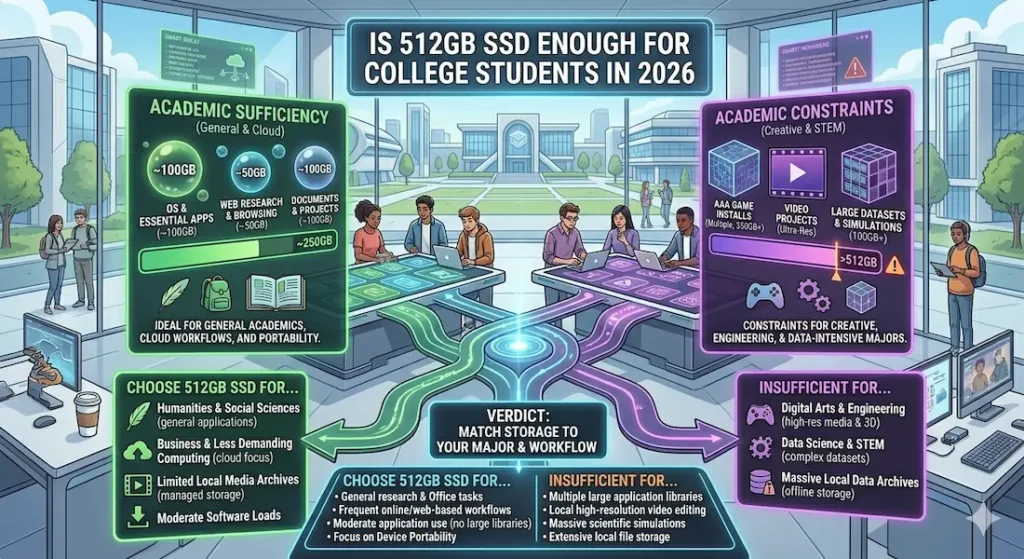
Yes — for most students. A student doing coursework, note-taking, web browsing, video calls, and standard academic productivity can manage 512GB comfortably, especially with active cloud storage habits and regular cleanup.
No — for a specific group. Students in programs that involve video editing, graphic design, large dataset work, or multiple large software environments (Android Studio, game engines, simulation software) will feel the 512GB ceiling within a semester or two.
The useful framing isn’t “is 512GB enough” — it’s “how much mental overhead am I willing to spend managing storage?” That question has a different answer depending on how you work and what program you’re in.
Where 512GB Works Comfortably for College Students
For the majority of college programs, 512GB SSD is enough for college students without creating real daily frustration. Here’s what that looks like in practice.
General academics (liberal arts, business, education, social sciences): Notes, documents, presentations, PDFs, browser-based research, email, video calls. Storage consumption stays predictable and manageable. 512GB covers four years of this workload with room to spare if cloud storage handles larger files.
Computer science and programming: This surprises some students, but most CS coursework doesn’t consume enormous storage. Python environments, JavaScript projects, web development repos — even with multiple active projects, typical CS coursework stays within 512GB comfortably. Is 512GB SSD enough for computer science students? For most undergraduate programs, yes — with active repo management and cloud backups.
Online classes and standard assignments: Is 512GB enough for online classes and assignments? Easily. Streaming replaces most downloaded content, and standard academic files are much smaller than most students anticipate. Cloud-based assignment tools (Google Docs, cloud storage platforms) keep local footprint minimal.
Where 512GB Starts Feeling Tight
There’s a specific set of workflows where 512GB SSD for college students creates real friction — not theoretical friction, but the kind where you’re declining software installations because you don’t have space, or choosing what to delete before every new project.
Video editing: Is 512GB enough for video editing students? No — not comfortably. A single project with raw footage, working files, and exports can consume 20–50GB. Once you have two or three active projects plus your standard course files, 512GB creates constant management overhead. 1TB is the practical minimum for any student who edits video regularly.
Graphic design: Large project files, asset libraries, font collections, and software requirements (Adobe Creative Cloud alone installs 30–50GB for a standard design toolkit) push storage consumption well past what 512GB manages gracefully. Is 512GB SSD enough for graphic design students? For casual users, borderline. For students who design intensively, genuinely limiting.
Data science and machine learning: Large datasets, trained model weights, Jupyter notebooks with output caches, and multiple Python environments add up to storage consumption that surprises many data science students by their second semester. 512GB becomes a real constraint for this workload.
Engineering simulation and CAD: Simulation software, large technical drawing files, and the specific engineering tools many programs require can fill storage faster than general-purpose academic work. Is 512GB SSD enough for engineering students? For electrical and software engineering, typically yes. For mechanical and civil with heavy CAD workflows, more challenging.
512GB vs 1TB SSD for College Students — The Real Difference
The spec difference is simple: double the storage. The daily experience difference is more subtle and more meaningful.
| Storage | Daily Experience |
|---|---|
| 512GB | You think about storage occasionally — aware of it, manage it |
| 1TB | You almost never think about storage — it stays in the background |
Should students buy 512GB or 1TB? That question resolves clearly once you answer: how much mental overhead do you want to spend on storage management across four years?
512GB works for most students because most students are willing to use cloud storage actively, delete downloaded files they’ve finished with, and do occasional cleanup. If that describes your approach, 512GB saves money without creating meaningful daily friction.
1TB works for students who want storage to be completely invisible. No choosing between software installs, no cleanup sessions before large projects, no calculating whether you can download that lecture recording. If you want the machine to disappear into your work rather than requiring periodic maintenance attention, 1TB is worth the additional spend.
Real Laptops with 512GB SSD for College Students — What the Experience Actually Looks Like
MacBook Air (M-series, 512GB)
The MacBook Air’s efficiency means you don’t notice storage constraints in the same way initially — the machine runs so smoothly that other friction points don’t exist to remind you storage is becoming an issue. But once media files and creative project work enter the picture, active storage management becomes part of the ownership pattern.
For students staying within standard academic work, the 512GB MacBook Air is the best laptop with 512GB SSD for students that provides that experience cleanly. For students in creative or data-heavy programs, the 1TB configuration is worth the upgrade at purchase — because RAM and storage are fixed on this machine and can’t be expanded later.
Check Price NowDell Inspiron (512GB)
More flexible upgrade path than the MacBook. Handles standard college workloads well at 512GB. A practical budget laptop with 512GB SSD for college students that covers most undergraduate program requirements without requiring constant storage management during lighter academic years.
View Best DealLenovo IdeaPad Slim 3 (512GB)
Storage pressure appears relatively quickly here — partly because the machine’s performance characteristics mean system processes and swap activity can consume more of the available storage footprint than on more efficient chips. An affordable laptop with 512GB SSD for light use, but not comfortable for students with growing project and software demands.
Check latest dealASUS VivoBook 15 (512GB)
Faster performance means you feel storage limits later rather than earlier, but they still arrive. Good choice for general students. The 512GB configuration is comfortable for standard academic workloads and starts requiring management once creative or development projects scale up.
View Best DealRAM and SSD Together — The Relationship Students Miss
Is 512GB SSD enough for college students in 2026 is often the right question asked without the right context. Storage capacity and RAM configuration interact in ways that change how the 512GB experience actually feels.
A machine with 8GB RAM and 512GB SSD uses storage as overflow memory through swap files, which both occupies storage space and creates performance drag as the drive fills. A machine with 16GB RAM and 512GB SSD keeps more active data in memory, reduces swap activity, and effectively makes the 512GB stretch further.
How much SSD storage is enough for students partly depends on how much RAM the machine has. If you’re configuring a new laptop: 16GB RAM + 512GB SSD is a better combination than 8GB RAM + 1TB SSD for most student workloads.
How Long Will 512GB Last Through College?
Based on real student usage patterns across different programs:
Light users (mostly text-based coursework, cloud-native tools, streaming rather than downloading): 3–4 years comfortably.
Moderate users (standard coding projects, some downloaded media, typical academic software): 2–3 years before storage management becomes a regular habit.
Heavy users (video editing, design, data science, gaming alongside academics): 1–2 years before 512GB creates real daily friction.
Is 512GB enough for 4 years of college? Yes — for the first two groups. For heavy users, plan for either a 1TB upgrade at purchase or an external drive strategy from the start.
Cloud Storage — The Strategy That Makes 512GB Work Longer
Every student with 512GB should have a deliberate cloud storage strategy. This is the habit that extends 512GB SSD for college students from adequate to genuinely comfortable:
- Store completed projects and assignments in Google Drive or OneDrive rather than locally
- Stream lecture recordings rather than downloading when connection allows
- Keep only active projects on local storage
- Archive completed semester files to cloud at semester end
Students who do this consistently rarely hit storage walls with 512GB. Students who download everything and never clean up hit walls within a year regardless of major.
Frequently Asked Questions
Is 512GB SSD enough for college students in 2026?
Yes for most college students doing standard academic work — coursework, coding, research, and general productivity. Students in video editing, graphic design, data science, or any storage-intensive program will benefit from 1TB.
Should I buy 512GB or 1TB for college?
If budget is genuinely constrained: 512GB with active cloud storage habits works. If you want storage to stay invisible and never require management attention: 1TB is the practical recommendation, especially for MacBook Air where storage can’t be upgraded later.
Is 512GB enough for engineering college students?
Depends on the engineering discipline. Software and electrical engineering: typically yes. Mechanical and civil with heavy CAD and simulation workloads: more challenging, 1TB is safer.
Can I survive college with 512GB SSD?
Yes — many students do, and comfortably. Active cloud storage use, periodic cleanup, and streaming rather than downloading are the three habits that make 512GB work across a full four-year program.
Final Answer
Is 512GB SSD enough for college students?
For most students: yes. Standard academic work, programming coursework, online classes, and general college productivity fit within 512GB with reasonable storage habits.
For students in video editing, design, data science, or any field where large file creation is part of the workflow: no — 512GB creates friction that compounds across semesters.
The honest upgrade recommendation is 1TB — not because most students need it, but because the mental overhead of never thinking about storage is worth the price difference for four years of college use. If that upgrade is available at purchase and within budget, take it.
If 512GB is the budget reality: use cloud storage actively, be intentional about local downloads, and you’ll make it work.
About BestLaptopGuide.com: Our editorial team evaluates real student usage patterns across multiple semesters — not manufacturer claims. Recommendations updated regularly.
Disclosure: Some links are affiliate links. A small commission may be earned at no extra cost to you. This does not influence our recommendations.


