Last Updated: May 2026 | Author: Marcus Hale | Reading Time: 11 min
The Chromebook vs Windows laptop for students debate has a frustrating reputation for producing vague, hedge-everything answers. “It depends on your needs.” “Both have advantages.” “Consider your use case.”
That’s not useful when you’re trying to make a $300–$700 purchase decision before the semester starts.
I’ve watched students use both across programs ranging from communications and business to computer science and engineering. The honest answer to the Chromebook vs Windows laptop for students question is specific, not hedged — and it changes significantly based on what program you’re in and what tools your coursework requires.
Here’s the direct version.
Table of Contents
Quick Decision Framework — Chromebook vs Windows Laptop for Students
| Situation | Better Choice |
|---|---|
| General academics, Google Workspace, browser-based tools | Chromebook |
| STEM, engineering, programming with specific software | Windows |
| Budget is tight, light coursework | Chromebook |
| School requires Microsoft Office desktop apps | Windows |
| Long battery and campus mobility are top priority | Chromebook |
| Data science, video editing, local software required | Windows |
| K-12 or community college general use | Chromebook |
| Four-year university with technical program | Windows |
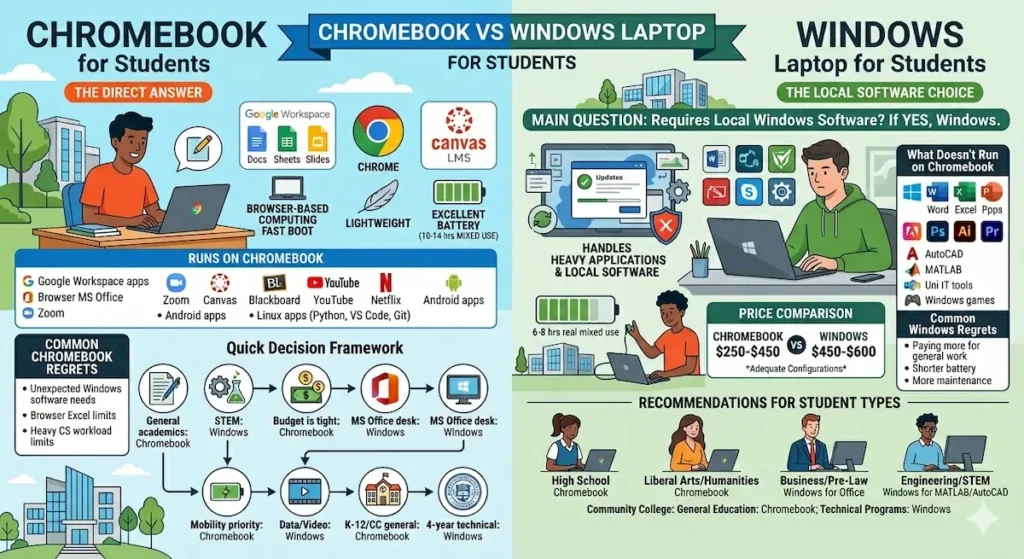
The Chromebook vs Windows laptop for students decision is mostly settled by one question: does your coursework require software that runs locally on Windows? If yes, Windows. If no, Chromebook is worth serious consideration.
What Is a Chromebook Actually Good At?
Before comparing Chromebook vs Windows for students, being clear about what Chromebooks genuinely do well prevents buying regret in both directions.
Chromebooks run ChromeOS — Google’s operating system built around browser-based computing. Everything happens in Chrome or through Android apps. Google Docs, Sheets, Slides, Gmail, Google Meet, Canvas LMS, Blackboard in a browser, YouTube, Netflix, Zoom in a browser — all of these run flawlessly on a Chromebook.
For students whose entire academic workflow lives in Google Workspace and browser-based tools, a Chromebook is genuinely excellent. Fast boot, lightweight, excellent battery life, and lower prices than equivalent Windows machines make the Chromebook vs Windows laptop for students comparison look very favorable for Chromebook when the workload fits.
Dell vs HP Laptop – Which Brand Is More Reliable
The limitation is hard and real: Chromebooks don’t run traditional Windows software. No Windows version of Adobe Photoshop. No AutoCAD. No MATLAB. No local development environments for most languages without workarounds. No Microsoft Office desktop apps (the browser version of Office has limitations that matter for complex documents).
If you know your program runs entirely in a browser, Chromebook competes strongly in the Chromebook vs Windows laptop comparison and often wins on battery and price.
Buy HP ChromebookChromebook vs Windows Laptop for Students — Performance in Real Use
For Everyday Academic Tasks
For note-taking, web research, essay writing in Google Docs, video calls, LMS platforms, and lecture streaming — the Chromebook vs Windows laptop performance comparison is closer than most people expect. A $350 Chromebook handles these tasks as smoothly or smoother than a $350 Windows laptop, partly because ChromeOS is a lighter operating system that doesn’t carry Windows’ background process overhead.
A $350 Windows machine is competing against Windows itself — background updates, antivirus, system processes — while running on modest hardware. A $350 Chromebook runs ChromeOS, which is designed specifically to run efficiently on modest hardware. The result is that budget Chromebooks often feel faster and more responsive for browser-based work than budget Windows machines at the same price.
For Technical and Programming Coursework
This is where the Chromebook vs Windows laptop for computer science students comparison becomes most consequential.
Chromebooks can run Linux apps through the built-in Linux development environment — which gives access to Python, VS Code, Git, and command-line tools. For students doing general Python scripting, web development fundamentals, and command-line programming, a Chromebook with Linux enabled is a functional development environment.
The limitation is resource-intensive development tools. Android Studio, IntelliJ IDEA with large projects, Docker containers, virtual machines, and local database environments push Chromebook hardware harder than most Chromebook configurations handle comfortably. For CS programs beyond introductory coursework — junior and senior level projects, capstone requirements, internship-level development tools — a Windows machine with 16GB RAM and a Ryzen 5 or Core i5 handles the workload more reliably.
Best Laptop for Excel and Office Work
For the Chromebook vs Windows laptop for programming students comparison: Chromebook with Linux covers introductory programming; Windows handles the full undergraduate CS curriculum without configuration workarounds.
Chromebook vs Windows Laptop Battery Life
This is where Chromebook vs Windows laptop battery life comparison tilts clearly toward Chromebook for most configurations.
Chromebooks with efficient ARM processors — most consumer models in 2026 — consistently deliver 10 to 14 hours of real mixed academic use. The combination of efficient hardware and a lightweight operating system produces battery endurance that budget Windows machines rarely match.
A Windows laptop at the same price point typically delivers 6 to 8 hours of real mixed use — less because Windows background processes and heavier hardware demands consume more power under equivalent workloads.
For students with demanding all-day campus schedules — back-to-back classes from 8am to 5pm, field work, all-day seminars — the battery advantage of a Chromebook in the Chromebook vs Windows comparison is a daily practical difference that matters more than spec comparisons suggest.
Chromebook vs Windows Laptop for Students — Software Compatibility
Software compatibility is the most important factor in the Chromebook vs Windows laptop for students decision, and it’s the one most students under-research before buying.
What runs on Chromebook:
- All Google Workspace apps (Docs, Sheets, Slides, Gmail, Meet, Drive)
- Browser versions of Microsoft Office (with limitations on complex formatting)
- Zoom, Canvas, Blackboard, most LMS platforms in browser
- YouTube, Netflix, Spotify, all streaming platforms
- Android apps from Google Play
- Linux apps through the built-in Linux environment (Python, VS Code, Git, terminal tools)
What doesn’t run on Chromebook:
- Microsoft Office desktop applications (Word, Excel, PowerPoint locally installed versions)
- Adobe Creative Suite (Photoshop, Illustrator, Premiere — desktop versions)
- AutoCAD, SolidWorks, MATLAB, and most engineering software
- Most Windows-specific university IT tools
- Local Windows game installations
For a student asking is a Chromebook good enough for college, the answer is yes — if their entire program runs in a browser or Google Workspace. It’s genuinely not adequate for programs requiring any of the software in the second list.
This is the one check that must happen before buying: email your department’s IT office or your advisor and ask which software your program specifically requires. Programs that require Microsoft Office desktop (not browser), MATLAB, AutoCAD, Adobe CC desktop, or any Windows-specific tool require Windows. If nothing on that list appears in your requirements, Chromebook deserves serious consideration.
Chromebook vs Windows Laptop Price Comparison
The Chromebook vs Windows laptop price comparison generally favors Chromebook for equivalent functional performance on browser-based workloads.
A capable Chromebook for student use — Acer Chromebook Spin, HP Chromebook x360, Lenovo Chromebook Flex — runs $250–$450 at configurations that handle full student workflows comfortably.
A capable Windows laptop for equivalent general student use — Acer Aspire 5, Lenovo IdeaPad Slim 5 — starts at $450–$600 for configurations that stay comfortable across a full semester of real concurrent workload.
The $150–$200 price gap is real. For students on tight budgets who confirm their program is fully browser-compatible, the Chromebook vs Windows laptop for budget students comparison makes Chromebook an attractive option.
Best Laptop Under $500 for High School Students
The caveat: if Chromebook’s software limitations mean you need to buy a Windows machine in semester two when a required course introduces Windows-only software, the initial savings are erased and then some. Research your program requirements first.
Chromebook vs Windows Laptop for Specific Student Types
For High School Students
The Chromebook vs Windows laptop for high school students comparison generally favors Chromebook for students in standard academic tracks. Most high school coursework runs in Google Classroom, browser-based tools, and Google Workspace — exactly what Chromebook is optimized for. Battery endurance, lower price, and simpler maintenance make Chromebooks a strong practical choice for most high school use cases.
For Community College Students
For community college students in general education, liberal arts, business, or healthcare administration programs that use browser-based tools: Chromebook is a capable, budget-friendly option. For students in technical programs requiring Windows-specific software: Windows is necessary regardless of cost considerations.
For Liberal Arts and Humanities Students
The best Chromebook for college students in writing, history, communications, English, political science, and similar programs is a strong recommendation. These programs run almost entirely on word processing, browser research, LMS platforms, and email — the exact workload Chromebook handles excellently.
For Business and Pre-Law Students
The Microsoft Office dependency that business and pre-law programs often carry tilts the Chromebook vs Windows laptop for business students comparison toward Windows. Complex Excel financial models, detailed Word formatting for legal briefs, and PowerPoint presentations for business courses often require the full desktop versions of Office apps that browser-based alternatives don’t fully replicate.
For Engineering and STEM Students
Chromebook vs Windows laptop for engineering students is not a close comparison — Windows is the clear choice. MATLAB, AutoCAD, SolidWorks, simulation environments, and most engineering department software require Windows without exception. Engineering students who buy Chromebooks typically replace them by sophomore year when technical coursework begins in earnest.
Buy Samsung ChromebookWhat Students Regret About Each Choice
Common Chromebook regrets:
- Discovering a required course uses Windows-only software after purchasing
- Finding that the browser version of Excel or Word doesn’t handle complex assignments correctly
- Running into limitations with Linux development environments under heavy CS workloads
- Feeling limited when internship tools or employer software requirements are Windows-specific
Common Windows regrets:
- Paying $200 more for general academic use that could have run fine on Chromebook
- Shorter battery life creating charger dependency on active campus days
- More system maintenance (updates, antivirus, startup management) compared to ChromeOS
The Chromebook vs Windows laptop for students regrets in both directions trace back to the same root cause: not checking software requirements before buying.
Frequently Asked Questions
Is a Chromebook good enough for college in 2026?
For students in programs that run entirely on browser-based tools and Google Workspace — yes, absolutely. For students with Windows-specific software requirements in their program: no, a Chromebook creates limitations that will require workarounds or replacement. The Chromebook vs Windows laptop for students answer depends entirely on your specific program’s software requirements.
Can a Chromebook run Microsoft Office?
Chromebooks run browser-based Microsoft 365 apps. These cover most standard document tasks. Complex Excel macros, advanced Word formatting, and specific PowerPoint features may not work correctly in the browser versions. Students in programs requiring full Office desktop functionality need Windows.
Is a Chromebook or Windows laptop better for college students on a budget?
For browser-compatible programs: Chromebook provides better performance-per-dollar at the budget tier. For programs requiring Windows software: the cheapest adequate Windows laptop is still the right choice — a Chromebook that can’t run required software isn’t a bargain at any price.
Can you do programming on a Chromebook?
Yes, with the Linux development environment. Python, JavaScript, HTML/CSS, VS Code, Git, and command-line tools all work. For resource-intensive development environments (Android Studio, Docker, virtual machines, large frameworks): a Windows machine with 16GB RAM handles these more reliably.
Final Recommendation
The Chromebook vs Windows laptop for students comparison ends with a clear answer once you’ve done one piece of research.
Choose Chromebook if: Your program’s coursework runs entirely in browser-based tools, Google Workspace, or apps available on ChromeOS. You’ll get better battery life, a lower price, and a simpler, faster daily experience for the workload you actually have.
Choose Windows if: Your program uses any software that requires Windows installation — Microsoft Office desktop, Adobe Creative Suite, engineering tools, development environments beyond basic Python and JavaScript, or any university IT tool with Windows requirements. There’s no workaround that makes Chromebook fully replace Windows for these use cases.
The email to your advisor or IT department confirming software requirements takes five minutes. It’s the most important step in the Chromebook vs Windows laptop for students decision — and the one most students skip.
Do that check first. The right answer follows from it clearly.
About BestLaptopGuide.com: Our editorial team evaluates laptops through real student usage testing across academic programs — not manufacturer benchmarks. Recommendations updated regularly.
Disclosure: Some links on this page are affiliate links. A small commission may be earned at no extra cost to you. This does not influence our recommendations.