Last Updated: April 2026 | Author: Marcus Hale | Reading Time: 10 min
The question of is 256GB SSD enough for college in 2026 comes up at two very specific moments.
The first is before you buy — you’re weighing a $50–$80 savings from dropping to 256GB and wondering if it’s a reasonable trade-off. The second is around week eight of your first semester, when your storage warning appears and you realize you haven’t done anything unusual — just installed the standard software, saved a semester’s worth of files, and downloaded a few lectures — and you’re already at 85% capacity.
Is 512GB SSD Enough for College Students in 2026?
I’ve watched both scenarios play out. The student who saved $60 on storage and spent $30 on an external drive by February because she’d run out of space entirely. The student who chose 256GB for a lightweight MacBook Air configuration and discovered that macOS, Xcode, and three months of coursework files consumed everything he had before spring break.
The honest answer to is 256GB SSD enough for college is: for some students, yes — but the conditions under which it works are narrower than most buyers realize going in, and the regret when it doesn’t is immediate and inconvenient.
Table of Contents
What You Actually Get From a 256GB SSD
Before the major-by-major breakdown, the math matters — because most students buying 256GB laptops don’t account for how little usable space they’re actually starting with.
| What Consumes Space Before Your Files | Rough Size |
|---|---|
| Windows 11 + system files + recovery partition | 50–70GB |
| Cumulative Windows updates (first year) | 15–25GB |
| Standard college applications (Office, browser, Zoom, etc.) | 15–30GB |
| System page file and hibernation file | 8–16GB |
| Total consumed before personal files | 88–141GB |
That leaves 115–168GB of usable space from a 256GB drive before you’ve saved a single assignment.
On macOS, the situation is similar — macOS Sequoia with system files and applications consumes 30–50GB, leaving 200–220GB starting space before personal files begin accumulating.
This is the number that matters when asking is 256GB SSD enough for college. Not 256GB total — the real starting space after the system and essential software have taken their share.
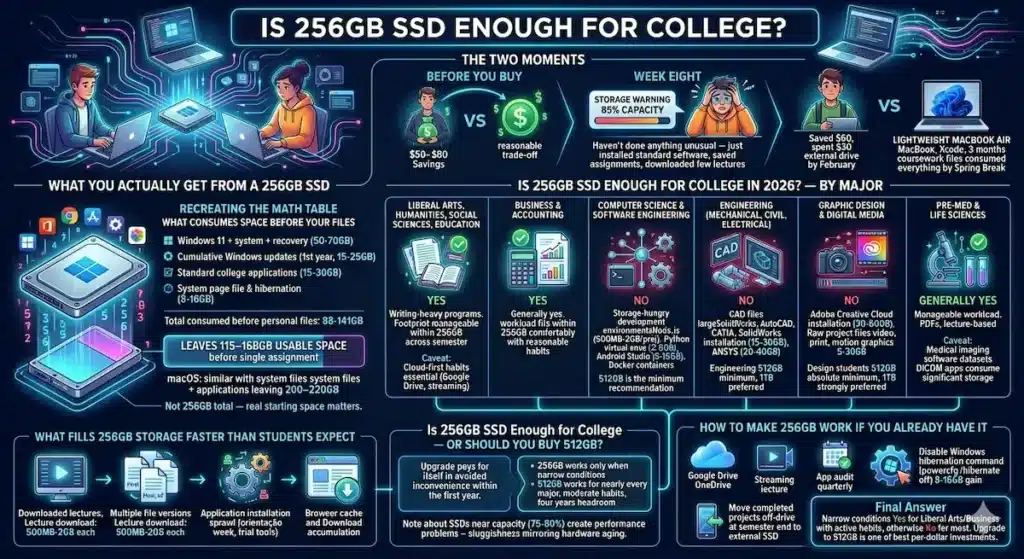
Is 256GB SSD Enough for College in 2026? — By Major
The right answer depends heavily on your program. Here’s the honest breakdown.
Liberal Arts, Humanities, Social Sciences, and Education
Is 256GB SSD enough for college students in writing-heavy programs? Yes — with active habits.
For students whose primary digital output is documents, research papers, PDFs, and browser-based work, the total file footprint is manageable within 256GB across a semester. A full year of Word documents, research PDFs, presentation files, and downloaded readings from a liberal arts program might consume 15–25GB of personal file space — well within what 256GB provides after system overhead.
The caveat is cloud-first habits. Students who stream rather than download lectures, store completed semester files in Google Drive rather than locally, and clean up their downloads folder monthly operate comfortably within 256GB. Students who download everything by default hit the wall faster than they expect.
Business and Accounting
Is 256GB SSD enough for business students? Generally yes, with the same caveat.
Business program software requirements — Microsoft Office, analysis tools, financial modeling software — are not storage-intensive. The workload fits within 256GB comfortably for students with reasonable file management habits.
Excel models, PowerPoint presentations, and case study files don’t consume significant storage individually. A full semester of business coursework might add 10–20GB of personal files.
Computer Science and Software Engineering
Is 256GB SSD enough for CS students? This is where the answer shifts toward no — and more quickly than most CS students anticipate.
Development environments are storage-hungry in ways that catch beginners off guard. Node.js projects generate node_modules directories that can reach 500MB to 2GB per project. Python virtual environments with data science libraries (NumPy, TensorFlow, PyTorch) consume 2–8GB each. Android Studio with SDK components uses 8–15GB. Docker container storage accumulates quickly with multiple active configurations.
A CS student finishing junior year with multiple active projects, several development environments, and standard coursework files could easily have 150–200GB consumed in personal files alone — completely filling a 256GB drive when combined with system overhead.
For CS students: 512GB is the minimum recommendation. 256GB creates real storage management friction within the first two semesters.
Engineering (Mechanical, Civil, Electrical)
Is 256GB SSD enough for engineering students? For most: no.
CAD files (SolidWorks, AutoCAD, CATIA) and simulation data are large. A complex SolidWorks assembly can be 200MB to 1GB per project. Simulation output files from ANSYS or MATLAB can reach multiple gigabytes per run. Add the software itself — SolidWorks installation is 15–30GB, ANSYS 20–40GB — and 256GB is consumed quickly.
Engineering students also accumulate lab reports, technical documentation, and simulation data across a full program. For engineering: 512GB is the minimum. 1TB is worth pursuing if budget allows.
Graphic Design and Digital Media
Is 256GB SSD enough for design students? Almost certainly not.
Adobe Creative Cloud installation for standard design tools (Photoshop, Illustrator, InDesign, Premiere, After Effects) consumes 30–60GB depending on which applications are installed. Raw project files for video editing, high-resolution print design, and motion graphics projects can each be 5–30GB. A full semester of design coursework generates personal file data that quickly exceeds what 256GB provides after system and application overhead.
For design students: 512GB absolute minimum. 1TB strongly preferred.
Pre-Med and Life Sciences
Is 256GB SSD enough for pre-med students? Generally yes for the academic workload, with one caveat.
Standard pre-med coursework — biology, chemistry, physics, medical terminology — is primarily document, PDF, and lecture-based. The file footprint is manageable within 256GB.
The caveat is medical imaging software. Some programs require DICOM viewing applications and sample datasets that consume significant storage. Check your program’s specific software requirements before assuming 256GB is adequate.
Buy Apple Macbook 256GBWhat Fills 256GB Storage Faster Than Students Expect
Understanding what creates the storage crunch helps both evaluate whether 256GB works and manage it if you have it.
Downloaded lecture recordings. A 90-minute lecture recording at standard university upload quality is 500MB to 2GB. Students who download lectures for offline review rather than streaming can add 20–40GB of video files per semester without realizing it.
Duplicate and version files. Assignment drafts saved as “Final_v2”, “Final_v3”, “Final_ACTUAL_FINAL” across a semester consume more space than students track. Version-controlled cloud storage eliminates this habit’s storage cost.
Application installation sprawl. Software installed during orientation week, a free trial that expired, course-specific tools for a single semester — these accumulate without being actively cleaned up. Students on 256GB drives who’ve never audited their installed applications often find 15–30GB of unused software sitting in their Applications or Program Files folder.
Browser cache and download accumulation. A full academic year of web browsing generates significant cache data. A downloads folder that’s never been cleaned contains every PDF, assignment, and file downloaded across every semester — often 10–20GB of files that were used once.
Is 256GB SSD Enough for College — Or Should You Buy 512GB?
This is the practical decision most buyers are actually making.
The $50–$80 storage upgrade from 256GB to 512GB is almost always worth it for college students. Here’s the reasoning:
256GB works only when: the major is not storage-intensive, cloud storage habits are active and consistent, streaming replaces downloading for lecture content, and regular cleanup is maintained.
512GB works for: nearly every college major, moderate file management habits without constant vigilance, and four years of accumulated coursework without reaching the anxiety threshold.
The storage concern on 256GB isn’t that you run completely out — it’s that you operate near capacity, which creates performance problems. SSDs slow measurably when they exceed 75–80% full. A 256GB drive that reaches 200GB consumed is effectively at 78% — the threshold where performance degradation begins. And 200GB consumed isn’t an unusual amount for a student in year two or three of a technical program.
512GB provides four years of comfortable headroom without requiring the active storage management discipline that makes 256GB work. For most US college students, the upgrade pays for itself in avoided inconvenience within the first year.
How to Make 256GB Work If You Already Have It
If you’ve already purchased a 256GB laptop or the budget genuinely doesn’t allow the upgrade, these habits extend the storage runway meaningfully.
Use cloud storage as your primary file system. Google Drive (15GB free, affordable for students) or OneDrive (1TB included with Microsoft 365 Education, free for most US colleges) can hold completed semester files without occupying local storage. Treat local storage as working space for active files only.
Stream rather than download. University lecture recordings, YouTube tutorials, and online course content consumed via streaming occupy zero local storage. Reserve downloads for content you genuinely need offline.
Audit installed applications quarterly. Every application uses storage even when not running. Three months into a semester, check what’s installed and remove anything unused.
How to Speed Up a Slow Laptop Without Buying a New One
Move completed projects off-drive at semester end. An external SSD ($30–$50 for 500GB) or a cloud archive at the end of each semester keeps the local drive clear for the next term’s active files.
Disable Windows hibernation. powercfg /hibernate off in Command Prompt as administrator reclaims 8–16GB depending on your RAM size. This single command adds meaningful space without deleting anything you need.
Frequently Asked Questions
Is 256GB SSD enough for college in 2026?
For liberal arts, business, and education students with active cloud storage habits: yes — manageable with reasonable file discipline. For CS, engineering, design, and data-intensive programs: no — is 256GB SSD enough for college in technical programs is a consistent source of mid-year storage regret. 512GB is the recommendation for most students.
Should I buy 256GB or 512GB for college?
512GB is the recommendation for most US college students in 2026. The $50–$80 price difference is recovered quickly in avoided inconvenience, performance maintained above the critical 80% capacity threshold, and four years of comfortable use without constant storage management.
Is 256GB enough for a MacBook Air for college?
For liberal arts and general students whose work is primarily document and browser-based: yes, with cloud storage habits. For CS students who need Xcode (which alone consumes 12–15GB plus iOS simulators at 2–5GB each), is 256GB SSD enough for college Mac users in technical programs is a clear no. Apple’s fixed storage at purchase makes this decision especially important — it cannot be upgraded later.
What happens when a 256GB SSD gets full?
When an SSD exceeds 75–80% capacity, write speeds slow measurably because the drive lacks free space for wear leveling and write buffering operations. A full 256GB drive doesn’t just refuse new files — it performs noticeably slower for all operations. Students near capacity experience general system sluggishness that mirrors hardware aging but is actually a storage management issue.
Is 256GB SSD enough for online classes?
For students whose online class content is primarily streamed and whose assignments are document-based: yes. For students who download lecture recordings, require discipline-specific software, or accumulate significant media files: 256GB becomes restrictive within a semester or two of active use.
Final Answer
Is 256GB SSD enough for college in 2026?
For the specific student it works for — a liberal arts or business major with cloud-first storage habits who streams rather than downloads — yes, 256GB is enough for college. It requires active management, but it works.
For most US college students in 2026: no — the combination of system overhead, application requirements, and natural file accumulation across a four-year degree makes 256GB a configuration that requires vigilance rather than comfort.
The $50–$80 upgrade to 512GB is one of the best per-dollar investments available in the laptop buying decision. It removes storage as a daily consideration for most students and programs, and that peace of mind across four years of coursework is worth more than the price difference at purchase.
If the budget truly doesn’t allow it: cloud storage discipline, streaming instead of downloading, and quarterly cleanup audits make 256GB workable. But if you have the choice — take the 512GB.
About BestLaptopGuide.com: Our editorial team evaluates real student usage patterns across programs and semesters — not manufacturer specifications. Recommendations updated regularly.
Disclosure: Some links on this page may be affiliate links. A small commission may be earned at no extra cost to you. This does not influence our content.


