Last Updated: April 2026 | Author: Marcus Hale | Reading Time: 14 min
The Acer Aspire vs Lenovo IdeaPad budget comparison is one of the most common laptop decisions students and everyday buyers face — and it’s genuinely hard to get right from spec sheets alone.
Both lines live in the same price range. Both regularly appear on best-budget-laptop lists. Both run on similar processors, similar RAM configurations, and similar SSD storage options. On paper they look almost interchangeable. In daily use across a semester or a work year, they feel meaningfully different in ways that matter for how comfortable and productive you are every day.
I’ve spent extended time with machines from both families — the Aspire 5, Aspire Lite, IdeaPad Slim 3, and IdeaPad Slim 5 — across student and everyday professional workloads. The Acer Aspire vs Lenovo IdeaPad budget comparison has a clear directional answer for most buyers, and a few specific situations where the answer flips.
Here’s what real use reveals.
Table of Contents
Acer Aspire vs Lenovo IdeaPad Budget Comparison — At a Glance
| Category | Acer Aspire | Lenovo IdeaPad |
|---|---|---|
| Keyboard comfort | ✅ Good key travel | ✅Better — softer, less fatigue |
| Build consistency | ✅ Solid for price | ✅ Slightly better chassis feel |
| Thermal management | ✅ Gradual fan behavior | ⚠️ More noticeable under stress |
| Display quality | ✅ Adequate indoors | ✅ Slightly better brightness |
| Battery life | ✅ 6–8 hours real use | ✅ 6–8 hours real use |
| Port selection | ✅Better — USB-A, HDMI, SD card | ⚠️ More limited on slim models |
| Value per dollar | ✅ Strong at same price | ✅ Strong — keyboard justifies cost |
| Long-term stability | ✅ Consistent months in | ✅ Consistent months in |
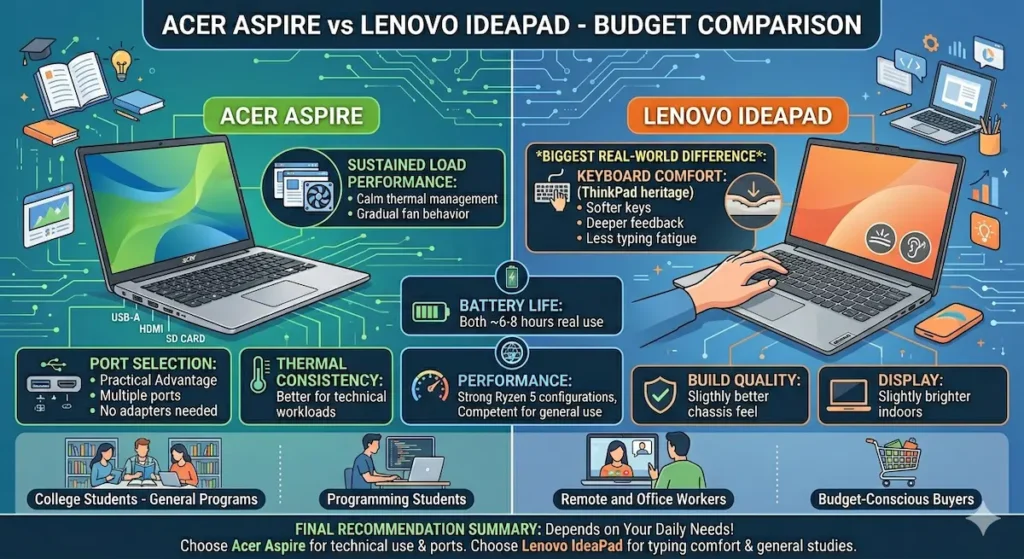
Neither line dominates across every category. The Acer Aspire vs Lenovo IdeaPad difference is most visible in keyboard quality and port selection — two things that determine daily physical comfort in ways spec sheets never communicate.
Who Each Machine Is Built For
Before diving into the detailed Acer Aspire vs Lenovo IdeaPad budget comparison, it’s worth being direct about who each line is designed for — because most buying regret at this price range comes from mismatched expectations.
Acer Aspire fits students and buyers who:
- Need the port variety that everyday productivity actually requires — USB-A, HDMI, SD card without carrying adapters
- Run concurrent workloads that benefit from calmer thermal management
- Want consistent everyday performance without paying a premium for design refinement
- Value practical usability over keyboard comfort specifically
Lenovo IdeaPad fits students and buyers who:
- Type extensively — long essays, detailed notes, hours of coding or writing daily
- Want the better typing experience that matters across four years of heavy use
- Work in environments where keyboard comfort reduces physical fatigue over time
- Are comfortable managing a slightly more limited port setup
The honest summary: Acer Aspire vs Lenovo IdeaPad for everyday use tips toward IdeaPad if you type all day. It tips toward Aspire if you need ports and calmer thermals under concurrent workload.
Acer Aspire vs Lenovo IdeaPad Performance — Real Workload Testing
Everyday Concurrent Use
For the standard daily workload — ten to twelve Chrome tabs open alongside a working document, music streaming in the background, occasional video calls, and background downloads — both lines perform without obvious strain. Neither the Aspire nor the IdeaPad will disappoint during this kind of moderate concurrent use at their Ryzen 5 or Core i5 configurations.
The performance distinction between the two lines shows under sustained combined stress, not under normal use. For most students and everyday professionals, the day-to-day performance difference between an Aspire 5 and an IdeaPad Slim 5 at equivalent configurations is not the deciding factor.
Sustained and Heavy Workloads
This is where the Acer Aspire vs Lenovo IdeaPad performance difference becomes visible.
The Acer Aspire line handles background task accumulation with better thermal composure. Fan behavior builds gradually as heat accumulates — it doesn’t spike suddenly mid-task. Keyboard surface temperatures under heavy sustained load stay lower on the Aspire than on equivalent IdeaPad configurations.
The Lenovo IdeaPad, particularly the IdeaPad Slim 3 on lighter Ryzen 3 or Core i3 configurations, becomes more audibly vocal under combined stress. When compiling a project while browser tabs run in the background, or when a system update triggers during an active work session, the fan becomes noticeable in a way that can draw attention in quiet library environments.
For students in demanding programs — CS, engineering, data science — the Aspire’s thermal management produces a more consistent daily experience under the sustained concurrent tool use those programs require.
The Ryzen Configuration Difference
The Acer Aspire 5 vs Lenovo IdeaPad Slim 5 comparison at Ryzen 5 configurations is the tier where most buyers are actually deciding. Both machines with Ryzen 5 processors handle real student and professional workloads competently. Both deliver sustained performance without the thermal throttling that entry-level configurations show under pressure. At this configuration tier, performance is close enough that other daily factors — keyboard comfort, port selection, display brightness — drive the decision more than raw processing capability.
Check Price of Acer Aspire 5Acer Aspire vs Lenovo IdeaPad Keyboard — The Biggest Real-World Difference
In the Acer Aspire vs Lenovo IdeaPad budget comparison, keyboard quality is the specification that shows up most distinctly in daily use — and the Lenovo IdeaPad wins it clearly.
Lenovo’s keyboard heritage comes from the ThinkPad line, which has the most respected keyboard reputation in the laptop industry. That influence carries into the IdeaPad line in measurable ways. Key travel is deeper, feedback per keypress is more deliberate, key spacing feels more natural for sustained touch typing. After two hours of continuous writing or coding on an IdeaPad keyboard, hands are noticeably less fatigued than after equivalent sessions on the Acer Aspire.
This matters more than it sounds at first.
A student in a writing-heavy program types tens of thousands of words per semester. A remote professional types through email, documents, and communication tools for six to eight hours daily. A coder spends hours on specific characters — brackets, semicolons, backslashes — that require consistent key response. The keyboard you use for all of that shapes the physical experience of your entire work day, compounding across months and years.
The Acer Aspire keyboard is adequate. Key travel is present, feedback is functional, and it won’t frustrate you during normal typing. But adequate is not the same as comfortable across four years of sustained daily use. The IdeaPad keyboard is noticeably better — not dramatically, not in a way you’d predict from a five-minute store test, but meaningfully in a way you notice at the end of a long session.
For the Acer Aspire vs Lenovo IdeaPad for students who type extensively — English majors, pre-law students, journalism programs, CS students with heavy documentation requirements — the IdeaPad keyboard is a daily quality-of-life advantage that accumulates across every session.
Acer Aspire vs Lenovo IdeaPad Build Quality
Both lines are budget machines and both reflect that honestly — neither will be confused with a MacBook Air or Dell XPS. But within the budget tier, there are real differences.
Acer Aspire build is functional and consistent. Plastic chassis with modest flex under deliberate pressure, a hinge that holds position without obvious play, a lid that doesn’t wobble excessively. After a semester of bag carry and desk use, Aspire machines hold up without developing the rattles and loosening that lower-quality budget alternatives accumulate. The chassis is not premium, but it’s durable enough for the workload it’s designed for.
Lenovo IdeaPad build has a slightly more confident feel in hand. The chassis is marginally more rigid, the hinge behavior is slightly more precise, and the overall tactile impression is a step above the Aspire at equivalent price points. This is a qualitative assessment rather than a dramatic structural difference — both machines are adequate for student carry and everyday professional use.
For the Acer Aspire vs Lenovo IdeaPad build quality comparison, the IdeaPad edges ahead in the feel of the chassis without a dramatic functional difference in real durability.
Acer Aspire vs Lenovo IdeaPad Display Quality
Neither line delivers impressive displays — at this price tier, both are functional rather than notable. But they’re not identical.
The Lenovo IdeaPad Slim 5 display handles variable indoor lighting slightly better than the Aspire 5. Brightness is marginally higher on the IdeaPad Slim 5, which translates to more comfortable use in bright classroom environments, near office windows, and in campus lounges with overhead lighting.
The Acer Aspire display is entirely adequate for standard productivity, document editing, and student coursework. Near direct sunlight or in very bright environments, it requires more screen angle management than the IdeaPad. For the overwhelming majority of indoor study and work environments, both displays are comfortable for extended use.
Neither line offers OLED or color-calibrated panels at typical budget configurations. For color-sensitive creative work, both are reference-quality displays — which is to say, neither is appropriate for professional creative workflows without calibration.
Lenovo Ideapad Best DealAcer Aspire vs Lenovo IdeaPad Battery Life
The Acer Aspire vs Lenovo IdeaPad battery life comparison is one where neither line holds a systematic advantage — both deliver real-world results in the six-to-eight-hour range under mixed student workloads.
The specific processor and display configuration within each line influences battery more than the brand. A Ryzen 5 IdeaPad Slim 5 and a Ryzen 5 Aspire 5 will deliver similar battery results under equivalent workloads because the efficiency characteristics of the processor dominate the battery equation at this tier.
For students with demanding all-day schedules without consistent charger access, neither line delivers the all-day endurance of a MacBook Air. Both require charger planning for very long days — eight hours of back-to-back use, field work, or full-day campus schedules without outlet access.
Acer Aspire vs Lenovo IdeaPad Port Selection — Aspire’s Practical Advantage
This is where the Acer Aspire vs Lenovo IdeaPad budget comparison tips clearly in Aspire’s favor for many practical users.
The Acer Aspire line — particularly the Aspire 5 — offers USB-A, USB-C, HDMI, and SD card slots in most configurations. For students who connect to classroom projectors, transfer files from cameras or phones, and use USB-A peripherals and accessories without carrying an adapter, this port variety is a daily practical convenience.
Lenovo’s IdeaPad Slim models, particularly the slimmer configurations, have moved toward fewer and smaller ports in favor of the slimmer chassis design. Depending on the specific IdeaPad model, USB-A availability varies and HDMI may require a dongle. For students who regularly connect to external displays or use USB-A devices, this limitation creates a carry consideration — an adapter or hub becomes standard equipment.
For the Acer Aspire vs Lenovo IdeaPad for everyday use from a connectivity standpoint: Aspire is the more practical choice for users who need complete connectivity without accessories. IdeaPad is appropriate for users who primarily work in cloud-based workflows and don’t depend on physical port variety.
Acer Aspire vs Lenovo IdeaPad for Specific Use Cases
For College Students — General Programs
For most general college programs — humanities, business, education, social sciences — the Acer Aspire vs Lenovo IdeaPad for students comparison tips toward IdeaPad for keyboard comfort and toward Aspire for port variety and thermal management. The right answer depends on which matters more in your specific daily pattern.
Choose IdeaPad Slim 5 if your coursework involves extensive writing, note-taking, and you’ll spend several hours per day typing.
Choose Aspire 5 if you regularly connect to projectors, use USB devices, or run concurrent tools that benefit from calmer thermal behavior.
For Programming Students
The Acer Aspire vs Lenovo IdeaPad for programming students comparison favors the Aspire 5 at Ryzen 5 configuration for thermal consistency under sustained development workloads, and the IdeaPad Slim 5 for the keyboard quality that makes long coding sessions less physically fatiguing. Both are viable — your priority between thermal management and keyboard comfort determines the choice.
For Remote and Office Workers
Remote workers who video call frequently, use collaboration tools continuously, and type heavily through their workday get the most from the IdeaPad Slim 5’s keyboard advantage. Remote workers who need complete port connectivity without accessories get more from the Aspire 5’s port selection.
For Budget-Conscious Buyers
At the entry level — IdeaPad Slim 3 vs Aspire Lite — the performance ceiling arrives earlier on both machines under heavy workloads. For genuinely light daily use (browsing, documents, streaming, occasional calls), both are adequate. For students who expect their workload to grow across a semester, either Ryzen 5 configuration is a much better investment than either entry-level configuration.
Common Mistakes in the Acer Aspire vs Lenovo IdeaPad Budget Comparison
Buying the entry-level configuration to save $50–$80. The Ryzen 3 or Core i3 entry configurations on both lines create performance friction within months of real student or professional use. The Ryzen 5 tier on both machines is the configuration that stays comfortable across a full year of growing workload. That price gap closes quickly when measured against frustration.
Ignoring keyboard quality for a writing-heavy workload. If you’re going to type for three to four hours daily, keyboard comfort is the specification that shapes every session. The IdeaPad’s keyboard advantage is daily and compounding across a semester.
Choosing Lenovo without checking port requirements. If your workflow involves USB-A devices, SD cards, or regular HDMI connections without wanting to carry an adapter, verify that the specific IdeaPad configuration you’re buying has those ports. Some slim IdeaPad models don’t.
MacBook Air vs Dell XPS 13 for students
Comparing spec sheets without comparing use cases. An Aspire 5 and an IdeaPad Slim 5 at equivalent configurations are close enough on paper that the decision should be driven by daily physical experience factors — keyboard, ports, thermals — not processor speed comparisons.
Frequently Asked Questions
Acer Aspire vs Lenovo IdeaPad — which is better for college students?
The Acer Aspire vs Lenovo IdeaPad budget comparison for college students tips toward IdeaPad for writing-heavy programs (better keyboard, less fatigue over long sessions) and toward Aspire for STEM and technical programs (better thermal management under sustained tool use, better port variety). Both are capable four-year budget options at Ryzen 5 tier.
Is Acer Aspire more reliable than Lenovo IdeaPad?
Both lines are comparably reliable at equivalent configuration tiers with similar long-term durability expectations. Dell’s enterprise engineering background provides stronger systematic reliability data, but the Acer Aspire vs Lenovo IdeaPad reliability comparison doesn’t show a dramatic difference — both are appropriate budget options for students and everyday professional use.
Acer Aspire 5 vs Lenovo IdeaPad Slim 5 — which should I buy?
For most students: IdeaPad Slim 5 if keyboard comfort and typing quality are daily priorities. Aspire 5 if port variety, thermal management under heavy concurrent workloads, or value at equivalent configuration is the priority. At Ryzen 5 configuration, both are strong recommendations.
Is Lenovo IdeaPad good for programming?
Yes — particularly the IdeaPad Slim 5 at Ryzen 5 configuration. For students asking about Lenovo IdeaPad vs Acer Aspire for programming, both handle standard CS coursework. The IdeaPad’s keyboard advantage matters for extensive coding sessions; the Aspire’s thermal management matters for sustained heavy development tool use. Either works for beginner-to-intermediate programming workloads.
Which has a better display — Acer Aspire or Lenovo IdeaPad?
The Lenovo IdeaPad Slim 5 display is slightly brighter and handles variable indoor lighting somewhat better than the Acer Aspire 5 at equivalent price points. Neither line delivers impressive display quality at the budget tier, but the IdeaPad has a marginal daily advantage for students who work in well-lit environments.
Final Recommendation — Acer Aspire vs Lenovo IdeaPad Budget Comparison
The Acer Aspire vs Lenovo IdeaPad budget comparison concludes with different recommendations for different buyers — and that’s the honest answer rather than a hedge.
Choose Lenovo IdeaPad Slim 5 if: You type extensively daily. The keyboard advantage is real, daily, and compounding. For writing-heavy students and professionals who spend hours in documents, emails, or code editors, the IdeaPad’s typing comfort is the most impactful daily specification in this comparison.
Choose Acer Aspire 5 if: You need practical port variety without adapters, run concurrent technical workloads that benefit from calmer thermal management, or want the strongest all-round budget value at Ryzen 5 tier. For technical students and professionals who connect to external displays, USB devices, and need ports that work without accessories, the Aspire’s connectivity advantage is a daily practical convenience.
For most general students and everyday users who are genuinely undecided: the Acer Aspire vs Lenovo IdeaPad budget comparison tips slightly toward IdeaPad Slim 5 for the keyboard quality that defines the physical experience of every session. If you’re going to type on a machine for four years, the keyboard matters more than any other single daily specification at this price tier.
Both machines are honest, capable budget laptops that won’t embarrass you at the price. Buy the right one for your actual workload and you won’t regret either choice.
About BestLaptopGuide.com: Our editorial team evaluates laptops through real-world testing across full usage periods — not manufacturer benchmarks. Recommendations updated regularly.
Disclosure: Some links on this page are affiliate links. A small commission may be earned at no extra cost to you. This does not influence our recommendations.