Last Updated: May 2026 | Author: Marcus Hale | Reading Time: 10 min
If you’ve spent any time searching for a budget everyday laptop, you’ve almost certainly ended up comparing the ASUS VivoBook vs HP Pavilion for everyday use. They appear on the same lists, sit in the same price ranges, and look nearly identical on spec comparison pages.
That surface similarity is exactly what makes this a confusing decision — and exactly why the real answer matters.
Acer Aspire vs Lenovo IdeaPad – Budget Comparison
I’ve spent extended time with both lines across the kind of everyday use most buyers actually care about: browsing with multiple tabs, document editing, streaming, video calls, and the accumulated software overhead that builds up across months of real use. The ASUS VivoBook vs HP Pavilion for everyday use comparison has clear directional answers that spec sheets don’t reveal.
ASUS VivoBook vs HP Pavilion for Everyday Use — At a Glance
| Category | ASUS VivoBook | HP Pavilion |
|---|---|---|
| Display quality | ✅ Better color, more vivid | ⚠️ Average, functional |
| Performance consistency | ✅ Snappier application response | ⚠️ Slows under combined load |
| Keyboard comfort | ⚠️ Adequate, slightly shallow | ✅ Better key spacing |
| Build quality | ✅ Slightly more premium feel | ⚠️ More plastic, less confident |
| Fan behavior | ⚠️ More audible under load | ✅ Quieter during light tasks |
| Battery life | ✅ 7–9 hours real use | ⚠️ 6–7 hours real use |
| Long-term reliability | ✅ Consistent months in | ⚠️ Slows more visibly over time |
| Value for money | ✅ Better performance per dollar | ✅ Better price at entry tier |
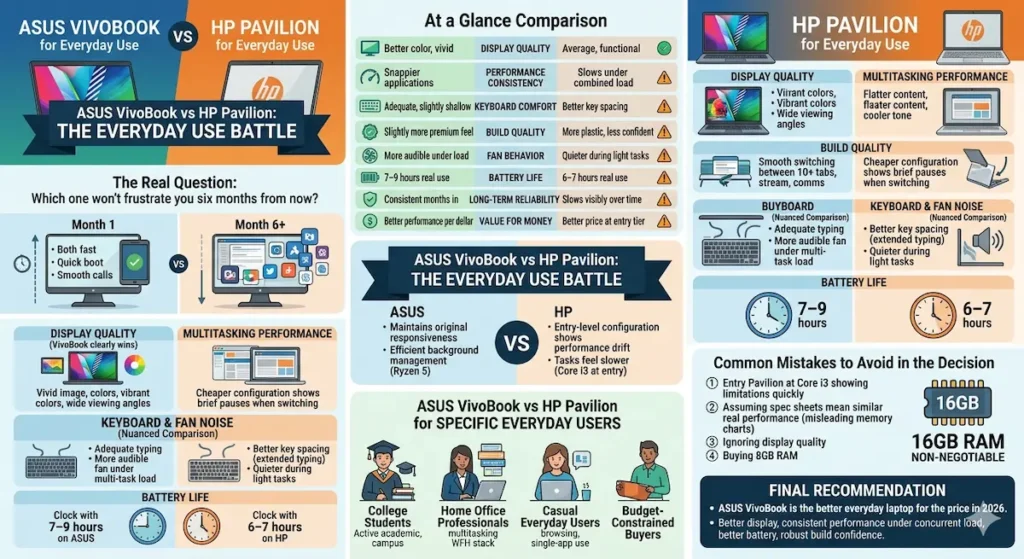
Table of Contents
The Real Question Behind the ASUS VivoBook vs HP Pavilion Comparison
When most people ask about the ASUS VivoBook vs HP Pavilion for everyday use, they’re really asking: which one won’t frustrate me six months from now?
Both machines look adequate during the first week. Both boot quickly, open tabs without complaint, and handle video calls without obvious strain. The difference that matters shows up after months of daily use — when the browser has accumulated extensions, background processes have grown, and your workload has naturally expanded to fill the machine’s headroom.
At that point, the ASUS VivoBook vs HP Pavilion performance gap becomes visible. The VivoBook tends to maintain more of its original responsiveness. The HP Pavilion, particularly at entry-level configurations, shows the kind of accumulated performance drift that makes everyday tasks feel slower than they should.
This is the core of the ASUS VivoBook vs HP Pavilion story, and everything else in this comparison builds around it.
ASUS VivoBook vs HP Pavilion Display Quality
Display quality is where the ASUS VivoBook vs HP Pavilion for everyday use difference is most immediately visible — and the VivoBook wins clearly.
ASUS consistently equips the VivoBook line with more color-accurate, more vivid IPS panels than HP uses in equivalent Pavilion configurations. The VivoBook display renders colors with more warmth and accuracy, handles gradient transitions more smoothly, and provides better viewing angles for the everyday content consumption most buyers actually care about — YouTube, Netflix, browsing, document reading.
The HP Pavilion display is functional. It gets the job done for spreadsheets, emails, and document work. But side by side with a VivoBook panel at the same price point, the Pavilion display looks flatter, cooler in tone, and less engaging for streaming and creative content.
For most everyday users who browse, stream, and work in roughly equal proportions, the VivoBook display is a daily quality-of-life improvement that you notice every session — not just during setup week.
Buy ASUS VivoBookASUS VivoBook vs HP Pavilion Performance for Everyday Tasks
The First Month vs Month Six
This is the most important dimension of the ASUS VivoBook vs HP Pavilion for everyday use performance comparison, and most reviews don’t cover it because they test for days rather than months.
Both machines perform adequately in the first few weeks. Tab switching is fine, documents open quickly, video calls work. The divergence starts as the system accumulates real-world overhead — installed applications, background processes, Windows updates, growing browser history, and expanding user files.
The ASUS VivoBook everyday performance holds up more consistently across this accumulation period. The Ryzen 5 configurations specifically handle background task management more efficiently than equivalent Core i3 Pavilion configurations, which means the VivoBook maintains more responsive foreground performance as background overhead grows.
Dell vs HP Laptop – Which Brand Is More Reliable
The HP Pavilion at entry-level Core i3 configuration shows more visible performance drift across the same period. Tasks that felt fast in month one feel noticeably slower by month four — not because the hardware has failed, but because the processor is less efficient at managing the combined workload of everyday use at sustained duration.
Concurrent Everyday Workload
For the kind of multitasking everyday users actually do — ten Chrome tabs including YouTube, a Google Doc open, Spotify running, a video call starting — the ASUS VivoBook vs HP Pavilion multitasking comparison consistently favors the VivoBook.
The VivoBook handles this combination without the slight hesitation when switching applications that cheaper HP Pavilion configurations produce. It’s not dramatic — both machines technically handle it — but the VivoBook does it more smoothly, with less of the brief pause that breaks concentration and makes a machine feel inadequate.
ASUS VivoBook vs HP Pavilion Build Quality
Build quality is a meaningful difference in the ASUS VivoBook vs HP Pavilion for everyday use comparison, though neither line should be confused with a premium ultrabook.
The ASUS VivoBook has a slightly more confident chassis feel. Less flex in the keyboard deck under typing pressure, a lid that holds position more precisely, and materials that feel slightly less purely budget in hand. The VivoBook’s design aesthetic is also more modern — slimmer bezels, cleaner lines, a look that doesn’t immediately read as entry-level.
The HP Pavilion chassis is more variable. Some configurations use adequate plastic that holds up reasonably well. Others feel softer and more flexible than the VivoBook equivalent, with hinges that develop slight looseness after a year of daily open-close cycles. For students who carry their laptop daily and set it down without exceptional care, the VivoBook’s slightly more robust feel provides more structural confidence over time.
Neither line offers premium chassis engineering. But the ASUS VivoBook vs HP Pavilion build quality comparison consistently gives the VivoBook the modest advantage that adds up to meaningful reassurance across years of real daily use.
Buy HP PavilionASUS VivoBook vs HP Pavilion Keyboard and Typing Experience
This is one category where the ASUS VivoBook vs HP Pavilion for everyday use comparison doesn’t give a clean VivoBook win.
The HP Pavilion keyboard has better key spacing on some configurations — particularly the 15-inch models — that makes extended typing sessions feel less cramped than the VivoBook equivalent. The VivoBook’s keyboard is adequate and functional, but the depth and spacing that makes typing comfortable across two or three hours of continuous work varies more by specific model.
For users whose everyday use is heavily writing-intensive — content creators, students with essay-heavy programs, professionals who type most of their day — the keyboard comparison is worth examining by specific model rather than assuming either brand has a systematic advantage.
For users whose everyday use involves more browsing, video consumption, and occasional typing: the VivoBook’s other advantages outweigh the keyboard distinction.
ASUS VivoBook vs HP Pavilion Fan Noise
Fan behavior is a daily quality-of-life factor in the ASUS VivoBook vs HP Pavilion for everyday use comparison that spec sheets never address.
The HP Pavilion is quieter during genuinely light tasks — browsing and streaming produce minimal fan activity, and the machine stays quiet during casual use. This is an advantage for users whose everyday use rarely pushes the machine under sustained load.
The VivoBook becomes more audible under the combined load of concurrent tasks — multiple applications running simultaneously, background downloads alongside active use, video calls with other tools open. For users who routinely run concurrent workloads, the VivoBook’s fan becoming present during those sessions is the honest trade-off for its better multitasking performance.
For the ASUS VivoBook vs HP Pavilion for everyday quiet use: if your sessions are primarily single-app light use, the Pavilion’s quieter operation is preferable. If your sessions involve regular multitasking, the VivoBook’s better performance at the cost of more fan presence is the better daily trade-off.
ASUS VivoBook vs HP Pavilion Battery Life
The ASUS VivoBook vs HP Pavilion battery life comparison consistently favors the VivoBook in real mixed daily use.
Under the typical everyday mixed workload — browsing, YouTube, document editing, video calls — the VivoBook delivers 7–9 hours of real battery. The HP Pavilion at equivalent configurations delivers 6–7 hours under the same conditions.
That one to two hour difference matters for everyday users without consistent outlet access. For students in all-day classes, professionals who work from coffee shops, or anyone whose day doesn’t reliably include a desk with power access, the VivoBook’s battery advantage is a daily practical difference rather than a spec sheet distinction.
ASUS VivoBook vs HP Pavilion for Specific Everyday User Types
For College Students
The ASUS VivoBook vs HP Pavilion for students comparison favors the VivoBook for most general academic programs. Better display for reading and content, better concurrent performance for the combination of research, writing, and streaming that defines student everyday use, and better battery for campus days without consistent outlet access.
For Home Office Professionals
For the ASUS VivoBook vs HP Pavilion for home office use, the VivoBook’s better multitasking performance and display quality make it more appropriate for professionals using the machine for work alongside everyday tasks. The VivoBook handles the WFH tool stack — browser tools, video calls, document editing simultaneously — more gracefully.
For Casual Everyday Users
For purely casual use — browsing, streaming, occasional light document work — the ASUS VivoBook vs HP Pavilion for casual use comparison is closer. If the HP Pavilion is meaningfully cheaper at a specific moment and the workload is genuinely light, it covers basic everyday use adequately. For users whose everyday use is likely to grow more demanding across time, the VivoBook’s performance headroom is worth the price difference.
For Budget-Constrained Buyers
The HP Pavilion’s advantage appears primarily when it’s priced meaningfully below the VivoBook at equivalent configurations. When both are at similar prices — which is common in 2026 — the VivoBook is the clearer recommendation for everyday use. When the HP Pavilion is $50–$80 less and the usage is genuinely casual, the price gap may justify the trade-offs.
Common Mistakes in the ASUS VivoBook vs HP Pavilion Decision
Buying HP Pavilion at Core i3 expecting mid-range performance. Entry-level Core i3 configurations of the Pavilion show performance limitations more quickly under real everyday concurrent use than Ryzen 5 VivoBook configurations. Configuration tier matters as much as brand.
Assuming similar spec sheets mean similar real-world performance. Both machines at 8GB RAM and 512GB SSD look identical on a comparison chart. The processor efficiency difference between Ryzen 5 and Core i3 is significant under sustained concurrent load — exactly the condition everyday use creates across a full day.
Ignoring display quality for everyday content consumption. If streaming, YouTube, and browsing are significant parts of your everyday use, the display quality difference between VivoBook and Pavilion is visible in every session. It’s not a minor specification.
Buying 8GB RAM on either machine. The everyday multitasking workload of 2026 — Chrome tabs, streaming, communication tools — fills 8GB RAM more quickly than most buyers expect. 16GB is the configuration that keeps both machines comfortable across a full day of real everyday use.
Frequently Asked Questions
Is ASUS VivoBook better than HP Pavilion for everyday use?
For most everyday use cases, yes — the ASUS VivoBook vs HP Pavilion for everyday use comparison favors the VivoBook for better display quality, more consistent performance under concurrent load, and better battery. The HP Pavilion is competitive primarily when priced meaningfully lower or for genuinely light single-app use.
Which is better for students, VivoBook or Pavilion?
The VivoBook is the stronger student recommendation for display quality, performance consistency under concurrent academic workloads, and battery coverage for campus days. The ASUS VivoBook vs HP Pavilion for students comparison is not particularly close for students with active academic schedules.
How long does ASUS VivoBook last compared to HP Pavilion?
Both machines deliver three to four years of comfortable everyday use at 16GB RAM configurations. At entry-level 8GB configurations, both show performance drift earlier as software requirements grow. The VivoBook tends to maintain more of its original performance longer under equivalent use patterns.
Is HP Pavilion good for everyday home use?
For very light, single-app everyday use — browsing, streaming, light document work — yes, the HP Pavilion is adequate. For users whose everyday use involves regular multitasking or who expect to grow their workload across time, the VivoBook is the more capable and future-resistant choice.
Final Recommendation — ASUS VivoBook vs HP Pavilion for Everyday Use
The ASUS VivoBook vs HP Pavilion for everyday use comparison produces a clear recommendation for most buyers: the ASUS VivoBook is the better everyday laptop for the price in 2026.
Better display quality for the content consumption that defines everyday use. More consistent performance across the concurrent tab and application workloads that real daily use creates. Better battery for everyday users who aren’t always near outlets. And a build quality that holds slightly more structural confidence across years of daily handling.
The HP Pavilion earns consideration when it’s priced meaningfully lower than the VivoBook and the use case is genuinely and durably light. When both are at comparable prices — which is increasingly common — the VivoBook is the recommendation that holds up better across the full ownership period.
Whatever you choose: 16GB RAM, current-generation Ryzen 5 configuration, and SSD storage. Those three decisions determine the ASUS VivoBook vs HP Pavilion for everyday use experience more than the brand comparison itself.
About BestLaptopGuide.com: Our editorial team evaluates laptops through real daily workload testing — not manufacturer benchmarks. Recommendations updated regularly.
Disclosure: Some links on this page are affiliate links. A small commission may be earned at no extra cost to you. This does not influence our recommendations.