Best Laptop for MBA Students in 2026 (Real Business School Experience, Not Spec Theory)
Author: Marcus Hale | Reading Time: 11 min
Nobody tells you before starting an MBA that the laptop decision matters in ways that have nothing to do with performance benchmarks.
A classmate of mine switched laptops mid-fall semester — not because his original machine was slow, but because carrying a 4.4-pound machine across campus every day had become genuinely exhausting. He didn’t regret the specs. He regretted the weight, every single morning.
That’s the kind of problem that doesn’t show up in any comparison table.
Laptop for Excel and Office Work
After talking with MBA students across programs on both coasts, the pattern of complaints is surprisingly consistent: they bought a capable machine and overlooked the daily experience. Fan noise in quiet lecture halls. Battery that starts becoming a concern by 3pm. Long case prep sessions that reveal how much keyboard comfort actually matters at hour four of modeling work. These aren’t performance failures — they’re friction points that accumulate across a demanding schedule until they become the thing you resent about your program.
The best laptop for MBA students is the one that disappears into your routine — one that handles presentations, Excel models, case prep, and back-to-back class days without requiring you to manage it alongside everything else.
Table of Contents
Quick Decision Framework
MacBook Air: Best for most MBA students who can work in macOS. Battery endurance, silent operation, and lightweight carry eliminate the most common daily friction points.
Dell XPS 13: Best for MBA students who need Windows or want the closest premium equivalent for professional presentations and internship settings.
ASUS VivoBook 15: Workable on a tighter budget, with limits that emerge by second semester.
Lenovo ThinkPad E14: Best for MBA students who do heavy writing and value keyboard quality and long-term durability over thinness.
Quick Picks — Best Laptop for MBA Students
| Award | Laptop | Why It Wins |
|---|---|---|
| 🏆 Best Overall | MacBook Air (M-series) | Silent, all-day battery, lightweight for daily campus carry |
| 💻 Best Windows Option | Dell XPS 13 | Premium feel, strong performance, professional presentation presence |
| 💰 Best Budget Pick | ASUS VivoBook 15 | Covers standard MBA workloads on a tight budget |
| ⌨️ Best for Durability | Lenovo ThinkPad E14 | Keyboard quality and build that hold up across the full program |
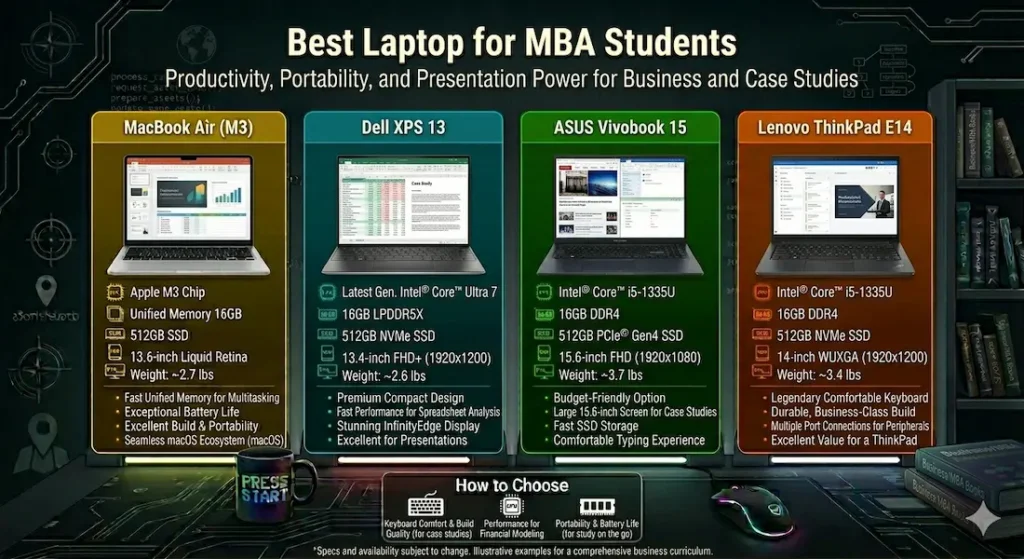
Best Laptop for MBA Students — Full Reviews
1. MacBook Air (M-series) — Best Laptop for MBA Students Overall
The MacBook Air earns its top position in the best laptop for MBA students category not through any single impressive feature, but through the daily experience of a program that gives you very little bandwidth to manage your tools.
What a full MBA day looks like on this machine
A friend in a consulting prep group at a West Coast program used his MacBook Air through a full-day case practice session without touching a charger. That’s six to eight hours of Excel financial models, group presentations, team collaboration tools, and back-to-back case discussions. He brought the charger. He never needed it.
That’s the battery story — and for MBA students, it’s not a minor point. A machine that makes it through the full day removes a category of logistical management from a schedule that’s already overloaded with actual coursework.
Equally important: no fan noise. The M-series chip is passively cooled. In quiet lecture halls during a guest speaker presentation, during library case prep sessions where every sound registers, during a networking coffee chat where your laptop is open on the table — silence matters in ways that become obvious the first time someone else’s machine announces itself.
Running fifteen to twenty Chrome tabs alongside Excel, PowerPoint, and communication tools simultaneously stays smooth. Not perfect under peak combined load — nothing at this price is — but consistent enough that you stop thinking about the machine and focus on the work.
Where it has real limits
Some MBA programs require Windows-only analytics or simulation software. If your MIS, operations, or finance coursework depends on specific Windows tools, verify macOS compatibility before committing. This is the single check that prevents the most common MacBook Air buyer regret.
RAM and storage are fixed at purchase. Configure for what you’ll need in second year, not first year.
Pros:
- All-day battery that genuinely covers a full MBA schedule without charger management
- Completely silent operation — no fan noise during lectures, case prep, or networking
- Lightweight carry that stops accumulating as a daily frustration after week two
- Consistent long-term performance that doesn’t degrade across the full program
Cons:
- Fixed hardware — cannot upgrade RAM or storage after purchase
- macOS compatibility check required for Windows-dependent coursework
Verdict: For most MBA students who can use macOS, the MacBook Air is the best laptop for MBA students that earns its recommendation through daily comfort rather than benchmark performance.
Check Price Now2. Dell XPS 13 — Best Windows Laptop for MBA Students
For MBA students who need Windows — or who want a machine that presents as confidently professional in internship and networking settings — the Dell XPS 13 is the closest equivalent to the MacBook Air’s daily experience.
Why it works for the MBA context specifically
The design reads as professional in a way that budget Windows machines don’t. When you’re in a finance internship interview with your laptop open, or presenting to a room of second-year students, or networking with recruiters who will notice the machine on the table — the XPS 13’s build quality communicates something. This sounds like a superficial point. In an MBA program where first impressions span three years of professional relationships, it’s not entirely superficial.
Performance in spreadsheet-heavy work — financial modeling, data analysis, Excel-intensive case prep — stays responsive and noticeably faster during multitasking than most thin laptops at the same price. For the quantitative coursework that defines many MBA core requirements, this responsiveness is daily practical value.
13 Inch vs 15 Inch Laptop for College
Battery at around 10 hours of real mixed use covers a full class day without charger anxiety. The fan becomes audible under heavy sustained load — a relevant consideration for students who work through intensive sessions in quiet shared spaces.
Pros:
- Premium build quality that holds up in professional MBA and internship environments
- Strong multitasking performance for spreadsheet-heavy financial and analytical coursework
- Full Windows compatibility eliminates software compatibility concerns
- Clean, professional design that presents well in business school settings
Cons:
- Fan audible under heavy sustained workload in quiet environments
- Limited ports require adapter for full peripheral setup
- Premium pricing near the top of this comparison
Verdict: The right best Windows laptop for MBA students who need Windows compatibility and want a machine that matches the professional presentation standards of business school environments.
View Best Deal3. ASUS VivoBook 15 — Best Budget Laptop for MBA Students
Not every MBA student has the budget for a MacBook Air or Dell XPS 13. The ASUS VivoBook 15 is the honest answer to the best budget laptop for MBA students question — capable for the coursework, with limits that become clear by the second semester.
First semester versus second semester reality
First semester: lectures, notes, presentations, basic spreadsheet work. The VivoBook 15 handles all of this comfortably. Battery covers most of a standard class day. The larger 15-inch screen actually helps when working on complex spreadsheet models that benefit from visible real estate.
Second semester: more simultaneous applications, heavier Excel models running alongside browser research alongside presentation editing. This is where performance limits begin showing — not failure, but the kind of gradual hesitation that compounds across a busy week. Students who push heavy concurrent workloads regularly will feel this ceiling earlier than those with more focused, sequential work habits.
For MBA students with genuine budget constraints who need a functional daily machine without premium pricing: the VivoBook 15 covers the program’s demands with reasonable management.
Pros:
- Most accessible price for a capable MBA laptop under budget
- Larger screen benefits complex spreadsheet and case study work
- Adequate battery for standard class day use
Cons:
- Performance limits emerge under heavy second-semester concurrent workloads
- Fans more noticeable than MacBook Air or XPS 13 in quiet academic environments
Verdict: A workable affordable laptop for business school for budget-constrained MBA students — with clear expectations about the performance ceiling heading into more demanding coursework.
Check latest deal4. Lenovo ThinkPad E14 — Best Durable Laptop for MBA Students Who Write Extensively
Case studies. Written analyses. Research papers. Reflection journals. The MBA program involves more sustained writing than most students anticipate before starting. The ThinkPad E14 is the best laptop for MBA students who want that writing experience to feel consistently good across the full program.
The keyboard quality difference in MBA context
ThinkPad keyboards have a multi-decade reputation among professional writers and developers for a reason. Key travel is deeper, tactile feedback is more deliberate, and the typing experience stays comfortable across four-hour case writing sessions in ways that shallower keyboards don’t match.
After a week on a ThinkPad keyboard, returning to consumer laptop keyboards feels noticeably less satisfying. MBA students who do heavy writing report this consistently — the keyboard becomes the reason they stay with ThinkPad for the full program.
Build quality is the other argument. The ThinkPad E14 carries with a confidence that budget consumer machines don’t inspire. For students who put their laptop through the physical reality of two years of MBA life — daily bag carry, travel for case competitions, classroom sessions across different buildings — the durable construction pays off.
Pros:
- Best keyboard typing experience in this best laptop for MBA students comparison
- Durable business-class build that holds up across two years of demanding daily use
- Upgradeable RAM for growing workload demands across the program
Cons:
- Heavier than MacBook Air and XPS 13 for daily campus carry
- Less visually sleek than competitors for professional presentation settings
Verdict: The right best business laptop for MBA students who write extensively and want typing comfort and durability to hold up across the full two-year program.
View Best DealWhat MBA Workloads Actually Demand
Why Processing Efficiency Beats Raw Power
MBA coursework is sustained and parallel — Excel running alongside PowerPoint alongside a browser with fifteen research tabs, across four-to-six-hour study blocks. The processor that performs consistently across hour four performs better in this context than one that peaks in the first thirty minutes and throttles as thermal limits arrive.
Efficiency-focused chips — Apple M-series and AMD Ryzen U-series — handle MBA workloads better in real daily use than high-TDP processors in thin chassis. For the best processor for MBA laptop, prioritize sustained consistent performance over benchmark peak speed.
16GB RAM — The MBA Baseline in 2026
The typical mid-semester MBA workload: Excel financial model, PowerPoint presentation deck, Zoom for team coordination, browser with research and LMS tabs, email, and Slack simultaneously. This combination fills 8GB RAM noticeably. The slowdowns appear as brief hesitations during application switching — manageable one at a time, frustrating under deadline pressure when every switch costs a beat.
16GB RAM handles this workload smoothly for the full program. For the best laptop for MBA students with Excel and presentations, 16GB is the configuration that stays comfortable from orientation through thesis.
Common MBA Laptop Mistakes
Not accounting for daily carry weight. An MBA schedule involves real physical movement — building to building, campus to library to study rooms. The half-pound difference between machines becomes a daily physical variable across two years.
Choosing a gaming laptop for business school. Weight, battery life, and fan noise all go in the wrong direction. MBA coursework never requires a dedicated GPU.
Buying 8GB RAM to save money. Mid-semester workloads fill this quickly. The regret typically arrives by October of first year.
Ignoring software compatibility. Some quantitative MBA courses use Windows-only analytics software. Verify every tool requirement before committing to macOS.
Frequently Asked Questions
Which laptop is best for MBA students in 2026?
The MacBook Air (M-series) is the most consistently recommended best laptop for MBA students for its all-day battery, silent operation, and lightweight daily carry. For students who need Windows, the Dell XPS 13 is the strongest alternative.
Is 16GB RAM necessary for MBA students?
Yes — for the concurrent workload that mid-semester MBA coursework creates. Excel, presentations, browser research, and communication tools running simultaneously fill 8GB more quickly than most students anticipate before starting.
Is Mac or Windows better for MBA programs?
Mac provides better battery life, silent operation, and lighter carry for most MBA workflows. Windows provides complete software compatibility and is necessary for programs with Windows-only analytics or simulation tools. Check your program’s specific software requirements before deciding.
Do MBA students need a powerful laptop?
No — MBA coursework requires efficiency and reliability, not raw power. The best laptop for MBA students is one that handles sustained parallel workloads calmly across long days, not one that peaks briefly on performance benchmarks.
Final Recommendation
The best laptop for MBA students is the one that stays out of your way during the program’s most demanding weeks — all-day battery that doesn’t require planning, silent operation that doesn’t draw attention, and performance consistent enough that you never find yourself managing the machine instead of the material.
After evaluating all four options through real MBA workload scenarios, the MacBook Air earns that description most completely. If macOS works for your program’s tools, it’s the recommendation I’d make without hesitation.
For Windows users, the Dell XPS 13 is the right choice. For budget-constrained students, the ASUS VivoBook 15 covers the workload honestly. For heavy writers who value durability, the ThinkPad E14 delivers the keyboard and build that last two years.
Check your program’s software requirements first. Configure for 16GB RAM. The best laptop for MBA students answer follows from those two decisions more reliably than from any brand comparison.
About BestLaptopGuide.com: Our editorial team evaluates laptops through real student and professional workload testing — not manufacturer benchmarks. Recommendations updated regularly.
Disclosure: Some links are affiliate links. A small commission may be earned at no extra cost to you. This does not influence our recommendations.


