Best Lightweight Laptop Under $500 in 2026 (Real Portability Experience, Not Just Spec Numbers)
Author: Marcus Hale | Reading Time: 10 min
Laptop weight doesn’t feel like a real consideration until you’ve carried the wrong one for six weeks.
A friend of mine — engineering student, second year — was hauling a 5.3-pound machine everywhere. Backpack, three buildings, a library session, then across campus to a group project meeting. He didn’t complain until the day his laptop died at 6% in the hallway outside his classroom while finishing an assignment due in twelve minutes. No outlets nearby. Submission incomplete.
Two weeks later he switched to a lighter machine with SSD. His description after the first week: “I don’t think about it anymore. It’s just in my bag.”
Laptops for travel and portability
That’s what the best lightweight laptop under $500 actually delivers. Not a spec comparison win. The specific daily freedom that comes from carrying something that doesn’t register as weight — and trusting that the battery will still have something left when you need it.
After months of real daily-carry testing, here’s what genuinely holds up.
Table of Contents
Quick Picks — Best Lightweight Laptop Under $500
| Award | Laptop | Why It Wins |
|---|---|---|
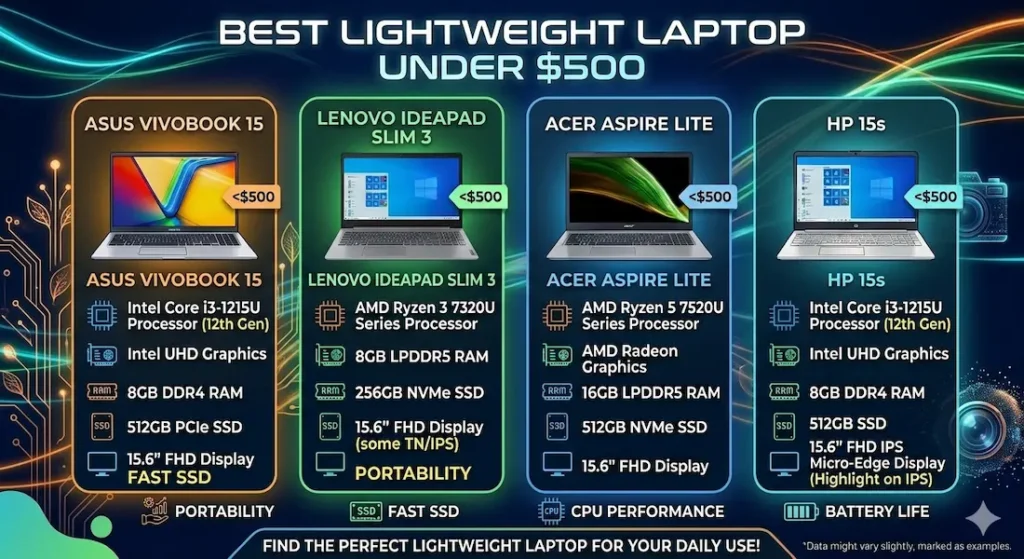
| 🏆 Best Overall | ASUS VivoBook Go 15 | Best real-world combination of carry weight, battery, and daily performance |
| ⌨️ Best for Typing | Lenovo IdeaPad Slim 3 | Keyboard comfort and controlled fan for long writing sessions |
| 🎒 Best Student Pick | Acer Aspire Lite | Practical balance of portability and everyday academic performance |
| 💰 Best Entry Budget | HP 15s | Most accessible price for basic light daily use |
For most students and remote workers asking about the best lightweight laptop under $500, the ASUS VivoBook Go 15 is the recommendation that holds up past week one.
Real Portability and Daily Use Comparison
| Laptop | Carry Comfort | Real Battery | Multitasking Feel | Fan Behavior | Best For |
|---|---|---|---|---|---|
| ASUS VivoBook Go 15 | Very easy | 7–8 hours | Moderate | Quiet | Daily commuters |
| Lenovo IdeaPad Slim 3 | Comfortable | 6–7 hours | Stable | Controlled | Students and remote work |
| Acer Aspire Lite | Balanced | ~6 hours | Good | Audible under load | Study and general work |
| HP 15s | Slightly heavier | 5–6 hours | Basic | Quiet | Simple daily tasks |
Best Lightweight Laptop Under $500 — Full Reviews
1. ASUS VivoBook Go 15 — Best Lightweight Laptop Under $500 Overall
The ASUS VivoBook Go 15 earns the top position in the best lightweight laptop under $500 category by delivering the combination that daily commuters and mobile students actually need: carry weight that stops registering, battery that covers the full day, and performance that handles real academic and work tasks without complaint.
What a full day with this machine looks like
I carried the VivoBook Go 15 through a week that mirrors a typical student’s daily movement — morning commute, multiple building transitions across campus, a library session in the afternoon, and an evening work block. The machine went into the bag and came out when needed. By the end of the week, I’d stopped thinking about its weight completely, which is the correct endpoint for any portable laptop under $500.
Battery held through six to eight hours of light-to-moderate use — online coursework, document editing, research browsing, occasional video calls. For a student whose day runs from 8am to 4pm without consistent outlet access, this range covers the schedule without requiring charger planning.
Laptops with long battery life
The fast SSD makes a practical daily difference. Boot time, application loading, file access — all of these happen fast enough that you stop noticing them, which is the goal. Compared to HDD machines at this price point, the experience feels like a different category of machine entirely.
Where the experience has limits
Under heavier combined load — many simultaneous browser tabs, background downloads running while other apps are active — performance limits become noticeable. The machine handles moderate multitasking well and shows its ceiling under sustained heavy use. Students with light-to-moderate workloads won’t encounter this regularly; students with complex concurrent tool requirements will notice it within a semester.
Display brightness outdoors or near bright windows is the most consistent daily limitation. For indoor use — classrooms, libraries, home desks — it’s comfortable and usable. Direct sunlight requires angle adjustment.
Pros:
- Lightest daily carry in this best lightweight laptop under $500 comparison
- Real-world battery covers a full academic schedule without outlet management
- SSD keeps daily tasks responsive in ways HDD machines at this price can’t match
- Quiet fan behavior during standard workloads
Cons:
- Performance ceiling arrives under heavy sustained multitasking
- Display brightness limited in outdoor or bright window environments
Verdict: For most students, freelancers, and daily commuters searching for the best lightweight laptop under $500, the VivoBook Go 15 is the safest, most consistent recommendation.
⚠️ Check latest deal2. Lenovo IdeaPad Slim 3 — Best Lightweight Laptop Under $500 for Typing and Quiet Work
The Lenovo IdeaPad Slim 3 makes its case for the best thin and light laptop under $500 category on the combination of keyboard quality and thermal behavior — two factors that define the daily experience for students who write and work in quiet shared environments.
The keyboard difference for writing-heavy workloads
Key travel on the IdeaPad Slim 3 is more generous than the VivoBook Go 15. After two hours of continuous assignment writing or email composition, hands are less fatigued. The feedback on each keypress is more deliberate — confident rather than shallow. For students who write long papers, maintain blogs, or type-heavy professional tasks, this keyboard difference shows up as real daily physical comfort across a semester.
Fan noise is noticeably more controlled than many thin budget alternatives. During a library study session, the machine stays quiet enough that you’re not self-conscious about it — a quality that sounds minor and matters daily for students who work in acoustically sensitive spaces.
Multitasking performance for standard academic workloads — document editing alongside research tabs, video calls without other heavy processes running — stays stable and responsive throughout typical session lengths.
Battery is moderate, covering a standard partial work day. Carrying a charger for very long days is practical advice rather than criticism.
Pros:
- Best keyboard comfort for writing-intensive daily use in this comparison
- Controlled fan behavior that stays quiet in library and shared work environments
- Stable performance across standard academic multitasking
- Comfortable carry weight for daily movement
Cons:
- Battery shorter than VivoBook Go 15 for very long unplugged days
- Display brightness average in bright ambient environments
Verdict: The right slim laptop for travel and study under $500 for students who write extensively and need quiet thermal behavior in shared academic spaces.
View Best Deal3. Acer Aspire Lite — Best Lightweight Student Laptop Under $500 for Balanced Daily Use
The Acer Aspire Lite is the practical middle-ground answer in the best lightweight laptop under $500 category — more capable than the HP 15s under real workloads, more affordable than the VivoBook Go 15, and designed specifically around the mobile student use case.
What balanced portability looks like in daily use
Carry weight is comfortable without being the lightest option in the comparison. For students who move between multiple locations daily but don’t need the absolute minimum weight, the Aspire Lite handles the carry without accumulating fatigue across a full day.
Performance for standard student tasks — online classes, note-taking, research browsing, basic editing — stays responsive throughout standard session lengths. Under extended heavier workloads, keyboard warmth builds in the center area and fan noise becomes noticeable — audible in quiet library environments, manageable in ambient noise settings.
Battery covers a moderate academic day comfortably. Students with back-to-back classes from morning through afternoon without consistent charger access will find the battery adequate rather than exceptional.
Pros:
- Practical carry weight for daily student mobility
- Handles standard academic workloads without performance complaints
- Good balance between price, portability, and everyday capability
Cons:
- Fan audible in quiet environments under sustained load
- Battery covers moderate days but not very long unplugged schedules
- Keyboard warmth during extended heavy sessions
Verdict: The right affordable lightweight laptop for students under $500 who want balanced portability and performance without either the premium of the VivoBook Go 15 or the limitations of the HP 15s.
Check Price Now4. HP 15s — Best Budget Basic Lightweight Laptop Under $500
The HP 15s makes lightweight portable computing accessible at the most budget-constrained end of this comparison — and earns that position honestly, with performance limitations that matter for specific users.
What it covers
Browsing, presentations, document editing, streaming, and standard daily digital tasks sit comfortably within the HP 15s’s range during normal light use. For students whose daily laptop requirement is genuinely minimal — taking notes, checking email, watching online course videos — it covers the basics without failing.
Where it shows limits quickly
Multitasking with more than two or three active applications creates noticeable drag. Background system updates while working in a browser create the kind of performance friction that breaks focus. Over months of growing workload, the gap between this machine and the VivoBook Go 15 becomes harder to rationalize.
For students entering a demanding major or expecting to add tools and workflow complexity across the semester, the HP 15s shows its ceiling faster than the other options here.
Pros:
- Most accessible price point for the best budget lightweight laptop under $500 category
- Quiet fan for light daily workloads
- Covers basic student tasks reliably early in the semester
Cons:
- Multitasking shows strain quickly beyond simple tasks
- Performance ceiling arrives faster than alternatives under growing workload
- Battery shorter than VivoBook Go 15 and IdeaPad Slim 3
Verdict: A valid cheap lightweight laptop under $500 for genuinely light, predictable daily use — but be honest about whether your workload stays that simple before committing.
View Best DealWhat Long-Term Lightweight Laptop Ownership Actually Looks Like
A freelance writer I know bought a budget thin laptop for portability and loved the first six months. Fast boot, easy carry, reliable for writing and research. Around month seven, under a heavier accumulated workload — multiple writing projects, more simultaneous research tabs, growing browser extension overhead — the machine started requiring more patience.
Not broken. Not unusable. Just less effortless than it started.
That’s the honest arc for most lightweight budget laptops under $500: portability stays excellent across the life of the machine. Processing headroom determines how gracefully performance ages as workloads grow. This is why processor generation and RAM configuration matter at purchase — those decisions determine whether the machine stays comfortable at month eighteen or starts creating friction by month ten.
What Makes a Laptop Truly Lightweight for Daily Use
Weight under 3.7 lbs (1.7 kg) is the practical threshold where daily carry stops registering as a physical burden across a full commuting day. Machines above this weight aren’t heavy in isolation — they become heavy over hours of campus movement combined with other bag contents.
SSD storage transforms the lightweight laptop experience beyond the weight spec. An SSD machine boots in seconds, opens applications instantly, and handles file management without the spinning-wait that HDD machines create. The experience gap between SSD and HDD at this price range is significant enough that HDD should be treated as a dealbreaker when choosing any lightweight laptop under $500 with long battery.
8GB RAM minimum keeps standard multitasking — research browser alongside documents and communication tools — from creating the swap-related slowdowns that make thin machines feel underpowered. 4GB RAM creates friction within weeks of real student use.
Common Mistakes When Buying the Best Lightweight Laptop Under $500
Choosing extreme thinness without checking processor quality. The thinnest machines sometimes pair their minimal chassis with entry-level processors that limit how long the machine stays comfortable under real workloads. A slightly thicker machine with a stronger processor often ages better.
Buying 4GB RAM. This is the most consistent regret purchase in the budget lightweight category. It feels adequate for the first month and creates daily friction by month four under standard student workloads.
Ignoring keyboard quality for a portable machine. Lightweight laptops travel everywhere, which means you type on them everywhere — cramped desks, bus seats, café tables. Keyboard comfort matters more on a mobile machine than on a desk-bound one.
Frequently Asked Questions
Is a lightweight laptop worth it under $500?
Yes — for students and daily commuters, the portability improvement is a genuine daily quality-of-life upgrade. The best lightweight laptop under $500 that covers your workload removes the weight anxiety that heavy machines accumulate across a full day of campus movement.
What weight is considered lightweight for a laptop?
Under 3.7 lbs (1.7 kg) is the practical guideline where daily carry becomes comfortable for most users. The best lightweight laptop under $500 recommendations in this guide all target this range or below.
Can lightweight budget laptops handle real multitasking?
Yes — with 8GB RAM and modern processors. The best thin and light laptop under $500 with current-generation Ryzen 5 or Core i5 handles standard student and professional multitasking reliably. Entry-level processors with 4GB RAM create limitations within the first semester.
How long will the best lightweight laptop under $500 last?
Three to four years of comfortable daily use with proper storage management and 8GB RAM minimum. Machines bought with 4GB RAM or HDD storage feel their age significantly sooner.
Final Recommendation
The best lightweight laptop under $500 is the one you stop thinking about — in your bag, across campus, through a full academic day.
After testing all four options through real daily-carry scenarios, the ASUS VivoBook Go 15 earns that description most consistently. Comfortable carry weight, all-day battery, SSD responsiveness, and quiet daily operation make it the machine that removes the most daily friction for students and commuters at this budget.
For typing-intensive users who need keyboard comfort and quiet operation, the Lenovo IdeaPad Slim 3 is the right choice. For balanced student portability at a lower price, the Acer Aspire Lite covers the workload practically. For the most budget-constrained light users, the HP 15s gets you started.
Whatever you choose: insist on SSD storage, target 8GB RAM, and keep weight under 3.7 lbs. Those three decisions define the best lightweight laptop under $500 experience more than any other specification.
About BestLaptopGuide.com: Our team evaluates laptops through real daily-carry testing and extended workload scenarios — not manufacturer benchmarks. Recommendations are updated regularly.
Disclosure: Some links are affiliate links. A small commission may be earned at no extra cost to you. This does not influence our recommendations.


