Best Laptop Under $800 for Programming in 2026 (Real Coding Workflows, Honest Results)
Author: Marcus Hale | Reading Time: 11 min
Programming laptops reveal their real nature around week three — not week one.
Week one, everything feels fast. VS Code opens quickly, the terminal is responsive, even heavy projects compile without obvious strain. You feel good about the purchase.
Week three: extensions have accumulated, your project directories have grown, Windows is running background updates during a build process, and you have fifteen browser tabs open with documentation and Stack Overflow threads. That’s when the machine stops performing like a demo and starts performing like what it actually is.
I watched a CS student working in a campus library during a late-evening project session. He was compiling a multi-module Java project while Chrome tabs were open in the background. The fan ramped up suddenly — not gradually, suddenly — and he paused typing mid-line. Just stopped. The system wasn’t crashing. He was just startled by the noise, and the interruption broke his concentration at exactly the moment he was tracking down a bug.
Small moment. Real cost.
The best laptop under $800 for programming is the one that handles that exact scenario — sustained concurrent workload, background processes running, long session duration — without becoming the thing you’re managing alongside the code.
Table of Contents
Quick Picks — Best Laptop Under $800 for Programming
| Award | Laptop | Why It Wins |
|---|---|---|
| 🏆 Best Overall | Acer Swift 3 (Ryzen 5) | Consistent IDE performance across real long coding sessions |
| ⌨️ Best Keyboard | Lenovo IdeaPad Slim 5 | Typing comfort that holds up through extended debugging sessions |
| 🔋 Best Battery | ASUS ZenBook 14 | Practical all-day battery for CS students who code between classes |
| 💰 Best Entry Option | HP Pavilion 15 | Most accessible price for beginner-level programming workloads |
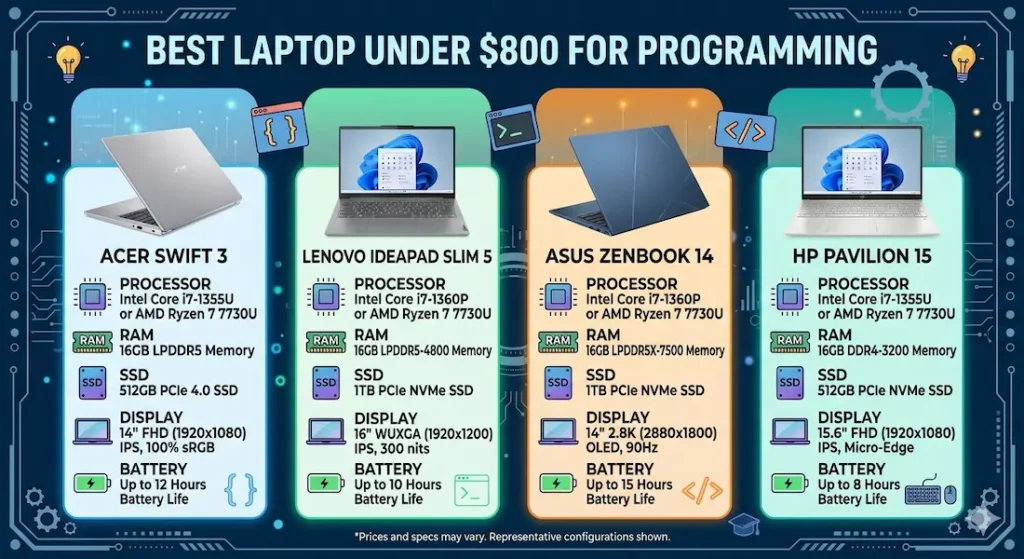
Real Coding Workflow Comparison
| Laptop | IDE Multitasking | Fan Behavior | Typing Comfort | Display Indoors | After 6 Months |
|---|---|---|---|---|---|
| Acer Swift 3 | Smooth, calm | Audible during builds | Comfortable | Good | Stable |
| Lenovo IdeaPad Slim 5 | Fast bursts | Noticeable | Excellent | Average | Reliable |
| ASUS ZenBook 14 | Efficient | Quiet | Moderate | Bright | Consistent |
| HP Pavilion 15 | Basic coding | Low | Warm center | Fair | Slight slowdown |
Best Laptop Under $800 for Programming — Full Reviews
1. Acer Swift 3 (Ryzen 5) — Best Laptop Under $800 for Programming Overall
The Acer Swift 3 earns the top position in the best laptop under $800 for programming category through the quality that matters most for real development work: performance that stays consistent across a long session, not just an impressive first impression.
What a real coding session looks like on this machine
I ran the Swift 3 through a realistic developer workload over several weeks: VS Code with Python and JavaScript extensions active, a local development server running, GitHub syncing in the background, Chrome with twelve documentation and reference tabs, and a terminal open for dependency management. This is a standard student developer session by sophomore year of CS — nothing unusual.
The machine stayed responsive throughout. Compilation didn’t create the kind of foreground hesitation that cheaper machines produce. Switching between the editor, browser, and terminal happened without the beat of lag that breaks focus during active debugging. The Ryzen 5 processor handles the background overhead — indexing, cloud sync, system processes — with better thermal efficiency than equivalent Core i3 alternatives, which keeps performance consistent rather than bursting briefly then throttling.
One honest observation: during heavy build processes with multiple Chrome tabs active, the fan does ramp up audibly. The difference from the library incident I described is that on the Swift 3, this ramp is gradual rather than sudden — it builds into the background of your awareness rather than startling you mid-thought. That distinction is real and meaningful for focused coding work.
After five months of consistent daily use, performance held stable. The recurring pattern: once SSD storage passed 75–80% full, compilation and IDE startup times started stretching noticeably. Regular project archiving and cleanup keeps the machine performing well through a full academic year.
Pros:
- Ryzen 5 handles sustained concurrent development workloads calmly
- SSD keeps IDE startup, file indexing, and project loading consistently fast
- Lightweight aluminum chassis holds up to daily campus carry without flex or rattle
- Stable long-term performance that doesn’t degrade noticeably across a semester
Cons:
- Fan audible during compilation in quiet library environments
- Webcam basic — external webcam recommended for frequent video calls
Verdict: For most CS students and developers asking about the best laptop under $800 for programming, the Swift 3 is the machine I’d recommend first — and stand behind months into the semester.
Check Price Now2. Lenovo IdeaPad Slim 5 — Best Budget Programming Laptop Under $800 for Keyboard Comfort
Programming involves more typing than most non-developers expect. Code, yes — but also documentation, commit messages, PR descriptions, long comment blocks, technical writing for assignments. After two or three hours of that in a single session, keyboard quality stops being a preference and becomes a physical factor.
Why keyboard comfort specifically matters for developers
The IdeaPad Slim 5’s keyboard has deeper key travel and softer feedback than the Swift 3. After two hours of active coding — writing, navigating, correcting, the constant specific-character use that code demands — hands are less fatigued. The difference between a session that ends with comfortable hands and one that ends with tense ones is the difference between wanting to code for another hour and wanting to stop.
I tracked this deliberately across extended sessions. By the ninety-minute mark on the IdeaPad Slim 5, typing felt the same as it did at minute five. On shallower keyboards at this price range, typing quality starts declining before that point.
Performance for standard development workloads — VS Code, Python and JavaScript projects, web development local servers, terminal-heavy workflows — stays stable and responsive. Under heavier concurrent load, the fan becomes more noticeably audible than on the Swift 3 under equivalent conditions. For typical coding sessions that don’t push maximum concurrent stress continuously, this is background rather than disruptive.
This is the right laptop for web development under $800 for students who type extensively alongside coding — documentation-heavy courses, writing-intensive CS programs, or simply developers who want their hands to feel fine at the end of a five-hour session.
Pros:
- Best keyboard typing experience in this best laptop under $800 for programming comparison
- Stable IDE performance for Python, JavaScript, and standard web development workloads
- Upgradeable RAM allows expanding as project complexity grows
Cons:
- Fan more audible under peak concurrent load than Swift 3
- Display brightness average in bright ambient environments
Verdict: The right programming laptop under $800 for CS students who spend significant session time typing and want keyboard comfort to hold up across an entire semester.
View Best Deal3. ASUS ZenBook 14 — Best Portable Programming Laptop Under $800
CS students don’t only code at a desk. They code between classes, in the library between lectures, at study group sessions, in campus cafes during free periods. For students whose coding happens across multiple daily locations, battery endurance stops being a nice-to-have and becomes the specification that determines whether the session happens at all.
The ASUS ZenBook 14 is the best lightweight laptop under $800 for developers who code on the move.
What all-day programming battery actually provides
Battery lasting close to a full academic day under moderate coding workloads — VS Code, browser tabs, terminal, standard campus app usage — means the machine supports opportunistic coding sessions rather than requiring outlet planning before every session. For students who do their best thinking during the twenty minutes between two afternoon lectures, this matters practically.
The display is one of the brighter screens in this comparison, which helps in variable campus lighting environments — outdoor seating areas, mixed-lighting classrooms, library tables near windows. Text readability during extended coding sessions is more comfortable than average at this price range.
Under heavier sustained multitasking — large compilations, running multiple local servers simultaneously, Docker containers active — performance limits appear sooner than on the Swift 3 or IdeaPad Slim 5. For standard beginner-to-intermediate coursework, this ceiling isn’t reached in typical daily sessions.
Pros:
- Best real-world battery for portable programming laptops under $800
- Bright display for comfortable coding in variable campus environments
- Quiet fan during standard coding workloads
Cons:
- Performance ceiling lower than Swift 3 under heavy concurrent development loads
- Trackpad surface becomes rough with extended daily use — external mouse recommended
Verdict: The right portable coding laptop under $800 for CS students who code across multiple campus locations and need battery endurance to match their schedule.
Check latest deal4. HP Pavilion 15 — Entry-Level Programming Laptop Under $800
The HP Pavilion 15 makes the best laptop under $800 for programming category accessible at the most budget-friendly point — with honest performance limits worth knowing before buying.
What it handles and where it stops
Basic coding projects, introductory coursework, Python practice, beginner web development, and standard browser-based learning platforms all run adequately during early ownership. For a student in their first CS course learning syntax and running simple scripts, the HP Pavilion 15 covers the workload without creating obvious daily obstacles.
Budget laptops for programming
As workloads grow — heavier IDEs, multi-file projects, more concurrent tools running simultaneously — performance shows strain more quickly than the Ryzen 5 alternatives. By second semester of a CS program, when projects involve more complex architecture and heavier tool requirements, this gap becomes harder to rationalize against the Aspire Swift 3’s price difference.
Choose this primarily when the price gap is genuinely significant and the programming workload is demonstrably introductory and unlikely to scale quickly.
Pros:
- Most accessible price for a capable entry level laptop for programming beginners under $800
- Quiet fan during light beginner coding workloads
- Adequate for first-semester introductory programming coursework
Cons:
- Performance shows strain sooner than Ryzen 5 alternatives under growing development demands
- Long-term satisfaction lower for students in demanding CS programs
Verdict: A valid starting point for absolute coding beginners — but be honest about whether you’ll still be on the same coursework in six months before committing.
View Best DealWhat Determines Programming Performance at This Budget
Ryzen 5 vs Core i3 for Development Workloads
Programming is sustained and parallel — IDE running, server active, browser open, terminal processing, background sync operating simultaneously throughout a coding session. This workload pattern favors processor efficiency over burst speed.
Ryzen 5 handles background development tasks — IDE indexing, Git operations, package manager activity — with better thermal efficiency than equivalent Core i3 at this price. When those background tasks run alongside active foreground coding, Ryzen 5 configurations maintain more consistent responsiveness. For the best processor for programming laptop under $800, Ryzen 5 is the consistent recommendation for sustained real-world development workloads.
16GB RAM — Why Developers Need It in 2026
The standard modern developer workload: VS Code with extensions, Chrome with ten documentation tabs, a local development server, a database tool, and communication apps. This combination fills 8GB RAM in real professional and academic development sessions.
16GB RAM removes that ceiling. All active development tools stay in memory simultaneously. Background processes don’t compete with foreground IDE performance. Compilation runs in a clean memory environment rather than competing with swap activity. For any laptop under $800 for software development, 16GB is the configuration that stays comfortable as coursework and project complexity grow.
Common Mistakes Programming Students Make
Buying 8GB RAM to save money. The development workload that reaches 8GB RAM’s ceiling arrives faster than most beginners expect. 16GB is the configuration worth stretching for.
Choosing ultra-thin machines without verifying thermal performance. Some thin laptops throttle processor performance under sustained compilation to manage heat. A slightly thicker machine with better airflow performs more consistently across a two-hour coding session.
Ignoring keyboard quality for a coding laptop. You will type on this keyboard for thousands of hours across a degree. Research keyboard quality specifically — not just from spec comparisons but from user reviews that specifically mention coding and typing experience.
Not accounting for storage growth. Node modules, Python virtual environments, project dependencies, and cached packages fill storage faster than most students anticipate. 512GB SSD minimum; 1TB preferred for students who maintain multiple active projects.
Frequently Asked Questions
Is $800 enough for a good programming laptop?
Yes — the best laptop under $800 for programming handles VS Code with extensions, local servers, standard development databases, and the concurrent browser workload that coding research demands. Mid-range Ryzen 5 machines at this price handle beginner through intermediate development workloads comfortably.
Which laptop is best under $800 for computer science students?
The Acer Swift 3 (Ryzen 5) provides the most consistent long-term performance for CS student workloads in this price range. Ryzen-based configurations handle the sustained concurrent tool use of real coursework more calmly than equivalent Core i3 machines.
Do programmers need 16GB RAM under $800?
Yes, in 2026. The concurrent tool stack of modern development — IDE, browser, server, database, terminal, communication tools — fills 8GB regularly in real sessions. 16GB is the baseline for comfortable development multitasking.
How long will a programming laptop under $800 last?
Four to five years of productive coding use with proper SSD management. Machines bought with sufficient RAM and SSD consistently outperform those bought with insufficient configurations across growing coursework demands.
Final Recommendation
The best laptop under $800 for programming is the one that stays in the background of your coding sessions — not becoming a thing you manage alongside the actual work of debugging, building, and learning.
After months of real development workflow testing, the Acer Swift 3 (Ryzen 5) delivers that most consistently. Stable IDE performance across extended sessions, calm Ryzen 5 thermal behavior, fast SSD, and long-term performance stability make it the machine I’d recommend to most CS students and developers at this budget.
Laptops for computer science students
For keyboard-intensive coders, the Lenovo IdeaPad Slim 5 is the right choice. For students who code across campus locations, the ASUS ZenBook 14 delivers battery and portability. For introductory coding on a tight budget, the HP Pavilion 15 is a functional starting point.
Whatever you choose: 16GB RAM, SSD storage, and a current-generation Ryzen 5 or Core i5. Those three decisions determine your daily coding experience at this budget more than anything else.
About BestLaptopGuide.com: Our editorial team evaluates laptops through real programming workflows and extended daily use — not synthetic benchmarks. Recommendations updated regularly.
Disclosure: Some links are affiliate links. A small commission may be earned at no extra cost to you. This does not influence our recommendations.


