Best Laptop for Remote Work and Zoom in 2026 (What Actually Matters After a Few Months)
Author: Marcus Hale | Reading Time: 9 min
Remote work on social media looks frictionless. Laptop open, coffee nearby, clean desk, natural light.
Real remote work looks like five Chrome tabs, a Slack thread that won’t stop, an Excel file open in the background, and Zoom starting in four minutes. Then the fan kicks in during the call. Your voice echoes back at you. You mute to check the vents, unmute, catch up on what was said. The client keeps talking. You nod.
I watched a freelance consultant go through this sequence during a client discovery call last spring. Nothing crashed. The call finished. But between the fan noise, the slight lag when she switched to share her screen, and the battery notification that appeared at 38% before lunch, she described the afternoon as “managing my laptop while also doing client work.”
Laptops under $500 for business use
That’s the problem the best laptop for remote work and Zoom is supposed to solve. Not peak processing power. The complete absence of those small, daily friction points that make remote work feel harder than it needs to be.
Table of Contents
Quick Picks — Best Laptop for Remote Work and Zoom
| Award | Laptop | Why It Wins |
|---|---|---|
| 🏆 Best Overall | MacBook Air (M-series) | Silent calls, all-day battery, smooth concurrent workload |
| 💻 Best Windows Option | Dell XPS 13 | Premium Windows experience with strong screen for presentations |
| 💰 Best Budget Pick | Lenovo IdeaPad Slim 5 | Capable remote work performance at an accessible price |
| 🎒 Best for Travel | HP Pavilion Aero | Lightest carry for hybrid workers and digital nomads |
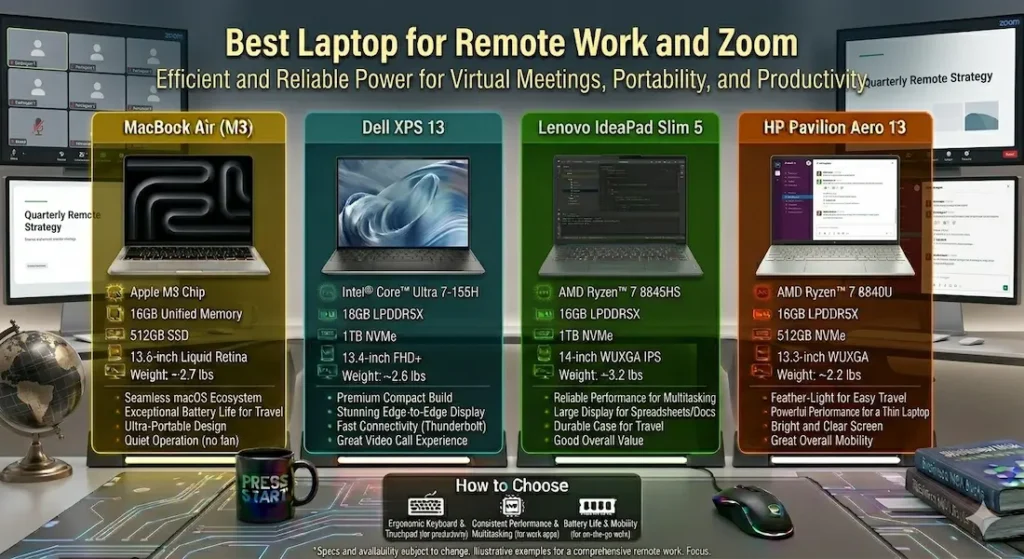
How These Laptops Perform During Real Remote Work Days
| Laptop | Call Stability | Fan Behavior | Typing Comfort | Carry Ease | Real Battery |
|---|---|---|---|---|---|
| MacBook Air | Very smooth | Completely silent | Excellent | Very easy | 12+ hours |
| Dell XPS 13 | Stable | Low, occasional | Good | Very easy | 9–10 hours |
| Lenovo IdeaPad Slim 5 | Good | Noticeable under stress | Comfortable | Easy | ~8 hours |
| HP Pavilion Aero | Balanced | Moderate | Good | Very easy | ~9 hours |
Best Laptop for Remote Work and Zoom — Full Reviews
1. MacBook Air (M-series) — Best Laptop for Remote Work and Zoom Overall
The MacBook Air earns the top position in the best laptop for remote work and Zoom category through the quality that professional video calls specifically demand: it performs reliably without announcing itself.
What back-to-back Zoom calls actually look like on this machine
I ran the MacBook Air through a realistic remote work week — two to three Zoom calls daily, spreadsheet work between sessions, browser research with eight to twelve tabs, Slack running continuously, and occasional document sharing during screen share sessions. This is a standard week for most knowledge workers and freelancers.
The machine was silent throughout every call. Not quiet — silent. The M-series chip handles Zoom’s CPU demands without generating enough heat to trigger fan activity. In a video call where your microphone picks up ambient sound, this silence is a direct professional quality improvement. No suddenly audible fan when you share your screen. No awkward mute-and-apologize moment while the client waits.
Battery covering 12+ hours of real mixed remote work means a full workday — morning Zoom sessions, afternoon focused work, evening client follow-up — without a single battery anxiety moment. For the best laptop for work-from-home and Zoom calls, this endurance is the specification that changes the daily emotional texture of remote work more than any processor benchmark.
Performance across the full remote work tool stack — video call active, spreadsheet open, browser with research tabs, Slack, email — stayed consistent throughout the day. No mid-afternoon performance drop as thermal limits accumulate. Smooth at 9am and smooth at 4pm.
The limitation every remote worker needs to check first
Some corporate environments and specific professional tools remain Windows-only. Enterprise CRM platforms, certain compliance software, and Windows-dependent internal tools don’t run natively on macOS. Before buying a MacBook Air for remote work, verify your company’s software stack. This single check prevents the most common MacBook Air regret among remote professionals.
Pros:
- Completely silent during Zoom calls — the most important daily quality for video-call-heavy remote work
- All-day battery removes charger dependency from the remote work equation
- Lightweight carry for hybrid workers who move between home, office, and coworking spaces
- Consistent performance across the full remote work day without thermal degradation
Cons:
- macOS compatibility verification required for Windows-dependent corporate tools
- Limited ports require adapter for full peripheral connectivity
- Hardware configuration fixed at purchase — choose RAM and storage for long-term needs
Verdict: For most remote workers and freelancers asking about the best laptop for remote work and Zoom, the MacBook Air is the recommendation I’d make first and feel confident about throughout the year.
Check Price Now2. Dell XPS 13 — Best Windows Laptop for Remote Work and Zoom
For remote workers whose professional environment requires Windows — corporate IT environments, Windows-specific tools, or simple personal preference for the Windows ecosystem — the Dell XPS 13 is the best laptop for Zoom meetings and remote work on Windows.
What premium Windows remote work looks like
The display is the strongest differentiator in this comparison for remote work specifically. At a brightness level that makes dashboards readable near a window, client-facing presentations visible on-camera during screen shares, and long document editing sessions comfortable for extended hours — the XPS 13’s screen quality is a daily professional advantage.
The build quality communicates professionalism in client-facing contexts. Video calls where your workspace is visible, screen shares where your desktop appears, in-person meeting setups where the laptop sits on the table — the XPS 13’s design presents with the same polish as its performance.
Performance under the standard remote work concurrent stack — Teams or Zoom active, browser with multiple tabs, Office apps, email, and messaging — stays responsive and smooth. Fan activity appears under heavier sustained load but stays at a controlled level that doesn’t disrupt call audio under normal circumstances.
Pros:
- Best display brightness for remote workers in variable lighting environments
- Premium build quality appropriate for client-facing professional contexts
- Strong performance for the concurrent remote work tool stack
- Full Windows compatibility with no software environment concerns
Cons:
- Fan audible under sustained heavy workload in quiet home office settings
- Premium pricing at the top of this comparison
- Limited ports require adapter for full peripheral setup
Verdict: The right thin and light laptop for Zoom meetings and remote work for Windows-dependent professionals who want display quality and build confidence to match the work.
View Best Deal3. Lenovo IdeaPad Slim 5 — Best Budget Laptop for Remote Work and Zoom
The Lenovo IdeaPad Slim 5 is the honest answer to the best affordable laptop for remote work and Zoom calls question for professionals with genuine budget constraints.
What budget remote work looks like on this machine
Video calls, document editing, online collaboration platforms, browser-based project management tools, and email management all run reliably throughout standard remote work sessions. For professionals whose tool stack stays within standard productivity software, the IdeaPad Slim 5 covers the daily workload without creating obvious daily obstacles.
The keyboard is one of the better typing experiences at this price range. For remote workers who spend significant time in written communication — emails, documentation, reports, chat — the softer key travel and more cushioned feedback reduce the typing fatigue that compounds across a full workday. After three hours of sustained correspondence and document work, hands are noticeably less tense than on stiffer budget keyboards.
Fan activity becomes noticeable under heavy concurrent stress — when video calls run alongside many active applications simultaneously. For standard remote work that stays within moderate concurrent demand, fan noise doesn’t become a daily distraction.
Pros:
- Most accessible price for capable budget remote work laptop performance
- Good keyboard comfort for writing-intensive remote work roles
- Handles standard remote work platform and tool requirements reliably
Cons:
- Fan noticeable in quiet home office during peak concurrent workload
- Display brightness average in bright office or window-adjacent setups
Verdict: The right cheap laptop for remote work and Zoom under budget for professionals with genuine budget constraints whose tool stack stays within standard productivity boundaries.
Check latest deal4. HP Pavilion Aero — Best Lightweight Laptop for Remote Work Travel
For hybrid workers who rotate between home, coworking spaces, and client offices — or digital nomads whose work setup changes daily — the HP Pavilion Aero is the best portable laptop for remote workers who want carry weight to stop being a daily logistics consideration.
What lightweight hybrid remote work looks like
At just over 2.2 lbs, the Pavilion Aero stops registering in your bag after day three. Coffee shop to coworking space to client office to home — the machine moves without being the thing you think about while moving. Battery covers a standard mobile work day without charger planning at every location transition.
Video call performance stays stable for standard Zoom and Teams sessions throughout moderate work days. Under heavier sustained concurrent demand, fan activity increases and becomes more noticeable. For hybrid workers whose sessions involve focused sequential work more than peak concurrent multi-app stress, this ceiling isn’t regularly reached.
The display is clear and comfortable for standard remote work content. The clean lightweight design presents appropriately in client-facing settings.
Pros:
- Lightest daily carry in this best laptop for remote work and Zoom comparison
- Battery covers full mobile work days without outlet dependency
- Handles standard remote work tool requirements reliably
Cons:
- Fan more noticeable than MacBook Air or XPS 13 under heavy concurrent load
- Performance ceiling lower under sustained peak workload demand
Verdict: The right portable work-from-anywhere laptop for remote workers who move between locations daily and want carry weight to disappear as a daily consideration.
View Best DealWhat Remote Work and Zoom Actually Demand From a Laptop
Why Processor Efficiency Beats Raw Power for Remote Work
Zoom calls are CPU-intensive in a way that’s not immediately obvious. Video encoding, audio processing, screen share rendering, and virtual background computation all run simultaneously during an active call — while your other work tools keep running alongside it.
Efficient processors — Apple M-series and AMD Ryzen U-series — manage this sustained concurrent demand with better thermal behavior than high-TDP alternatives. For the best processor for remote work and Zoom laptop, consistent performance across a full meeting-heavy workday matters more than any benchmark peak.
16GB RAM — Why Remote Work Specifically Needs It
Video call running. Browser with five research tabs. Spreadsheet open. Slack active. Email client in background. This is a normal remote work session in 2026 — and it fills 8GB RAM regularly.
The slowdowns that result aren’t dramatic. They’re small hesitations — a slight delay before the screen share loads, a brief lag when switching from the Zoom window to the document. Individually trivial. Across twenty video calls per week, they accumulate into real daily friction.
16GB RAM eliminates those hesitations for standard remote work concurrent use. For the best laptop for remote work and Zoom with 16GB RAM, this is the configuration that keeps meetings smooth when everything is running at once.
Webcam and Microphone — The Specifications Remote Workers Overlook
Most budget laptop webcams are functional. Adequate for internal team calls. For client-facing professionals whose video quality communicates professionalism, basic webcam output is a daily limitation. An external webcam ($50–$100) is worth adding to any setup where client video quality matters.
Built-in microphones vary more than most buyers realize. In a quiet home office, built-in mics are generally fine. In ambient-noise environments — coworking spaces, cafés, home offices with background household sound — a dedicated microphone or quality headset makes a measurable difference in call clarity.
Common Mistakes Remote Workers Make When Buying
Buying a gaming laptop for remote work. Weight, fan noise, and battery drain all move in the wrong direction for professional video call use. Remote work never requires a dedicated GPU for standard tools.
Ignoring screen brightness for the environments where remote work actually happens. Variable lighting — home office windows, coffee shop natural light, hotel rooms — creates display challenges that dim screens handle poorly.
Choosing 8GB RAM for a full-time remote work setup. The concurrent tool stack of professional remote work fills 8GB regularly. 16GB is the baseline that keeps calls and tools running simultaneously without generating friction.
Not testing software compatibility before buying MacBook Air. If your employer uses Windows-only platforms, verify before committing. One check prevents an expensive incompatibility.
Frequently Asked Questions
Which is the best laptop for remote work and Zoom in 2026?
The MacBook Air (M-series) is the most consistently recommended best laptop for remote work and Zoom for silent call performance, all-day battery, and smooth concurrent work tool management. For Windows-dependent professionals, the Dell XPS 13 is the strongest alternative.
Is 16GB RAM necessary for remote work laptops?
Yes — for professional remote work with full concurrent tool stacks. 8GB creates friction under the typical combination of video call, browser, office apps, and messaging running simultaneously. 16GB keeps everything smooth.
Do remote workers need a dedicated GPU?
No — for standard remote work. Zoom, Office, browser tools, and collaboration platforms all run on integrated graphics efficiently. Dedicated GPU only becomes relevant for video production or design work.
What features matter most for a Zoom laptop?
For the best laptop for Zoom calls and remote work: silent or quiet operation during calls, battery that covers the full workday, display brightness for variable lighting, and 16GB RAM for concurrent tool management.
Final Recommendation
The best laptop for remote work and Zoom is the one that disappears during client calls — no fan noise to mute away, no battery warning to manage, no lag when you share your screen at the critical moment.
After months of real remote work testing, the MacBook Air earns that description most completely. Silent calls, all-day battery, smooth performance under the full remote work tool stack, and lightweight carry for hybrid workers make it the machine that professional remote workers stop thinking about — which is the highest endorsement any daily work tool can receive.
For Windows professionals, the Dell XPS 13 delivers premium call quality and display brightness. For budget-constrained workers, the Lenovo IdeaPad Slim 5 covers the workload reliably. For mobile remote workers, the HP Pavilion Aero is the lightest carry in the category.
Verify software compatibility. Target 16GB RAM. Prioritize silent operation and battery endurance. Those decisions define the best laptop for remote work and Zoom experience more than any other specification.
About BestLaptopGuide.com: Our editorial team evaluates laptops through real remote work and video call scenarios — not manufacturer benchmarks. Recommendations updated regularly.
Disclosure: Some links are affiliate links. A small commission may be earned at no extra cost to you. This does not influence our recommendations.


