Last Updated: April 2026 | Author: Marcus Hale | Reading Time: 12 min
The question of how long should a laptop last comes up at two very different moments.
The first is before you buy — you’re deciding whether $700 is reasonable for something that might feel outdated in three years. The second is after something starts going wrong — the battery barely holds a charge, the fan runs constantly, the machine feels sluggish in ways it didn’t twelve months ago — and you’re trying to figure out whether you’re dealing with normal aging or a machine that’s failing prematurely.
Both moments deserve a direct answer, not a “it depends.”
I’ve seen laptops from the same purchase year end up in completely different places at the five-year mark — one still running a CS student’s development environment smoothly, another serving as a glorified browser that struggles with twelve tabs. The difference almost never comes down to hardware luck. It comes down to how the machine was maintained, used, and configured across those five years.
Here’s the honest answer to how long should a laptop last — and specifically, what determines whether yours falls on the comfortable end or the frustrating end of that range.
Table of Contents
How Long Should a Laptop Last — The Direct Answer by Category
Different buyer categories have genuinely different realistic expectations for laptop lifespan. Here’s what the data and real-world observation support.
| Laptop Type | Average Lifespan | Well-Maintained Lifespan |
|---|---|---|
| Budget laptop ($300–$500) | 2–3 years comfortable | 3–4 years with care |
| Mid-range laptop ($500–$900) | 3–5 years | 5–6 years with care |
| Premium laptop ($900–$1,500+) | 4–6 years | 6–8 years with care |
| Business/enterprise class | 5–7 years | 7–10 years with care |
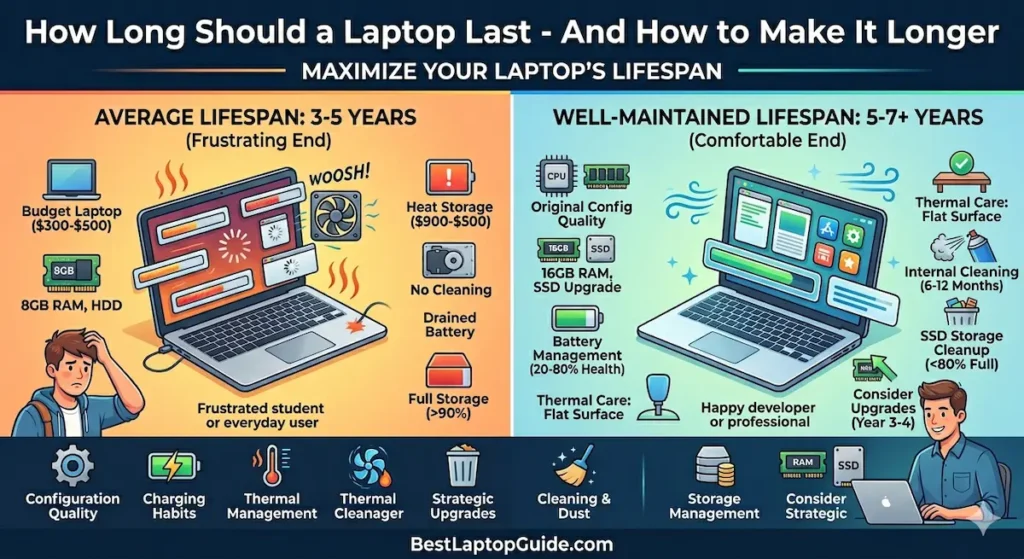
So how long should a laptop last on average? Three to five years is the realistic expectation for a mid-range machine used daily without deliberate maintenance. Five to seven years is achievable for the same machine with consistent care. Premium and business-class machines regularly exceed those numbers.
The gap between average and well-maintained lifespan — often two to three additional years — is what this guide is about.
What “Laptop Lifespan” Actually Means in Practice
When people ask how long should a laptop last, they usually mean one of three different things — and the answer is different for each.
Physical lifespan: How long before the hardware actually fails — battery dies completely, components stop working, screen breaks. Budget machines typically last three to five years physically with normal care. Premium machines last significantly longer.
Performance lifespan: How long before the machine feels too slow for the software you need to run. This is where most laptops actually feel “dead” to users. A machine that runs fine physically can feel obsolete if software requirements have outpaced its capabilities.
Battery lifespan: How long before the battery holds enough charge to be useful without being plugged in constantly. Batteries typically reach 80% of original capacity within 300–500 charge cycles — roughly one to two years of daily charging. After three to four years, battery degradation is usually the first thing users notice.
Understanding how long a laptop should last requires being clear about which of these you mean. A laptop can have a failing battery, perfectly functional hardware, and still run your software adequately — three different answers to the same question.
How Long Should a Laptop Last for Students?
This is one of the most common specific versions of the question, and it has a practical answer.
How long should a laptop last for college students? The typical expectation — and the goal when buying — is four years, matching a standard undergraduate program. A mid-range laptop bought with adequate configuration (Ryzen 5 or Core i5, 16GB RAM, 512GB SSD) should cover a full undergraduate degree without becoming the limiting factor in your workflow.
In practice, I’ve seen two consistent patterns:
Students who buy adequate configurations and maintain them moderately — keeping the drive reasonably clear, charging sensibly, using on hard surfaces — finish four years with a machine that still functions well for basic to moderate academic use.
Students who buy entry-level configurations to save money often find their machines feeling inadequate by sophomore or junior year, when coursework grows heavier and concurrent tool requirements expand beyond what 8GB RAM and entry-level processors handle comfortably.
How long a laptop lasts for students is determined as much by the original configuration as by maintenance. Buying underpowered to save $80 and upgrading in eighteen months is more expensive than buying right initially.
How Long Should a Laptop Last for Everyday Use?
For non-students using a laptop for everyday work, browsing, and entertainment, the answer to how long should a laptop last for everyday use is more forgiving than most people expect.
Everyday use — email, browsing, streaming, video calls, basic documents — is genuinely light on hardware. A mid-range laptop from 2022 running a clean, well-maintained system handles 2026 everyday use without significant strain. The software requirements for everyday tasks don’t advance nearly as quickly as the software requirements for creative, development, or gaming use.
For everyday users, how long should a laptop last is often a battery question more than a performance question. The machine that still runs fine but dies after two hours unplugged feels more “dead” than a machine that runs slowly but holds charge all day. Battery management is the most impactful maintenance habit for extending the perceived useful lifespan of an everyday laptop.
How Long Should a Laptop Battery Last?
The battery conversation needs its own section because battery degradation is the most consistent, predictable, and misunderstood aspect of laptop lifespan.
How long should a laptop battery last? A new lithium-ion battery typically reaches about 80% of original capacity after 300–500 complete charge cycles. For a user who charges from 20% to 80% daily — the healthiest charging pattern — that’s two to three years before noticeable capacity loss. For a user who charges from 0% to 100% daily, capacity loss arrives faster.
How to Make Your Laptop Last 5+ Years
At 80% capacity, a laptop rated for 10 hours delivers 8 hours. At 70%, it delivers 7 hours. Most users notice “my battery got worse” somewhere between year two and year three of daily use. This is normal degradation, not a defect.
How long should a laptop battery last before replacement? Most batteries are still serviceable at 70% capacity — inconvenient for all-day mobile use, but functional with strategic charging habits. Battery replacement typically costs $60–$120 at a repair shop and can restore a three-to-four-year-old machine to near-new battery performance. For a laptop whose hardware is otherwise sound, battery replacement is often a better investment than full machine replacement.
What Determines How Long a Laptop Lasts — The Real Factors
Understanding how long should a laptop last requires understanding what actually determines lifespan. It’s not random hardware luck. These are the factors that matter most.
1. Original Configuration Quality
A laptop bought with adequate specifications for the workload it will face — not just the workload at purchase, but at year three — lasts longer comfortably. 16GB RAM, SSD storage, and a current-generation processor don’t just improve day-one performance. They determine whether the machine remains comfortable as software requirements grow.
8GB RAM and HDD storage are the most common “bought too light” configurations. Both create performance degradation experiences that feel like hardware aging but are actually configuration inadequacy. How long a laptop lasts with 8GB RAM versus 16GB RAM under identical use patterns is often eighteen to twenty-four months shorter in subjective perceived performance.
2. Battery Charging Habits
The single highest-impact maintenance decision most laptop owners make — usually unconsciously. Keeping a laptop plugged in at 100% constantly, routinely draining to 0%, and charging through heat all accelerate battery capacity loss. Maintaining charge between 20–80% using native battery management software extends battery lifespan by one to two years compared to unrestricted charging.
How long a laptop battery lasts is significantly more controllable than most users realize.
3. Thermal Management
Heat is the primary enemy of long-term hardware health. Using a laptop on soft surfaces that block intake vents raises internal temperatures significantly. A laptop used consistently on a bed or couch runs measurably hotter than the same machine on a hard, flat surface — and that sustained temperature difference accelerates wear on the processor, battery, and storage components.
How long should a laptop last under good thermal conditions versus poor ones can differ by two or more years in sustained daily use.
4. Dust Accumulation and Cleaning
This is the maintenance step most laptop owners have never performed and that makes one of the most dramatic visible differences when finally done. Laptop cooling systems accumulate dust in heatsink fins over months of use, progressively blocking airflow and increasing internal temperatures. After two to three years without cleaning, many laptops run 10–20°C hotter than they did new — which affects both performance and hardware longevity.
How long a laptop lasts without cleaning versus with regular cleaning (every six to twelve months) is a difference that shows up in fan behavior, keyboard temperature, and long-term component health.
5. SSD Storage Management
SSDs perform measurably slower when they approach capacity. A drive maintained below 75–80% full performs better and ages more gracefully than one that routinely sits at 90%+ capacity. Storage management — regular cleanup, cloud archiving of completed files, uninstalling unused applications — is the zero-cost maintenance habit that directly affects how responsive the machine feels throughout its lifespan.
How to Make a Laptop Last Longer — The Practical Habits
Knowing how long should a laptop last is useful. Knowing what to do to push that number higher is what actually changes your outcome.
Smart Battery Management
Enable whatever native battery health management your laptop offers:
- Lenovo: Conservation Mode
- ASUS: Battery Health Charging
- Dell: Custom Charge Limits (in Dell Power Manager)
- MacBook: Optimized Battery Charging (automatic)
These tools limit charging to 80% and prevent the sustained high-charge-under-heat pattern that accelerates capacity loss. If your laptop doesn’t have native tools, third-party options like BatteryBar or similar utilities accomplish similar results.
MacBook Air vs Dell XPS 13 for students
Keep the SSD Below 75–80% Full
Move completed projects, old semester files, and archived documents to external storage or cloud services (Google Drive, OneDrive). Clear your Downloads folder monthly. Uninstall applications you haven’t opened in three months. This takes fifteen minutes quarterly and directly affects both performance and long-term drive health.
Use on Hard, Flat Surfaces
The simplest thermal habit. If you regularly work from a couch, bed, or carpet, put a hardcover book or a dedicated laptop stand under the machine to ensure full airflow through the intake vents. A $20–$40 cooling pad for heavy workloads provides active airflow that measurably reduces sustained temperatures.
Clean Internally Every 6–12 Months
Compressed air through the exhaust vent with the machine off removes surface dust without opening the chassis. For thorough cleaning, opening the bottom panel — accessible on most laptops with a few screws — and directing compressed air through the heatsink fins provides significantly better results. Most computer repair shops offer full cleaning for $30–$60 if you’re not comfortable doing it yourself.
Audit Startup Programs Quarterly
Every installed application tends to add itself to startup. After a year of software accumulation, boot time and background RAM consumption can double without any change to hardware. On Windows: Task Manager → Startup tab. Disable everything that doesn’t need to run at boot. This free five-minute cleanup can restore near-new boot and background performance.
Consider Strategic Upgrades at Year 3–4
For laptops with upgradeable components — many Lenovo, ASUS, and Dell mid-range machines — targeted upgrades at year three or four can extend functional lifespan significantly:
RAM upgrade: If your machine supports 16GB and you’re running 8GB, this single upgrade produces immediate, significant performance improvement under the concurrent workloads you’ve accumulated.
SSD upgrade: Replacing a full or aging SSD with a larger, faster NVMe drive is the most impactful performance upgrade for an aging machine. Modern NVMe drives are dramatically faster than drives from three to four years ago.
Thermal paste replacement: At year three to four, replacing the thermal paste between the processor and heatsink — which dries and loses conductivity over time — restores temperature management to near-original effectiveness. A repair shop handles this for $30–$60.
Signs Your Laptop Is Aging vs. Signs It Needs Maintenance
Understanding how long a laptop should last also means knowing the difference between normal aging and fixable degradation.
Signs that are actually maintenance issues (fixable):
- Slowed boot time and application loading → Startup program accumulation, full SSD
- Running hot and loud fan → Dust accumulation, blocked vents
- Battery draining faster than it used to → Battery health degradation (replaceable)
- Generally sluggish feel → RAM pressure from accumulated background processes, full storage
Best Laptop for Programming Students
Signs of actual hardware aging (less fixable without component replacement):
- Battery dies within minutes even after replacement
- Screen develops permanent lines, dead pixels, or backlight failure
- Physical keyboard keys stop registering consistently
- Machine shuts down randomly under moderate load
Most “my laptop got slow” experiences fall in the first category — maintenance issues disguised as aging. Before concluding that a three-year-old machine has reached end of life, a cleaning session, SSD cleanup, and startup audit will reveal whether the machine is actually aging or just neglected.
Frequently Asked Questions
How long should a laptop last on average?
For a mid-range laptop with adequate original configuration and basic maintenance, three to five years of comfortable performance is realistic. With consistent maintenance habits, five to seven years is achievable. How long a laptop should last depends significantly on original configuration quality and maintenance practices.
How long should a laptop battery last before it needs replacing?
Most laptop batteries reach noticeable capacity degradation between year two and year four of daily use, depending on charging habits. A battery that holds 70% of original capacity is still usable with adjusted charging expectations. Replacement costs $60–$120 and is worth doing on a machine whose hardware is otherwise sound.
Is a 5-year-old laptop still worth using?
Often yes — particularly if the hardware remains functional and the workload is moderate. How long a laptop should last in real-world use is frequently extended by targeted maintenance: cleaning, storage management, and strategic component upgrades. A well-maintained five-year-old mid-range laptop running everyday productivity tasks is often faster than a new budget machine.
How long should a gaming laptop last?
Gaming laptops typically last three to five years before feeling underpowered for demanding new titles, due to advancing GPU requirements. For casual gaming and esports titles, how long a gaming laptop lasts can extend to five to six years. Thermal maintenance is especially important for gaming laptops, which run hotter under sustained load than productivity machines.
Does keeping a laptop plugged in all the time reduce its lifespan?
Yes — specifically the battery lifespan. Keeping a laptop at 100% charge continuously under heat accelerates capacity degradation. Using native battery health management software to limit charge to 80% extends battery lifespan by one to two years compared to unrestricted plugged-in use.
Final Answer — How Long Should a Laptop Last
How long should a laptop last? Three to five years on average for a mid-range machine with basic care. Five to seven years with consistent maintenance habits. Premium and business-class machines regularly push past that range.
The machines that end up at the two-to-three-year mark feeling obsolete almost always got there through a combination of underpowered original configuration and zero maintenance — not through unavoidable hardware failure.
The machines that reach year six still running comfortably are almost always machines that were bought with adequate specifications for the actual workload and maintained with the basic habits covered in this guide.
How long your laptop lasts is more in your control than most buyers realize. Buy right, charge smart, keep it clean, and manage your storage — and a five-year machine is a realistic, comfortable outcome rather than an optimistic one.
About BestLaptopGuide.com: Our editorial team evaluates laptops and publishes maintenance guidance based on real extended daily use — not manufacturer specifications. Recommendations updated regularly.
Disclosure: Some links on this page may be affiliate links. A small commission may be earned at no extra cost to you. This does not influence our content.