MacBook Air vs Windows Laptop for Students in 2026 (Real College Life Perspective)
Author: Marcus Hale | Reading Time: 9 min
Nobody thinks hard about their laptop decision until semester three.
First year: everything works fine. Notes get typed, slides get made, Netflix streams smoothly between study sessions. The laptop feels adequate and the decision feels validated.
Then real academic pressure arrives. Three assignments overlapping. A coding project due Thursday. A group presentation Friday. Research tabs multiplying. That’s when you find out whether your laptop is a tool that works with you or a machine you’re constantly managing around.
I’ve watched students in campus libraries dimming their screens to stretch battery. I’ve sat near someone whose fan kicked in during a silent midterm exam hall — audible enough that he shifted uncomfortably and checked the vents. Some students I know avoid bringing their laptops to certain classes because the carry weight has become a daily complaint.
The MacBook Air vs Windows laptop for students decision looks like a brand preference question from the outside. From inside a real semester, it’s a question about daily friction — how much of your cognitive bandwidth goes to managing your machine versus the actual work.
Here’s the honest breakdown.
Table of Contents
Quick Decision Framework
Choose MacBook Air if: Your priority is battery endurance, silent operation, and a machine that performs consistently without requiring thermal management.
Choose Windows laptop if: Your coursework requires Windows-specific software, you need dedicated GPU capability, or your budget is better matched to the Windows market.
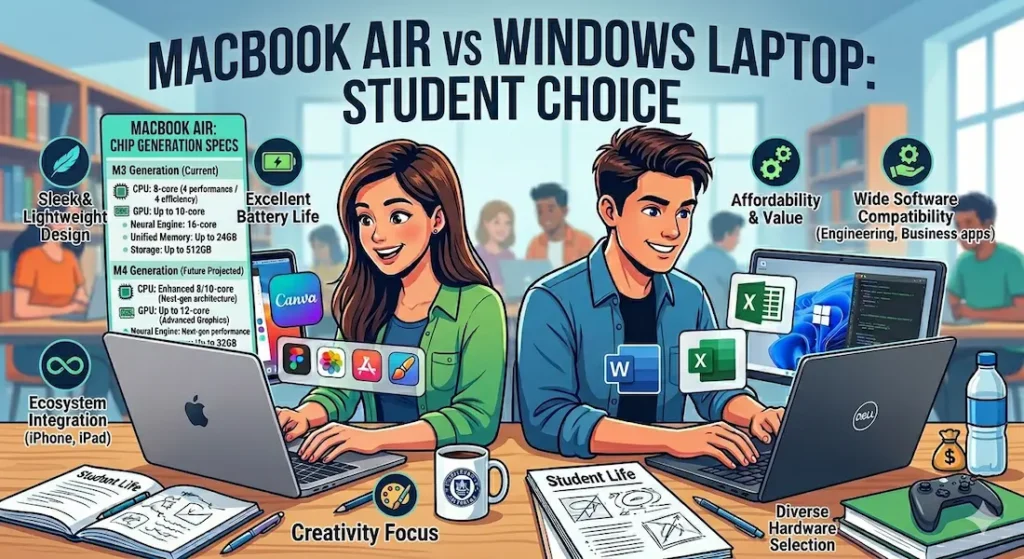
For the majority of students whose academic work runs on standard productivity tools and cross-platform software, the MacBook Air vs Windows laptop for students decision tips toward MacBook Air for daily comfort. For technical students with specific tool requirements, Windows is often the practical necessity rather than a preference.
MacBook Air for Students — The Real Daily Experience
What Living With MacBook Air Actually Looks Like
The strongest argument for MacBook Air in the MacBook Air vs Windows laptop for students comparison isn’t in a spec sheet. It’s in what doesn’t happen during a full academic day.
No fan noise during lectures. No battery anxiety during a three-hour library session. No thermal throttling during a coding assignment that runs longer than expected. No sudden performance drop when the machine has been running for six hours.
The M-series chip handles standard academic workloads — research browsing with multiple tabs, document editing, video calls, streaming, light coding — without the heat generation and power draw that trigger fan activity. In a silent exam review session, in a library during finals week, in a study group where everyone can hear your laptop — this silence is a genuine daily quality-of-life advantage that accumulates across a full semester.
Battery delivering 10 to 12 hours of real mixed academic use means you start the day without planning around charger access. That background freedom — the absence of battery anxiety — keeps focus on the coursework rather than the power indicator.
Laptops for video editing students
MacBook Air Performance for Real Student Workloads
In the MacBook Air vs Windows laptop multitasking performance comparison for standard academic use, MacBook Air holds up across the full day in a way that most budget Windows machines don’t match. Performance at hour six of a session doesn’t differ meaningfully from performance at hour one — no throttling, no accumulated heat-related slowdown.
For students in writing-heavy majors, the trackpad and keyboard quality also matter. The trackpad is in a different category from most Windows alternatives. Gesture-based navigation between apps, documents, and browser windows becomes second nature within a week and genuinely reduces the time spent managing the workspace.
Where MacBook Air Falls Short
The MacBook Air vs Windows laptop for college comparison has real limitations on the Mac side that are worth stating plainly.
Software compatibility: Some engineering simulation tools, specific data science packages, game development environments, and certain university-licensed academic software run on Windows only. Before buying MacBook Air, verify that every tool your program requires runs on macOS. This single check prevents the most common MacBook Air buyer regret.
No hardware upgrades: What you buy is what you have for the life of the machine. Choose the RAM and storage configuration you’ll need in four years, not one.
Gaming: Limited. If gaming is a regular use case alongside academics, MacBook Air is the wrong machine.
Verdict on MacBook Air: For students whose software stack is cross-platform — which covers most liberal arts, business, pre-med, and general academic programs — MacBook Air is the more comfortable daily machine. For technical students, verify tool compatibility first.
Check Price NowWindows Laptops for Students — The Real Daily Experience
What the Windows Variety Actually Means
The MacBook Air vs Windows laptop for students comparison gets complicated on the Windows side because Windows laptops aren’t a single thing. A $500 budget Windows machine and a $1,200 premium ultrabook are radically different experiences that happen to run the same operating system.
At the budget end — the most common student purchase — Windows laptops deliver capable performance that shows its limits under sustained pressure. Fan noise during coding or heavy multitasking is standard. Battery life under real academic workloads typically falls in the five to seven hour range, which requires more charger management than most students anticipate. Performance can vary across the semester as software overhead accumulates in ways that the MacBook Air’s architecture handles more gracefully.
At the premium ultrabook level — Dell XPS 13, Lenovo ThinkPad X1, ASUS ZenBook 14 — Windows closes much of the gap with MacBook Air in build quality, battery, and thermal behavior. The MacBook Air vs premium Windows ultrabook for college comparison is genuinely close and depends more on software ecosystem than hardware quality.
Laptops for computer science students
Where Windows Laptops Win Clearly
Software compatibility: This is the strongest argument for Windows in the MacBook Air vs Windows laptop for students conversation. Every academic tool runs on Windows. Engineering simulation software, industry-specific applications, older university systems, Windows-only research tools — no compatibility questions, no workarounds.
Dedicated GPU access: Students in game development, 3D modeling, machine learning, or any GPU-dependent workflow need a Windows machine. MacBook Air’s integrated graphics are capable for standard work and limited for GPU-intensive tasks.
Price-to-spec value: At equivalent price points, Windows machines typically offer more RAM, more storage, and more raw processing power than MacBook Air configurations. For students who need maximum specification within a tight budget, Windows offers better numbers-per-dollar.
Upgradeability: Many Windows laptops allow RAM and SSD upgrades that extend useful life beyond what a fixed-spec MacBook Air configuration provides. For students who buy now and want to expand later, this flexibility has real value.
Verdict on Windows: The right choice for CS and engineering students with specific tool requirements, students who game regularly, and anyone for whom budget constraints make the Windows market the practical option.
Check latest dealMacBook Air vs Windows Laptop Battery Life Comparison for Students
This is the most practically impactful daily difference in the MacBook Air vs Windows laptop battery life comparison for students.
MacBook Air under real academic mixed use — browsing, documents, video calls, streaming — consistently delivers 10+ hours. Equivalent-priced Windows machines deliver five to seven hours under the same workload. Premium Windows ultrabooks close this gap but don’t eliminate it.
For a student whose day runs from 8am to 4pm across campus without consistent outlet access, this difference is not a minor preference — it’s a daily practical variable that shapes how they use the machine every single day.
Processor and Performance Reality After a Few Months
The MacBook Air vs Windows laptop performance for students comparison looks different at purchase than it does at month five of the semester.
New Windows machines feel fast during setup. As background software accumulates — startup items, browser extensions, antivirus overhead, Windows update processes — performance patterns change. Mid-range processors, particularly Core i3 and older Core i5 configurations, show this accumulated overhead more clearly than the M-series chip.
MacBook Air maintains more consistent performance across the ownership arc because the M-series architecture processes tasks more efficiently without the same degree of background overhead accumulation. At six months of real use, the performance gap between M-series MacBook Air and mid-range Windows machines typically widens rather than narrows.
For the MacBook Air vs Windows laptop durability for college students, this efficiency advantage translates into a machine that stays useful longer under growing academic workload demands.
RAM and Storage — What Students Learn Too Late
The MacBook Air vs Windows laptop for college decision often gets made without enough attention to configuration.
For either platform: 16GB RAM is the configuration worth targeting for real multi-year academic use. 8GB handles light use and creates friction once real academic workflows — IDE alongside browser alongside communication tools alongside background processes — reach their stride. This applies to both MacBook Air and Windows configurations.
512GB SSD provides practical storage for a full academic program. Projects, software, downloaded course materials, and the natural accumulation of files across a four-year degree fill storage faster than most students anticipate.
On MacBook Air: RAM and storage are fixed at purchase. Choose correctly upfront. On Windows: many configurations allow upgrades, which is a legitimate long-term budget advantage.
Common Mistakes Students Make in This Decision
Choosing MacBook Air without verifying software compatibility. The single most preventable regret. Check every tool your program requires before buying.
Buying a budget Windows machine expecting MacBook Air-level battery. Budget Windows configurations deliver real-world battery that requires daily charger management. This is not a defect — it’s the reality of the hardware economics.
Buying 8GB RAM on either platform for a four-year program. The workload in senior year is not the workload in freshman year. Configure for where you’ll be, not where you are.
Choosing heavy gaming laptops for academic use. Weight, battery life, and fan noise all go in the wrong direction for classroom and library use. If gaming and academics both matter, buy a balanced machine — not a gaming machine — and accept the gaming performance tradeoff.
Frequently Asked Questions
Should students buy MacBook Air or Windows laptop for college?
For most students whose software stack is cross-platform, MacBook Air provides a more comfortable daily academic experience through battery life, silent operation, and consistent performance. For students in technical programs with Windows-specific tool requirements, a Windows laptop is the practical choice regardless of the MacBook Air’s other advantages.
How does MacBook Air vs Windows laptop multitasking performance compare in real student use?
Under sustained academic workloads — multiple applications running across a full day — MacBook Air typically maintains more consistent performance with less thermal overhead than equivalent-priced Windows machines. Premium Windows ultrabooks close this gap significantly.
Is MacBook Air worth it for students compared to budget Windows laptops?
For students who can use macOS without compatibility issues, yes — the battery life, silent operation, and long-term performance consistency provide daily value that justifies the price premium over budget Windows alternatives. For students with tight budgets or Windows-specific tool requirements, a well-configured Windows machine is the right call.
Which lasts longer in college — MacBook Air or Windows laptop?
MacBook Air’s fixed configuration and efficient architecture tend to maintain consistent performance across four years of academic use. Quality Windows ultrabooks also hold up well. Budget Windows configurations with 8GB RAM show their age more clearly under the growing workload of junior and senior year coursework.
Final Recommendation
The MacBook Air vs Windows laptop for students decision doesn’t have a universal answer. It has the right answer for your specific situation.
For most students in humanities, business, pre-med, education, and general academic programs whose software is cross-platform: MacBook Air is the more comfortable, lower-friction daily machine. Battery that covers the full day, silence in every environment, consistent long-term performance, and build quality that holds up across a degree program.
For students in engineering, CS, game development, or any program with Windows-specific tool requirements: Windows laptop is the practical necessity. Choose a well-configured mid-range or premium option with 16GB RAM and SSD — the experience is genuinely good and the software compatibility is complete.
Check your software requirements first. Configure for 16GB RAM on either platform. The MacBook Air vs Windows laptop for students answer follows from those two decisions more reliably than from brand preference.
About BestLaptopGuide.com: Our editorial team evaluates laptops through real student workload testing across full academic programs — not manufacturer benchmarks. Recommendations are reviewed and updated regularly.
Disclosure: Some links on this page are affiliate links. A small commission may be earned at no extra cost to you if you purchase through them. This does not influence our recommendations.


