Best Laptop Under $800 for Students in 2026 (Real Campus Testing, Honest Results)
Every student laptop story follows the same arc.
Week one: fast, impressive, great purchase. Week three: still good. Week eight: three assignments due Thursday, a coding project compiling in the background, twelve research tabs open, and the machine suddenly feels like it’s working against you instead of with you.
Nothing dramatic. Just a fan that kicks in loud during a library session. A slight hesitation before the IDE responds. A battery warning at 2pm with four hours of class still ahead.
I watched exactly this unfold with an engineering student at a university library last fall. He was compiling a project while streaming a recorded lecture — the kind of simultaneous demand that’s completely standard by October of freshman year. The laptop didn’t crash. Nothing failed. But the fan noise ramped up enough that he paused, looked around like he’d been caught doing something, and quietly angled the vents toward the edge of the desk.
That shift becomes even more noticeable when comparing everyday laptops to machines designed for heavier sustained workloads.
That small moment of friction is what the best laptop under $800 for students is designed to prevent. Not the dramatic failures — the daily accumulation of small frustrations that make the work harder than it needs to be.
After months of observing and testing these machines through real academic workloads, here’s what actually holds up.
Table of Contents
Quick Picks — Best Laptop Under $800 for Students
| Award | Laptop | Why It Wins |
|---|---|---|
| 🏆 Best Overall | Acer Swift 3 (Ryzen 5) | Most consistent real-world academic performance over a full semester |
| 💻 Best for Programming | Lenovo IdeaPad Slim 5 | Keyboard and IDE stability that makes long coding sessions bearable |
| 🔋 Best Battery Life | ASUS ZenBook 14 | Genuine all-day battery that removes one category of campus anxiety |
| 💰 Best Budget Entry | HP Pavilion 15 | Most accessible price for students with genuinely light coursework needs |
For most students searching for the best laptop under $800 for students — regardless of major — the Acer Swift 3 is the recommendation that holds up past the first month.
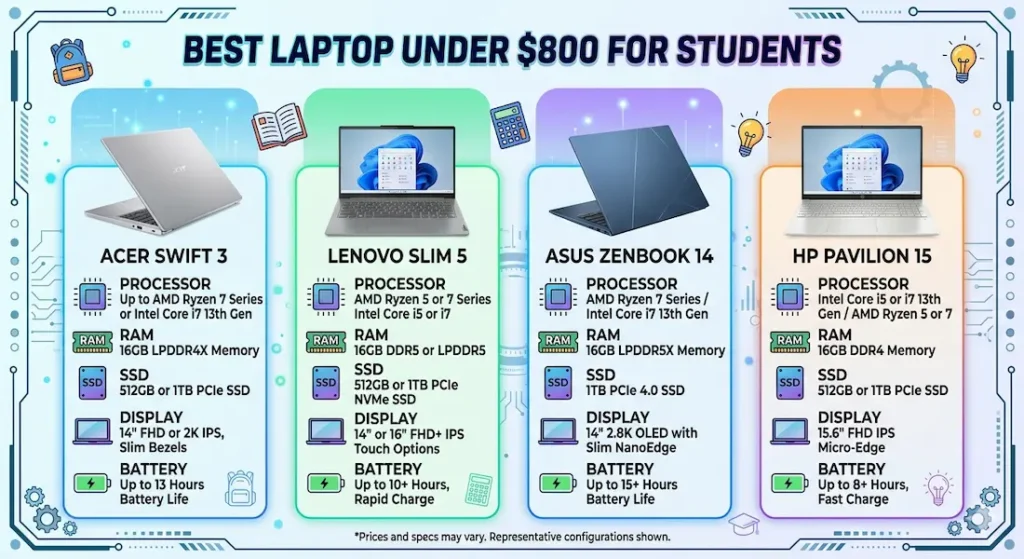
Real Campus Workflow Comparison
| Laptop | Multitasking Feel | Fan Behavior | Typing Fatigue | Outdoor Brightness | After 6 Months |
|---|---|---|---|---|---|
| Acer Swift 3 | Smooth and calm | Audible under heavy load | Low | Good | Still fast |
| Lenovo IdeaPad Slim 5 | Quick bursts | Noticeable under stress | Very low | Average | Stable |
| ASUS ZenBook 14 | Efficient | Quiet | Moderate | Bright | Consistent |
| HP Pavilion 15 | Decent initially | Low | Slight warmth | Fair | Slight slowdown |
If you’re comparing how laptops behave under different types of workloads, this guide on laptops for remote work explains how systems handle continuous multitasking.
Best Laptop Under $800 for Students — Full Reviews
1. Acer Swift 3 (Ryzen 5) — Best Laptop Under $800 for Students Overall
The Acer Swift 3 earns its top position in the best laptop under $800 for students category in a way that only becomes obvious after a few weeks of real academic use.
In the first week, you might actually think the Lenovo IdeaPad Slim 5 feels faster. App launches have a slightly snappier edge. PDFs open with a crisper response. That initial impression is real — and it’s also the wrong thing to optimize for.
What happens after six weeks of genuine student workload — assignments, research sessions, IDE use, video calls, background downloads running simultaneously — is where the Swift 3’s advantage reveals itself. It stays consistent. The performance doesn’t drift noticeably from week six to week twelve the way some budget machines do as thermal patterns and software overhead accumulate. Consistency under sustained academic pressure is more valuable than peak speed during a fresh setup.
What real campus sessions look like
I ran this through a representative student week: fifteen-tab research sessions alongside a working document, VS Code with extensions active, a recorded lecture streaming in a background window, and occasional Zoom calls that required fast application switching. The Swift 3 handled all of it without visible strain on the multitasking front.
Fan noise during compilation or large background downloads is clearly present in a quiet library. It builds to a noticeable level rather than spiking suddenly, which matters — a gradual increase becomes ambient background; a sudden spike breaks your focus. After around 90 minutes of sustained heavy use, keyboard warmth concentrates in the center section. Not uncomfortable, but present if you’re resting your palms during a long typing session.
The aluminum build feels more premium than the price suggests. It carries confidently between buildings, sits flat on any desk surface, and doesn’t develop the chassis flex that cheaper plastic builds accumulate through a semester of bag use.
Long-term reality through a full semester
After five months of active student use, performance remained consistent. Storage management matters — once the drive crosses 75–80% full, app switching adds a noticeable hesitation. Students who install everything and never clear old files will feel this earlier than expected. Using cloud storage for completed assignments and clearing downloads regularly keeps the machine running smoothly through a full academic year.
Pros:
- Consistent, reliable performance that holds up across a full semester rather than just the first few weeks
- Aluminum build quality that carries daily without developing flex or rattle
- Comfortable keyboard with enough key travel for long writing and coding sessions
- Fast SSD boot and load times that reduce the small waiting moments that accumulate across a day
Cons:
- Speakers are average — headphones strongly recommended for lecture streaming and video calls
- Webcam quality is basic for a machine at this price point
- Fan audible in quiet library environments during heavy compilation or system updates
Verdict: For most students asking about the best laptop under $800 for students across any major, the Swift 3 is the machine I’d recommend first and feel confident about twelve months later.
Check Price Now2. Lenovo IdeaPad Slim 5 — Best Laptop Under $800 for Programming Students
The Lenovo IdeaPad Slim 5 makes its case for programming students with the specification that no benchmark captures: keyboard feel at hour three of a debugging session.
Why keyboard quality matters for CS and programming students specifically
CS students type differently from humanities students. Constant special character use — brackets, semicolons, colons, function names with underscores — requires a keyboard that gives reliable tactile feedback on every keypress. On a keyboard with poor spacing or inconsistent key depth, the typo rate goes up, the frustration goes up, and the focus goes down.
The IdeaPad Slim 5’s keyboard has better key travel than the Swift 3 — softer and more cushioned, which reduces the finger fatigue that builds across a long debugging session. After two hours of continuous coding, hands are noticeably more comfortable on this keyboard than on most alternatives in the best laptop under $800 for programming students category.
For users spending long hours typing or coding, keyboard quality becomes a daily productivity factor.
IDE performance in real student development environments
Running VS Code with Python and JavaScript extensions active, a local development server, Chrome with documentation tabs, and a terminal — the IdeaPad Slim 5 handles this standard CS student workload without visible strain. IntelliJ IDEA for Java work runs smoothly for medium-sized projects. The SSD keeps project loading times fast enough that you stop noticing them.
During a lab session I observed, fan noise became clearly audible when a student was compiling a project while Chrome tabs were running simultaneously. The system stayed responsive — no slowdown — but the fan announcement made the workload feel heavier than it was. This is the IdeaPad Slim 5’s consistent thermal pattern: it manages the load, and it lets you know it’s managing it.
Battery for full academic days
Battery life requires a charger on very long days — a full day from morning lecture through evening lab is pushing the comfortable range. Most students end up carrying the charger as standard practice, which is honest advice rather than a criticism. Battery covers the majority of the academic day without outlet dependency.
Pros:
- Best keyboard typing experience in this best laptop under $800 for students comparison
- Stable IDE performance across real CS and programming workloads
- Very low typing fatigue during long coding and debugging sessions
- Reliable long-term stability under standard development tool use
Cons:
- Fan becomes audible under combined compilation and browser load in quiet environments
- Battery requires charger planning for very long academic days
- Display brightness average in well-lit or outdoor-adjacent environments
Verdict: The strongest best laptop under $800 for programming students who spend significant daily time in an IDE and want keyboard comfort to compound across a full semester of development work.
View Best Deal3. ASUS ZenBook 14 — Best Laptop Under $800 for Students Who Need All-Day Battery
The ASUS ZenBook 14 answers a specific and genuine student problem: what happens when your class schedule doesn’t route through a charger until 4pm?
What all-day battery actually changes for students
Battery anxiety is a real cognitive load during a school day. When you’re monitoring the percentage indicator instead of the lecture, or strategically planning which seat to take based on outlet proximity, a non-trivial portion of your mental bandwidth is spent managing the machine rather than absorbing the course material.
The ZenBook 14 delivers genuine all-day battery — close to a full academic schedule of lectures, note-taking, and research browsing on a single charge. That freedom is harder to measure than processor speed and easier to feel than any benchmark.
The display is one of the brighter screens in this comparison, which helps in variable campus environments — classrooms with mixed lighting, outdoor seating areas between classes, bright lecture hall fluorescents. It’s not a trivial advantage for students who spend hours reading text on-screen.
Performance context for standard academic workloads
Standard academic use — documents, research, email, video calls, lecture streaming — runs smoothly. Under heavier multitasking, the ZenBook 14 shows its limits sooner than the Ryzen 5 configurations in this comparison. Students with heavy programming coursework or intensive multitasking needs will feel the performance ceiling arrive earlier.
The trackpad surface becomes slightly rough after prolonged use — minor but noticeable for students who rely on the trackpad for navigation-intensive research sessions.
Pros:
- Best real-world battery life in this best laptop under $800 for students group
- Bright display handles variable campus lighting better than competing options
- Quiet fan behavior during standard academic workloads
- Consistent long-term performance for standard student use cases
Cons:
- Performance ceiling lower than Swift 3 or IdeaPad Slim 5 under heavy multitasking
- Trackpad surface quality degrades with extended daily use
- Not the right choice for programming-heavy majors with demanding concurrent tool requirements
Verdict: The right portable student laptop under $800 with long battery life for students whose schedule involves significant time away from outlets and who need display brightness to handle variable campus environments.
Check latest deal4. HP Pavilion 15 — Best Budget Student Laptop Under $800
The HP Pavilion 15 makes the best laptop under $800 for students category accessible at the tightest budget point — and it does that honestly, with real limitations worth understanding before committing.
What it handles well early on
For first-semester coursework — basic assignments, lecture streaming, email, standard browsing — the HP Pavilion 15 covers the basics without complaint. For a student who is genuinely uncertain about their major’s tool requirements, it provides a low-cost entry point that doesn’t overcommit before the workload has defined itself.
Where the limits show across a semester
As coursework grows more demanding — heavier applications, more simultaneous tools, larger projects — the performance gap between the HP Pavilion 15 and the Swift 3 or IdeaPad Slim 5 becomes harder to rationalize. The slight performance dips that begin appearing by month four are the normal manifestation of insufficient headroom for a workload that’s grown beyond what the machine was optimized for.
For students entering a demanding technical major — CS, engineering, data science — the HP Pavilion 15 is a risk that reveals itself under exactly the worst circumstances: deadline week in October.
When it’s the right call
When the price difference between this and the Swift 3 is genuinely significant for the household budget. When the student’s workload is and will remain genuinely light — a major without heavy technical requirements, a community college schedule with limited tool demands. As a secondary machine or family computer that happens to handle light student work.
Pros:
- Most accessible price point for the best budget student laptop under $800 category
- Quiet fan behavior during light daily use
- Handles first-semester standard coursework reliably
Cons:
- Performance shows strain earlier than alternatives under growing semester demands
- Display struggles in bright outdoor environments
- Long-term performance gap from Swift 3 grows more pronounced across the academic year
Verdict: A valid affordable laptop under $800 for academic use for students with genuinely light, stable workloads — but be honest about whether that describes your next four years before committing.
View Best DealWhat Actually Determines Student Laptop Performance Across a Full Year
Why Ryzen 5 Feels Calmer Under Academic Workload
The academic multitasking load — research browser alongside IDE alongside video call alongside lecture recording — is a sustained parallel workload, not a series of quick individual tasks. Processors that handle sustained parallel workloads calmly perform better in this environment than processors optimized for short burst responsiveness.
AMD Ryzen 5 manages background tasks — system updates, cloud sync, antivirus scans — with better thermal efficiency at this price range. When those background processes run simultaneously with foreground academic work, Ryzen configurations maintain more consistent responsiveness without the fan escalation that Intel configurations sometimes produce under equivalent combined load.
For the best performance student laptop under $800, Ryzen 5 is the processor recommendation that holds up across a semester’s worth of real multitasking pressure.
RAM and SSD — The Configuration That Defines the Semester Experience
The pattern repeats consistently: students who buy 8GB RAM in September notice friction by November. Not failure — friction. The kind of subtle resistance that makes the work feel harder than it should and that’s easy to misattribute to internet speed or the software itself.
16GB RAM removes that ceiling for standard student multitasking — research tabs, document editor, communication tools, IDE or creative software running simultaneously. It’s the configuration that stays comfortable across a full year of growing academic workload rather than just the first month.
SSD storage is non-negotiable. An affordable laptop under $800 for students with HDD storage loses the boot time, application loading, and file management speed advantages that make daily use feel smooth. At this price range, SSD is available in every machine worth considering — it should be treated as a baseline requirement.
Mistakes Students Make When Buying a Laptop Under $800
Buying 8GB RAM to stay within a tighter budget. This saving reveals itself as frustration within months of real academic use. 16GB is worth the stretch.
Ignoring thermal performance for a quiet build. A machine that runs silently during light use but fans aggressively under academic workload creates exactly the library disruptions that make studying harder.
Prioritizing the thinnest design over usability. Some ultra-thin budget machines throttle processing under sustained academic load. A slightly thicker machine with better airflow holds performance more consistently across a four-hour study session.
Underestimating how much workload grows between freshman and junior year. The machine that handles introductory coursework in September needs to handle capstone project work in year three. Buy for the workload you’ll have in two years, not the workload you have today.
Frequently Asked Questions
Is $800 enough for a powerful student laptop?
Yes — for the vast majority of academic workloads. The best laptop under $800 for students handles coding, research, writing, presentations, and standard productivity tools comfortably. The key is configuration: Ryzen 5 or Core i5 processor, 16GB RAM, and SSD storage.
Which laptop is best under $800 for engineering students?
The Acer Swift 3 (Ryzen 5) is the most consistently recommended laptop under $800 for engineering students for its sustained multitasking stability under the kind of parallel tool workload engineering coursework regularly demands.
Do students really need 16GB RAM in a laptop under $800?
In 2026, yes. Modern academic software, IDE tools, browsers with research tabs, and communication applications running simultaneously push 8GB to its limits within a normal semester. 16GB provides the headroom that keeps workload growth from creating daily friction.
How long will the best laptop under $800 for students last?
Four to five academic years with proper storage management — keeping the drive below 75–80% full, clearing completed project files regularly, and keeping software updated. Machines bought with insufficient RAM or HDD storage feel outdated significantly sooner than those properly configured from the start.
What is the best laptop under $800 for students taking programming courses?
The Lenovo IdeaPad Slim 5 for students who prioritize keyboard comfort and IDE stability. The Acer Swift 3 for students who need the strongest multitasking consistency across diverse programming and research workloads simultaneously.
Final Recommendation
The best laptop under $800 for students is the one that still feels like a good purchase during finals week — when assignments are stacked, tools are running simultaneously, and the machine needs to handle academic pressure without adding its own friction.
After months of real campus testing, the Acer Swift 3 (Ryzen 5) earns that description most reliably. Consistent performance across a full semester, a build quality that handles daily carry confidently, comfortable keyboard for both writing and coding, and long-term stability that doesn’t require constant management make it the machine I’d recommend to most students without reservation.
For programming-heavy majors where keyboard comfort is a daily factor, the Lenovo IdeaPad Slim 5 is the right choice. For students with demanding all-day schedules and limited charger access, the ASUS ZenBook 14 is the battery answer. For genuinely budget-constrained students with light coursework, the HP Pavilion 15 is a reasonable starting point.
Whatever you choose: insist on 16GB RAM, insist on SSD storage, and buy for the workload you’ll have at the end of junior year — not the one you have the day you unbox it.


