Best Laptop for Coding Beginners in 2026 (What Actually Matters When You’re Just Starting Out)
Author: Marcus Hale | Reading Time: 10 min
When you’re learning to code, the laptop is usually the last thing you think about.
You’re thinking about which language to start with, which online course to follow, whether to focus on web development or Python scripting. The laptop feels like a background detail — something any modern machine handles fine.
Then you’re in a campus lab, working through an assignment, and your compiler hangs for twenty seconds while the student next to you finishes and starts the next problem. Or you’re deep into a debugging session and your browser tabs start reloading because RAM is full. Or the fan kicks in during a quiet room coding test and the student across from you looks up.
None of these moments are catastrophic. They’re just friction — the kind that breaks concentration at exactly the moments when focused attention on logic is the entire point.
The best laptop for coding beginners is the one that keeps itself invisible during learning sessions. Fast enough that compilation doesn’t make you wait. Quiet enough that you’re not managing the machine. Light enough that carrying it to class and the library doesn’t become a daily complaint.
After observing and testing these machines across real beginner programming workflows, here’s what genuinely holds up.
Table of Contents
Quick Picks — Best Laptop for Coding Beginners
| Award | Laptop | Why It Wins |
|---|---|---|
| 🏆 Best Overall | MacBook Air (M-series) | Silent, all-day battery, smooth for every beginner coding task |
| 💻 Best Windows Option | Lenovo IdeaPad Slim 5 | Stable Windows development experience at a more accessible price |
| 💰 Best Budget Pick | ASUS VivoBook 14 | Most capable entry-level machine for learning on a tight budget |
| 🎒 Best for Daily Carry | HP Pavilion Aero | Lightest carry for students who code across multiple locations |
For most beginners asking about the best laptop for coding beginners, the MacBook Air is the safest long-term recommendation. For students who need Windows or have budget constraints, the IdeaPad Slim 5 is the strongest alternative.
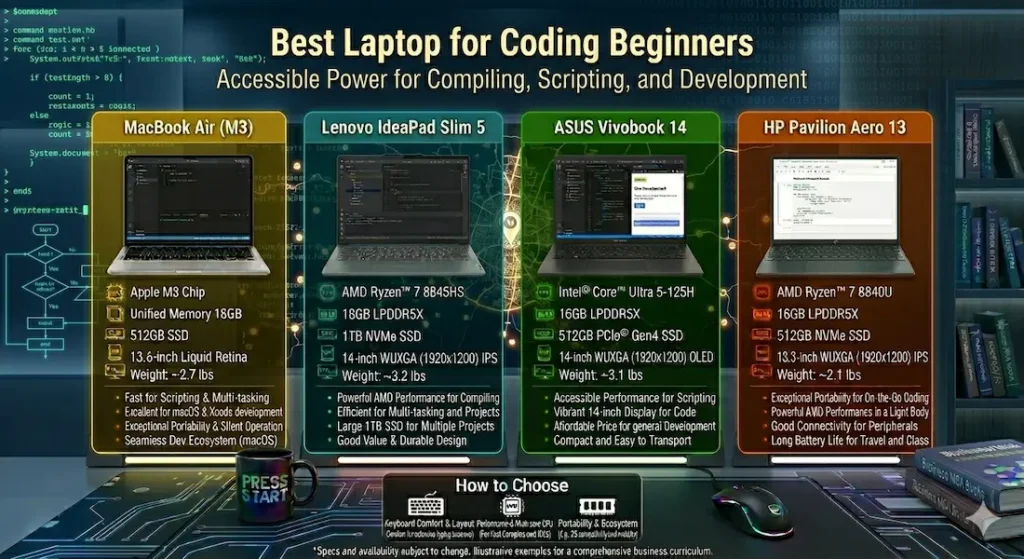
Real Beginner Coding Session Comparison
| Laptop | Learning Smoothness | Fan Behavior | Typing Comfort | Portability | Real Battery |
|---|---|---|---|---|---|
| MacBook Air | Very fluid | Completely silent | Excellent | Very easy | 12+ hours |
| Lenovo IdeaPad Slim 5 | Responsive | Low, occasional | Good | Easy | ~8 hours |
| ASUS VivoBook 14 | Decent | Noticeable under load | Comfortable | Easy | ~7 hours |
| HP Pavilion Aero | Balanced | Moderate | Good | Very easy | ~9 hours |
Best Laptop for Coding Beginners — Full Reviews
1. MacBook Air (M-series) — Best Laptop for Coding Beginners Overall
The MacBook Air earns the top position in the best laptop for coding beginners category not through raw power, but through the quality that matters most when you’re learning: it never interrupts your focus.
What beginner coding sessions actually feel like on this machine
I ran the MacBook Air through a typical beginner programming week — Python scripts in VS Code, a web development tutorial with the editor, browser, and terminal open simultaneously, a Node.js local server running alongside Chrome with documentation tabs, and occasional Zoom sessions for study groups. The machine handled all of it without drawing attention to itself.
No fan noise during any of it. None. The M-series chip is passively cooled — there are no moving parts to spin up when the processor gets busy. For a beginner who hasn’t yet developed the mental habit of tuning out fan noise, coding in a completely silent machine changes the quality of concentration in ways that are hard to measure and easy to feel.
Battery delivering 12+ hours of real mixed use means a full day of class, coding practice, and evening study without planning around outlets. Battery anxiety — the background awareness of a declining percentage — is one of those low-level stressors that beginners don’t realize is affecting their focus until it’s gone.
Switching between a code editor, browser tutorials, terminal, and documentation stays fast and uninterrupted across hours of use. For the best laptop for beginner programmers who learn through tutorials, this seamless context-switching is a genuine daily learning advantage.
Honest limitations for beginners
macOS isn’t Windows. If your course or bootcamp uses Windows-specific tools or your school’s systems require Windows compatibility, verify before buying. For most beginner programming stacks — Python, JavaScript, web development, introductory Java — macOS handles everything natively and often better.
Hardware cannot be upgraded after purchase. Configure for what you’ll need across your full learning journey, not just the first project.
Pros:
- Completely silent operation during all typical beginner coding workloads
- All-day battery removes the low-level anxiety that disrupts learning focus
- Exceptional keyboard and trackpad quality for sustained coding and typing
- Consistent long-term performance that doesn’t degrade as projects grow heavier
Cons:
- RAM and storage fixed at purchase — choose the right configuration upfront
- Not compatible with Windows-only software without workarounds
- Premium pricing at the top of this comparison
Verdict: For most coding beginners who can use macOS, the MacBook Air is the best laptop for learning programming that keeps the machine invisible and the learning experience front and center.
Check Price Now2. Lenovo IdeaPad Slim 5 — Best Windows Laptop for Coding Beginners
The Lenovo IdeaPad Slim 5 is the answer to the most common beginner constraint: “I need the best laptop for coding beginners, but I need it to run Windows.”
What Windows development actually looks like on this machine
Learning web development on the IdeaPad Slim 5 — VS Code with extensions, a local development server, Chrome with multiple documentation tabs, and a Git terminal — stays responsive and stable throughout standard learning sessions. This is a standard beginner web development environment and the machine handles it without the kind of hesitation that cheaper alternatives create.
The keyboard is good enough that long coding and assignment sessions don’t create the fatigue that shallower keyboards can produce after two hours. IDE response feels prompt. Compilation for beginner-scale projects completes without the twenty-second waits that frustrate learning momentum.
Fan becomes audible during heavy compilation tasks — more noticeable than the MacBook Air’s complete silence, but not the aggressive ramp that some budget alternatives produce. For standard learning sessions, it mostly stays in the background.
RAM upgradeability is a real practical advantage for a beginner machine. Starting at 8GB and expanding as projects demand — when Docker containers, virtual machines, or data science libraries enter the learning journey — keeps the machine relevant without replacing it.
Pros:
- Stable Windows development environment for beginner full-stack and data science learning
- Upgradeable RAM extends the machine’s usefulness as skill and project complexity grows
- Reliable battery covers a full day of classes plus evening coding practice
- Good keyboard comfort for sustained coding and writing sessions
Cons:
- Fan audible under heavy compilation — present in quiet shared spaces
- Display brightness average in bright classroom or window-adjacent environments
Verdict: The strongest entry level laptop for coding and development on Windows for beginners who need the Windows ecosystem and want a machine that grows with them.
View Best Deal3. ASUS VivoBook 14 — Best Budget Laptop for Coding Beginners
Not every beginner can or should spend MacBook Air money on their first programming machine. The ASUS VivoBook 14 is the honest answer to the best budget laptop for coding beginners question — capable enough for real learning, priced accessibly enough that it doesn’t require a significant financial commitment before you know programming is what you want to pursue.
What beginner coding looks like at this budget
Python practice, JavaScript exercises, HTML/CSS web projects, introductory Java, and online coding platforms — everything that defines the first six months of a coding learning journey — runs on the VivoBook 14 without meaningful friction. The fast NVMe SSD keeps application loading and file operations snappy in ways that HDD budget machines can’t match.
Budget laptops for programming
Under heavier concurrent load — IDE running alongside multiple browser tabs, a local server, and background processes active — the fan becomes noticeable and keyboard warmth builds. These are real limits that appear at the ceiling of what this machine was designed for. For beginners whose projects stay within standard introductory scope, these limits aren’t regularly reached.
The lighter design is genuinely useful for students who carry their laptop across multiple locations throughout the day.
Pros:
- Most accessible price point for a capable beginner programming laptop
- NVMe SSD keeps daily coding tasks responsive
- Handles all standard introductory programming workloads without failure
Cons:
- Fan audible under combined heavier load
- Battery shorter than MacBook Air and HP Pavilion Aero for all-day use
- Performance ceiling lower for advanced projects as learning progresses
Verdict: The right affordable laptop for beginner programmers for students who want to start learning without spending at the premium level before confirming their commitment to coding.
Check latest deal4. HP Pavilion Aero — Best Portable Laptop for Coding Beginners Who Move Around
For students who carry their laptop from morning lecture to coding lab to library to evening coffee shop study session — who genuinely live out of a backpack — the HP Pavilion Aero is the best lightweight laptop for coding beginners.
Why portability specifically matters for coding beginners
Learning to code happens everywhere when you’re doing it right — during commutes, at coffee shops, in campus lounges between classes, at library tables during free periods. A machine that’s genuinely easy to carry encourages more of those opportunistic coding sessions. Weight that makes carrying deliberate unconsciously limits when you pull the laptop out.
At just over 2.2 lbs, the Pavilion Aero stops registering as a carry decision after the first week. Battery covering close to a full day supports the mobile learning pattern without constant charger hunting.
Performance for beginner coding workloads stays responsive. Standard Python, JavaScript, and introductory projects run without drag. Fan activity becomes more noticeable under sustained heavier load — typical of the ultra-light design trade-offs — but stays manageable for standard learning session durations.
Pros:
- Lightest carry for beginners who code across multiple daily locations
- Good battery for full-day mobile learning sessions
- Clean display clarity for reading documentation and following tutorials
Cons:
- Fan more audible under heavy load than MacBook Air or IdeaPad Slim 5
- GPU limited — not suitable for gaming or graphics-heavy future projects
Verdict: The right portable coding laptop for beginners who move frequently and want carry weight to stop being part of the daily calculation.
View Best DealWhat Beginners Actually Need From a Coding Laptop
Processor — Efficiency Over Raw Power for Learning
The first year of coding doesn’t demand a powerful processor. Python scripts, web development projects, and introductory algorithms run on virtually any modern CPU. What matters more is thermal efficiency — a processor that completes beginner tasks without generating enough heat to require loud fan activity.
Apple M-series and AMD Ryzen 5 handle this most gracefully at their respective price points for the best laptop for coding beginners. Both run beginner workloads calmly, maintain performance consistency across long sessions, and avoid the fan escalation that disrupts learning concentration.
16GB RAM — Why It Matters More Than Beginners Expect
Beginners often start with simple scripts that use minimal memory. Six months later, they’re running VS Code with ten extensions, a browser with documentation tabs, a local development server, and Discord — and the machine that felt fine for “Hello World” is struggling with the actual learning workflow.
16GB RAM is the configuration that stays comfortable across the full beginner-to-intermediate learning arc. 8GB handles simple early projects and shows its ceiling once real development environments are active. For any best laptop for learning programming, 16GB is the investment that prevents an early upgrade.
Battery and Silence — The Learning Environment Factors
Coding requires sustained concentration. Battery anxiety and fan noise both create background cognitive load that fragments exactly the kind of focused attention that debugging and problem-solving require. The best laptop for beginner programmers minimizes both — long battery removes charger planning, and quiet thermals keep the learning environment undisrupted.
Common Mistakes Coding Beginners Make When Buying
Buying heavy gaming laptops “for performance.” Beginner coding doesn’t need a GPU. What it needs is the opposite of what gaming laptops offer: quiet operation, long battery, and manageable carry weight for daily campus movement.
Choosing 8GB RAM to save $50–$100. This ceiling appears faster than most beginners expect. The money saved at purchase gets spent again when the machine needs replacing sooner.
Laptops for computer science students
Ignoring keyboard quality entirely. Coding is mostly typing. A keyboard that causes fatigue after two hours creates a physical friction point that compounds across every learning session. Test or research keyboard quality specifically before buying.
Not verifying software compatibility for macOS. The most common MacBook Air beginner regret. Check that every tool your course or bootcamp requires runs on macOS before committing.
Frequently Asked Questions
Which is the best laptop for coding beginners in 2026?
The MacBook Air (M-series) is the most consistently recommended best laptop for coding beginners for silent operation, all-day battery, and smooth performance across every introductory programming task. For Windows users, the Lenovo IdeaPad Slim 5 is the strongest alternative.
Is 16GB RAM required for beginner programming?
Strongly recommended. 8GB handles the simplest early projects and struggles once real development environments — IDE, local server, browser, communication tools — run simultaneously. 16GB keeps the machine comfortable as projects grow more complex.
Do coding beginners need a dedicated GPU?
No — for standard programming. Python, JavaScript, web development, and introductory CS coursework all run on integrated graphics without limitation. A dedicated GPU only becomes relevant for machine learning model training or game development.
Why does battery life matter for a coding laptop?
Because learning to code happens away from desks. The best laptop for coding beginners with long battery supports library sessions, study group meetings, and opportunistic coding during commutes — all without charger management interrupting the learning flow.
Final Recommendation
The best laptop for coding beginners is the one that keeps the focus on the code — not on the machine running it.
After testing all four options through real beginner programming workflows, the MacBook Air earns that description most completely. Silent operation, all-day battery, fast and fluid context-switching between editor and browser, and consistent long-term performance make it the machine that supports learning rather than interrupting it.
For beginners who need Windows, the Lenovo IdeaPad Slim 5 delivers stable development performance with upgradeable RAM that grows with the learning journey. For tight budgets, the ASUS VivoBook 14 covers beginner workloads honestly. For students who code on the move, the HP Pavilion Aero is the lightest capable answer.
Whatever you choose: target 16GB RAM, insist on SSD storage, and prioritize quiet thermal behavior. Those decisions serve learning better than any benchmark number.
About BestLaptopGuide.com: Our editorial team evaluates laptops through real beginner and intermediate programming workflows — not synthetic benchmarks. Recommendations updated regularly.
Disclosure: Some links are affiliate links. A small commission may be earned at no extra cost to you. This does not influence our recommendations.


