Best Laptop for Writers in 2026 (What Actually Feels Good After 4 Hours of Writing)
Writing laptops don’t get discussed the way gaming laptops do. Nobody’s posting benchmark scores for how fast a machine handles a 3,000-word draft. There’s no frame rate counter for focus.
But anyone who writes seriously — daily blog posts, freelance articles, a novel chapter at midnight, academic papers with six research tabs open — knows that the laptop underneath the work shapes the experience in ways that are hard to quantify until something goes wrong.
A keyboard that starts feeling stiff at the two-hour mark. A fan that spins up in a quiet coffee shop during a particularly good paragraph. A screen that washes out near the window of the café you specifically chose for its natural light. The battery notification that pulls your attention at exactly the wrong moment.
I’ve watched writers pause mid-sentence because of distractions exactly like these. Not catastrophic failures — just small interruptions that stack up. Each one individually is nothing. Collectively, across a writing session, they grind against flow in ways that make the work harder than it needs to be.
That kind of friction becomes even more noticeable when you’re working outside a fixed setup or changing environments frequently
The best laptop for writers doesn’t win by being impressive. It wins by being invisible — performing so consistently and comfortably that you stop being aware of it. This guide is built around finding exactly that.
Table of Contents
Quick Picks — Best Laptop for Writers
| Award | Laptop | Why It Wins |
|---|---|---|
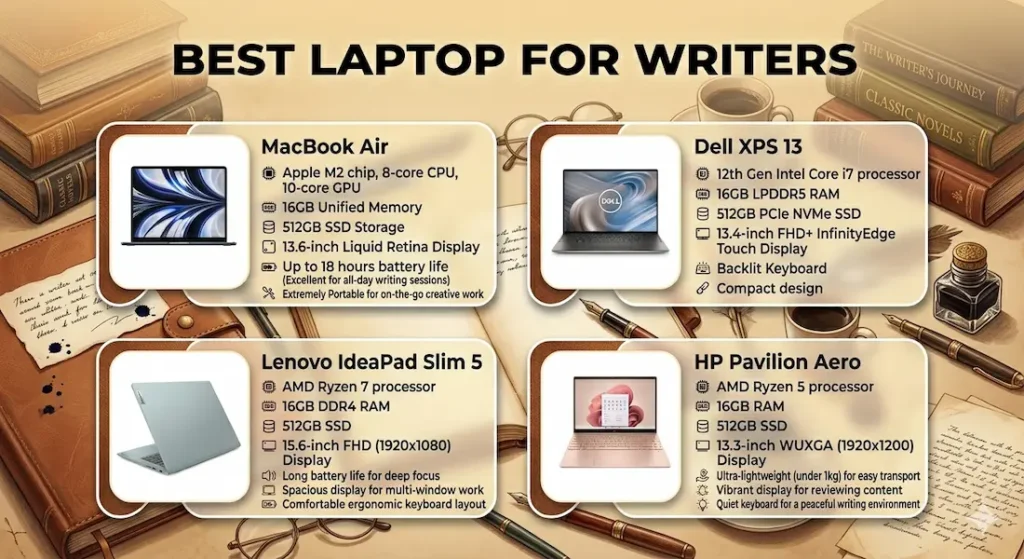
| 🏆 Best Overall | MacBook Air (M-series) | Silent, all-day battery, keyboard and display that hold up across long sessions |
| 💻 Best Windows Option | Dell XPS 13 | Premium Windows writing experience with excellent display |
| 💰 Best Budget Pick | Lenovo IdeaPad Slim 5 | Capable everyday writing machine at an accessible price |
| 🧳 Best for Travel Writers | HP Pavilion Aero | Lightest carry with reliable battery for café and location-based work |
If someone asked me right now for a single answer — the best laptop for writers without additional context — I’d say MacBook Air and feel completely confident about it for most writing workflows.
What Writing Actually Feels Like on These Laptops
| Laptop | Typing Feel | Background Noise | Screen Comfort | Carry Weight | Battery Anxiety |
|---|---|---|---|---|---|
| MacBook Air | Smooth, completely natural | Silent | Comfortable for long sessions | Very light | Almost none |
| Dell XPS 13 | Slightly firmer, still good | Low, occasional | Bright, excellent | Light | Low |
| Lenovo IdeaPad Slim 5 | Decent, comfortable | Noticeable sometimes | Average | Fine | Medium |
| HP Pavilion Aero | Good, consistent | Moderate under load | Good | Very light | Low |
Best Laptop for Writers — Full Reviews
1. MacBook Air (M-series) — Best Laptop for Writers Overall
The MacBook Air makes its case for writers not through impressive specs but through the complete absence of the small frustrations that interrupt long writing sessions. After testing it through weeks of sustained daily writing work, the thing I noticed most was what I stopped noticing.
What a long writing session actually feels like
I’ve spent four-to-five-hour sessions on this machine — drafting, editing, researching across multiple tabs, switching between a document and source material, taking notes. By hour three on most laptops, you’ve become aware of something: fan noise that’s accumulated into background presence, a keyboard surface that’s warmed under your palms, a battery warning that pulled you out of a paragraph.
On the MacBook Air, none of those things happened. The M-series chip runs the full writing workflow — document editor, six browser tabs, a music app, occasional image searching — with no fan and no heat buildup. The machine is physically cool at hour four. The writing environment stays as quiet at the end of the session as it was at the beginning.
This kind of silent performance is what separates distraction-free machines from those that constantly pull your attention.
This is what “distraction-free writing laptop” actually means in practice, and it’s harder to engineer than any spec sheet explains.
Keyboard comfort across long sessions
The keyboard travel is well-calibrated for sustained writing — responsive without being stiff, consistent without being mushy. After two hours of continuous typing, fingers aren’t complaining in the way they do on keyboards with poorly tuned feedback. For writers who measure sessions in hours rather than minutes, this consistency across the full duration is the detail that separates good keyboards from great ones.
Battery reality for writers
Working without charger anxiety is a legitimate quality-of-life improvement for writers. With the MacBook Air delivering 12+ hours of real mixed use — writing, research, light media — you start a session at a coffee shop without calculating how long the outlet will be free, without watching the battery percentage while you’re trying to watch the word count.
That background freedom keeps attention where it belongs: on the writing.
Display comfort for long reading and writing sessions
The display is clear, accurate, and easy on the eyes across extended use. Anti-reflective coating handles indoor lighting well. Near windows with direct sunlight, reflections require angle adjustment — not the absolute brightest panel in this comparison. For the indoor environments where most writing sessions happen, it’s excellent.
The limitations to know clearly
Ports are limited — two Thunderbolt connections and MagSafe charging. Writers who regularly connect to external monitors, SD card readers, or multiple peripherals need a small hub or adapter. This is a minor planning consideration, not a daily friction point for most writing workflows.
macOS is not Windows. Writers who depend on Windows-specific tools, certain academic software, or prefer the Windows environment should look at the Dell XPS 13 before deciding.
Pros:
- Completely silent operation — no fan noise in any writing environment
- Battery that genuinely covers all-day writing without charger management
- Keyboard comfort that holds up across four to five hour writing sessions
- Lightweight enough to carry daily without deliberate thought about weight
Cons:
- Limited ports require adapter planning for writers with multiple peripherals
- Premium price at the top of this comparison
- Not compatible with Windows-only software
Verdict: For most freelancers, bloggers, students, and working writers asking about the best laptop for writers, this is the recommendation I’d make first — and the one that holds up longest.
Check Price Now2. Dell XPS 13 — Best Laptop for Writers Who Prefer Windows
The Dell XPS 13 is what happens when a Windows laptop is designed by people who understand that the machine’s job is to disappear while you work. It doesn’t fully achieve the MacBook Air’s silence, but it comes closer than most Windows alternatives.
What Windows writing actually feels like on this machine
The keyboard is one of the better typing experiences in the Windows ultrabook category — slightly firmer than the MacBook Air, which some writers prefer for the more defined tactile response, while others find it marginally more fatiguing across very long sessions. The difference is subtle enough that personal preference drives the verdict.
The display is where the Dell XPS 13 genuinely earns an advantage over the MacBook Air: brightness. Working near a sunny window — a coffee shop with afternoon light coming through, a home office desk adjacent to a window — the XPS 13’s panel reads more clearly without the angle adjustment the MacBook Air’s coating sometimes requires. For writers who specifically work near natural light, this is a real daily advantage.
Performance for research-heavy writing workflows — document editor alongside multiple browser tabs, reference material, note-taking tools — stays smooth and responsive throughout standard writing sessions. The machine handles the multitasking that writing research demands without visible strain.
Where the experience shows limits
Fan noise appears under sustained multitasking load — clearly audible in a quiet environment when the processor is working harder. For writers who work in coffee shops or ambient environments, this disappears into background noise. For writers who specifically need silence — recording voiceover alongside writing, working in library quiet zones, or simply preferring acoustic peace — this is worth factoring into the decision.
The Dell XPS 13 for writers and bloggers use case is strongest for those who need Windows, value display brightness, and work in environments where occasional fan activity isn’t disruptive.
Pros:
- Best display brightness in this comparison for writing near windows or in variable light
- Comfortable keyboard that handles sustained writing sessions well
- Premium build quality that holds up to daily carry across years
- Strong research-tab multitasking for writers whose work involves heavy source material
Cons:
- Fan audible under sustained load in quiet writing environments
- Battery life at 6–8 real hours shorter than MacBook Air for all-day sessions
- Limited ports require adapter for writers with multiple peripherals
Verdict: The strongest best laptop for content writing and blogging on Windows — particularly for writers who work near natural light and value display brightness alongside typing comfort.
View Best Deal3. Lenovo IdeaPad Slim 5 — Best Budget Laptop for Writers
Not every writer has $1,000+ for a MacBook Air or Dell XPS 13. The Lenovo IdeaPad Slim 5 is the honest answer to the best affordable laptop for writers question — capable enough for real daily writing work, priced accessibly enough that the decision doesn’t require a month of savings.
What budget writing looks like on this machine
For the core writing workload — Google Docs, WordPress, Notion, browser research, email, standard communication tools — the IdeaPad Slim 5 runs everything cleanly. The keyboard is comfortable enough for extended writing without the fatigue that cheaper keyboards create. For a part-time writer, student, or someone starting out who wants a capable tool without the premium investment, it covers the daily workload reliably.
This is similar to how many budget machines perform when the workload stays predictable and structured.
Fan activity becomes noticeable during heavier multitasking — multiple applications running simultaneously, background downloads, video calls alongside active documents. In a coffee shop, ambient noise covers it. In a quiet home office during early morning writing sessions, it’s present.
For the best laptop for bloggers under $800 who want reliable everyday writing performance without premium pricing, the IdeaPad Slim 5 consistently delivers.
Where the limits show
Display brightness is average — less comfortable in well-lit rooms compared to the XPS 13 or MacBook Air. Build quality reflects the price point — functional and reliable, but lacking the confidence of premium aluminum construction. Over a long session, you’re aware you’re on a budget machine in a way you aren’t with the premium options.
Pros:
- Most accessible price point for a genuinely capable writing laptop under $800
- Comfortable keyboard for standard writing session lengths
- Handles all core writing and research tools without performance issues
Cons:
- Fan audible in quiet environments under moderate sustained load
- Display average in brightness and color accuracy compared to premium options
- Build quality reflects budget — durable but not confidence-inspiring
Verdict: The right affordable laptop for writers on a budget who need a reliable daily writing machine without stretching into premium pricing.
Check latest deal4. HP Pavilion Aero — Best Laptop for Travel Writers
Travel writers, remote freelancers, writers who work from different locations across the week — for this category of writer, carry weight stops being a spec consideration and becomes a daily quality-of-life factor.
The HP Pavilion Aero is the best lightweight laptop for travel writers in this comparison at just over 2.2 lbs. The weight difference from the MacBook Air or XPS 13 sounds like a minor spec delta. Carried from a home desk to a coffee shop to a co-working space and back across a full day, it’s a physical reality that accumulates.
What mobile writing looks like with this machine
You pack it without thinking about it. Pull it out at a coffee counter without adjusting your bag. Set up at three different locations in one day without the machine becoming the thing you’re managing. That carry lightness is the Pavilion Aero’s primary argument, and it’s a real one for writers whose best work happens away from a fixed desk.
Battery life holds through café sessions and medium-length working days without constant charger management. Performance for standard writing workloads — documents, research tabs, email — stays responsive. Fan activity appears under heavier loads — more vocal than the MacBook Air under equivalent stress.
Pros:
- Lightest daily carry of any machine in this best laptop for writers comparison
- Reliable battery for mobile writing sessions without charger anxiety
- Good keyboard comfort for sustained travel writing sessions
Cons:
- Fan more noticeable under sustained load than MacBook Air or XPS 13
- Build quality functional but not premium — less confidence for heavy travel wear
- Performance ceiling lower than MacBook Air or XPS 13 for complex multitasking
Verdict: The right portable laptop for travel writers and remote freelancers who prioritize carry weight and want a machine that moves as freely as their work does.
View Best DealWhat Actually Matters for Writers — Beyond the Spec Sheet
Keyboard Quality — The Spec Nobody Reviews Carefully Enough
Writers spend more time on their keyboard than on any other part of the machine. Across a year of daily writing work, that’s hundreds of hours of contact between your fingers and the key surface.
Key travel depth, spacing consistency, tactile feedback, key stability under off-center strikes — all of these determine whether a keyboard remains comfortable at hour three or starts creating subtle resistance that accumulates into fatigue.
For the best laptop for writers, researching keyboard quality specifically — reading reviews from users who specifically mention typing experience, not just performance — is the single most overlooked pre-purchase step. A keyboard that costs you one percent of your focus across every session costs you real creative output across a year.
Screen Comfort for Long Reading and Writing Sessions
Writers read almost as much as they write — source material, previous drafts, research, reference. A display that causes eye strain by 9pm affects the quality of evening writing sessions in ways that are felt clearly and measured in word count.
Anti-glare coating, accurate color rendering, and comfortable brightness levels all contribute to sustained screen comfort. The best laptop for writers with comfortable display is one you can sit with for four hours without adjusting brightness every thirty minutes or finishing sessions with eye fatigue.
Battery and Silent Operation — The Writing Environment Factors
Writing rarely happens in a loud place by choice. Coffee shops, libraries, home offices, coworking spaces — these environments are where writers do their best work, and they’re acoustically sensitive in ways that fan noise disrupts clearly.
A laptop that stays quiet under writing workloads preserves the environment that makes writing possible. Combined with battery that doesn’t require constant management, silent operation removes two background stressors that compete with the actual work of writing.
Common Mistakes Writers Make When Buying a Laptop
Buying a gaming laptop for writing. Weight, fan noise, and battery life all go in the wrong direction for writing use. High-performance machines are optimized for the opposite of what long writing sessions require.
Ignoring keyboard quality entirely. It’s not on the standard spec comparison. But it determines your physical comfort across every hour of writing work you do on the machine.
Choosing 8GB RAM to save money. Within a semester of academic writing or several months of professional work, the browser-heavy research sessions that writing requires fill 8GB RAM. The subtle slowdowns that follow interrupt the exact focused state that good writing requires.
Underestimating battery life for writing away from home. Writers who want to work from coffee shops, libraries, or anywhere away from a fixed desk need battery that genuinely covers the session. A machine that requires charger management every three hours creates friction that accumulates into avoidance.
Frequently Asked Questions
What is the best laptop for writers in 2026?
The MacBook Air (M-series) is the most consistently recommended best laptop for writers for its combination of silent operation, all-day battery, keyboard comfort, and display quality. For writers who need Windows, the Dell XPS 13 is the strongest alternative.
Is the MacBook Air good for writers and bloggers?
Yes — it’s arguably the machine most naturally suited to writing work. Silent operation, 12+ hour battery, a keyboard that holds up across long sessions, and lightweight carry make it the reference point for what a best laptop for bloggers and freelance writers should deliver.
Do writers need a high-performance laptop?
No. Writing is a comfort and consistency task, not a performance one. Efficient, quiet, and reliable matters far more than processor benchmarks or GPU specifications. The best laptop for writers under $1000 that delivers smooth everyday performance is more valuable than a powerful machine that creates noise and heat during creative sessions.
What RAM do writers actually need?
16GB is the practical recommendation for writers who research with multiple browser tabs open simultaneously. 8GB handles very controlled, minimal workflows and creates subtle friction once real research sessions build up tab count alongside the document editor and communication tools.
Is the Dell XPS 13 good for writers?
Yes — particularly for Windows users who work near natural light, where its display brightness advantage over the MacBook Air is most noticeable. The Dell XPS 13 for writers fits best when Windows compatibility matters and writing sessions happen in variable lighting conditions.
Final Recommendation
The best laptop for writers is the one you stop thinking about halfway through a session — the machine whose keyboard, display, fan behavior, and battery all stay out of the way while you do the work.
After testing all four options through real sustained writing workflows, the MacBook Air earns that description most completely. Silent, light, all-day battery, a keyboard that holds up across long sessions, and consistent performance across months of daily use — it removes more friction from the writing experience than any other machine at this price.
For Windows writers who specifically need the ecosystem, the Dell XPS 13 delivers a premium writing experience with a display that handles bright environments better. For budget-conscious writers, the Lenovo IdeaPad Slim 5 covers the core writing workload without the premium investment. For writers who move constantly, the HP Pavilion Aero is the lightest carry in the category.
Whatever you choose: prioritize keyboard quality, quiet operation, battery endurance, and display comfort. Those four factors determine the daily experience of writing on a machine more than any processor benchmark or RAM configuration — and they’re the four things this comparison was specifically designed to evaluate.


