8GB vs 16GB RAM for Programming: What No One Tells You Until It’s Too Late
A few months ago, a CS student reached out asking why his laptop felt sluggish. He’d bought it six months earlier and it was perfectly fine at first — responsive, quick to boot, no complaints.
We looked at what he had open: VS Code with a handful of extensions, Chrome with around 12 tabs (Stack Overflow, documentation, a YouTube tutorial), a local development server, and Spotify running in the background.
Nothing out of the ordinary for a programming student. That’s a Tuesday.
But his system was clearly struggling — slow tab switching, IDE indexing pauses, the fan running constantly. He assumed the processor was weak.
It wasn’t the processor.
It was RAM.
If you’re currently choosing a machine, this guide on best laptops under $500 for programming can help you avoid configurations that struggle once real development work begins.
This is the part of the 8GB vs 16GB RAM for programming conversation that rarely gets said clearly: the problem doesn’t hit you on day one. It creeps up after a few weeks, once your workflow grows, your projects get more complex, and you stop being careful about closing things you’re not actively using. By then, you’re already frustrated — and you’ve already spent the money.
This guide covers what actually happens in both configurations, who can get away with 8GB, who will regret it, and how to make the right call without overspending.
Who This Guide Is For
- Students choosing their first programming laptop
- Developers deciding whether to upgrade their current machine
- Buyers torn between an 8GB model that fits the budget and a 16GB model that doesn’t quite
- Anyone who’s been told “8GB is fine for coding” and wants a second opinion
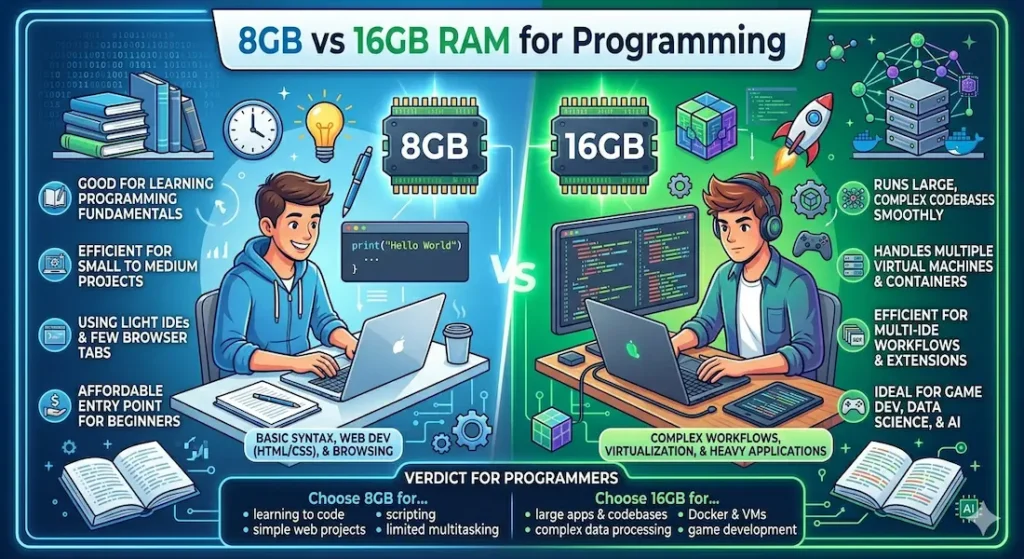
8GB vs 16GB RAM for Programming — Quick Comparison
| Scenario | 8GB RAM | 16GB RAM |
|---|---|---|
| Single project in VS Code | Smooth | Effortless |
| Chrome + VS Code simultaneously | Occasional lag | No issues |
| Zoom call while coding | Struggles noticeably | Handles it fine |
| 20+ browser tabs open | Slowdowns begin | Still stable |
| Android Studio or IntelliJ IDEA | Noticeable lag | Comfortable |
| Docker containers or virtual machines | Frustrating | Usable |
| Long coding sessions (3+ hours) | Heat increase, delays | Stable throughout |
| Background tools (Spotify, Slack, etc.) | Adds pressure | Barely noticed |
The pattern here is clear. 8GB vs 16GB RAM for programming isn’t a question of whether 8GB works — it’s a question of how long before it stops working well enough.
For students balancing coding with coursework, you may also want to explore this guide on best laptops under $500 for students to understand how RAM impacts everyday academic workloads.
8GB RAM for Programming — Honest Assessment
The First Few Weeks Feel Fine
Let’s be fair: 8GB RAM is not useless for programming. If you’re learning your first language, running beginner Python scripts, or building simple web pages in a text editor, you won’t hit the ceiling immediately.
The problem is that nobody stays at that level. Coursework gets harder. Projects get bigger. You start running a backend server locally alongside your frontend. You open more documentation tabs. You jump on a Zoom call for a group project without thinking to close everything first.
That’s when 8GB RAM for programming starts showing its limits — not in a single dramatic crash, but in a slow accumulation of small frustrations.
What a Typical Day Actually Looks Like
Morning (light load): VS Code open, two or three Chrome tabs, nothing else running. 8GB handles this without complaint. Everything feels normal.
Afternoon (moderate load): A few more tabs open, a YouTube tutorial running in the background, maybe a local server started up. Response times start to feel slightly heavier. Tab switching has a beat of lag you didn’t notice before.
Evening (deadline pressure): Everything from earlier is still open because you haven’t had time to close it. You’ve added a database tool, the IDE is indexing in the background, and Chrome has grown to 15 tabs. This is when 8GB RAM for coding starts genuinely affecting your productivity — not just your comfort.
The delays are small individually. Collectively, they’re the difference between a focused session and a frustrated one.
The Swap Memory Problem (What Actually Causes the Heat)
Here’s something most guides skip: when RAM fills up, your system doesn’t just slow down — it starts using your SSD as temporary memory through a process called swapping. This means:
- Your SSD is constantly being read and written to
- Your CPU works harder compensating for slower memory access
- Fan speed increases noticeably
- The keyboard deck gets warm
You’re not running anything particularly demanding. Your laptop is just desperately trying to manage too many things with too little RAM. This is the real cause of the heat and noise people associate with “heavy” coding sessions on underpowered machines.
Understanding this also explains something counterintuitive: upgrading RAM can actually make your laptop run cooler, because it removes the constant swap cycle stress.
Who Can Realistically Get By on 8GB RAM
- Complete beginners learning their first programming language
- Students doing coursework that’s genuinely simple — introductory Python, basic HTML/CSS
- Anyone on an extremely tight budget who plans to upgrade within a year
- Casual coders who work on one thing at a time and close everything else
Who Will Outgrow 8GB RAM Quickly
- CS or software engineering students past the first semester
- Anyone learning web development with a full stack
- Developers using heavier IDEs like Android Studio or IntelliJ IDEA
- Anyone who multitasks naturally — because most people do
Pros:
- Lower cost at point of purchase
- Adequate for basic, controlled coding tasks
- A reasonable starting point if upgrading RAM is possible later
Cons:
- Reaches limits once real development workflows kick in
- Causes swap-related heat and fan noise under moderate load
- Not future-proof — most professional workflows will exceed it
- Creates a ceiling that arrives faster than most students expect
16GB RAM for Programming — What the Upgrade Actually Changes
The Difference Is Invisible (in the Best Way)
When you switch from 8GB to 16GB RAM, nothing feels dramatically faster at first glance. You don’t boot up and think “wow.” The improvement is more subtle — and more meaningful.
What actually changes is that you stop thinking about your laptop.
You stop deciding which tabs to close before opening your IDE. You stop feeling a small spike of dread when someone calls you on Zoom mid-project. You stop noticing a lag before your IDE responds to a keystroke.
That absence of friction is the whole point of 16GB RAM for programming. It’s not about peak performance — it’s about consistent, uninterrupted workflow.
What a Real 16GB Coding Session Looks Like
VS Code open with eight extensions active. Chrome running 20+ tabs — documentation, Stack Overflow, a few reference pages, a YouTube tutorial. A local backend server. A database browser. Possibly Slack or Discord for team communication.
You don’t close anything. You don’t need to. That’s the upgrade.
This matters more than it sounds if you’ve been on 8GB and developed habits around managing your RAM — keeping tabs minimal, restarting the IDE regularly, closing tools when not in active use. With 16GB, those habits become optional rather than necessary.
16GB RAM and Heat Stability
This surprises people: 16GB RAM systems typically run cooler during development work than 8GB systems under equivalent workloads. The reason comes back to swap memory — with enough RAM, the system doesn’t need to offload to SSD constantly, which reduces overall CPU and I/O stress, which means less heat generated and lower fan activity.
If you’ve been accepting fan noise and warm keyboards as a normal part of coding sessions, it’s worth knowing that might be a RAM issue, not a hardware design issue.
Who Genuinely Needs 16GB RAM for Programming
- Web developers working with a full stack locally
- App developers using Android Studio, Xcode, or similar tools
- Data science or ML students running Jupyter notebooks alongside other tools
- Anyone who multitasks naturally during development (which is most people)
- Students who want their laptop to remain useful across three or four years of coursework
Who Might Not Need to Rush to 16GB
- Complete beginners in the first month of learning
- Students on very tight budgets where 8GB is the only option right now
- Anyone whose laptop has upgradeable RAM and can add more later
Pros:
- Smooth, consistent multitasking throughout real development sessions
- Handles modern IDEs, local servers, Docker, and browsers simultaneously
- Reduces swap-related heat and fan noise
- Future-proof for three to four years of typical programming workloads
- You stop managing RAM and start just coding
Cons:
- Higher upfront cost
- Mild overkill for genuinely basic beginner use
8GB vs 16GB RAM for Programming — The Real Difference in Plain Terms
When someone asks about 8GB vs 16GB RAM for programming, the conversation usually focuses on performance numbers. That misses the point.
8GB RAM means your laptop adapts to what’s possible. You work around its limits — closing things, restarting when it gets slow, keeping your workspace lean.
16GB RAM means your laptop adapts to you. Your workflow is what it is, and the machine keeps up.
That’s the difference. Not a benchmark. A relationship between you and your tools.
For beginner, controlled use: 8GB is manageable. For anything resembling real development work: 16GB is the right answer.
RAM vs CPU — Which One Is Actually Slowing You Down?
This is a common source of confusion, especially for buyers who focus heavily on processor specs. Here’s how to think about it clearly:
Your CPU determines how fast individual tasks execute. Compilation speed, rendering, calculations — this is the processor’s job.
Your RAM determines how many things can be in motion at once. Open applications, background processes, browser tabs, cached data — all of this lives in RAM.
When RAM is limited, even a fast processor gets bottlenecked. The CPU can only work as fast as data arrives from memory — and when memory is full and swapping to SSD, that data arrives slowly.
This is why upgrading from 8GB to 16GB RAM on a mid-range processor often feels like a bigger improvement than upgrading the processor itself on a RAM-limited machine. The bottleneck was RAM the whole time.
RAM + SSD Together — Why One Without the Other Falls Short
A question that comes up often: does 16GB RAM matter if I still have HDD storage?
Yes — and here’s why both matter:
- SSD handles how quickly your system loads files, installs packages, and boots applications
- RAM handles how smoothly everything runs once it’s open and active
Without SSD, everything feels slow before it even gets into RAM. Loading a project, installing dependencies, starting the IDE — all of this depends on storage speed.
Without enough RAM, everything that’s already loaded competes for space and starts swapping back to storage.
Together, SSD + 16GB RAM is the configuration that makes a budget laptop feel genuinely capable for development work. Either one alone leaves a gap the other can’t fully cover.
If you’re unsure how storage speed plays into this, this guide on SSD vs HDD for gaming laptops explains how slower drives can make these slowdowns even worse.
Common Mistakes Developers Make About RAM
Buying 8GB for long-term development work to save money The saving is real. The cost in daily frustration over 12–18 months of increasing workload is also real — and harder to quantify until you’re in it.
Underestimating Chrome’s RAM appetite Chrome is not a lightweight browser for developers. Each tab holds active processes. Documentation pages, web apps you’re testing, Stack Overflow threads — they add up faster than most people expect. 8GB of RAM vs 16GB for programming with Chrome open is a meaningful real-world difference.
Ignoring how tools scale with project complexity Month one: basic syntax exercises. Month six: a full-stack project with a database, API, frontend, and backend all running locally. The RAM requirements are not the same, and machines bought for month one sometimes struggle significantly by month six.
Assuming RAM is less important than processor For day-to-day development multitasking, RAM has a more immediate, noticeable impact on workflow smoothness than a modest processor upgrade. Both matter — but RAM is the one people consistently underestimate.
Not checking whether RAM is upgradeable On some budget laptops, RAM is soldered directly to the motherboard. What you buy is what you have for the life of the machine. If 8GB is soldered, you can’t upgrade later. Always verify this before purchasing.
Practical Buying Guide — Choosing Between 8GB and 16GB
If you’re still undecided on 8GB vs 16GB RAM for programming, here’s the most direct framework I can offer:
Choose 8GB RAM if:
- You are genuinely a complete beginner in your first weeks of learning
- Your budget makes 16GB impossible right now
- The laptop has upgradeable RAM and you plan to add more within a year
- Your workload is truly minimal and you’re honest with yourself about that
Choose 16GB RAM if:
- You’re studying CS, software engineering, or web development
- You multitask naturally — browser, IDE, server, tools open simultaneously
- You want the laptop to remain useful for three or more years
- You’re working on any kind of full-stack, app, or data science project
RAM by use case:
| Use Case | Recommendation |
|---|---|
| Learning basics (Python, HTML/CSS) | 8GB minimum, 16GB better |
| Web development (full stack) | 16GB strongly recommended |
| App development (Android/iOS) | 16GB required |
| Data science / machine learning | 16GB minimum |
| Competitive programming | 8GB workable, 16GB preferred |
| Docker / virtual machines | 16GB required |
Frequently Asked Questions
Is 8GB RAM enough for programming in 2026?
For basic, beginner-level coding — yes, 8GB is workable. For anything resembling a real development workflow with multiple tools open simultaneously, 8GB will start showing its limits within months. It’s not that 8GB can’t run an IDE; it’s that 8GB struggles once your full workflow is running.
Do programmers really need 16GB RAM?
Most working developers and CS students benefit meaningfully from 16GB RAM. The improvement isn’t about raw speed — it’s about being able to run your full workflow without managing RAM constantly. For anyone doing web development, app development, or data science, 16GB has become the practical standard.
Is 16GB RAM overkill for coding in 2026?
No. It was arguably overkill in 2018. In 2026, with modern IDEs, browser-heavy workflows, and local development servers being standard parts of everyday coding, 16GB is the sensible baseline for anyone coding regularly.
Should CS students get 16GB RAM?
Yes, if at all possible. CS coursework scales in complexity quickly. By the second semester of most programmers, students are running development environments that benefit noticeably from 16GB. Buying 8GB to save money and upgrading later — if the RAM is even upgradeable — often costs more in total than buying 16GB upfront.
Does 8GB vs 16GB RAM affect compile times?
Compilation speed depends more on your CPU than RAM. However, if RAM is full and the system is swapping to SSD during compilation, build times will be slower than the processor alone would suggest. With 16GB, compilation runs in a cleaner environment and finishes closer to the processor’s actual capability.
What’s more important for programming — RAM or SSD?
Both matter in different ways. SSD determines how fast your system loads files and starts applications. RAM determines how smoothly everything runs once it’s open. A laptop with 16GB RAM but no SSD will feel slow loading projects. A laptop with SSD but 8GB RAM will feel smooth launching but sluggish multitasking. For the best experience, you need both.
Final Recommendation
If I were choosing between 8GB and 16GB RAM for a programming laptop today, I wouldn’t agonise over it.
8GB will get you started and frustrate you eventually. How quickly depends on what you’re building and how you work — but most students and developers hit the ceiling faster than they expected.
16GB removes that ceiling for the foreseeable future. You stop thinking about RAM entirely. Your laptop just handles whatever you throw at it within normal development use, and you put that mental energy back into actually coding.
For anyone who’s going to be coding regularly — not just experimenting, but actually studying or working in development — 16GB RAM is the right call. It’s not about luxury. It’s about removing a frustration that compounds quietly until it’s impossible to ignore.
The student I mentioned at the start of this article? He upgraded his RAM. The fan noise dropped. The lag cleared up. He stopped counting his browser tabs.
That’s what 16GB actually buys you.


