SSD vs HDD for Gaming Laptop: The Real Difference (From Someone Who’s Used Both)
Author: Marcus Hale | Reading Time: 11 min
There’s a specific kind of frustration every gamer has felt at least once.
You boot up your laptop, load your favourite game, hit Play — and then you’re just sitting there. Staring. Counting ceiling tiles. The loading bar crawls. You wonder if something’s wrong.
Nothing’s wrong. You just have the wrong storage.
I’ve tested two near-identical gaming laptops side by side — same processor, same GPU, same RAM — where the only real difference was one had an SSD and the other had an HDD. The performance gap wasn’t subtle. It was immediate, obvious, and honestly a little embarrassing for the HDD machine.
That’s what the SSD vs HDD for gaming laptop debate actually looks like in practice. Not benchmark charts. Just one person playing games and another person watching loading screens.
This guide breaks down exactly what you’ll notice, what you won’t, and what to buy based on how you actually play.
If you’re currently choosing a gaming laptop, this guide on best laptops under $800 with RTX Graphics can help you avoid configurations that still rely on slower storage.
Table of Contents
Who Should Read This
- Budget gamers deciding between SSD and HDD configurations
- Laptop buyers trying to understand whether paying extra for SSD is worth it
- Existing HDD users wondering if upgrading makes a real difference
- Anyone who’s been told “storage doesn’t affect gaming” and isn’t sure whether to believe it
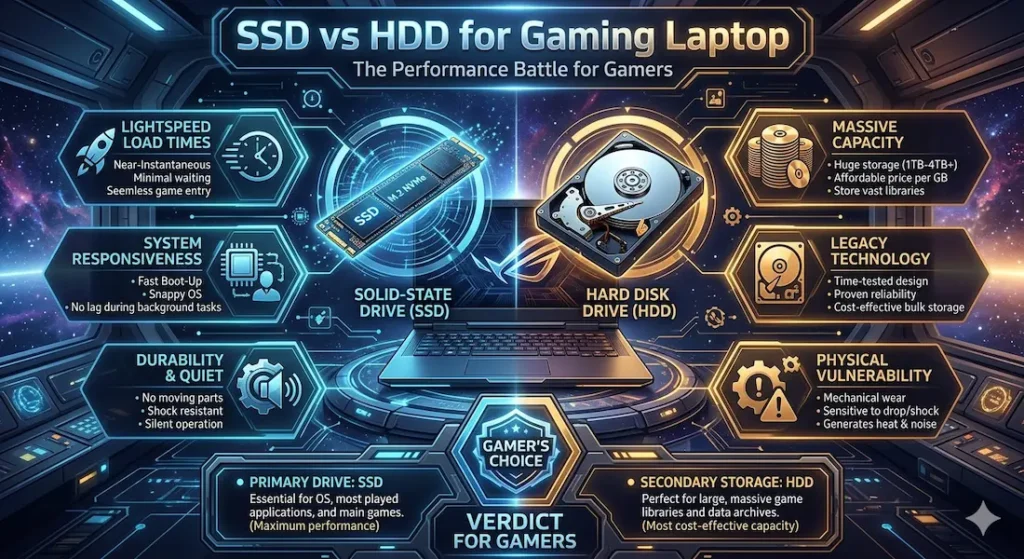
SSD vs HDD for Gaming Laptop — What You Actually Notice (Quick Comparison)
Before getting into the details, here’s the honest side-by-side of what real gaming sessions look like:
| Situation | SSD | HDD |
|---|---|---|
| Game launch time | Fast, nearly instant | Noticeably slower |
| Fast travel in open-world games | Smooth, minimal pause | Delayed, sometimes jarring |
| Laptop boot time | Under 20 seconds typically | 45–60+ seconds |
| Installing new games | Faster file writes | Slower across the board |
| Texture loading in big maps | Clean, loads ahead of you | Occasionally late, pop-in visible |
| Background noise | Completely silent | Faint spinning/clicking sound |
| Vibration | None | Slight, especially on hard surfaces |
| FPS impact | Minimal direct effect | Minimal direct effect |
The last row surprises people. We’ll get into that.
Check Price NowSSD for Gaming Laptops — The Real Experience
What It Actually Feels Like
The first week on an SSD, you might not even think “wow, this is fast.” What you notice instead is the absence of annoyance. You stop unconsciously bracing for loading screens. You stop minimising the game while you wait and checking your phone.
After two weeks on an SSD, going back to an HDD feels genuinely painful. The wait times that seemed normal before suddenly feel unacceptable.
That’s the SSD experience in a sentence: you stop noticing delays because there aren’t any.
SSD vs HDD Gaming Load Times — Real Game Examples
Load time improvements are where the SSD vs HDD gaming load times difference shows up most clearly. From personal testing and consistent reports across the gaming community:
- GTA V — Story mode loads cut down significantly. Going from a 90-second HDD wait to a 25–30 second SSD load is not a small quality-of-life upgrade.
- Call of Duty (Warzone/Modern Warfare) — Map loading between matches is noticeably faster. In competitive lobbies, HDD users are often still loading when SSD players are already in the pre-game.
- Elden Ring / open-world RPGs — Fast travel is where you really feel it. Every fast travel on HDD involves a pause that breaks immersion. On SSD, the transition feels almost seamless.
- Microsoft Flight Simulator / large asset games — HDD machines can struggle to stream terrain data fast enough, leading to blurry textures and pop-in. SSD mostly eliminates this.
Does SSD Improve FPS in Gaming?
Let’s be clear and honest here, because a lot of content gets this wrong.
SSD does not significantly increase your FPS. Your frame rate is determined by your GPU and CPU, not your storage drive. If you’re getting 60 FPS on an HDD machine, switching to an SSD won’t push you to 90 FPS.
If you’re buying a new laptop primarily for gaming, it’s worth checking current recommendations like best laptops under $1000 for FPS Games to ensure you’re getting an SSD-based configuration.
What SSD does improve:
- Time spent waiting to play (load times)
- Texture streaming smoothness in open-world games
- Overall system responsiveness — switching apps, returning to desktop, loading saves
- Consistency — fewer sudden hitches caused by slow asset loading mid-game
For SSD vs HDD for gaming FPS specifically, the honest answer is: don’t buy SSD expecting a frame rate boost. Buy it expecting to spend less time waiting and more time actually playing.
SSD and Heat + Noise in Gaming Laptops
This part gets overlooked in most comparisons.
SSD has no moving parts. There’s nothing spinning, nothing seeking, nothing vibrating. In a quiet room during a late gaming session, this matters. HDDs produce a subtle but real mechanical hum and occasional clicking. On a hard desk surface, you can sometimes feel faint vibration.
SSDs also tend to contribute slightly less heat over long sessions. In gaming laptops where thermal management is already a challenge, this is a small but real advantage.
Who Should Choose SSD
- Anyone playing modern open-world or AAA titles
- Competitive gamers where lobby load times matter
- Anyone who games more than a couple of hours a week
- Students who use the same laptop for both gaming and coursework
Pros:
- Dramatically faster load times in real gaming sessions
- Smooth texture streaming in large open-world maps
- Silent operation — no mechanical noise or vibration
- More durable (no moving parts to fail from drops or movement)
- Faster system boot and overall responsiveness
Cons:
- Costs more per gigabyte than HDD
- At the same price, you get less total storage capacity
HDD for Gaming Laptops — Still Relevant, But Know the Limits
What Gaming on HDD Actually Feels Like in 2026
HDD isn’t useless. If someone handed you an HDD gaming laptop tomorrow, you could still play games on it. But here’s what the experience honestly looks like:
You click Play. You wait. You fast travel. You wait. You die in an open-world game and reload a save. You wait again.
The individual waits aren’t catastrophic — 60 seconds here, 45 seconds there. But they add up. Across a two-hour gaming session, you might spend 15–20 minutes of that time on loading screens. Over a week of gaming, that’s real time gone.
In some older or less asset-heavy games, the difference is smaller. Running a 2015 indie game on HDD? Fine. Running Hogwarts Legacy or Cyberpunk 2077 on HDD? You’ll feel it constantly.
HDD vs SSD Open World Games Performance
Open-world games are the category where the SSD vs HDD open world games difference is most painful on HDD. These games constantly stream new assets as you move through the world — new terrain, new NPCs, new textures. SSD handles this in the background without you noticing. HDD sometimes can’t keep up, which leads to:
- Visible texture pop-in (low-res textures that suddenly sharpen)
- Brief hitches or micro-stutters as assets load mid-scene
- Slower fast travel that pulls you out of immersion
It’s not game-breaking. But once you’ve experienced smooth streaming on SSD, HDD pop-in is difficult to un-see.
Where HDD Still Makes Sense
There’s one legitimate use case for HDD in a gaming setup: bulk storage.
If you have an SSD as your primary drive for the OS and active games, a large HDD (1TB or 2TB) for storing games you’re not currently playing is a smart and cost-effective setup. Installing a game you’re about to play means moving it from HDD to SSD first — a minor inconvenience worth the price-per-GB savings.
Who can still reasonably use HDD:
- Very casual gamers playing older or less demanding titles
- Users who need maximum storage on a tight budget
- People using HDD strictly as secondary storage alongside an SSD
Pros:
- Much cheaper per gigabyte
- 1TB+ capacities are common at budget price points
- Fine for storing games you aren’t actively playing
Cons:
- Slow load times — noticeable in every modern game
- Occasional texture pop-in and micro-stutter in open-world titles
- Mechanical noise and slight vibration
- More vulnerable to damage from physical movement (moving parts)
- Feels genuinely dated in a 2026 gaming setup
SSD vs HDD for Gaming Laptop — The Storage Setup That Actually Works
After testing multiple configurations, here’s what I’d recommend depending on your situation:
Best Setup (If Your Budget Allows)
512GB NVMe SSD + 1TB HDD
Install your OS and currently active games on the SSD. Use the HDD as a library for everything else. This gives you the fast gaming experience of SSD without the storage anxiety of living on 512GB alone.
Budget Setup (SSD Only)
512GB SSD — no HDD
Tight on budget? Go SSD-only. You’ll need to manage what’s installed and uninstall games you’re not playing, but the experience is still far better than an HDD-only setup. You can always add external storage later.
What to Avoid
HDD-only gaming laptops in 2026. There’s no real justification for buying one as a primary gaming machine anymore. The price gap between HDD and SSD configurations has narrowed significantly. The experience gap has not.
NVMe SSD vs SATA SSD vs HDD — Quick Breakdown
Not all SSDs are equal, and this matters for the SSD vs HDD for gaming laptop conversation:
| Storage Type | Speed | Best For |
|---|---|---|
| NVMe SSD | Fastest | Primary gaming drive, OS |
| SATA SSD | Fast (slower than NVMe) | Still much better than HDD |
| HDD | Slow | Bulk storage only |
If your laptop uses NVMe, you’re getting the best storage experience available at this price range. SATA SSD is still a major upgrade over HDD — don’t let the NVMe vs SATA debate talk you into accepting an HDD.
The RAM + Storage Combination Most Gamers Miss
Here’s something that surprises people who ask about SSD vs HDD for gaming with 16GB RAM:
More RAM doesn’t compensate for slow storage.
A laptop with 16GB RAM and an HDD will still feel sluggish loading game assets because RAM and storage do different jobs. RAM holds data that’s actively being used. Storage is where the game lives and where data is pulled from. When your storage is slow, data arrives to RAM slowly — and your game loading experience suffers regardless of how much RAM you have.
This is why:
- 8GB RAM + NVMe SSD often feels quicker in daily gaming use than
- 16GB RAM + HDD
The RAM vs storage balance matters. Both need to be adequate. Prioritising RAM while ignoring storage speed is a common and easily avoidable mistake.
Common Mistakes Gamers Make When Choosing Storage
Installing games on HDD out of habit Even on dual-drive setups, some people install everything to HDD by default. Check your install path every time — active games belong on SSD.
Buying HDD-only laptops to save money The price saving is real in the short term. The time you spend watching loading screens over a year of gaming is also real. It’s rarely a good trade.
Ignoring the difference between NVMe and SATA SSD Both beat HDD easily. But if two laptops are similarly priced and one offers NVMe while the other offers SATA, lean toward NVMe — especially for larger, more demanding games.
Prioritising storage size over speed A 2TB HDD sounds better than a 512GB SSD on paper. In practice, 512GB SSD and smart game management beats 2TB of slow storage for anyone gaming regularly.
Frequently Asked Questions
Is SSD necessary for a gaming laptop?
For any modern gaming — AAA titles, open-world games, competitive shooters — yes. SSD is no longer a luxury in 2026; it’s the baseline for a functional gaming experience. HDD is viable for very casual gamers on a strict budget, but the load time difference is significant.
Does SSD vs HDD affect FPS in gaming?
Not significantly. FPS depends primarily on your GPU and CPU. SSD improves load times, texture streaming, and overall system responsiveness — but don’t expect your frame rate to jump just because you switched storage drives.
Can you game on HDD in 2026?
You can, but you’ll notice the difference in every modern game. Load times are longer, texture pop-in is more common in open-world titles, and the overall experience feels dated compared to SSD. For older or less demanding games, HDD is more tolerable.
How much SSD storage do I need for gaming?
512GB is the realistic minimum for a primary gaming SSD. It fits your OS and three to five large games comfortably. 1TB SSD gives you more flexibility and is worth stretching for if your budget allows.
What’s better — NVMe SSD or SATA SSD for gaming laptops?
Both are vastly better than HDD. NVMe is faster, particularly for large file transfers and loading asset-heavy games. If both options are available near the same price, choose NVMe.
Does the SSD vs HDD choice matter for game installation speed?
Yes. Installing a 60–100GB game on SSD is meaningfully faster than on HDD. If you download and install games regularly, this adds up over time.
Final Verdict — What I’d Buy Today
If I were picking a SSD vs HDD for gaming laptop right now, HDD as the primary drive wouldn’t even be a consideration.
The SSD vs HDD for gaming laptop debate has a clear answer in 2026, and it’s not close. SSD wins on load times, texture streaming, system responsiveness, noise, durability, and overall gaming feel. HDD wins on price-per-GB and total storage capacity — two advantages that are best used in a secondary storage role, not as a primary gaming drive.
Laptops Under $800 for Remote Work
My recommendation:
- Minimum: 512GB SSD as primary drive
- Ideal: 512GB or 1TB NVMe SSD + 1TB HDD combo
- Avoid: HDD-only gaming laptops for active gaming use
Once you’ve played on SSD, the waiting on HDD doesn’t feel like a small inconvenience. It feels like going backwards. That’s not marketing language — it’s genuinely what the experience is like, and it’s the most honest thing I can tell you before you make this decision.
About BestLaptopGuide.com: Our editorial team evaluates laptops through real daily workload testing — not manufacturer benchmarks. Recommendations updated regularly.
Disclosure: Some links are affiliate links. A small commission may be earned at no extra cost to you. This does not influence our recommendations.


