Author: Marcus Hale | Reading Time: 11 min
The first time I opened the Dell XPS 13 in a university library, the person at the next desk glanced over.
Not because it was loud or attention-grabbing. Exactly the opposite. It’s the kind of laptop that reads as quietly expensive — thin, clean edges, a display that looks sharp before you’ve even loaded anything. If a laptop could have good posture, this one does.
Most Dell XPS 13 reviews stop somewhere around that first impression. Clean design. Strong display. Premium feel. Recommended.
That long-term experience becomes even more noticeable when comparing ultrabooks designed for mobility versus those built for heavier workloads.
But that’s not where the laptop actually gets tested. It gets tested three weeks in, when you’ve got Chrome open with fifteen tabs, VS Code running in the background, Spotify going, and a deadline in two hours. It gets tested during a quiet study session when the fan suddenly kicks in loud enough that you check whether someone opened a window. It gets tested on a cross-campus commute when you realize your bag feels noticeably heavier than expected for a 13-inch machine.
That’s the Dell XPS 13 review this guide is built around — not the unboxing moment, but the months after it.
Table of Contents
Quick Take — Is the Dell XPS 13 Worth It in 2026?
Best for: Students, writers, remote workers, professionals who prioritize portability
Not ideal for: Video editors, heavy multitaskers, anyone who games regularly
Closest alternative: MacBook Air M2 (if you can move away from Windows)
Is the Dell XPS 13 worth it in 2026? Yes — for the right workload and the right user. It’s a premium daily-use machine that performs its best role exceptionally well. Understanding exactly what that role is before buying saves a lot of buyer’s regret.
Check Price NowDell XPS 13 vs Alternatives — Real Daily Use Comparison
| Laptop | How It Feels Daily | Real Battery | Fan Behavior | Best For |
|---|---|---|---|---|
| Dell XPS 13 | Premium, compact, composed | 6–8 hours | Noticeable under sustained load | Everyday professional use |
| MacBook Air M2 | Effortless, invisible | 12+ hours | Completely silent | Long sessions, travel |
| HP Spectre x360 | Flexible, slightly bulkier | 7–9 hours | Moderate | Hybrid touchscreen users |
The Dell XPS 13 vs MacBook Air decision is where most buyers in this category ultimately land. Both are premium ultrabooks. The differences are real and worth understanding before committing.
If you’re deciding between operating systems, this comparison of MacBook Air vs Windows laptops breaks down how the experience differs in real daily use
Who the Dell XPS 13 Actually Works For
Before the detailed Dell XPS 13 review, it’s worth being specific about fit — because the people who regret this purchase almost always bought it for the wrong use case.
This laptop fits:
- Students who move between classes, libraries, and home and want a machine that feels premium without being heavy
- Writers and bloggers whose primary tool is a text editor and browser
- Remote workers handling documents, email, video calls, and standard cloud-based tools
- Professionals for whom build quality and Windows compatibility both matter
This laptop will frustrate:
- Video editors or anyone working with large files who needs sustained processing power
- Developers running Docker containers, virtual machines, or resource-intensive development environments
- Students in demanding technical programs with heavy concurrent tool requirements
- Anyone who genuinely needs a silent machine for shared quiet spaces
Dell XPS 13 Performance Review — What Real Sessions Look Like
Everyday Light-to-Moderate Workloads
For the tasks that define most students’ and professionals’ daily use — writing documents, managing email, browser research, video calls, note-taking — the Dell XPS 13 performance is best described as effortlessly smooth.
You don’t think about it. Tabs load. Documents save. Zoom calls connect. The machine does what you ask without making you aware it’s doing it. For a student asking whether the Dell XPS 13 is good for everyday use, this frictionless quality is the best argument for buying it.
The keyboard plays a real role in this. After two to three hours of continuous writing — the kind of sustained session that reveals keyboard design quality — there’s no finger fatigue, no resistance, no second-guessing whether a key registered. The key travel is deliberate enough to feel intentional without being deep enough to tire your hands. For students and writers who spend hours in a text editor, this matters more than it initially sounds.
When the Workload Grows
This is the section most Dell XPS 13 full review articles skip, and it’s the one that actually determines whether this machine fits your life.
Open VS Code with extensions active, add Chrome with ten or twelve tabs including documentation and Stack Overflow, run a local development server, and keep Spotify in the background. This is a moderate developer session — nothing exotic.
You’ll notice a subtle shift in responsiveness. Not lag exactly — more of a slight hesitation before applications respond. The kind of pause where you instinctively click again to confirm the action registered. Individually, each instance is minor. Across a four-hour session, it shapes how the machine feels.
This is the honest reality of Dell XPS 13 multitasking performance — genuinely good for standard workloads, and genuinely limited once multiple demanding applications run simultaneously.
Dell XPS 13 Heat and Fan Behavior — The Detail That Matters in Real Life
This is the question that comes up repeatedly in practical use:
Does the Dell XPS 13 have heating issues?
The honest answer: not in the dangerous sense, but in the practical sense — yes, you’ll notice it.
Under light workloads, the machine stays cool and quiet. That composure is part of what makes the everyday experience pleasant. Under sustained moderate-to-heavy load — compiling code, running video calls while other applications process in the background, sustained browser-heavy sessions — the fan becomes clearly audible in a quiet room.
During a library study session I observed, a student paused mid-sentence because the fan on his XPS 13 kicked in loudly enough to be startling in the silence. He glanced at the vents, shifted slightly, and continued. The machine wasn’t struggling — just announcing itself.
In a coffee shop or ambient environment, this fan behavior disappears into background noise. In a quiet exam room, library, or shared office during silent working hours, it draws awareness in a way that the MacBook Air’s passive cooling never does.
The keyboard surface warms noticeably under sustained load. Not uncomfortable during brief periods, but present across a two-to-three hour session in a way that accumulates.
Dell XPS 13 Battery Life — Real Test Results
Battery is where expectations need the most calibration.
Light use (documents, light browsing, writing): 7–8 hours consistently.
Mixed real use (combination of video calls, development, browser research, media): closer to 6 hours.
For a student asking whether Dell XPS 13 battery life is good: it’s adequate. It covers a half-day of academic work comfortably. For a full day on campus moving between morning classes, an afternoon study session, and evening work — you’ll want to charge somewhere in between.
Compared to the MacBook Air M2’s 12+ hours of real mixed use, the gap is meaningful. For travelers or students who genuinely need all-day battery without charger access, the MacBook Air is the more practical machine. For users whose day includes regular charging opportunities, the XPS 13’s battery is sufficient without being exceptional.
Dell XPS 13 Display and Build Quality — Where It Genuinely Excels
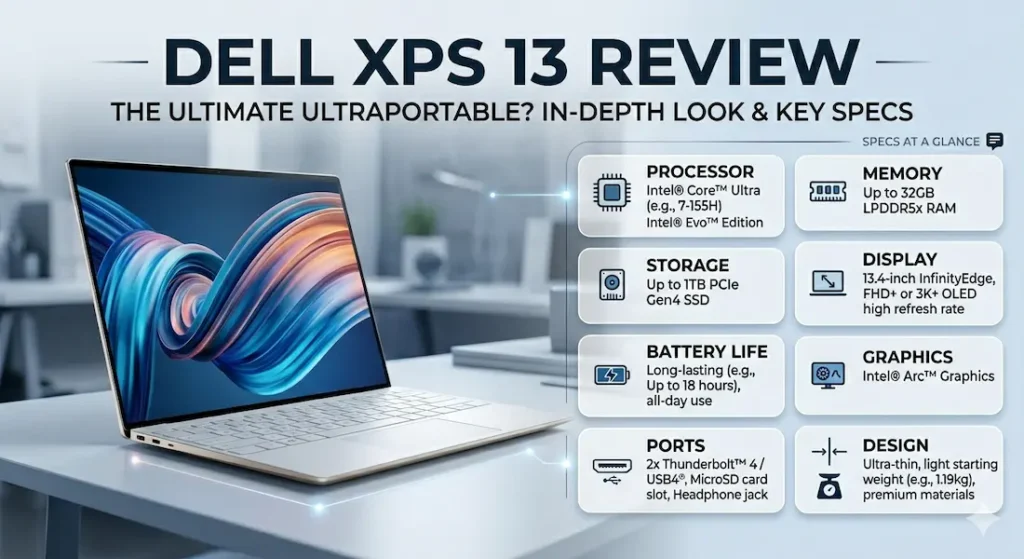
This is where the Dell XPS 13 premium build quality earns its reputation without qualification.
The chassis is machined aluminum that feels different from plasticky budget alternatives the moment you pick it up. The lid doesn’t flex. The keyboard deck doesn’t creak. The hinge opens smoothly to the precise angle you position it at and stays there. After six months of daily use — dropped into bags, opened and closed hundreds of times, carried through campus weather — it holds up without developing the rattles and looseness that lower-quality machines accumulate.
The display is sharp and accurate indoors. Colors render faithfully for both creative work and standard productivity. Near windows in bright outdoor light, brightness becomes a real limitation — the panel isn’t the brightest in this class, and direct ambient light requires screen angle adjustment. For the overwhelmingly indoor environments where most student and professional work happens, it’s genuinely excellent.
For users working outdoors or near windows, display brightness becomes a more noticeable factor than resolution alone.
Dell XPS 13 outdoor screen performance: usable with positioning adjustment. Not the strongest panel in bright outdoor environments, but not unusable either.
Dell XPS 13 Keyboard and Trackpad — The Long-Term Comfort Story
The keyboard on the Dell XPS 13 is one of its more underappreciated qualities. Key travel is well-calibrated — enough feedback to type accurately without fatigue, not so deep that rapid typing feels labored. After a solid three-hour writing session, hands feel comfortable in a way that distinguishes good keyboards from adequate ones.
This is the kind of performance profile you typically see in machines optimized for everyday productivity rather than sustained heavy workloads
The trackpad is smooth and accurate. Gesture support works reliably. It’s not quite at the level of the MacBook Air’s trackpad — few Windows trackpads are — but it’s among the better Windows trackpad experiences at this price point. For users who rely heavily on the trackpad for navigation-intensive work, it performs without creating friction.
Dell XPS 13 for Students — Is It a Good Fit?
Is the Dell XPS 13 good for students? The answer depends more on the student than the laptop.
For students whose workload is primarily writing, research, presentations, and standard digital coursework — the XPS 13 is an excellent choice. The portability, build quality, and keyboard comfort make it a daily companion that doesn’t create friction.
For CS and engineering students who regularly run heavy development environments, virtual machines, and resource-intensive tools — the XPS 13 will show its limits within the first semester. The MacBook Air handles that workload more gracefully through better thermal efficiency, or a larger Windows machine offers more headroom.
The Dell XPS 13 for college students recommendation comes with this clarity: know your workload before committing.
Dell XPS 13 for Programming — Honest Capability Assessment
Is the Dell XPS 13 good for programming?
For web development, Python scripting, introductory JavaScript, and standard development workflows using VS Code: yes, comfortably. The machine handles these workloads without visible strain under moderate session lengths.
For full-stack development with multiple local services running, Android Studio, Docker containers, or data science work with heavy libraries: you’ll hit the thermal and performance ceiling faster than the spec sheet suggests. The Dell XPS 13 coding performance holds well within its lane and gets noticed once workloads push consistently beyond it.
16GB RAM is the configuration worth targeting for any development use. The 8GB configurations feel tight once real development tools are active alongside browser research and communication tools. 16GB removes that constraint for standard development workloads.
Dell XPS 13 After 6 Months — Long-Term Honest Assessment
Dell XPS 13 long-term durability is genuinely one of its strengths.
After six months of daily use:
Build quality: Essentially unchanged. No new creaks, no visible wear on chassis surfaces, hinge still operates smoothly. The machined aluminum holds up in a way that cheaper machines don’t.
Performance: Consistent for everyday tasks. If anything, slightly faster than early use as Windows has had time to optimize background processes for the specific hardware configuration.
Battery: Noticeably degraded from peak capacity — down from the original 7–8 hours to closer to 6–6.5 hours in equivalent use. This is normal lithium battery degradation, faster than the MacBook Air’s larger battery but within expected range for the category.
Software: No major issues or compatibility problems across a full semester of academic use.
Common Mistakes Buyers Make With the Dell XPS 13
Choosing 8GB RAM to save money. Once development tools, browser tabs, and communication apps run simultaneously, 8GB creates a ceiling that shapes the daily experience within weeks.
Expecting silent operation for quiet-space work. The fan becomes clearly audible under sustained load. For users who work in quiet libraries or shared offices where silent operation matters, this is a daily consideration — not a theoretical one.
Buying for heavy workloads. The XPS 13 is engineered around portability and everyday elegance. Forcing it into video editing, heavy development, or sustained high-performance work creates the exactly wrong match between machine and use case.
Comparing it directly to the MacBook Air without considering the ecosystem. If Windows compatibility is genuinely required, the XPS 13 is among the best Windows ultrabooks available. If your software stack runs on macOS, the MacBook Air is the more capable daily machine at this price — better battery, better thermals, better long-term performance under the same workloads.
Frequently Asked Questions
Is the Dell XPS 13 good for students in 2026?
Yes — for students with light-to-moderate workloads. The Dell XPS 13 for students is an excellent fit for writing-heavy, research-intensive coursework. For students in CS or engineering programs with heavy tool requirements, it shows performance limits faster than alternatives like the MacBook Air or larger Windows machines.
Is the Dell XPS 13 good for programming?
For web development, scripting, and standard development workflows: yes. For full-stack development with multiple running services, Docker, or data science work: performance limits become noticeable. 16GB RAM is strongly recommended for any development use case.
Should I buy the Dell XPS 13 or MacBook Air M2?
For battery life, silent operation, and long-session performance: MacBook Air M2. For Windows compatibility and a premium Windows ultrabook experience: Dell XPS 13. The gap in battery life and thermal behavior is real — choose based on which matters more for your specific workflow.
Is the Dell XPS 13 worth buying in 2026?
Yes, for moderate workloads and users who value Windows portability and premium build quality. For users whose work pushes past standard productivity into heavy development or creative work, the performance limits make other options worth considering.
How long does the Dell XPS 13 last?
Three to four years of reliable daily use for the target workload. The build quality holds up exceptionally well; battery degradation is the most noticeable change across years of ownership.
Final Verdict — Dell XPS 13 Review Summary
After months of real daily use, the Dell XPS 13 is exactly what it looks like from across a library room: a premium, quiet, confidently built machine that performs its best role — polished everyday productivity — exceptionally well.
It won’t replace a more powerful machine for demanding workloads. The fan behavior under sustained load and the battery life compared to the MacBook Air are real limitations that matter for specific users and don’t matter at all for others.
For students, writers, remote professionals, and everyday users who want a Windows ultrabook that looks and feels premium, carries without complaint, and handles the workday’s actual demands without friction — the Dell XPS 13 in 2026 is one of the best choices available.
For battery life and silence: MacBook Air M2. For Windows flexibility and premium build at this size: Dell XPS 13. Those two sentences are the most honest summary of where this machine belongs.
About BestLaptopGuide.com: Our editorial team evaluates laptops through real student workload testing and extended daily use — not manufacturer benchmarks. Recommendations are reviewed and updated regularly.
Disclosure: Some links on this page are affiliate links. A small commission may be earned at no extra cost to you if you purchase through them. This does not influence our recommendations.


