Best Laptop Under $500 for Programming in 2026 (Tested for Coding, Students & Beginners)
I’ve spent the last three years helping beginner developers pick their first machine — and the $500 range is where most real buying decisions happen for beginner programmers, students, and anyone looking for a reliable budget laptop for coding.. Not because it’s glamorous, but because it’s where most students and career-switchers actually live.
I’ve watched people freeze during lab sessions, lose code because their machine crashed mid-compile, and regret spending $350 on a laptop that became useless after one semester. This guide is the same advice I give in person when someone asks for the best budget laptop for programming without wasting money on specs that don’t actually improve real coding performance.
If you’re also a student managing coding assignments and classes together, this guide on best laptops under $500 for students can give a clearer picture of what to expect in real academic use
Table of Contents
Who This Guide Is For
This guide is designed for anyone searching for a budget laptop for programming, especially:
- College students picking their first programming laptop
- Self-taught developers on a tight budget
- Bootcamp students who need something reliable before day one
If you’re already running Docker containers and Kubernetes clusters daily, you’ve outgrown the $500 bracket. But if you’re learning Python, Java, web development, or data science fundamentals — this price range covers you well.
Quick Picks (If You’re in a Hurry)
| Award | Laptop | Why |
|---|---|---|
| 🏆 Best Overall | Acer Aspire 3 (Ryzen 5) | Most balanced real-world performance |
| ⌨️ Best for Typing | Lenovo IdeaPad 3 (Ryzen 5) | Softer keys, less fatigue over long sessions |
| 🎒 Best for Portability | ASUS VivoBook 15 | Lighter build, better battery on the go |
| 💰 Budget Pick | HP 15 (Core i3) | Fine for absolute beginners, limited headroom |
My honest recommendation if you’re looking for the best laptop under $500 for coding: Acer Aspire 3 with Ryzen 5. It’s not the cheapest, but it’s the one I’ve seen hold up the longest without causing frustration.
Full Comparison Table
| Laptop | Processor | RAM | Storage | Real Coding Feel | Best For |
|---|---|---|---|---|---|
| Acer Aspire 3 | Ryzen 5 | 8GB | 512GB SSD | Smooth, handles multitasking well | All-around programming |
| Lenovo IdeaPad 3 | Ryzen 5 | 8GB | 256GB SSD | Stable, comfortable for long sessions | Daily coding comfort |
| ASUS VivoBook 15 | Ryzen 3 / i3 | 8GB | 512GB SSD | Handles moderate workloads | Students who commute |
| HP 15 | Core i3 | 8GB | 512GB SSD | Basic projects only | Learning basics |
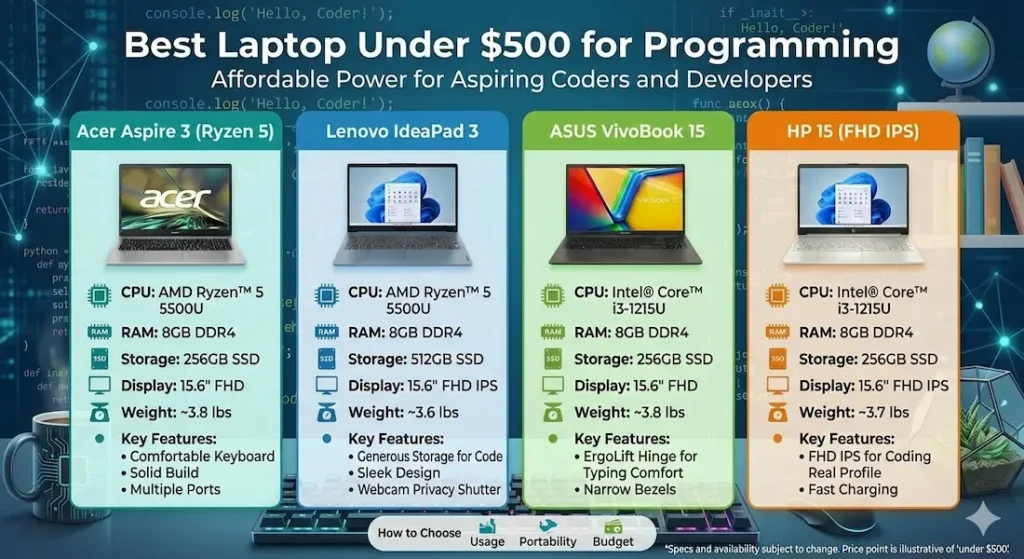
Best Laptop Under $500 for Programming — Full Reviews
1. Acer Aspire 3 (Ryzen 5) — Best Overall Pick
The real-world experience
I’ve recommended this to at least a dozen people over the past two years. None of them came back regretting it — which is honestly the best endorsement I can give at this price.
Running VS Code with 10–12 extensions loaded, , a local development server, and browser tabs for documentation? It handles that without the fan screaming or the cursor stuttering. Indexing a medium-sized project in IntelliJ IDEA takes a minute or two rather than grinding forever.
One thing to know upfront: after 60–70 minutes of continuous compiling or heavy IDE use, the keyboard deck gets warm. Not hot enough to be uncomfortable, but you notice it. The fan kicks in and becomes audible in a quiet room. In a library during finals week, you’ll want to sit away from other people.
Boot time with the SSD sits around 12–15 seconds. That matters more than it sounds when you’re reinstalling packages, rebooting after system updates, or quickly switching machines between classes.
Keyboard and build
The keyboard has enough travel and firmness for long coding sessions. It’s not a ThinkPad, but it won’t make your fingers ache. The plastic chassis flexes a bit if you push hard near the centre — not during typing, but during setup or carrying. It’s fine in daily use.
Display brightness is average. Works great indoors. Near a sunny window, you’ll fight glare. Coding outside is technically possible but not comfortable.
Why it’s ranked first
Consistency. Budget laptops sometimes feel quick for the first week because they haven’t accumulated background tasks and IDE caches yet. After a month of daily development work, that initial snappiness fades on weaker machines. The Aspire 3 behaves more or less the same on day one as it does six months later.
The RAM is also upgradeable on most configurations — that matters when you’re still using this laptop in your second or third year and your projects have grown.
Pros:
- Reliable performance during real development workloads
- SSD makes project loading and builds noticeably faster
- RAM can be upgraded to extend the laptop’s useful life
Cons:
- Fan gets audible under sustained load
- Display brightness struggles outdoors
2. Lenovo IdeaPad 3 (Ryzen 5) — Best for Long Coding Sessions
If you know you’ll be typing for four or five hours straight, this is worth a serious look.
The keyboard on the IdeaPad 3 has a softer, slightly cushioned feel compared to the Aspire 3. It’s a subtle difference that doesn’t show up in spec sheets, but after a four-hour debugging session at 1 AM, your fingers will notice. Python scripts, Java projects, and basic web development work all run smoothly.
The tradeoffs: battery backup is a bit shorter in practice, storage is 256GB instead of 512GB on some configurations (you’ll want an external drive eventually), and the speakers are weak — which matters if you rely on video tutorials.
For programmers who treat typing comfort as a priority and don’t need the absolute ceiling on processing headroom, this can be a smarter daily pick than the Aspire 3.
View Best Deal3. ASUS VivoBook 15 — Best If You Code on the Move
Students who carry their laptop between labs, libraries, lecture halls, and cafés will appreciate what this machine trades away in raw speed to gain in portability and battery.
In light-to-moderate workloads — learning a new language, running beginner-level projects, working through online courses — it keeps up fine. Battery life is genuinely better for all-day use.
The limitation shows up when projects get heavier. Multiple services running simultaneously, larger codebases, heavier IDEs — that’s when you’ll start noticing more lag than you’d get from a Ryzen 5 machine.
My honest take: Choose this only if commuting is a daily reality and you’re willing to accept some performance limits in exchange for not hauling a heavier machine everywhere.
⚠️ Check latest deal4. HP 15 (Core i3) — For Absolute Beginners Only
If you’re just starting programming and need a basic laptop for coding beginners and your projects are simple, the HP 15 works. It gets you through syntax exercises, beginner Python, basic HTML and CSS, and simple Java programs without embarrassing itself.
But here’s what I’ve seen happen more than once: a student buys this to save money, breezes through month one, then hits their first real project in month three — a Java application with a full IDE, or a Node.js project with multiple running services — and the machine starts to struggle. By the second year of a CS programme, some students end up buying again.
If there’s any chance your coursework will get demanding, stretch your budget toward the Ryzen 5 options. You’re not paying for luxury — you’re paying to avoid buying twice.
View Best DealRyzen 5 vs Core i3 — What the Difference Actually Feels Like
Specs aside, here’s the practical version.
On a Core i3 machine, everything feels fine when you’re doing one thing at a time. The moment you have your IDE open, a local server running, and Chrome with documentation tabs in the background, you start to feel resistance. Switching applications takes a beat longer. Background indexing slows down your typing.
Ryzen 5 systems handle that background noise better. They stay responsive because the processor has more breathing room. It’s not dramatic — it’s the difference between a laptop that feels effortless and one that feels like you’re managing it.
For programming specifically, where you’re almost always running multiple tools simultaneously, that difference matters.
Why SSD and 8GB RAM Matter More Than the Brand
Two things make a bigger real-world difference than almost any other spec at this price range:
SSD storage speeds up everything — boot time, project loading, installing dependencies, switching between applications. An HDD laptop might look cheaper, but you’ll spend a meaningful portion of your day just waiting. Don’t buy a laptop with HDD storage for programming in 2026. The wait times alone will drain your motivation.
8GB RAM is now the realistic minimum for comfortable development multitasking. 4GB gets you through basic tasks, but the moment your IDE, browser, and terminal are all open together, you’ll hit the ceiling. If a laptop offers upgradeable RAM, that’s a genuine long-term advantage — you can add more as your projects grow without replacing the whole machine.
Mistakes I See Beginner Programmers Make When Buying Best Laptop Under $500 for Programming
Buying HDD laptops to save ₹2,000–₹3,000. The daily time cost makes it a bad trade in weeks.
Choosing 4GB RAM. It’s fine for YouTube and email. It’s not fine for development work with a real IDE.
Ignoring processor generation. A newer Core i3 is not the same as an older one. Check the generation number, not just the name.
Picking a thin, light design and discovering it throttles under load. Slim doesn’t always mean efficient. Some thin budget laptops drop performance significantly when the CPU gets warm.
Not checking RAM upgradeability. On some laptops, RAM is soldered. What you buy is what you have for the machine’s entire life.
Practical Buying Checklist
Before you add anything to cart, verify these five things:
- ✅ Processor: Ryzen 5 (preferred) or Core i5. Avoid i3 if you can stretch the budget.
- ✅ RAM: 8GB minimum. Check if it’s upgradeable.
- ✅ Storage: SSD only. 256GB is tight but workable; 512GB gives you more comfort.
- ✅ Battery: Expect honest real-world use to be 5–7 hours, not the 10–12 hours manufacturers claim.
- ✅ Keyboard: If you can, try it in a store first. You’ll type on it for thousands of hours.
Frequently Asked Questions
Is $500 enough for a programming laptop for beginners?
Yes — for beginner to intermediate coding work. Running IDEs, learning new frameworks, building portfolio projects, attending online bootcamps — a well-configured $500 laptop handles all of this. You won’t be editing 4K video or running machine learning model training, but you won’t need to either.
Can budget laptops run IDEs like IntelliJ or VS Code smoothly?
Ryzen 5 laptops with 8GB RAM run VS Code very smoothly. IntelliJ IDEA (which is heavier) runs fine for moderate projects, though startup takes a bit longer than on higher-end machines. Core i3 laptops with 8GB RAM manage, but feel slower under the same workload.
How much RAM do I really need for programming?
8GB gets you through most coursework and beginner projects comfortably. If you’re planning to work with Docker containers, virtual machines, or data science libraries simultaneously, 16GB would serve you better — but that usually pushes past the $500 range.
How long will a $500 programming laptop last?
A well-configured Ryzen 5 laptop with SSD storage should stay useful for three to four years of active development work. The RAM upgradeability is what often determines whether year three and four are comfortable or frustrating.
Should I buy refurbished to get a better spec?
Refurbished laptops from reputable sellers (manufacturer-certified, not third-party marketplaces) can get you more spec for the money. The risk is reduced warranty and the possibility of previous wear on the battery. If you’re comfortable with that tradeoff and the seller is trustworthy, it can be a smart move.
Final Verdict
For most students and beginner developers looking for the best laptop under $500 for programming — students, self-taught developers, bootcamp students — the Acer Aspire 3 with Ryzen 5 is the safest, most consistent choice under $500.
If you’re specifically looking for a Windows-focused setup, you can also explore this guide on best Windows laptops under $500 for more options in the same price range.
It’s not the most exciting laptop. But exciting doesn’t help you when you’re three hours into a debugging session and your machine starts lagging. Reliability does.
If keyboard comfort is your priority, the Lenovo IdeaPad 3 is worth considering. If you’re constantly on the move, look at the ASUS VivoBook 15 — but go in with clear expectations about its performance ceiling.
Avoid 4GB RAM. Avoid HDD storage. Get an SSD, get 8GB, and buy from the Ryzen 5 tier if your budget allows.
That’s the same advice I’d give a friend asking in person — and it’s the same advice I’m giving you.


