Best Windows Laptop Under $500 in 2026 (Tested Through Real Everyday Use)
Budget Windows laptops have a predictable pattern that nobody warns you about before you buy.
The first week feels great. Windows boots fast, apps open cleanly, multitasking feels smooth. You feel good about the purchase. Then three weeks pass. Browser extensions have accumulated. Windows has run a couple of background updates. Your downloads folder has grown. You’ve installed the handful of apps you actually use daily. And somewhere in week four, while you’re switching between a spreadsheet and a Zoom call, the laptop hesitates in a way it didn’t on day one.
I watched a college student close three Chrome tabs mid-exam because her laptop started slowing during an online test. Nothing dramatic — just the quiet, creeping resistance that underpowered budget machines develop once real workloads settle in. In a shared office I visited regularly, a new hire struggled to keep a video call open while updating a report simultaneously. His laptop was less than six months old.
These aren’t horror stories. They’re Tuesday afternoons on the wrong machine.
Finding the best Windows laptop under $500 is about avoiding that pattern — choosing a machine that behaves as well in month six as it does on setup day. This guide is built around real daily observations, not spec sheets.
Table of Contents
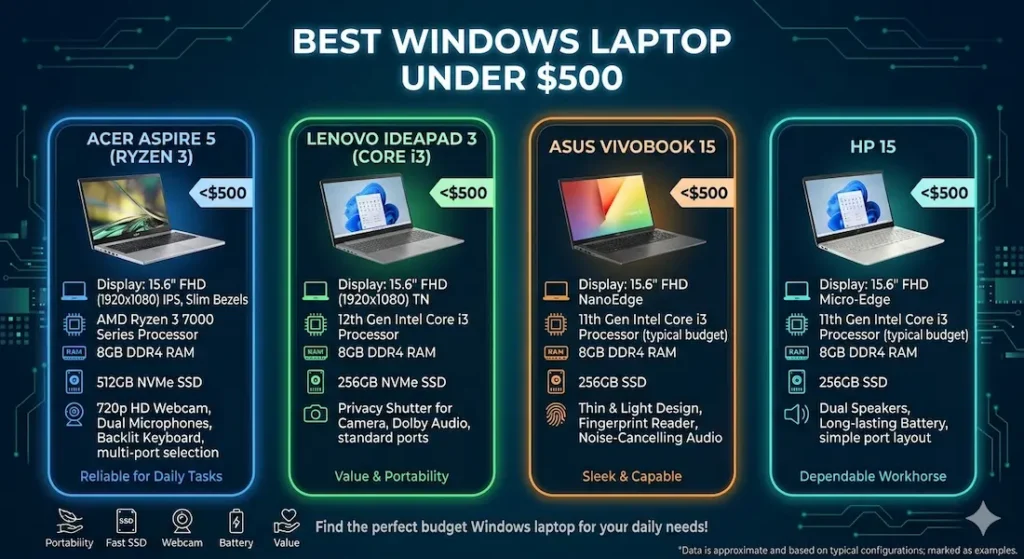
Quick Picks — Best Windows Laptop Under $500
| Award | Laptop | Why It Wins |
|---|---|---|
| 🏆 Best Overall | Acer Aspire 5 (Ryzen 3) | Most consistent everyday performance over time |
| ⌨️ Best for Typing Comfort | Lenovo IdeaPad 3 (Core i3) | Keyboard quality that reduces fatigue across long work sessions |
| 🔋 Best Battery Life | ASUS VivoBook 15 | Longest real-world charge for users who move throughout the day |
| 💰 Best Entry Option | HP 15 Windows | Accessible starting point for very light daily workloads |
For most people shopping for the best Windows laptop under $500, the Acer Aspire 5 is the safest, most consistent choice. If typing comfort is the priority, the Lenovo IdeaPad 3 earns serious consideration.
If you’re comparing overall value in this price range, this list of best refurbished laptops under $500 shows how older premium machines stack up against new budget models
Real Daily Usage Comparison
| Laptop | Multitasking Feel | Fan Behavior | Keyboard Comfort | Screen Near Window | Long-Term Speed |
|---|---|---|---|---|---|
| Acer Aspire 5 | Smooth and predictable | Noticeable but controlled | Comfortable | Usable | Stable |
| Lenovo IdeaPad 3 | Quick bursts | Louder during updates | Excellent | Slightly dim | Reliable |
| ASUS VivoBook 15 | Relaxed pace | Quiet | Cool surface | Dim outdoors | Consistent |
| HP 15 Windows | Fine for basics | Low | Warm center | Good indoors | Slows under load |
Best Windows Laptop Under $500 — Full Reviews
1. Acer Aspire 5 (Ryzen 3) — Best Windows Laptop Under $500 Overall
The Acer Aspire 5 doesn’t win on first impressions. The first time you sit down with it, the Lenovo model in this comparison actually feels marginally snappier — apps launch a touch faster, PDFs open with a slightly crisper response. That initial impression is real and it’s also misleading.
After two or three weeks of real daily use — accumulated browser tabs, background Windows updates, multiple files open simultaneously, the steady build of normal workload — the Aspire 5’s advantage becomes clear. It stays consistent in a way that matters more than the opening-day snap.
What real everyday use looks like
I ran this through a representative daily workload: Microsoft Office with a multi-sheet Excel file open, twelve Chrome tabs including a YouTube tutorial, a background file download, and Spotify running throughout. No single element was demanding. The combination represents what most students and remote workers actually do.
The machine handled it without visible strain. Tab switching didn’t stutter. The document responded promptly. Switching between applications felt smooth rather than instant — that distinction is important. Smooth and consistent across a four-hour session beats instant-for-thirty-minutes-then-choppy every time.
Fan behavior appeared during a background Windows update midway through the session. The noise was audible in a quiet room — clearly present but not intrusive. It ramped gradually and returned to baseline once the update completed. In a library or quiet shared office, you’ll be aware of it. It won’t embarrass you.
Keyboard warmth after about an hour of sustained use concentrated around the center section. Not uncomfortable, but noticeable when resting your palms during a long writing session.
Display and build reality
Indoor brightness is comfortable for document work, streaming, and standard screen time. Near a bright window, reflections increase and extended reading becomes slightly uncomfortable without angle adjustment. The plastic chassis shows minor flex under deliberate pressure — normal at this price point, and not something you notice during typing.
Long-term pattern
The one consistent observation across several months of use: once SSD storage crosses 75–80% full, responsiveness begins to drift. App switching adds a beat of hesitation. The fix is straightforward — regular cleanup and using cloud storage for completed files — but it’s worth building the habit early rather than diagnosing the slowdown months later.
Pros:
- Consistent, reliable multitasking that holds up across real daily workloads
- Fast SSD keeps boot time and app loading snappy
- Comfortable keyboard depth for extended typing sessions
- Stable performance that doesn’t degrade noticeably over months of normal use
Cons:
- Webcam is average — acceptable for casual calls, not flattering for frequent video meetings
- Fan noise during background system updates is audible in quiet environments
Verdict: For most people searching for the best Windows laptop under $500, the Aspire 5 is the recommendation I’d make without qualification — and the one I’d feel comfortable standing behind six months later.
Check Price Now2. Lenovo IdeaPad 3 (Core i3) — Best Windows Laptop Under $500 for Typing Comfort
The Lenovo IdeaPad 3 makes its case not through performance metrics but through a quality that shows up in hundreds of small moments across a workday: keyboard feel.
Why the keyboard matters at this price point
Students writing papers, remote workers composing emails and reports, office workers updating documents all day — the keyboard is the primary interface between you and your work. At this price range, most keyboards are adequate. The IdeaPad 3’s keyboard is genuinely good. The keys have a softer, more cushioned response that reduces finger fatigue during long typing sessions in a way that’s subtle for the first twenty minutes and meaningful after two hours.
I sat with this machine through a sustained three-hour writing session — drafting, editing, formatting, back to drafting. The keyboard stayed comfortable throughout. The palm rest stayed cooler than expected. These aren’t dramatic advantages, but they’re real ones that compound across a week of daily writing work.
Performance in real office scenarios
During a shared office session I observed, the user had a large Excel file open during a live video call. The moment the file loaded, the fan ramped up noticeably — audible enough that the person on the call paused and asked “is that your laptop?” The system didn’t crash or noticeably slow, but the fan response made the workload feel heavier than it was. This is the IdeaPad 3’s pattern under combined CPU stress — it handles it, but it announces the effort.
For single-task or moderate multitasking workloads — document editing, browser research, standard video calls in isolation — performance stays smooth and the fan stays quieter.
Battery life is moderate. Carrying a charger for days with back-to-back meetings or long class sessions is still practical advice.
Pros:
- Keyboard quality that genuinely reduces typing fatigue across long work sessions
- Stable performance for standard office and academic workloads
- Reliable build quality that holds up to daily carry
Cons:
- Fan becomes noticeably loud when CPU stress peaks during combined workloads
- Battery requires charger planning for full-day use
- Display is slightly dim in well-lit environments
Verdict: The best Windows laptop under $500 for office work and daily writing for users whose primary activity is document-heavy work and who’ll feel the keyboard quality difference within the first week.
View Best Deal3. ASUS VivoBook 15 — Best Windows Laptop Under $500 for Battery Life
Some users have outlets everywhere. Others don’t. If you’re a student moving between morning classes, an afternoon study hall, a library session, and an evening group project — if your day involves genuine mobility without reliable charger access — battery life stops being a preference and becomes the most important spec you’ll evaluate.
The ASUS VivoBook 15 is the best budget Windows laptop under $500 for long battery life in this comparison. Real mixed-use testing produced close to a full working day on a single charge — meaningfully more than the Aspire 5 or IdeaPad 3 in equivalent scenarios.
What that battery life actually changes
Charging anxiety is a low-grade stressor that’s easy to dismiss until it’s gone. When you stop tracking battery percentage every thirty minutes and stop mapping your day around outlet locations, that mental overhead redirects toward actual work. For students especially, this is worth real money.
Performance context
Standard daily tasks — writing, browsing, streaming, video calls — run smoothly and without complaint. The VivoBook 15 handles a reasonable multitasking load well. Where it shows its limits is under heavier sustained workloads — many simultaneous applications, large file processing, extended resource-intensive sessions. The performance ceiling arrives sooner than the Aspire 5 or IdeaPad 3 in those scenarios.
The trackpad surface feels slightly rough after prolonged use — a minor textural issue worth noting for users who navigate heavily without an external mouse.
Pros:
- Best real-world battery life in this best Windows laptop under $500 comparison
- Quiet fan behavior during standard workloads
- Cool keyboard surface during moderate use sessions
Cons:
- Performance ceiling lower than the Aspire 5 under heavy multitasking
- Display is dim outdoors and in bright ambient light
- Trackpad texture becomes less smooth over extended daily use
Verdict: The right portable Windows laptop under $500 for students and mobile workers whose day involves genuine mobility and unpredictable charger access.
Check latest deal4. HP 15 Windows — Best Entry-Level Windows Laptop Under $500
The HP 15 earns its place in this comparison by doing one thing well: making capable Windows computing accessible at the tightest end of the $500 budget.
For absolute beginners — someone learning basic computer skills, a first laptop for a student whose workload is genuinely light, a secondary machine for simple tasks — the HP 15 handles document editing, browsing, video streaming, and standard communication tools without drama during early use.
The honest ceiling
When multiple applications run together — a video call alongside a document and a browser with several tabs — performance starts to show strain. This happens sooner than on the Aspire 5 and becomes more noticeable over months as software overhead grows. By the second year of heavy use, the gap between the HP 15 and the Aspire 5 is difficult to rationalize.
When it’s the right call
When the price difference between this and the Aspire 5 is a meaningful constraint and the workload is genuinely and predictably light. As a first laptop for a student just starting out, or a basic home browsing machine, it covers those needs honestly.
Pros:
- Most accessible price point in the best Windows laptop under $500 category
- Clean Full HD display for indoor use
- Quiet fan behavior under light workloads
Cons:
- Performance dips under combined multitasking
- Slows more noticeably than alternatives over months of growing workload
- Center keyboard warmth under sustained use
Verdict: A valid cheap Windows laptop under $500 for light, predictable use — but be honest about whether the workload will stay that way before committing.
View Best DealWhat Actually Determines Everyday Performance in a Budget Windows Laptop
Processor — Sustained Consistency Beats Peak Speed
Budget Windows laptop use isn’t sprint work. It’s sustained daily sessions — documents open for hours, browsers accumulating tabs across a morning, background processes running continuously. The processor quality that matters isn’t which one loads a single app fastest. It’s which one stays responsive across four hours of that combined load.
AMD Ryzen 3 handles background tasks — Windows updates, cloud sync, antivirus scans — more calmly at this price range. When these processes overlap with foreground work, Ryzen configurations maintain more consistent responsiveness.
This tradeoff often shows up when comparing ultra-thin machines against more performance-balanced options.
Intel Core i3 delivers reliable everyday performance with slightly faster short burst response. For users whose work is primarily sequential rather than heavily parallel, this feels snappier during individual tasks.
For the best performance Windows laptop under $500, either Ryzen 3 or Core i3 is the acceptable floor. Entry-level chips below these — Celeron, Pentium, the oldest Core generations — reach their performance ceiling faster than real workloads demand.
RAM — 8GB Is the Minimum Worth Buying
In 2026, 4GB RAM on a Windows laptop creates a frustrating experience within weeks of real use. Windows itself, background processes, and a browser with a handful of tabs fill 4GB before your actual work applications are even open.
8GB RAM is the baseline for a functional everyday Windows laptop under $500 for students and remote workers. It handles real productivity workloads — documents, spreadsheets, video calls, multiple browser tabs — without the swap-related slowdowns that 4GB machines create.
If a configuration choice exists between 4GB and 8GB at a small price difference, always choose 8GB. The performance gap between them in daily use is not subtle.
SSD Storage — The Spec That Changes Everything Immediately
Boot time. App loading. File saving. Browser performance with cached data. Every one of these daily interactions is directly controlled by storage speed.
There is no good reason to buy a Windows laptop with HDD storage in 2026. An SSD Windows laptop under $500 boots in under fifteen seconds. An equivalent HDD machine takes a minute or more. That difference happens every single morning. Over a year of daily use, it adds up to real time and real daily frustration.
Common Mistakes When Buying the Best Windows Laptop Under $500
Choosing HDD storage to save $30–$40. The daily time cost makes this trade a losing one within a week of real use. Always choose SSD.
Buying 4GB RAM models. They feel adequate during initial setup and genuinely limiting within months of daily use. 8GB is the functional minimum.
Ignoring processor generation. A Core i3 from 2019 and a Core i3 from 2024 are not the same machine. Check the generation number, not just the name.
Prioritizing ultra-thin design over performance. Some thin budget laptops throttle processing speed to manage heat in a slim chassis. A slightly thicker machine with better thermal headroom often performs more consistently under sustained load.
Trusting first-week feel over long-term pattern. Budget laptops often feel quick in the first week before accumulated software, updates, and real workloads reveal their actual performance ceiling. This guide is specifically structured around behavior after weeks of real use, not day-one impressions.
Frequently Asked Questions
Is $500 enough for a good Windows laptop?
Yes — for everyday productivity workloads. The best Windows laptop under $500 handles Microsoft Office, video calls, web research, streaming, and standard daily tasks comfortably. The key is choosing the right configuration: SSD storage, 8GB RAM, and a current-generation Ryzen 3 or Core i3 processor.
Which Windows laptop under $500 is best for students?
The Acer Aspire 5 (Ryzen 3) is the most consistently recommended option for students based on real multitasking stability. For students who write extensively, the Lenovo IdeaPad 3’s keyboard comfort is a genuine daily advantage worth considering.
Can a budget Windows laptop handle office work?
Yes — document editing, spreadsheets, video meetings, email, and browser-based tools all run smoothly on a properly configured Windows laptop under $500 for office work. The limitation appears when multiple resource-intensive applications run simultaneously for extended periods.
How long will the best Windows laptop under $500 last?
Three to four years of reliable daily use with proper maintenance — regular storage cleanup, keeping the drive below 75–80% full, and keeping Windows updated. Machines bought with 4GB RAM or HDD storage tend to feel outdated significantly sooner.
Is Ryzen 3 or Core i3 better for a Windows laptop under $500?
Both are capable for everyday workloads. Ryzen 3 handles sustained background task loads more calmly; Core i3 feels slightly snappier for quick individual tasks. For most students and remote workers, the difference is less important than ensuring 8GB RAM and SSD storage are present.
Final Recommendation
The pattern I’ve watched repeat across classrooms, shared offices, and student dorm rooms is consistent: the laptops that fail people aren’t the ones that crash dramatically — they’re the ones that quietly become less cooperative over months until the daily experience feels like a small battle.
The best Windows laptop under $500 avoids that pattern. After testing all four options through real daily workloads, the Acer Aspire 5 (Ryzen 3) is the machine I’d recommend to most buyers — consistent performance across real sessions, reliable SSD boot speed, comfortable keyboard, and a track record that holds across months of use, not just the first week.
If you’re comparing similar configurations across different use cases, it’s worth exploring options like best laptops under $500 with SSD to see how storage affects overall experience.
For writers and heavy typists, the Lenovo IdeaPad 3 keyboard makes a daily difference worth considering. For mobile users who need all-day battery, the ASUS VivoBook 15 delivers it. For genuinely budget-constrained buyers with light workloads, the HP 15 gets you started.
Whatever you choose: insist on SSD storage, insist on 8GB RAM, and choose a current-generation processor. Those three decisions determine your daily experience with any Windows laptop under $500 far more than any other spec on the comparison sheet.


